KeylessUniversal
-- Services
local Players = game:GetService("Players")
local UserInputService = game:GetService("UserInputService")

local localPlayer = Players.LocalPlayer
local playerGui = localPlayer:WaitForChild("PlayerGui")

-- 1. ScreenGui Utama
local screenGui = Instance.new("ScreenGui")
screenGui.Name = "ScriptExecutorGui"
screenGui.ResetOnSpawn = false
screenGui.Parent = playerGui

-- 2. Tombol Buka/Tutup (Toggle) di Layar
local toggleButton = Instance.new("TextButton")
toggleButton.Name = "ToggleButton"
toggleButton.Size = UDim2.new(0, 110, 0, 32)
toggleButton.Position = UDim2.new(0, 10, 0, 150)
toggleButton.BackgroundColor3 = Color3.fromRGB(35, 35, 38)
toggleButton.Text = "Close Executor"
toggleButton.TextColor3 = Color3.fromRGB(255, 255, 255)
toggleButton.TextSize = 13
toggleButton.Font = Enum.Font.SourceSansBold
toggleButton.Parent = screenGui

local toggleCorner = Instance.new("UICorner")
toggleCorner.CornerRadius = UDim.new(0, 6)
toggleCorner.Parent = toggleButton

-- 3. Jendela Utama Executor (Main Frame)
local mainFrame = Instance.new("Frame")
mainFrame.Name = "MainFrame"
mainFrame.Size = UDim2.new(0, 480, 0, 270)
mainFrame.Position = UDim2.new(0.5, -240, 0.5, -135)
mainFrame.BackgroundColor3 = Color3.fromRGB(35, 35, 38)
mainFrame.BorderSizePixel = 0
mainFrame.Active = true
mainFrame.ClipsDescendants = true
mainFrame.Parent = screenGui

local mainUICorner = Instance.new("UICorner")
mainUICorner.CornerRadius = UDim.new(0, 8)
mainUICorner.Parent = mainFrame

toggleButton.MouseButton1Click:Connect(function()
	mainFrame.Visible = not mainFrame.Visible
	toggleButton.Text = mainFrame.Visible and "Close Executor" or "Open Executor"
end)

-- Sistem Drag Window
local dragging, dragInput, dragStart, startPos
local function updateDrag(input)
	local delta = input.Position - dragStart
	mainFrame.Position = UDim2.new(startPos.X.Scale, startPos.X.Offset + delta.X, startPos.Y.Scale, startPos.Y.Offset + delta.Y)
end

mainFrame.InputBegan:Connect(function(input)
	if input.UserInputType == Enum.UserInputType.MouseButton1 or input.UserInputType == Enum.UserInputType.Touch then
		dragging = true
		dragStart = input.Position
		startPos = mainFrame.Position
		input.Changed:Connect(function()
			if input.UserInputState == Enum.UserInputState.End then
				dragging = false
			end
		end)
	end
end)

mainFrame.InputChanged:Connect(function(input)
	if input.UserInputType == Enum.UserInputType.MouseMovement or input.UserInputType == Enum.UserInputType.Touch then
		dragInput = input
	end
end)

UserInputService.InputChanged:Connect(function(input)
	if input == dragInput and dragging then
		updateDrag(input)
	end
end)

-- 4. Title Bar & Close Button
local titleLabel = Instance.new("TextLabel")
titleLabel.Name = "TitleLabel"
titleLabel.Size = UDim2.new(1, -30, 0, 28)
titleLabel.Position = UDim2.new(0, 10, 0, 0)
titleLabel.BackgroundTransparency = 1
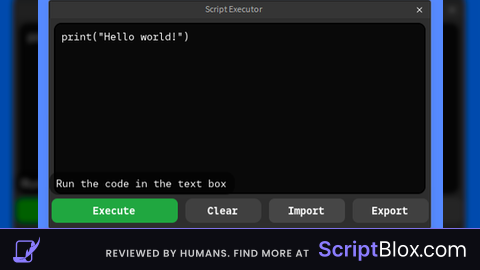
titleLabel.Text = "Script Executor"
titleLabel.TextColor3 = Color3.fromRGB(200, 200, 200)
titleLabel.TextSize = 14
titleLabel.Font = Enum.Font.SourceSans
titleLabel.TextXAlignment = Enum.TextXAlignment.Center
titleLabel.Parent = mainFrame

local closeButton = Instance.new("TextButton")
closeButton.Name = "CloseButton"
closeButton.Size = UDim2.new(0, 28, 0, 28)
closeButton.Position = UDim2.new(1, -28, 0, 0)
closeButton.BackgroundTransparency = 1
closeButton.Text = "×"
closeButton.TextColor3 = Color3.fromRGB(200, 200, 200)
closeButton.TextSize = 20
closeButton.Font = Enum.Font.SourceSansBold
closeButton.Parent = mainFrame

closeButton.MouseButton1Click:Connect(function()
	mainFrame.Visible = false
	toggleButton.Text = "Open Executor"
end)

-- 5. Kotak Hitam Teks Editor
local codeContainer = Instance.new("Frame")
codeContainer.Name = "CodeContainer"
codeContainer.Size = UDim2.new(1, -20, 0, 180)
codeContainer.Position = UDim2.new(0, 10, 0, 30)
codeContainer.BackgroundColor3 = Color3.fromRGB(12, 12, 12)
codeContainer.BorderSizePixel = 0
codeContainer.Parent = mainFrame

local containerUICorner = Instance.new("UICorner")
containerUICorner.CornerRadius = UDim.new(0, 6)
containerUICorner.Parent = codeContainer

local textBox = Instance.new("TextBox")
textBox.Name = "CodeTextBox"
textBox.Size = UDim2.new(1, -20, 1, -30)
textBox.Position = UDim2.new(0, 10, 0, 5)
textBox.BackgroundTransparency = 1
textBox.Text = 'print("Hello world!")'
textBox.TextColor3 = Color3.fromRGB(255, 255, 255)
textBox.TextSize = 14
textBox.Font = Enum.Font.Code
textBox.TextXAlignment = Enum.TextXAlignment.Left
textBox.TextYAlignment = Enum.TextYAlignment.Top
textBox.ClearTextOnFocus = false
textBox.MultiLine = true
textBox.Parent = codeContainer

local descLabel = Instance.new("TextLabel")
descLabel.Name = "DescLabel"
descLabel.Size = UDim2.new(1, -20, 0, 20)
descLabel.Position = UDim2.new(0, 10, 1, -22)
descLabel.BackgroundTransparency = 1
descLabel.Text = "Run the code in the text box"
descLabel.TextColor3 = Color3.fromRGB(220, 220, 220)
descLabel.TextSize = 13
descLabel.Font = Enum.Font.SourceSans
descLabel.TextXAlignment = Enum.TextXAlignment.Left
descLabel.Parent = codeContainer

-- 6. Container 4 Tombol Bawah
local buttonsFrame = Instance.new("Frame")
buttonsFrame.Name = "ButtonsFrame"
buttonsFrame.Size = UDim2.new(1, -20, 0, 36)
buttonsFrame.Position = UDim2.new(0, 10, 0, 222)
buttonsFrame.BackgroundTransparency = 1
buttonsFrame.Parent = mainFrame

local uiListLayout = Instance.new("UIListLayout")
uiListLayout.FillDirection = Enum.FillDirection.Horizontal
uiListLayout.HorizontalAlignment = Enum.HorizontalAlignment.Center
uiListLayout.SortOrder = Enum.SortOrder.LayoutOrder -- Pengurutan berdasarkan nomor urut (LayoutOrder)
uiListLayout.Padding = UDim.new(0, 8)
uiListLayout.Parent = buttonsFrame

-- Helper fungsi pembuat tombol dengan atribut urutan (order)
local function createButton(name, text, bgColor, textColor, order)
	local btn = Instance.new("TextButton")
	btn.Name = name
	btn.Size = UDim2.new(0, 106, 1, 0)
	btn.BackgroundColor3 = bgColor
	btn.BorderSizePixel = 0
	btn.Text = text
	btn.TextColor3 = textColor
	btn.TextSize = 14
	btn.Font = Enum.Font.SourceSansBold
	btn.LayoutOrder = order -- Menentukan urutan pasti dari kiri ke kanan
	btn.Parent = buttonsFrame

	local corner = Instance.new("UICorner")
	corner.CornerRadius = UDim.new(0, 6)
	corner.Parent = btn

	return btn
end

-- 4 Tombol dengan Urutan yang Benar (1 -> 2 -> 3 -> 4)
local btnExecute = createButton("1_ExecuteBtn", "Execute", Color3.fromRGB(40, 167, 69), Color3.fromRGB(255, 255, 255), 1)
local btnClear   = createButton("2_ClearBtn",   "Clear",   Color3.fromRGB(55, 55, 58),   Color3.fromRGB(230, 230, 230), 2)
local btnImport  = createButton("3_ImportBtn",  "Import",  Color3.fromRGB(55, 55, 58),   Color3.fromRGB(230, 230, 230), 3)
local btnExport  = createButton("4_ExportBtn",  "Export",  Color3.fromRGB(55, 55, 58),   Color3.fromRGB(230, 230, 230), 4)

-- 7. Logika Tombol
btnExecute.MouseButton1Click:Connect(function()
	local code = textBox.Text
	if code == "" then return end

	local fn, err = loadstring(code)
	if fn then
		task.spawn(fn)
	else
		warn("[Executor Error]:", err)
	end
end)

btnClear.MouseButton1Click:Connect(function()
	textBox.Text = ""
end)

btnImport.MouseButton1Click:Connect(function()
	textBox.Text = 'print("Imported code!")'
end)

btnExport.MouseButton1Click:Connect(function()
	if setclipboard then
		setclipboard(textBox.Text)
		descLabel.Text = "Copied code to clipboard!"
	else
		descLabel.Text = "Export string: " .. textBox.Text
	end
	task.wait(2)
	descLabel.Text = "Run the code in the text box"
end)No comments yet for this script.