

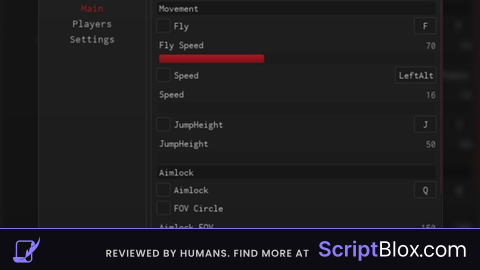
KeylessUniversal
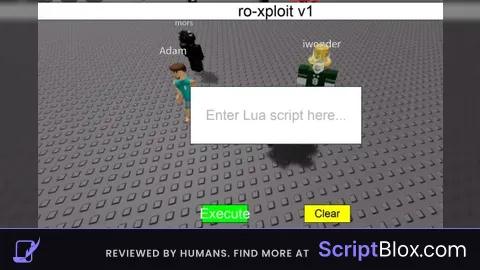
-- Create a ScreenGui
local screenGui = Instance.new("ScreenGui")
screenGui.Parent = game.Players.LocalPlayer:WaitForChild("PlayerGui")

-- Create a TextLabel
local textLabel = Instance.new("TextLabel")
textLabel.Parent = screenGui
textLabel.Position = UDim2.new(0, 0, 0, 0) -- Top left corner
textLabel.Size = UDim2.new(1, 0, 0, 30) -- Full width, 30 pixels high
textLabel.BackgroundColor3 = Color3.fromRGB(255, 255, 255) -- White background
textLabel.Text = "ro-xploit v1"
textLabel.TextColor3 = Color3.fromRGB(0, 0, 0) -- Black text
textLabel.TextSize = 20 -- Text size

-- Create a TextBox for Lua script input
local textBox = Instance.new("TextBox")
textBox.Parent = screenGui
textBox.Position = UDim2.new(0.5, -150, 0.5, -50) -- Centered on screen with some padding
textBox.Size = UDim2.new(0, 300, 0, 100) -- 300 pixels wide, 100 pixels high
textBox.BackgroundColor3 = Color3.fromRGB(255, 255, 255) -- White background
textBox.TextColor3 = Color3.fromRGB(0, 0, 0) -- Black text
textBox.TextSize = 18 -- Text size
textBox.TextWrapped = true -- Enable text wrapping
textBox.PlaceholderText = "Enter Lua script here..." -- Placeholder text

-- Create a "Clear" button
local clearButton = Instance.new("TextButton")
clearButton.Parent = screenGui
clearButton.Position = UDim2.new(0.5, 50, 1, -40) -- Bottom center with some padding
clearButton.Size = UDim2.new(0, 80, 0, 30) -- 80 pixels wide, 30 pixels high
clearButton.BackgroundColor3 = Color3.fromRGB(255, 255, 0) -- Yellow background
clearButton.Text = "Clear"
clearButton.TextColor3 = Color3.fromRGB(0, 0, 0) -- Black text
clearButton.TextSize = 14 -- Text size

-- Function to clear the script text
local function clearScriptText()
    textBox.Text = ""
end

-- Connect the button to the clearScriptText function
clearButton.MouseButton1Click:Connect(clearScriptText)

-- Create an Execute button
local executeButton = Instance.new("TextButton")
executeButton.Parent = screenGui
executeButton.Position = UDim2.new(0.5, -130, 1, -40) -- Bottom center with some padding
executeButton.Size = UDim2.new(0, 80, 0, 30) -- 80 pixels wide, 30 pixels high
executeButton.BackgroundColor3 = Color3.fromRGB(0, 255, 0) -- Green background
executeButton.Text = "Execute"
executeButton.TextColor3 = Color3.fromRGB(255, 255, 255) -- White text
executeButton.TextSize = 18 -- Text size

-- Function to execute Lua code
local function executeLuaCode()
    local scriptText = textBox.Text
    local success, errorMessage = pcall(loadstring(scriptText))
    if not success then
        warn("Error executing Lua script:", errorMessage)
    end
end

-- Connect the button to the executeLuaCode function
executeButton.MouseButton1Click:Connect(executeLuaCode)

-- Create a "Close" button
local closeButton = Instance.new("TextButton")
closeButton.Parent = screenGui
closeButton.Position = UDim2.new(1, -40, 0, 40) -- Top right corner with some padding
closeButton.Size = UDim2.new(0, 80, 0, 30) -- 80 pixels wide, 30 pixels high
closeButton.BackgroundColor3 = Color3.fromRGB(255, 0, 0) -- Red background
closeButton.Text = "Close the script"
closeButton.TextColor3 = Color3.fromRGB(255, 255, 255) -- White text
closeButton.TextSize = 14 -- Text size

-- Function to close the script
local function closeScript()
    screenGui:Destroy()
end

-- Connect the button to the closeScript function
closeButton.MouseButton1Click:Connect(closeScript)
Dam 66 views
More views dam I'm happy
I didn't expect to get this many views I'm gonna make more scripts
It's strange that you made your Executor Gui after mine was released, it's very suspicious
ScriptsFromMinion I didn't steal yours I just came up with the name and thought of a executer