

Keyless
-- Ultimate Draggable + Minimizable Packet Spammer (Mobile & PC)
local Players = game:GetService("Players")
local UserInputService = game:GetService("UserInputService")
local ReplicatedStorage = game:GetService("ReplicatedStorage")

local player = Players.LocalPlayer
local playerGui = player:WaitForChild("PlayerGui")
local remote = ReplicatedStorage:WaitForChild("Packets"):WaitForChild("Packet"):WaitForChild("RemoteEvent")

local screenGui = Instance.new("ScreenGui")
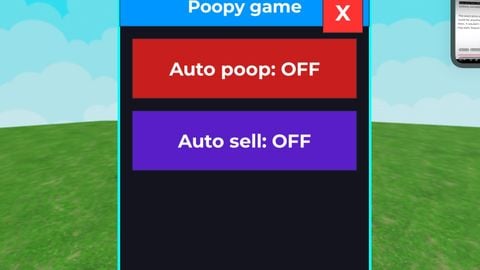
screenGui.Name = "Poop game"
screenGui.ResetOnSpawn = false
screenGui.Parent = playerGui

-- === Minimized "Open" button (always visible on the left) ===
local openButton = Instance.new("TextButton")
openButton.Size = UDim2.new(0, 70, 0, 70)
openButton.Position = UDim2.new(0, 10, 0.5, -35)
openButton.BackgroundColor3 = Color3.fromRGB(0, 200, 255)
openButton.Text = "OPEN"
openButton.TextColor3 = Color3.new(1,1,1)
openButton.Font = Enum.Font.GothamBold
openButton.TextSize = 24
openButton.Parent = screenGui

-- === Main big draggable frame (starts hidden) ===
local frame = Instance.new("Frame")
frame.Size = UDim2.new(0, 380, 0, 460)
frame.Position = UDim2.new(0.5, -190, 0.5, -230)
frame.BackgroundColor3 = Color3.fromRGB(20, 20, 30)
frame.BorderSizePixel = 4
frame.BorderColor3 = Color3.fromRGB(0, 255, 255)
frame.Visible = false
frame.Parent = screenGui

-- Title bar (for dragging)
local titleBar = Instance.new("Frame")
titleBar.Size = UDim2.new(1, 0, 0, 60)
titleBar.BackgroundColor3 = Color3.fromRGB(0, 150, 255)
titleBar.Parent = frame

local title = Instance.new("TextLabel")
title.Size = UDim2.new(1,0,1,0)
title.BackgroundTransparency = 1
title.Text = "Poopy game"
title.TextColor3 = Color3.new(1,1,1)
title.Font = Enum.Font.GothamBold
title.TextSize = 32
title.Parent = titleBar

-- Null packet toggle (big button)
local nullBtn = Instance.new("TextButton")
nullBtn.Size = UDim2.new(0.9,0,0,90)
nullBtn.Position = UDim2.new(0.05,0,0,80)
nullBtn.BackgroundColor3 = Color3.fromRGB(200,30,30)
nullBtn.Text = "Auto poop: OFF"
nullBtn.TextColor3 = Color3.new(1,1,1)
nullBtn.Font = Enum.Font.GothamBold
nullBtn.TextSize = 34
nullBtn.Parent = frame

-- Special packet toggle (big button)
local specialBtn = Instance.new("TextButton")
specialBtn.Size = UDim2.new(0.9,0,0,90)
specialBtn.Position = UDim2.new(0.05,0,0,190)
specialBtn.BackgroundColor3 = Color3.fromRGB(90,30,200)
specialBtn.Text = "Auto sell: OFF"
specialBtn.TextColor3 = Color3.new(1,1,1)
specialBtn.Font = Enum.Font.GothamBold
specialBtn.TextSize = 34
specialBtn.Parent = frame

-- Close button (X)
local closeBtn = Instance.new("TextButton")
closeBtn.Size = UDim2.new(0,60,0,60)
closeBtn.Position = UDim2.new(1,-70,0,10)
closeBtn.BackgroundColor3 = Color3.fromRGB(255,50,50)
closeBtn.Text = "X"
closeBtn.TextColor3 = Color3.new(1,1,1)
closeBtn.Font = Enum.Font.GothamBold
closeBtn.TextSize = 40
closeBtn.Parent = frame

-- === Dragging code (works on mobile & PC) ===
local dragging = false
local dragInput, dragStart, startPos

local function updateInput(input)
    local delta = input.Position - dragStart
    frame.Position = UDim2.new(startPos.X.Scale, startPos.X.Offset + delta.X, startPos.Y.Scale, startPos.Y.Offset + delta.Y)
end

titleBar.InputBegan:Connect(function(input)
    if input.UserInputType == Enum.UserInputType.MouseButton1 or input.UserInputType == Enum.UserInputType.Touch then
        dragging = true
        dragStart = input.Position
        startPos = frame.Position

        input.Changed:Connect(function()
            if input.UserInputState == Enum.UserInputState.End then
                dragging = false
            end
        end)
    end
end)

titleBar.InputChanged:Connect(function(input)
    if input.UserInputType == Enum.UserInputType.MouseMovement or input.UserInputType == Enum.UserInputType.Touch then
        dragInput = input
    end
end)

UserInputService.InputChanged:Connect(function(input)
    if dragging and (input == dragInput) then
        updateInput(input)
    end
end)

-- === Open / Close GUI ===
openButton.MouseButton1Click:Connect(function()
    frame.Visible = true
    openButton.Visible = false
end)

closeBtn.MouseButton1Click:Connect(function()
    frame.Visible = false
    openButton.Visible = true
end)

-- === Loop variables ===
local nullRunning = false
local specialRunning = false

-- Null packet loop
nullBtn.MouseButton1Click:Connect(function()
    nullRunning = not nullRunning
    if nullRunning then
        nullBtn.Text = "Auto poop: ON"
        nullBtn.BackgroundColor3 = Color3.fromRGB(30,200,30)
        task.spawn(function()
            while nullRunning do
                remote:FireServer(buffer.fromstring("\0\0\0\0"))
                task.wait(1)
            end
        end)
    else
        nullBtn.Text = "Auto poop: OFF"
        nullBtn.BackgroundColor3 = Color3.fromRGB(200,30,30)
    end
end)

-- Special packet AUTO loop (fast)
specialBtn.MouseButton1Click:Connect(function()
    specialRunning = not specialRunning
    if specialRunning then
        specialBtn.Text = "Auto sell: ON"
        specialBtn.BackgroundColor3 = Color3.fromRGB(150,50,255)
        task.spawn(function()
            while specialRunning do
                remote:FireServer(buffer.fromstring("\3\3"))
                task.wait(0.2)  -- super fast, change to 0.5 or 1 if you want slower
            end
        end)
    else
        specialBtn.Text = "Auto sell: OFF"
        specialBtn.BackgroundColor3 = Color3.fromRGB(90,30,200)
    end
end)

-- Done! Tap the floating "OPEN" button to show the big GUI anytime
Bro I've been trying to use grok what do I say
@Agaydude idk make a aim bot or something
grok cooked on this one