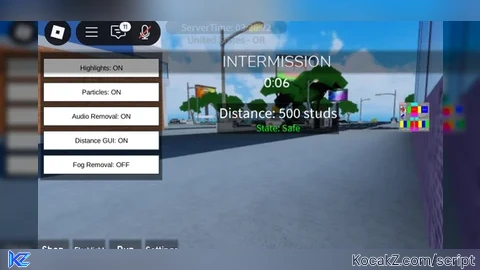
Key Required
local Players = game:GetService("Players")
local RunService = game:GetService("RunService")
local UserInputService = game:GetService("UserInputService")

local localPlayer = Players.LocalPlayer
local playerGui = localPlayer:WaitForChild("PlayerGui")

-- Create the ScreenGui
local screenGui = Instance.new("ScreenGui")
screenGui.Name = "ProximityGui"
screenGui.ResetOnSpawn = false -- Ensure the GUI doesn't reset when the player respawns
screenGui.Parent = playerGui

local frame = Instance.new("Frame")
frame.Size = UDim2.new(0, 200, 0, 50)
frame.Position = UDim2.new(0.5, -100, 0, 50)
frame.BackgroundColor3 = Color3.fromRGB(0, 0, 0)
frame.BackgroundTransparency = 0.5
frame.Active = true
frame.Draggable = true
frame.Parent = screenGui

local textLabel = Instance.new("TextLabel")
textLabel.Size = UDim2.new(1, 0, 1, 0)
textLabel.Position = UDim2.new(0, 0, 0, 0)
textLabel.BackgroundTransparency = 1
textLabel.TextColor3 = Color3.fromRGB(255, 255, 255)
textLabel.TextScaled = true
textLabel.Text = "Distance: 0 studs"
textLabel.Parent = frame

local function createHighlight(part)
    local highlight = Instance.new("Highlight")
    highlight.FillColor = Color3.fromRGB(255, 0, 0) -- Red color for highlighting
    highlight.OutlineColor = Color3.fromRGB(255, 255, 255) -- White outline
    highlight.FillTransparency = 0.5 -- Semi-transparent fill
    highlight.Parent = part
end

local function createHighlightForDecal(decal)
    local highlight = Instance.new("Highlight")
    highlight.FillColor = Color3.fromRGB(0, 255, 0) -- Green color for highlighting decals
    highlight.OutlineColor = Color3.fromRGB(255, 255, 255) -- White outline
    highlight.FillTransparency = 0.5 -- Semi-transparent fill
    highlight.Parent = decal
end

local function highlightDescendants(instance)
    for _, descendant in ipairs(instance:GetDescendants()) do
        if descendant:IsA("BasePart") then
            createHighlight(descendant)
        elseif descendant:IsA("Decal") then
            createHighlightForDecal(descendant)
        elseif descendant:IsA("Model") then
            highlightDescendants(descendant)  -- Recursively highlight models
        end
    end
end

local function highlightKillerStorage()
    -- Get the "Killer Storage" folder in the workspace
    local killerStorageFolder = game.Workspace:FindFirstChild("Killer Storage")

    if killerStorageFolder then

        highlightDescendants(killerStorageFolder)

        -- Connect to the DescendantAdded event to highlight new objects added to the folder
        killerStorageFolder.DescendantAdded:Connect(function(descendant)
            -- Ensure any errors are handled gracefully
            local success, errorMessage = pcall(function()
                if descendant:IsA("BasePart") then
                    createHighlight(descendant)
                elseif descendant:IsA("Decal") then
                    createHighlightForDecal(descendant)
                elseif descendant:IsA("Model") then
                    highlightDescendants(descendant)  -- Recursively highlight models
                end
            end)
            if not success then
                warn("Error highlighting descendant: " .. errorMessage)
            end
        end)
    else
        warn("Folder 'Killer Storage' not found in workspace.")
    end
end

-- Function to remove the audio named "roundsound"
local function removeRoundSound()
    -- Find the audio named "roundsound" in the workspace
    local roundSound = game.Workspace:FindFirstChild("roundsound")

    -- Check if the audio exists
    if roundSound and roundSound:IsA("Sound") then
        roundSound:Destroy()
        print("Audio 'roundsound' has been removed from the workspace.")
    end
end

-- Function to update the distance in the GUI
local function updateDistance()
    -- Get the "Killer Storage" folder in the workspace
    local killerStorageFolder = game.Workspace:FindFirstChild("Killer Storage")
    if not killerStorageFolder then
        warn("Folder 'Killer Storage' not found in workspace.")
        return
    end

    -- Get the character of the local player
    local character = localPlayer.Character or localPlayer.CharacterAdded:Wait()
    local humanoidRootPart = character:FindFirstChild("HumanoidRootPart") or character:WaitForChild("HumanoidRootPart")

    -- Find the closest NPC
    local closestDistance = 500
    for _, npc in ipairs(killerStorageFolder:GetChildren()) do
        if npc:IsA("Model") then
            local npcHumanoidRootPart = npc:FindFirstChild("HumanoidRootPart")
            if npcHumanoidRootPart then
                local distance = (humanoidRootPart.Position - npcHumanoidRootPart.Position).Magnitude
                if distance < closestDistance then
                    closestDistance = distance
                end
            end
        end
    end

    -- Update the text label
    textLabel.Text = string.format("Distance: %d studs", math.floor(closestDistance))
end

-- Set up the function to be called repeatedly using the Heartbeat event
RunService.Heartbeat:Connect(function()
    -- Use pcall to handle any potential errors gracefully
    local success, errorMessage = pcall(removeRoundSound)
    if not success then
        warn("Error removing 'roundsound': " .. errorMessage)
    end

    -- Use pcall to handle any potential errors gracefully
    local success2, errorMessage2 = pcall(updateDistance)
    if not success2 then
        warn("Error updating distance: " .. errorMessage2)
    end
end)

-- Call the function to highlight existing objects and set up the event listener for new objects
highlightKillerStorage()No comments yet for this script.