
Keyless
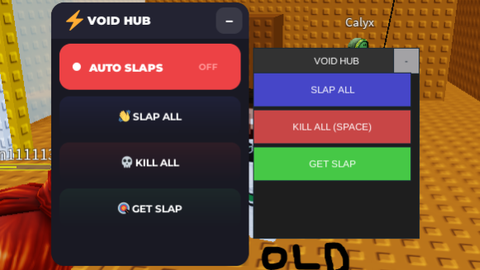
--!strict
-- VOID HUB - Modern Redesign
-- Improved buttons, Auto Slaps toggle, sleek UI

local Players = game:GetService("Players")
local RunService = game:GetService("RunService")
local TweenService = game:GetService("TweenService")
local UserInputService = game:GetService("UserInputService")
local LocalPlayer = Players.LocalPlayer

-- ==========================================
-- CONFIGURATION
-- ==========================================

local CONFIG = {
	Colors = {
		Background = Color3.fromRGB(25, 25, 35),
		Header = Color3.fromRGB(35, 35, 50),
		Accent = Color3.fromRGB(88, 101, 242), -- Discord blurple
		Slap = Color3.fromRGB(88, 101, 242),
		Kill = Color3.fromRGB(237, 66, 69),
		Get = Color3.fromRGB(59, 165, 93),
		AutoOff = Color3.fromRGB(237, 66, 69), -- Red when disabled
		AutoOn = Color3.fromRGB(59, 165, 93),  -- Green when enabled
		Text = Color3.fromRGB(255, 255, 255),
		Subtext = Color3.fromRGB(180, 180, 190),
	},

	AnimSpeed = 0.2,
}

-- State
local isAutoSlapping = false
local autoSlapConnection: RBXScriptConnection? = nil

-- ==========================================
-- UTILITY
-- ==========================================

local function tween(instance: Instance, props: { [string]: any }, duration: number?): Tween
	local t = TweenService:Create(instance,
		TweenInfo.new(duration or CONFIG.AnimSpeed, Enum.EasingStyle.Quart, Enum.EasingDirection.Out),
		props
	)
	t:Play()
	return t
end

local function slap(target, pos)
	local char = LocalPlayer.Character
	if char and char:FindFirstChild("VoidSlap") then
		char.VoidSlap.Event:FireServer("slash", target.Character, pos)
	end
end

-- ==========================================
-- MODERN GUI
-- ==========================================

local ScreenGui = Instance.new("ScreenGui")
ScreenGui.Name = "VoidHub_Modern"
ScreenGui.Parent = game:GetService("CoreGui")

local Main = Instance.new("Frame")
Main.Name = "Main"
Main.Size = UDim2.new(0, 240, 0, 320)
Main.Position = UDim2.new(0.5, -120, 0.5, -160)
Main.BackgroundColor3 = CONFIG.Colors.Background
Main.BorderSizePixel = 0
Main.Active = true
Main.ClipsDescendants = true
Main.Parent = ScreenGui

-- Rounded corners
local mainCorner = Instance.new("UICorner")
mainCorner.CornerRadius = UDim.new(0, 16)
mainCorner.Parent = Main

-- Shadow
local shadow = Instance.new("ImageLabel")
shadow.Name = "Shadow"
shadow.AnchorPoint = Vector2.new(0.5, 0.5)
shadow.Position = UDim2.new(0.5, 0, 0.5, 6)
shadow.Size = UDim2.new(1, 30, 1, 30)
shadow.BackgroundTransparency = 1
shadow.Image = "rbxassetid://6015897843"
shadow.ImageColor3 = Color3.new(0, 0, 0)
shadow.ImageTransparency = 0.5
shadow.ScaleType = Enum.ScaleType.Slice
shadow.SliceCenter = Rect.new(49, 49, 450, 450)
shadow.ZIndex = -1
shadow.Parent = Main

-- Header
local Header = Instance.new("Frame")
Header.Name = "Header"
Header.Size = UDim2.new(1, 0, 0, 44)
Header.BackgroundColor3 = CONFIG.Colors.Header
Header.BorderSizePixel = 0
Header.Parent = Main

local headerCorner = Instance.new("UICorner")
headerCorner.CornerRadius = UDim.new(0, 16)
headerCorner.Parent = Header

local headerFix = Instance.new("Frame")
headerFix.Size = UDim2.new(1, 0, 0, 16)
headerFix.Position = UDim2.new(0, 0, 1, -16)
headerFix.BackgroundColor3 = CONFIG.Colors.Header
headerFix.BorderSizePixel = 0
headerFix.Parent = Header

-- Title with icon
local TitleIcon = Instance.new("TextLabel")
TitleIcon.Name = "Icon"
TitleIcon.Size = UDim2.new(0, 24, 0, 24)
TitleIcon.Position = UDim2.new(0, 16, 0.5, 0)
TitleIcon.AnchorPoint = Vector2.new(0, 0.5)
TitleIcon.BackgroundTransparency = 1
TitleIcon.Text = "⚡"
TitleIcon.TextSize = 18
TitleIcon.Parent = Header

local Title = Instance.new("TextLabel")
Title.Size = UDim2.new(1, -80, 1, 0)
Title.Position = UDim2.new(0, 44, 0, 0)
Title.BackgroundTransparency = 1
Title.Text = "VOID HUB"
Title.TextColor3 = CONFIG.Colors.Text
Title.TextSize = 16
Title.Font = Enum.Font.GothamBlack
Title.TextXAlignment = Enum.TextXAlignment.Left
Title.Parent = Header

-- Minimize Button (modern)
local Minimize = Instance.new("TextButton")
Minimize.Name = "Minimize"
Minimize.Size = UDim2.new(0, 32, 0, 32)
Minimize.Position = UDim2.new(1, -40, 0.5, 0)
Minimize.AnchorPoint = Vector2.new(0, 0.5)
Minimize.BackgroundColor3 = Color3.fromRGB(255, 255, 255)
Minimize.BackgroundTransparency = 0.9
Minimize.Text = ""
Minimize.AutoButtonColor = false
Minimize.Parent = Header

local minCorner = Instance.new("UICorner")
minCorner.CornerRadius = UDim.new(0, 10)
minCorner.Parent = Minimize

local MinimizeIcon = Instance.new("TextLabel")
MinimizeIcon.Name = "Icon"
MinimizeIcon.Size = UDim2.new(1, 0, 1, 0)
MinimizeIcon.BackgroundTransparency = 1
MinimizeIcon.Text = "−"
MinimizeIcon.TextColor3 = CONFIG.Colors.Text
MinimizeIcon.TextSize = 20
MinimizeIcon.Font = Enum.Font.GothamBold
MinimizeIcon.Parent = Minimize

-- Hover effect
Minimize.MouseEnter:Connect(function()
	tween(Minimize, { BackgroundTransparency = 0.7 }, 0.15)
end)
Minimize.MouseLeave:Connect(function()
	tween(Minimize, { BackgroundTransparency = 0.9 }, 0.15)
end)

-- Content Container
local Content = Instance.new("Frame")
Content.Name = "Content"
Content.Size = UDim2.new(1, -20, 1, -54)
Content.Position = UDim2.new(0.5, 0, 0, 50)
Content.AnchorPoint = Vector2.new(0.5, 0)
Content.BackgroundTransparency = 1
Content.Parent = Main

local UIList = Instance.new("UIListLayout")
UIList.Padding = UDim.new(0, 8)
UIList.Parent = Content

-- ==========================================
-- MODERN BUTTON CREATOR
-- ==========================================

local function createModernButton(text: string, color: Color3, callback: () -> ()): TextButton
	local btn = Instance.new("TextButton")
	btn.Size = UDim2.new(1, 0, 0, 48)
	btn.BackgroundColor3 = color
	btn.Text = ""
	btn.AutoButtonColor = false
	btn.Parent = Content

	-- Gradient overlay
	local gradient = Instance.new("UIGradient")
	gradient.Color = ColorSequence.new({
		ColorSequenceKeypoint.new(0, Color3.new(1, 1, 1)),
		ColorSequenceKeypoint.new(1, Color3.new(0.8, 0.8, 0.8))
	})
	gradient.Transparency = NumberSequence.new(0.9, 1)
	gradient.Rotation = 90
	gradient.Parent = btn

	-- Corner
	local btnCorner = Instance.new("UICorner")
	btnCorner.CornerRadius = UDim.new(0, 12)
	btnCorner.Parent = btn

	-- Glow effect
	local glow = Instance.new("Frame")
	glow.Name = "Glow"
	glow.Size = UDim2.new(1, 0, 1, 0)
	glow.BackgroundColor3 = color
	glow.BackgroundTransparency = 0.6
	glow.BorderSizePixel = 0
	glow.ZIndex = -1
	glow.Parent = btn

	local glowCorner = Instance.new("UICorner")
	glowCorner.CornerRadius = UDim.new(0, 12)
	glowCorner.Parent = glow

	-- Text
	local btnText = Instance.new("TextLabel")
	btnText.Name = "Text"
	btnText.Size = UDim2.new(1, 0, 1, 0)
	btnText.BackgroundTransparency = 1
	btnText.Text = text
	btnText.TextColor3 = CONFIG.Colors.Text
	btnText.TextSize = 14
	btnText.Font = Enum.Font.GothamBold
	btnText.Parent = btn

	-- Icon (optional visual flair)
	local icon = Instance.new("TextLabel")
	icon.Name = "Icon"
	icon.Size = UDim2.new(0, 24, 0, 24)
	icon.Position = UDim2.new(0, 16, 0.5, 0)
	icon.AnchorPoint = Vector2.new(0, 0.5)
	icon.BackgroundTransparency = 1
	icon.Text = ""
	icon.TextSize = 16
	icon.Parent = btn

	-- Hover animations
	btn.MouseEnter:Connect(function()
		tween(btn, { Size = UDim2.new(1, 4, 0, 52) }, 0.15)
		tween(glow, { BackgroundTransparency = 0.4 }, 0.15)
	end)

	btn.MouseLeave:Connect(function()
		tween(btn, { Size = UDim2.new(1, 0, 0, 48) }, 0.15)
		tween(glow, { BackgroundTransparency = 0.6 }, 0.15)
	end)

	btn.MouseButton1Down:Connect(function()
		tween(btn, { Size = UDim2.new(1, -2, 0, 46) }, 0.1)
	end)

	btn.MouseButton1Up:Connect(function()
		tween(btn, { Size = UDim2.new(1, 4, 0, 52) }, 0.1)
		callback()
	end)

	return btn
end

-- ==========================================
-- TOGGLE BUTTON CREATOR (Auto Slaps)
-- ==========================================

local function createToggleButton(): (TextButton, Frame, TextLabel, Frame)
	local btn = Instance.new("TextButton")
	btn.Name = "AutoSlapsToggle"
	btn.Size = UDim2.new(1, 0, 0, 56)
	btn.BackgroundColor3 = CONFIG.Colors.AutoOff -- Default RED (disabled)
	btn.Text = ""
	btn.AutoButtonColor = false
	btn.Parent = Content

	-- Corner
	local btnCorner = Instance.new("UICorner")
	btnCorner.CornerRadius = UDim.new(0, 14)
	btnCorner.Parent = btn

	-- Animated border
	local stroke = Instance.new("UIStroke")
	stroke.Color = CONFIG.Colors.AutoOff
	stroke.Thickness = 2
	stroke.Transparency = 0.5
	stroke.Parent = btn

	-- Status indicator dot
	local dot = Instance.new("Frame")
	dot.Name = "StatusDot"
	dot.Size = UDim2.new(0, 10, 0, 10)
	dot.Position = UDim2.new(0, 16, 0.5, 0)
	dot.AnchorPoint = Vector2.new(0, 0.5)
	dot.BackgroundColor3 = Color3.new(1, 1, 1)
	dot.BorderSizePixel = 0
	dot.Parent = btn

	local dotCorner = Instance.new("UICorner")
	dotCorner.CornerRadius = UDim.new(1, 0)
	dotCorner.Parent = dot

	-- Pulse animation ring
	local pulse = Instance.new("Frame")
	pulse.Name = "Pulse"
	pulse.Size = UDim2.new(0, 10, 0, 10)
	pulse.Position = UDim2.new(0, 16, 0.5, 0)
	pulse.AnchorPoint = Vector2.new(0, 0.5)
	pulse.BackgroundColor3 = CONFIG.Colors.AutoOff
	pulse.BackgroundTransparency = 0.5
	pulse.BorderSizePixel = 0
	pulse.Visible = false
	pulse.Parent = btn

	local pulseCorner = Instance.new("UICorner")
	pulseCorner.CornerRadius = UDim.new(1, 0)
	pulseCorner.Parent = pulse

	-- Text
	local text = Instance.new("TextLabel")
	text.Name = "Text"
	text.Size = UDim2.new(1, -50, 1, 0)
	text.Position = UDim2.new(0, 36, 0, 0)
	text.BackgroundTransparency = 1
	text.Text = "AUTO SLAPS"
	text.TextColor3 = CONFIG.Colors.Text
	text.TextSize = 15
	text.Font = Enum.Font.GothamBlack
	text.TextXAlignment = Enum.TextXAlignment.Left
	text.Parent = btn

	-- State label
	local stateLabel = Instance.new("TextLabel")
	stateLabel.Name = "State"
	stateLabel.Size = UDim2.new(0, 60, 0, 20)
	stateLabel.Position = UDim2.new(1, -70, 0.5, 0)
	stateLabel.AnchorPoint = Vector2.new(0, 0.5)
	stateLabel.BackgroundTransparency = 1
	stateLabel.Text = "OFF"
	stateLabel.TextColor3 = Color3.fromRGB(255, 150, 150)
	stateLabel.TextSize = 12
	stateLabel.Font = Enum.Font.GothamBold
	stateLabel.Parent = btn

	-- Hover effects
	btn.MouseEnter:Connect(function()
		tween(btn, { Size = UDim2.new(1, 4, 0, 60) }, 0.15)
	end)

	btn.MouseLeave:Connect(function()
		tween(btn, { Size = UDim2.new(1, 0, 0, 56) }, 0.15)
	end)

	return btn, dot, text, pulse, stateLabel, stroke
end

-- ==========================================
-- BUTTONS SETUP
-- ==========================================

-- 1. Slap All Button
local slapBtn = createModernButton("👋 SLAP ALL", CONFIG.Colors.Slap, function()
	for _, p in pairs(Players:GetPlayers()) do
		if p ~= LocalPlayer and p.Character then
			slap(p, Vector3.new(5.795, 0, 1.553))
		end
	end
end)

-- 2. Kill All Button
local killBtn = createModernButton("💀 KILL ALL", CONFIG.Colors.Kill, function()
	for _, p in pairs(Players:GetPlayers()) do
		if p ~= LocalPlayer and p.Character then
			slap(p, Vector3.new(999999, 999999, 999999))
		end
	end
end)

-- 3. Get Slap Button
local getBtn = createModernButton("🎯 GET SLAP", CONFIG.Colors.Get, function()
	local char = LocalPlayer.Character
	local hrp = char and char:FindFirstChild("HumanoidRootPart")

	if hrp then
		local oldCF = hrp.CFrame
		hrp.CFrame = CFrame.new(92.7131577, -121.500008, -10.5628223, 0.0353914388, 3.56291707e-08, -0.999373555, 2.82042745e-08, 1, 3.66503201e-08, 0.999373555, -2.94837132e-08, 0.0353914388)
		task.wait(0.3)
		hrp.CFrame = oldCF
	end
end)

-- 4. Auto Slaps Toggle (NEW)
local toggleBtn, toggleDot, toggleText, togglePulse, stateLabel, toggleStroke = createToggleButton()

-- ==========================================
-- AUTO SLAPS LOGIC
-- ==========================================

local function updateToggleVisuals(enabled: boolean)
	local targetColor = enabled and CONFIG.Colors.AutoOn or CONFIG.Colors.AutoOff

	tween(toggleBtn, { BackgroundColor3 = targetColor }, 0.3)
	tween(toggleStroke, { Color = targetColor }, 0.3)

	stateLabel.Text = enabled and "ON" or "OFF"
	stateLabel.TextColor3 = enabled and Color3.fromRGB(150, 255, 150) or Color3.fromRGB(255, 150, 150)

	if enabled then
		-- Pulse animation
		togglePulse.Visible = true
		togglePulse.BackgroundColor3 = targetColor

		local function pulseAnim()
			while isAutoSlapping do
				togglePulse.Size = UDim2.new(0, 10, 0, 10)
				togglePulse.BackgroundTransparency = 0.5
				tween(togglePulse, { Size = UDim2.new(0, 30, 0, 30), BackgroundTransparency = 1 }, 0.6)
				task.wait(0.6)
			end
		end
		task.spawn(pulseAnim)
	else
		togglePulse.Visible = false
	end
end

local function startAutoSlaps()
	if autoSlapConnection then return end
	autoSlapConnection = RunService.Heartbeat:Connect(function()
		if not isAutoSlapping then return end
		for _, p in pairs(Players:GetPlayers()) do
			if p ~= LocalPlayer and p.Character then
				slap(p, Vector3.new(5.795, 0, 1.553))
			end
		end
	end)
end

local function stopAutoSlaps()
	if autoSlapConnection then
		autoSlapConnection:Disconnect()
		autoSlapConnection = nil
	end
end

toggleBtn.MouseButton1Click:Connect(function()
	isAutoSlapping = not isAutoSlapping
	updateToggleVisuals(isAutoSlapping)

	if isAutoSlapping then
		startAutoSlaps()
	else
		stopAutoSlaps()
	end
end)

-- ==========================================
-- MINIMIZE LOGIC
-- ==========================================

local open = true
Minimize.MouseButton1Click:Connect(function()
	open = not open

	if open then
		Content.Visible = true
		tween(Main, { Size = UDim2.new(0, 240, 0, 320) }, 0.3)
		MinimizeIcon.Text = "−"
	else
		tween(Main, { Size = UDim2.new(0, 240, 0, 44) }, 0.3)
		task.wait(0.15)
		Content.Visible = false
		MinimizeIcon.Text = "+"
	end
end)

-- ==========================================
-- DRAGGING (Smooth)
-- ==========================================

local dragging = false
local dragStart: Vector3?
local startPos: UDim2?

Header.InputBegan:Connect(function(input: InputObject)
	if input.UserInputType == Enum.UserInputType.MouseButton1 or
	   input.UserInputType == Enum.UserInputType.Touch then
		dragging = true
		dragStart = input.Position
		startPos = Main.Position

		tween(Main, { Size = UDim2.new(0, 232, 0, open and 308 or 42) }, 0.1)

		input.Changed:Connect(function()
			if input.UserInputState == Enum.UserInputState.End then
				dragging = false
				tween(Main, { Size = UDim2.new(0, 240, 0, open and 320 or 44) }, 0.1)
			end
		end)
	end
end)

UserInputService.InputChanged:Connect(function(input: InputObject)
	if dragging and (input.UserInputType == Enum.UserInputType.MouseMovement or
	   input.UserInputType == Enum.UserInputType.Touch) then
		if dragStart and startPos then
			local delta = input.Position - dragStart
			Main.Position = UDim2.new(
				startPos.X.Scale,
				startPos.X.Offset + delta.X,
				startPos.Y.Scale,
				startPos.Y.Offset + delta.Y
			)
		end
	end
end)

-- Intro animation
Main.Size = UDim2.new(0, 0, 0, 0)
Main.Rotation = -5
tween(Main, { Size = UDim2.new(0, 240, 0, 320), Rotation = 0 }, 0.5)
tbh this is a decent script
Good :D
The kill all function hits everyone but changes coordinates to 9999, which makes people fly away and die
@spynote i see, thanks for the explaination
@spynote then, what's the SPACE means? do i need to press spacebar?
I added this by accident, no space needed.