
Keyless
local Library = {}
local Players = game:GetService("Players")
local RunService = game:GetService("RunService")
local LocalPlayer = Players.LocalPlayer

-- Функция для отправки атаки
local function slap(target, pos)
	local char = LocalPlayer.Character
	if char and char:FindFirstChild("VoidSlap") then
		local args = {
			"slash",
			target.Character,
			pos
		}
		char.VoidSlap.Event:FireServer(unpack(args))
	end
end

-- Создание GUI
local ScreenGui = Instance.new("ScreenGui")
ScreenGui.Name = "JSHS_Hub"
ScreenGui.Parent = game:GetService("CoreGui")

local Main = Instance.new("Frame")
Main.Size = UDim2.new(0, 200, 0, 230) -- Высота увеличена для 3 кнопок
Main.Position = UDim2.new(0.5, -100, 0.5, -115)
Main.BackgroundColor3 = Color3.fromRGB(30, 30, 30)
Main.Active = true
Main.Draggable = true
Main.Parent = ScreenGui

local Title = Instance.new("TextLabel")
Title.Size = UDim2.new(1, 0, 0, 30)
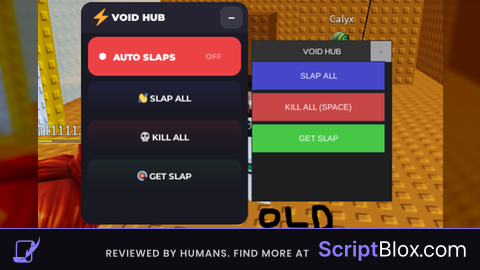
Title.Text = "VOID HUB"
Title.TextColor3 = Color3.new(1,1,1)
Title.BackgroundColor3 = Color3.fromRGB(50, 50, 50)
Title.Parent = Main

local Minimize = Instance.new("TextButton")
Minimize.Size = UDim2.new(0, 30, 0, 30)
Minimize.Position = UDim2.new(1, -30, 0, 0)
Minimize.Text = "-"
Minimize.Parent = Main

local Content = Instance.new("Frame")
Content.Size = UDim2.new(1, 0, 1, -30)
Content.Position = UDim2.new(0, 0, 0, 30)
Content.BackgroundTransparency = 1
Content.Parent = Main

local UIList = Instance.new("UIListLayout")
UIList.Parent = Content
UIList.Padding = UDim.new(0, 5)

-- Сворачивание
local open = true
Minimize.MouseButton1Click:Connect(function()
	open = not open
	Content.Visible = open
	Main.Size = open and UDim2.new(0, 200, 0, 230) or UDim2.new(0, 200, 0, 30)
	Minimize.Text = open and "-" or "+"
end)

-- Функция создания кнопок
local function createBtn(text, color, callback)
	local btn = Instance.new("TextButton")
	btn.Size = UDim2.new(1, -10, 0, 40)
	btn.Text = text
	btn.BackgroundColor3 = color
	btn.TextColor3 = Color3.new(1,1,1)
	btn.Parent = Content
	btn.MouseButton1Click:Connect(callback)
end

-- Кнопка 1: Slap All
createBtn("SLAP ALL", Color3.fromRGB(70, 70, 200), function()
	for _, p in pairs(Players:GetPlayers()) do
		if p ~= LocalPlayer and p.Character then
			slap(p, Vector3.new(5.795, 0, 1.553))
		end
	end
end)

-- Кнопка 2: Kill All
createBtn("KILL ALL (SPACE)", Color3.fromRGB(200, 70, 70), function()
	for _, p in pairs(Players:GetPlayers()) do
		if p ~= LocalPlayer and p.Character then
			slap(p, Vector3.new(999999, 999999, 999999))
		end
	end
end)

-- Кнопка 3: Get Slap (Teleport & Back)
createBtn("GET SLAP", Color3.fromRGB(70, 200, 70), function()
	local char = LocalPlayer.Character
	local hrp = char and char:FindFirstChild("HumanoidRootPart")

	if hrp then
		local oldCF = hrp.CFrame -- Запоминаем где были
		-- ТП на точку получения слапа
		hrp.CFrame = CFrame.new(92.7131577, -121.500008, -10.5628223, 0.0353914388, 3.56291707e-08, -0.999373555, 2.82042745e-08, 1, 3.66503201e-08, 0.999373555, -2.94837132e-08, 0.0353914388)

		task.wait(0.3) -- Ждем мгновение для регистрации

		hrp.CFrame = oldCF -- ТП обратно
	end
end)

print("GUI Loaded.  activated.")
ok