

KeylessUniversal
local Players = game:GetService("Players")
local RunService = game:GetService("RunService")
local UserInputService = game:GetService("UserInputService")
local TweenService = game:GetService("TweenService")

local player = Players.LocalPlayer
local mouse = player:GetMouse()

-- Movement recording variables
local recording = false
local waypoints = {}
local currentTween = nil
local dragging = false
local dragStartPos, frameStartPos
local movementSpeed = 10 -- Default speed

-- Create GUI
local screenGui = Instance.new("ScreenGui")
screenGui.Name = "MovementRecorder"
screenGui.Parent = player.PlayerGui

local mainFrame = Instance.new("Frame")
mainFrame.Size = UDim2.new(0, 350, 0, 500)
mainFrame.Position = UDim2.new(0, 10, 0, 10)
mainFrame.BackgroundColor3 = Color3.fromRGB(40, 40, 40)
mainFrame.BorderSizePixel = 0
mainFrame.Parent = screenGui

local UICorner = Instance.new("UICorner")
UICorner.CornerRadius = UDim.new(0, 8)
UICorner.Parent = mainFrame

-- Title bar for dragging
local titleBar = Instance.new("Frame")
titleBar.Size = UDim2.new(1, 0, 0, 30)
titleBar.Position = UDim2.new(0, 0, 0, 0)
titleBar.BackgroundColor3 = Color3.fromRGB(30, 30, 30)
titleBar.BorderSizePixel = 0
titleBar.Parent = mainFrame

local titleBarCorner = Instance.new("UICorner")
titleBarCorner.CornerRadius = UDim.new(0, 8)
titleBarCorner.Parent = titleBar

local title = Instance.new("TextLabel")
title.Size = UDim2.new(1, 0, 1, 0)
title.Position = UDim2.new(0, 0, 0, 0)
title.BackgroundTransparency = 1
title.TextColor3 = Color3.fromRGB(255, 255, 255)
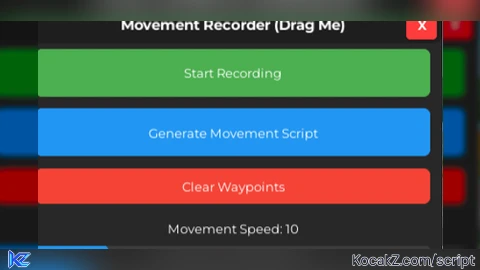
title.Text = "Movement Recorder (Drag Me)"
title.Font = Enum.Font.GothamBold
title.TextSize = 14
title.Parent = titleBar

local closeButton = Instance.new("TextButton")
closeButton.Size = UDim2.new(0, 25, 0, 25)
closeButton.Position = UDim2.new(1, -30, 0, 2)
closeButton.BackgroundColor3 = Color3.fromRGB(255, 60, 60)
closeButton.TextColor3 = Color3.fromRGB(255, 255, 255)
closeButton.Text = "X"
closeButton.Font = Enum.Font.GothamBold
closeButton.TextSize = 12
closeButton.Parent = titleBar

local closeCorner = Instance.new("UICorner")
closeCorner.CornerRadius = UDim.new(0, 4)
closeCorner.Parent = closeButton

-- Content frame
local contentFrame = Instance.new("Frame")
contentFrame.Size = UDim2.new(1, -20, 1, -40)
contentFrame.Position = UDim2.new(0, 10, 0, 35)
contentFrame.BackgroundTransparency = 1
contentFrame.Parent = mainFrame

local recordButton = Instance.new("TextButton")
recordButton.Size = UDim2.new(1, 0, 0, 40)
recordButton.Position = UDim2.new(0, 0, 0, 0)
recordButton.BackgroundColor3 = Color3.fromRGB(76, 175, 80)
recordButton.TextColor3 = Color3.fromRGB(255, 255, 255)
recordButton.Text = "Start Recording"
recordButton.Font = Enum.Font.Gotham
recordButton.TextSize = 12
recordButton.Parent = contentFrame

local UICorner2 = Instance.new("UICorner")
UICorner2.CornerRadius = UDim.new(0, 6)
UICorner2.Parent = recordButton

local saveButton = Instance.new("TextButton")
saveButton.Size = UDim2.new(1, 0, 0, 40)
saveButton.Position = UDim2.new(0, 0, 0, 50)
saveButton.BackgroundColor3 = Color3.fromRGB(33, 150, 243)
saveButton.TextColor3 = Color3.fromRGB(255, 255, 255)
saveButton.Text = "Generate Movement Script"
saveButton.Font = Enum.Font.Gotham
saveButton.TextSize = 12
saveButton.Parent = contentFrame

local UICorner3 = Instance.new("UICorner")
UICorner3.CornerRadius = UDim.new(0, 6)
UICorner3.Parent = saveButton

local clearButton = Instance.new("TextButton")
clearButton.Size = UDim2.new(1, 0, 0, 30)
clearButton.Position = UDim2.new(0, 0, 0, 100)
clearButton.BackgroundColor3 = Color3.fromRGB(244, 67, 54)
clearButton.TextColor3 = Color3.fromRGB(255, 255, 255)
clearButton.Text = "Clear Waypoints"
clearButton.Font = Enum.Font.Gotham
clearButton.TextSize = 12
clearButton.Parent = contentFrame

local UICorner4 = Instance.new("UICorner")
UICorner4.CornerRadius = UDim.new(0, 6)
UICorner4.Parent = clearButton

-- Speed Control Section
local speedLabel = Instance.new("TextLabel")
speedLabel.Size = UDim2.new(1, 0, 0, 20)
speedLabel.Position = UDim2.new(0, 0, 0, 140)
speedLabel.BackgroundTransparency = 1
speedLabel.TextColor3 = Color3.fromRGB(255, 255, 255)
speedLabel.Text = "Movement Speed: " .. movementSpeed
speedLabel.Font = Enum.Font.Gotham
speedLabel.TextSize = 12
speedLabel.Parent = contentFrame

local speedSliderContainer = Instance.new("Frame")
speedSliderContainer.Size = UDim2.new(1, 0, 0, 25)
speedSliderContainer.Position = UDim2.new(0, 0, 0, 165)
speedSliderContainer.BackgroundColor3 = Color3.fromRGB(60, 60, 60)
speedSliderContainer.Parent = contentFrame

local sliderCorner = Instance.new("UICorner")
sliderCorner.CornerRadius = UDim.new(0, 4)
sliderCorner.Parent = speedSliderContainer

local speedSliderFill = Instance.new("Frame")
speedSliderFill.Size = UDim2.new((movementSpeed - 1) / 49, 0, 1, 0) -- 1-50 range
speedSliderFill.Position = UDim2.new(0, 0, 0, 0)
speedSliderFill.BackgroundColor3 = Color3.fromRGB(33, 150, 243)
speedSliderFill.BorderSizePixel = 0
speedSliderFill.Parent = speedSliderContainer

local fillCorner = Instance.new("UICorner")
fillCorner.CornerRadius = UDim.new(0, 4)
fillCorner.Parent = speedSliderFill

local speedSliderButton = Instance.new("TextButton")
speedSliderButton.Size = UDim2.new(1, 0, 1, 0)
speedSliderButton.Position = UDim2.new(0, 0, 0, 0)
speedSliderButton.BackgroundTransparency = 1
speedSliderButton.Text = ""
speedSliderButton.Parent = speedSliderContainer

local speedMinLabel = Instance.new("TextLabel")
speedMinLabel.Size = UDim2.new(0, 30, 0, 15)
speedMinLabel.Position = UDim2.new(0, 0, 0, 195)
speedMinLabel.BackgroundTransparency = 1
speedMinLabel.TextColor3 = Color3.fromRGB(200, 200, 200)
speedMinLabel.Text = "Slow"
speedMinLabel.Font = Enum.Font.Gotham
speedMinLabel.TextSize = 10
speedMinLabel.Parent = contentFrame

local speedMaxLabel = Instance.new("TextLabel")
speedMaxLabel.Size = UDim2.new(0, 30, 0, 15)
speedMaxLabel.Position = UDim2.new(1, -30, 0, 195)
speedMaxLabel.BackgroundTransparency = 1
speedMaxLabel.TextColor3 = Color3.fromRGB(200, 200, 200)
speedMaxLabel.Text = "Fast"
speedMaxLabel.Font = Enum.Font.Gotham
speedMaxLabel.TextSize = 10
speedMaxLabel.Parent = contentFrame

local statusLabel = Instance.new("TextLabel")
statusLabel.Size = UDim2.new(1, 0, 0, 30)
statusLabel.Position = UDim2.new(0, 0, 0, 215)
statusLabel.BackgroundTransparency = 1
statusLabel.TextColor3 = Color3.fromRGB(255, 255, 255)
statusLabel.Text = "Click anywhere to record waypoints"
statusLabel.Font = Enum.Font.Gotham
statusLabel.TextSize = 12
statusLabel.Parent = contentFrame

local waypointCount = Instance.new("TextLabel")
waypointCount.Size = UDim2.new(1, 0, 0, 20)
waypointCount.Position = UDim2.new(0, 0, 0, 245)
waypointCount.BackgroundTransparency = 1
waypointCount.TextColor3 = Color3.fromRGB(200, 200, 200)
waypointCount.Text = "Waypoints: 0"
waypointCount.Font = Enum.Font.Gotham
waypointCount.TextSize = 11
waypointCount.Parent = contentFrame

-- Script output section
local outputLabel = Instance.new("TextLabel")
outputLabel.Size = UDim2.new(1, 0, 0, 20)
outputLabel.Position = UDim2.new(0, 0, 0, 270)
outputLabel.BackgroundTransparency = 1
outputLabel.TextColor3 = Color3.fromRGB(255, 255, 255)
outputLabel.Text = "Generated Script:"
outputLabel.Font = Enum.Font.GothamBold
outputLabel.TextSize = 12
outputLabel.Parent = contentFrame

local scriptTextBox = Instance.new("TextBox")
scriptTextBox.Size = UDim2.new(1, 0, 0, 180)
scriptTextBox.Position = UDim2.new(0, 0, 0, 295)
scriptTextBox.BackgroundColor3 = Color3.fromRGB(25, 25, 25)
scriptTextBox.TextColor3 = Color3.fromRGB(255, 255, 255)
scriptTextBox.Text = "-- Generated script will appear here"
scriptTextBox.Font = Enum.Font.Code
scriptTextBox.TextSize = 10
scriptTextBox.TextXAlignment = Enum.TextXAlignment.Left
scriptTextBox.TextYAlignment = Enum.TextYAlignment.Top
scriptTextBox.TextWrapped = true
scriptTextBox.ClearTextOnFocus = false
scriptTextBox.MultiLine = true
scriptTextBox.Parent = contentFrame

local textBoxCorner = Instance.new("UICorner")
textBoxCorner.CornerRadius = UDim.new(0, 6)
textBoxCorner.Parent = scriptTextBox

local copyButton = Instance.new("TextButton")
copyButton.Size = UDim2.new(1, 0, 0, 25)
copyButton.Position = UDim2.new(0, 0, 0, 485)
copyButton.BackgroundColor3 = Color3.fromRGB(156, 39, 176)
copyButton.TextColor3 = Color3.fromRGB(255, 255, 255)
copyButton.Text = "Copy to Clipboard"
copyButton.Font = Enum.Font.Gotham
copyButton.TextSize = 12
copyButton.Parent = contentFrame

local UICorner5 = Instance.new("UICorner")
UICorner5.CornerRadius = UDim.new(0, 6)
UICorner5.Parent = copyButton

-- Dragging functionality
local function updateDrag(input)
    if not dragging then return end

    local delta = input.Position - dragStartPos
    mainFrame.Position = UDim2.new(
        frameStartPos.X.Scale,
        frameStartPos.X.Offset + delta.X,
        frameStartPos.Y.Scale,
        frameStartPos.Y.Offset + delta.Y
    )
end

titleBar.InputBegan:Connect(function(input)
    if input.UserInputType == Enum.UserInputType.MouseButton1 then
        dragging = true
        dragStartPos = input.Position
        frameStartPos = mainFrame.Position

        input.Changed:Connect(function()
            if input.UserInputState == Enum.UserInputState.End then
                dragging = false
            end
        end)
    end
end)

titleBar.InputChanged:Connect(function(input)
    if input.UserInputType == Enum.UserInputType.MouseMovement then
        updateDrag(input)
    end
end)

UserInputService.InputChanged:Connect(function(input)
    if input.UserInputType == Enum.UserInputType.MouseMovement then
        updateDrag(input)
    end
end)

-- Speed slider functionality
local function updateSpeedSlider(input)
    if input.UserInputType ~= Enum.UserInputType.MouseMovement then return end

    local sliderAbsolutePosition = speedSliderContainer.AbsolutePosition
    local sliderAbsoluteSize = speedSliderContainer.AbsoluteSize

    local relativeX = (input.Position.X - sliderAbsolutePosition.X) / sliderAbsoluteSize.X
    relativeX = math.clamp(relativeX, 0, 1)

    -- Convert to speed range (1-50)
    movementSpeed = math.floor(1 + relativeX * 49)

    -- Update slider fill
    speedSliderFill.Size = UDim2.new(relativeX, 0, 1, 0)

    -- Update speed label
    speedLabel.Text = "Movement Speed: " .. movementSpeed
end

speedSliderButton.MouseButton1Down:Connect(function()
    updateSpeedSlider({Position = UserInputService:GetMouseLocation(), UserInputType = Enum.UserInputType.MouseMovement})

    local connection
    connection = UserInputService.InputChanged:Connect(function(input)
        if input.UserInputType == Enum.UserInputType.MouseMovement then
            updateSpeedSlider(input)
        end
    end)

    UserInputService.InputEnded:Connect(function(input)
        if input.UserInputType == Enum.UserInputType.MouseButton1 then
            connection:Disconnect()
        end
    end)
end)

-- Function to move character to a point
local function moveToPoint(targetPosition)
    local character = player.Character
    if not character then return end

    local humanoid = character:FindFirstChildOfClass("Humanoid")
    local rootPart = character:FindFirstChild("HumanoidRootPart")

    if not humanoid or not rootPart then return end

    -- Stop any existing movement
    if currentTween then
        currentTween:Cancel()
    end

    -- Calculate duration based on distance and speed
    local distance = (rootPart.Position - targetPosition).Magnitude
    local duration = distance / movementSpeed

    -- Create a tween for smooth movement
    local tweenInfo = TweenInfo.new(
        duration,
        Enum.EasingStyle.Linear
    )

    currentTween = TweenService:Create(rootPart, tweenInfo, {CFrame = CFrame.new(targetPosition)})
    currentTween:Play()

    currentTween.Completed:Connect(function()
        currentTween = nil
    end)
end

-- Function to handle mouse clicks for waypoints
local function onMouseClick()
    if not recording then return end

    local target = mouse.Target
    if target then
        local hitPoint = mouse.Hit.Position
        table.insert(waypoints, hitPoint)
        waypointCount.Text = "Waypoints: " .. #waypoints
        statusLabel.Text = "Added waypoint " .. #waypoints

        -- Move character to the clicked point
        moveToPoint(hitPoint)

        -- Visual feedback
        local part = Instance.new("Part")
        part.Size = Vector3.new(1, 1, 1)
        part.Position = hitPoint
        part.Anchored = true
        part.CanCollide = false
        part.Material = Enum.Material.Neon
        part.BrickColor = BrickColor.new("Bright green")
        part.Parent = workspace

        -- Remove the indicator after 3 seconds
        game:GetService("Debris"):AddItem(part, 3)
    end
end

-- Function to generate the movement script
local function generateMovementScript()
    if #waypoints == 0 then
        statusLabel.Text = "No waypoints recorded!"
        scriptTextBox.Text = "-- No waypoints recorded!\n-- Click 'Start Recording' and click in the world to add waypoints."
        return
    end

    local scriptString = [[-- Auto-generated Movement Script
-- Generated with Movement Recorder
-- Number of waypoints: ]] .. #waypoints .. [[
-- Movement Speed: ]] .. movementSpeed .. [[

local Players = game:GetService("Players")
local TweenService = game:GetService("TweenService")
local player = Players.LocalPlayer

local movementSpeed = ]] .. movementSpeed .. [[  -- Adjust this value to change speed (1-50)

local waypoints = {
]]

    -- Add all waypoints to the script
    for i, point in ipairs(waypoints) do
        scriptString = scriptString .. string.format("    Vector3.new(%.2f, %.2f, %.2f),  -- Waypoint %d\n", point.X, point.Y, point.Z, i)
    end

    scriptString = scriptString .. [[}

local function executeMovement()
    local character = player.Character
    if not character then
        character = player.CharacterAdded:Wait()
    end

    local humanoid = character:FindFirstChildOfClass("Humanoid")
    local rootPart = character:FindFirstChild("HumanoidRootPart")

    if not humanoid or not rootPart then
        warn("Movement Script: No humanoid or root part found!")
        return
    end

    for i, waypoint in ipairs(waypoints) do
        print("Moving to waypoint " .. i .. "...")

        -- Move to waypoint
        local distance = (rootPart.Position - waypoint).Magnitude
        local duration = distance / movementSpeed
        local tweenInfo = TweenInfo.new(
            duration,
            Enum.EasingStyle.Linear
        )
        local tween = TweenService:Create(rootPart, tweenInfo, {CFrame = CFrame.new(waypoint)})
        tween:Play()
        tween.Completed:Wait()

        wait(0.1)  -- Small delay between waypoints
    end

    print("Movement completed!")
end

-- Execute the movement (remove if you want to call it manually)
executeMovement()
]]

    scriptTextBox.Text = scriptString
    statusLabel.Text = "Script generated! Click 'Copy to Clipboard'"
end

-- Function to copy text to clipboard
local function copyToClipboard()
    if scriptTextBox.Text and scriptTextBox.Text ~= "" then
        scriptTextBox:CaptureFocus()
        scriptTextBox.Text = scriptTextBox.Text  -- This helps with selection
        wait()
        scriptTextBox:ReleaseFocus()

        -- For Roblox's built-in copy functionality (works in some executors)
        pcall(function()
            game:GetService("TextService"):SetSelection(scriptTextBox)
        end)

        statusLabel.Text = "Text selected - Use Ctrl+C to copy"
    end
end

-- Function to clear waypoints
local function clearWaypoints()
    waypoints = {}
    waypointCount.Text = "Waypoints: 0"
    statusLabel.Text = "Waypoints cleared!"
    scriptTextBox.Text = "-- Waypoints cleared\n-- Click 'Start Recording' to begin"

    if recording then
        recording = false
        recordButton.BackgroundColor3 = Color3.fromRGB(76, 175, 80)
        recordButton.Text = "Start Recording"
    end
end

-- Toggle recording state
recordButton.MouseButton1Click:Connect(function()
    recording = not recording

    if recording then
        recordButton.BackgroundColor3 = Color3.fromRGB(244, 67, 54)
        recordButton.Text = "Stop Recording"
        statusLabel.Text = "Recording... Click to add waypoints"
        waypointCount.Text = "Waypoints: " .. #waypoints
    else
        recordButton.BackgroundColor3 = Color3.fromRGB(76, 175, 80)
        recordButton.Text = "Start Recording"
        statusLabel.Text = "Recording stopped. " .. #waypoints .. " waypoints recorded"
    end
end)

-- Generate movement script
saveButton.MouseButton1Click:Connect(function()
    if recording then
        statusLabel.Text = "Stop recording before generating script!"
        return
    end

    generateMovementScript()
end)

-- Clear waypoints
clearButton.MouseButton1Click:Connect(function()
    clearWaypoints()
end)

-- Copy to clipboard
copyButton.MouseButton1Click:Connect(function()
    copyToClipboard()
end)

-- Close button
closeButton.MouseButton1Click:Connect(function()
    screenGui:Destroy()
end)

-- Connect mouse click event
mouse.Button1Down:Connect(onMouseClick)

-- Clean up when player leaves
player.CharacterRemoving:Connect(function()
    if currentTween then
        currentTween:Cancel()
    end
end)

-- Instructions
scriptTextBox.Text = [[-- Movement Recorder Instructions --

1. Click 'Start Recording'
2. Click anywhere in the 3D world to set waypoints
3. Your character will automatically move to each point
4. Adjust speed using the slider (1 = slow, 50 = fast)
5. Click 'Stop Recording' when done
6. Click 'Generate Movement Script' to create the script
7. Click 'Copy to Clipboard' and paste into your executor

Tip: Use clear areas for better movement!]]


select all in script paste into your executor to execute if it doesent work make it a loadstring
Can you make the script movable for mobile?