


Key RequiredUniversal
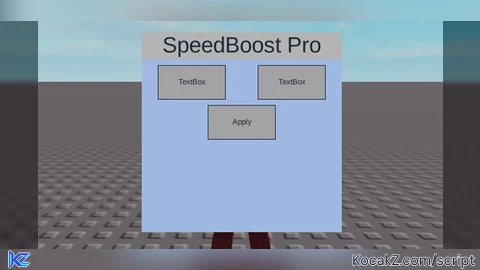
-- Create a ScreenGui
local screenGui = Instance.new("ScreenGui")
screenGui.Parent = game.Players.LocalPlayer:WaitForChild("PlayerGui")

-- Create a Frame
local frame = Instance.new("Frame")
frame.Size = UDim2.new(0, 300, 0, 300)
frame.Position = UDim2.new(0.5, -150, 0.5, -150)
frame.BackgroundColor3 = Color3.fromHex("#9fb9e2")
frame.BorderSizePixel = 0
frame.Active = true
frame.Draggable = true
frame.Parent = screenGui

-- Create a Title
local titleLabel = Instance.new("TextLabel")
titleLabel.Size = UDim2.new(1, 0, 0, 40)
titleLabel.Position = UDim2.new(0, 0, 0, 0)
titleLabel.BackgroundColor3 = Color3.new(0.7, 0.7, 0.7)
titleLabel.BorderSizePixel = 0
titleLabel.Text = "SpeedBoost Pro"
titleLabel.TextSize = 24
titleLabel.Parent = frame

-- Create walkspeed text box
local walkspeedBox = Instance.new("TextBox")
walkspeedBox.Size = UDim2.new(0, 100, 0, 50)
walkspeedBox.Position = UDim2.new(0, 25, 0, 50)
walkspeedBox.PlaceholderText = "Walkspeed"
walkspeedBox.Parent = frame

-- Create jump power text box
local jumpPowerBox = Instance.new("TextBox")
jumpPowerBox.Size = UDim2.new(0, 100, 0, 50)
jumpPowerBox.Position = UDim2.new(0, 175, 0, 50)
jumpPowerBox.PlaceholderText = "Jump Power"
jumpPowerBox.Parent = frame

-- Create apply button
local applyButton = Instance.new("TextButton")
applyButton.Size = UDim2.new(0, 100, 0, 50)
applyButton.Position = UDim2.new(0.5, -50, 0, 110)
applyButton.Text = "Apply"
applyButton.Parent = frame

applyButton.MouseButton1Click:Connect(function()
    local walkspeed = tonumber(walkspeedBox.Text)
    local jumpPower = tonumber(jumpPowerBox.Text)
    local player = game.Players.LocalPlayer
    local character = player.Character or player.CharacterAdded:Wait()
    local humanoid = character:FindFirstChildOfClass("Humanoid")

    if humanoid then
        if walkspeed then
            humanoid.WalkSpeed = walkspeed
        end
        if jumpPower then
            humanoid.JumpPower = jumpPower
        end
    end
end)


Very good!
@LunaKit thanks