


Key RequiredUniversal
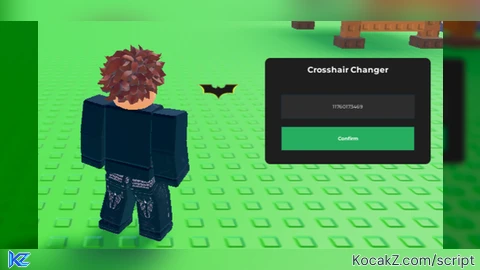
-- SERVICES
local UserInputService = game:GetService("UserInputService")
local RunService = game:GetService("RunService")
local Players = game:GetService("Players")

-- VARIABLES
local player = Players.LocalPlayer
local pGui = player:WaitForChild("PlayerGui")

-- 1. CREATE UI ELEMENTS
local ScreenGui = Instance.new("ScreenGui")
ScreenGui.Name = "CrosshairChangerGui"
ScreenGui.IgnoreGuiInset = true -- CRITICAL: Matches mouse math exactly
ScreenGui.ResetOnSpawn = false
ScreenGui.DisplayOrder = 10 -- Keeps crosshair above everything else
ScreenGui.Parent = pGui

-- Main Draggable Frame
local MainFrame = Instance.new("Frame")
MainFrame.Name = "MainFrame"
MainFrame.Size = UDim2.new(0, 250, 0, 160)
MainFrame.Position = UDim2.new(0.5, -125, 0.5, -80)
MainFrame.BackgroundColor3 = Color3.fromRGB(30, 30, 30)
MainFrame.BorderSizePixel = 0
MainFrame.Active = true
MainFrame.Parent = ScreenGui

local UICorner = Instance.new("UICorner")
UICorner.CornerRadius = UDim.new(0, 8)
UICorner.Parent = MainFrame

-- Title
local Title = Instance.new("TextLabel")
Title.Size = UDim2.new(1, 0, 0, 35)
Title.BackgroundTransparency = 1
Title.Text = "Crosshair Changer"
Title.TextColor3 = Color3.new(1, 1, 1)
Title.Font = Enum.Font.GothamBold
Title.TextSize = 14
Title.Parent = MainFrame

-- Textbox
local IDInput = Instance.new("TextBox")
IDInput.Size = UDim2.new(0.8, 0, 0, 35)
IDInput.Position = UDim2.new(0.1, 0, 0.35, 0)
IDInput.BackgroundColor3 = Color3.fromRGB(45, 45, 45)
IDInput.PlaceholderText = "Enter Image ID..."
IDInput.Text = ""
IDInput.TextColor3 = Color3.new(1, 1, 1)
IDInput.Font = Enum.Font.Gotham
IDInput.Parent = MainFrame

-- Confirm Button
local ConfirmBtn = Instance.new("TextButton")
ConfirmBtn.Size = UDim2.new(0.8, 0, 0, 35)
ConfirmBtn.Position = UDim2.new(0.1, 0, 0.65, 0)
ConfirmBtn.BackgroundColor3 = Color3.fromRGB(39, 174, 96)
ConfirmBtn.Text = "Confirm"
ConfirmBtn.Font = Enum.Font.GothamBold
ConfirmBtn.TextColor3 = Color3.new(1, 1, 1)
ConfirmBtn.Parent = MainFrame

-- THE CROSSHAIR (The Important Part)
local Crosshair = Instance.new("ImageLabel")
Crosshair.Name = "CustomCrosshair"
Crosshair.Size = UDim2.new(0, 64, 0, 64) -- Keep size even for pixel perfect centering
Crosshair.AnchorPoint = Vector2.new(0.5, 0.5) -- Centers the image on the mouse
Crosshair.BackgroundTransparency = 1
Crosshair.Image = ""
Crosshair.Visible = false
Crosshair.ZIndex = 100
Crosshair.Parent = ScreenGui

-- 2. DRAGGING LOGIC (Menu)
local dragging, dragInput, dragStart, startPos

MainFrame.InputBegan:Connect(function(input)
	if input.UserInputType == Enum.UserInputType.MouseButton1 then
		dragging = true
		dragStart = input.Position
		startPos = MainFrame.Position
		input.Changed:Connect(function()
			if input.UserInputState == Enum.UserInputState.End then dragging = false end
		end)
	end
end)

UserInputService.InputChanged:Connect(function(input)
	if dragging and input.UserInputType == Enum.UserInputType.MouseMovement then
		local delta = input.Position - dragStart
		MainFrame.Position = UDim2.new(startPos.X.Scale, startPos.X.Offset + delta.X, startPos.Y.Scale, startPos.Y.Offset + delta.Y)
	end
end)

-- 3. SMOOTH CROSSHAIR LOGIC
-- BindToRenderStep ensures this runs BEFORE the frame is drawn
RunService:BindToRenderStep("CrosshairUpdate", Enum.RenderPriority.Last.Value + 1, function()
	if Crosshair.Visible then
		local mouseLocation = UserInputService:GetMouseLocation()
		-- We use Offset only for absolute precision
		Crosshair.Position = UDim2.fromOffset(mouseLocation.X, mouseLocation.Y)
	end
end)

-- 4. BUTTON LOGIC
ConfirmBtn.MouseButton1Click:Connect(function()
	local assetID = IDInput.Text
	if tonumber(assetID) then
		Crosshair.Image = "rbxassetid://" .. assetID
		Crosshair.Visible = true
		UserInputService.MouseIconEnabled = false
	else
		IDInput.Text = ""
		IDInput.PlaceholderText = "Invalid ID!"
	end
end)


It's cool, but what is it for?
@munorahy just a cool little crosshair changer!
@SaiIsMe i cant fix that issue only mods can