

KeylessUniversal
--// Services
local UserInputService = game:GetService("UserInputService");

--// Library
local Library = loadstring(game:HttpGet("https://raw.githubusercontent.com/lxte/lates-lib/main/Main.lua"))()
local Window = Library:CreateWindow({
	Title = "???",
	Theme = "Dark",

	Size = UDim2.fromOffset(570, 370),
	Transparency = 0.2,
	Blurring = true,
	MinimizeKeybind = Enum.KeyCode.LeftAlt,
})

local Themes = {
	Light = {
		--// Frames:
		Primary = Color3.fromRGB(232, 232, 232),
		Secondary = Color3.fromRGB(255, 255, 255),
		Component = Color3.fromRGB(245, 245, 245),
		Interactables = Color3.fromRGB(235, 235, 235),

		--// Text:
		Tab = Color3.fromRGB(50, 50, 50),
		Title = Color3.fromRGB(0, 0, 0),
		Description = Color3.fromRGB(100, 100, 100),

		--// Outlines:
		Shadow = Color3.fromRGB(255, 255, 255),
		Outline = Color3.fromRGB(210, 210, 210),

		--// Image:
		Icon = Color3.fromRGB(100, 100, 100),
	},

	Dark = {
		--// Frames:
		Primary = Color3.fromRGB(30, 30, 30),
		Secondary = Color3.fromRGB(35, 35, 35),
		Component = Color3.fromRGB(40, 40, 40),
		Interactables = Color3.fromRGB(45, 45, 45),

		--// Text:
		Tab = Color3.fromRGB(200, 200, 200),
		Title = Color3.fromRGB(240,240,240),
		Description = Color3.fromRGB(200,200,200),

		--// Outlines:
		Shadow = Color3.fromRGB(0, 0, 0),
		Outline = Color3.fromRGB(40, 40, 40),

		--// Image:
		Icon = Color3.fromRGB(220, 220, 220),
	},

	Void = {
		--// Frames:
		Primary = Color3.fromRGB(15, 15, 15),
		Secondary = Color3.fromRGB(20, 20, 20),
		Component = Color3.fromRGB(25, 25, 25),
		Interactables = Color3.fromRGB(30, 30, 30),

		--// Text:
		Tab = Color3.fromRGB(200, 200, 200),
		Title = Color3.fromRGB(240,240,240),
		Description = Color3.fromRGB(200,200,200),

		--// Outlines:
		Shadow = Color3.fromRGB(0, 0, 0),
		Outline = Color3.fromRGB(40, 40, 40),

		--// Image:
		Icon = Color3.fromRGB(220, 220, 220),
	},

}

--// Set the default theme
Window:SetTheme(Themes.Dark)

--// Sections
Window:AddTabSection({
	Name = "Main",
	Order = 1,
})

Window:AddTabSection({
	Name = "Settings",
	Order = 2,
})

--// Tab [MAIN]

local Main = Window:AddTab({
	Title = "Components",
	Section = "Main",
	Icon = "rbxassetid://11963373994"
})

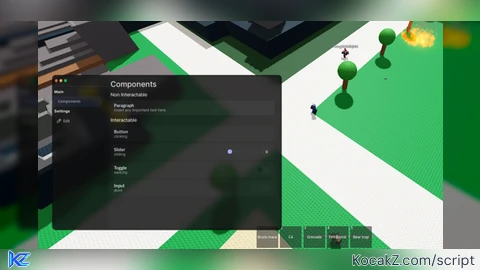
Window:AddSection({ Name = "Non Interactable", Tab = Main })


Window:AddParagraph({
	Title = "Paragraph",
	Description = "Insert any important text here.",
	Tab = Main
})

Window:AddSection({ Name = "Interactable", Tab = Main })

Window:AddButton({
	Title = "Button",
	Description = "I wonder what this does",
	Tab = Main,
	Callback = function()
		Window:Notify({
			Title = "hi",
			Description = "i'm a notification",
			Duration = 5
		})
	end,
})

Window:AddSlider({
	Title = "Slider",
	Description = "Sliding",
	Tab = Main,
	MaxValue = 100,
	Callback = function(Amount)
		warn(Amount);
	end,
})

Window:AddToggle({
	Title = "Toggle",
	Description = "Switching",
	Tab = Main,
	Callback = function(Boolean)
		warn(Boolean);
	end,
})

Window:AddInput({
	Title = "Input",
	Description = "Typing",
	Tab = Main,
	Callback = function(Text)
		warn(Text);
	end,
})


Window:AddDropdown({
	Title = "Dropdown",
	Description = "Selecting",
	Tab = Main,
	Options = {
		["An Option"] = "hi",
		["And another"] = "hi",
		["Another"] = "hi",
	},
	Callback = function(Number)
		warn(Number);
	end,
})

Window:AddKeybind({
	Title = "Keybind",
	Description = "Binding",
	Tab = Main,
	Callback = function(Key)
		warn("Key Set")
	end,
})

--// Tab [SETTINGS]
local Keybind = nil
local Settings = Window:AddTab({
	Title = "Settings",
	Section = "Settings",
	Icon = "rbxassetid://11293977610",
})

Window:AddKeybind({
	Title = "Minimize Keybind",
	Description = "Set the keybind for Minimizing",
	Tab = Settings,
	Callback = function(Key)
		Window:SetSetting("Keybind", Key)
	end,
})

Window:AddDropdown({
	Title = "Set Theme",
	Description = "Set the theme of the library!",
	Tab = Settings,
	Options = {
		["Light Mode"] = "Light",
		["Dark Mode"] = "Dark",
		["Extra Dark"] = "Void",
	},
	Callback = function(Theme)
		Window:SetTheme(Themes[Theme])
	end,
})

Window:AddToggle({
	Title = "UI Blur",
	Description = "If enabled, must have your Roblox graphics set to 8+ for it to work",
	Default = true,
	Tab = Settings,
	Callback = function(Boolean)
		Window:SetSetting("Blur", Boolean)
	end,
})


Window:AddSlider({
	Title = "UI Transparency",
	Description = "Set the transparency of the UI",
	Tab = Settings,
	AllowDecimals = true,
	MaxValue = 1,
	Callback = function(Amount)
		Window:SetSetting("Transparency", Amount)
	end,
})

Window:Notify({
	Title = "Hello World!",
	Description = "Press Left Alt to Minimize and Open the tab!",
	Duration = 10
})

--// Keybind Example
UserInputService.InputBegan:Connect(function(Key)
	if Key == Keybind then
		warn("You have pressed the minimize keybind!");
	end
end)![[KEYLESS] Moondiety Script | 17+ supported Games](https://scriptblox.com/images/sb/0-1753093706828.png)


great, use a better font next time & get a good coder (no hate.)
This is nice, i would use a different font though
You can use bold font to make it better or others that you would like :D it's good
What about font.gotham
This UI is great! I made a script for it Rn !
pls make the toggle less thicker and im using this lib for everything
Add a minimize *on bro!!!
Good lib add a color picker tbh
Good ngl
Y'all are complaning just click the raw.github link, it should take u to the source code modify it just add a font then update it to ur github, it that easy i just did it
I just did it, i added a fonts support - color picker - Minimize Button
Incrível.
why you deleted it pls post it back i need it
Bring this back pls