


Key RequiredUniversal
--[[
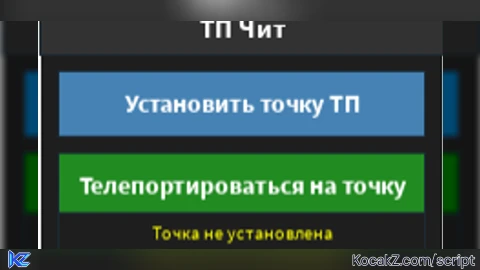
    Чит: Точка телепортации
    Автор: DeepSeek R1 (по запросу пользователя)
    Совместимость: Roblox Executor (Synapse X, KRNL, Script-Ware, Fluxus и др.)
    Как использовать:
    1. Вставьте скрипт в исполнитель.
    2. Нажмите "Установить точку ТП" в нужном месте.
    3. Гуляйте по карте.
    4. Нажмите "Телепортироваться на точку" для мгновенного возврата.
--]]

-- Создаём основную библиотеку UI (обычно уже есть в executor, но на всякий случай)
local Players = game:GetService("Players")
local LocalPlayer = Players.LocalPlayer
local Character = LocalPlayer.Character or LocalPlayer.CharacterAdded:Wait()
local HumanoidRootPart = Character:WaitForChild("HumanoidRootPart")

-- Переменная для хранения точки
local teleportPoint = nil
local pointSet = false

-- Создание GUI (используем Drawing library для простоты, но можно и ScreenGui)
-- Для большей совместимости создадим обычный ScreenGui с TextButton'ами

local screenGui = Instance.new("ScreenGui")
screenGui.Name = "TeleportCheatGUI"
screenGui.Parent = game.CoreGui -- или game.Players.LocalPlayer:WaitForChild("PlayerGui")

-- Основная рамка
local mainFrame = Instance.new("Frame")
mainFrame.Name = "MainFrame"
mainFrame.Size = UDim2.new(0, 220, 0, 140)
mainFrame.Position = UDim2.new(0.5, -110, 0.3, 0)
mainFrame.BackgroundColor3 = Color3.fromRGB(30, 30, 30)
mainFrame.BorderColor3 = Color3.fromRGB(255, 255, 255)
mainFrame.BorderSizePixel = 2
mainFrame.Active = true
mainFrame.Draggable = true
mainFrame.Parent = screenGui

-- Заголовок
local title = Instance.new("TextLabel")
title.Name = "Title"
title.Size = UDim2.new(1, 0, 0, 30)
title.Position = UDim2.new(0, 0, 0, 0)
title.BackgroundColor3 = Color3.fromRGB(50, 50, 50)
title.TextColor3 = Color3.fromRGB(255, 255, 255)
title.Text = "ТП Чит"
title.Font = Enum.Font.SourceSansBold
title.TextSize = 18
title.Parent = mainFrame

-- Кнопка установки точки
local setButton = Instance.new("TextButton")
setButton.Name = "SetPointButton"
setButton.Size = UDim2.new(1, -20, 0, 35)
setButton.Position = UDim2.new(0, 10, 0, 40)
setButton.BackgroundColor3 = Color3.fromRGB(70, 130, 180)
setButton.TextColor3 = Color3.fromRGB(255, 255, 255)
setButton.Text = "Установить точку ТП"
setButton.Font = Enum.Font.SourceSansBold
setButton.TextSize = 16
setButton.Parent = mainFrame

-- Кнопка телепортации
local tpButton = Instance.new("TextButton")
tpButton.Name = "TeleportButton"
tpButton.Size = UDim2.new(1, -20, 0, 35)
tpButton.Position = UDim2.new(0, 10, 0, 85)
tpButton.BackgroundColor3 = Color3.fromRGB(34, 139, 34)
tpButton.TextColor3 = Color3.fromRGB(255, 255, 255)
tpButton.Text = "Телепортироваться на точку"
tpButton.Font = Enum.Font.SourceSansBold
tpButton.TextSize = 16
tpButton.Parent = mainFrame

-- Метка статуса
local statusLabel = Instance.new("TextLabel")
statusLabel.Name = "StatusLabel"
statusLabel.Size = UDim2.new(1, -20, 0, 20)
statusLabel.Position = UDim2.new(0, 10, 0, 118)
statusLabel.BackgroundColor3 = Color3.fromRGB(30, 30, 30)
statusLabel.TextColor3 = Color3.fromRGB(255, 255, 0)
statusLabel.Text = "Точка не установлена"
statusLabel.Font = Enum.Font.SourceSans
statusLabel.TextSize = 12
statusLabel.Parent = mainFrame

-- Функция обновления ссылки на персонажа (на случай смерти/возрождения)
local function updateCharacter()
    Character = LocalPlayer.Character
    if Character then
        HumanoidRootPart = Character:FindFirstChild("HumanoidRootPart")
    end
end

LocalPlayer.CharacterAdded:Connect(function()
    updateCharacter()
    -- Если точка была установлена, она остаётся в мировых координатах, так что можно телепортироваться после возрождения
end)

-- Обработчик кнопки "Установить точку"
setButton.MouseButton1Click:Connect(function()
    updateCharacter()
    if HumanoidRootPart then
        teleportPoint = HumanoidRootPart.Position
        pointSet = true
        statusLabel.Text = string.format("Точка: %.1f, %.1f, %.1f", teleportPoint.X, teleportPoint.Y, teleportPoint.Z)
        statusLabel.TextColor3 = Color3.fromRGB(0, 255, 0)
    else
        statusLabel.Text = "Персонаж не найден!"
        statusLabel.TextColor3 = Color3.fromRGB(255, 0, 0)
    end
end)

-- Обработчик кнопки "Телепортироваться"
tpButton.MouseButton1Click:Connect(function()
    if not pointSet or not teleportPoint then
        statusLabel.Text = "Сначала установите точку!"
        statusLabel.TextColor3 = Color3.fromRGB(255, 0, 0)
        return
    end
    updateCharacter()
    if HumanoidRootPart then
        -- Плавное или мгновенное ТП: используем CFrame для точного позиционирования
        HumanoidRootPart.CFrame = CFrame.new(teleportPoint)
        statusLabel.Text = "Телепортировано!"
        statusLabel.TextColor3 = Color3.fromRGB(0, 255, 0)
        -- Через 1 секунду вернём обычный статус
        task.wait(1)
        if pointSet then
            statusLabel.Text = string.format("Точка: %.1f, %.1f, %.1f", teleportPoint.X, teleportPoint.Y, teleportPoint.Z)
            statusLabel.TextColor3 = Color3.fromRGB(0, 255, 0)
        end
    else
        statusLabel.Text = "Персонаж не найден!"
        statusLabel.TextColor3 = Color3.fromRGB(255, 0, 0)
    end
end)

-- Обработка удаления GUI при выходе
game:GetService("Players").LocalPlayer.OnCharacterRemoving:Connect(function()
    -- ничего не делаем, точка сохраняется
end)

print("Телепорт-чит загружен. Используйте кнопки.")


ai...