

KeylessUniversal
-- LocalScript inside StarterGui

local Players = game:GetService("Players")
local LocalPlayer = Players.LocalPlayer
local Camera = workspace.CurrentCamera
local RunService = game:GetService("RunService")
local UIS = game:GetService("UserInputService")

-- Create ScreenGui
local screenGui = Instance.new("ScreenGui")
screenGui.ResetOnSpawn = false
screenGui.Parent = LocalPlayer:WaitForChild("PlayerGui")

-- Main Frame
local frame = Instance.new("Frame")
frame.Size = UDim2.new(0, 260, 0, 190)
frame.Position = UDim2.new(0.4, 0, 0.4, 0)
frame.BackgroundColor3 = Color3.fromRGB(25, 25, 25)
frame.BorderSizePixel = 0
frame.Parent = screenGui

-- Title Bar
local titleBar = Instance.new("Frame")
titleBar.Size = UDim2.new(1, 0, 0, 30)
titleBar.BackgroundColor3 = Color3.fromRGB(40, 40, 40)
titleBar.BorderSizePixel = 0
titleBar.Parent = frame

local titleText = Instance.new("TextLabel")
titleText.Size = UDim2.new(1, -10, 1, 0)
titleText.Position = UDim2.new(0, 5, 0, 0)
titleText.BackgroundTransparency = 1
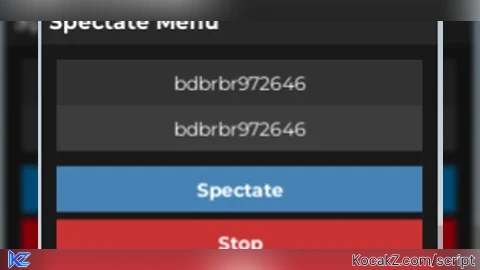
titleText.Text = "Spectate Menu"
titleText.Font = Enum.Font.GothamBold
titleText.TextSize = 16
titleText.TextColor3 = Color3.fromRGB(255, 255, 255)
titleText.TextXAlignment = Enum.TextXAlignment.Left
titleText.Parent = titleBar

-- Dragging Variables
local dragging = false
local dragStart, startPos

titleBar.InputBegan:Connect(function(input)
    if input.UserInputType == Enum.UserInputType.MouseButton1 then
        dragging = true
        dragStart = input.Position
        startPos = frame.Position
    end
end)

titleBar.InputChanged:Connect(function(input)
    if input.UserInputType == Enum.UserInputType.MouseMovement and dragging then
        local delta = input.Position - dragStart
        frame.Position = UDim2.new(startPos.X.Scale, startPos.X.Offset + delta.X, startPos.Y.Scale, startPos.Y.Offset + delta.Y)
    end
end)

UIS.InputEnded:Connect(function(input)
    if input.UserInputType == Enum.UserInputType.MouseButton1 then
        dragging = false
    end
end)

-- Player Name Box
local nameBox = Instance.new("TextBox")
nameBox.PlaceholderText = "Enter Player Name"
nameBox.Size = UDim2.new(1, -20, 0, 30)
nameBox.Position = UDim2.new(0, 10, 0, 40)
nameBox.BackgroundColor3 = Color3.fromRGB(50, 50, 50)
nameBox.BorderSizePixel = 0
nameBox.TextColor3 = Color3.fromRGB(255, 255, 255)
nameBox.Font = Enum.Font.Gotham
nameBox.TextSize = 14
nameBox.ClearTextOnFocus = false
nameBox.Parent = frame

-- Dropdown Frame (for autocomplete)
local dropdown = Instance.new("Frame")
dropdown.Size = UDim2.new(1, -20, 0, 0)
dropdown.Position = UDim2.new(0, 10, 0, 70)
dropdown.BackgroundColor3 = Color3.fromRGB(40, 40, 40)
dropdown.BorderSizePixel = 0
dropdown.ClipsDescendants = true
dropdown.Parent = frame

local uiListLayout = Instance.new("UIListLayout")
uiListLayout.SortOrder = Enum.SortOrder.LayoutOrder
uiListLayout.Parent = dropdown

-- Spectate Button
local spectateButton = Instance.new("TextButton")
spectateButton.Text = "Spectate"
spectateButton.Size = UDim2.new(1, -20, 0, 30)
spectateButton.Position = UDim2.new(0, 10, 0, 110)
spectateButton.BackgroundColor3 = Color3.fromRGB(70, 130, 180)
spectateButton.BorderSizePixel = 0
spectateButton.TextColor3 = Color3.fromRGB(255, 255, 255)
spectateButton.Font = Enum.Font.GothamBold
spectateButton.TextSize = 14
spectateButton.Parent = frame

-- Stop Button
local stopButton = Instance.new("TextButton")
stopButton.Text = "Stop"
stopButton.Size = UDim2.new(1, -20, 0, 30)
stopButton.Position = UDim2.new(0, 10, 0, 145)
stopButton.BackgroundColor3 = Color3.fromRGB(200, 50, 50)
stopButton.BorderSizePixel = 0
stopButton.TextColor3 = Color3.fromRGB(255, 255, 255)
stopButton.Font = Enum.Font.GothamBold
stopButton.TextSize = 14
stopButton.Parent = frame

-- Vars
local spectating = nil
local spectateLoop = nil
local guiVisible = true

-- Function to clear dropdown
local function clearDropdown()
    for _, item in ipairs(dropdown:GetChildren()) do
        if item:IsA("TextButton") then
            item:Destroy()
        end
    end
    dropdown.Size = UDim2.new(1, -20, 0, 0)  -- Hide dropdown by collapsing size
end

-- Function to update dropdown with matching player names
local function updateDropdown(text)
    clearDropdown()
    if #text < 2 then return end
    local matches = {}
    local lowerText = text:lower()
    for _, player in ipairs(Players:GetPlayers()) do
        if player.Name:lower():sub(1, #text) == lowerText then
            table.insert(matches, player.Name)
        end
    end
    if #matches == 0 then return end

    -- Limit max dropdown size (max 6 items)
    local maxItems = math.min(#matches, 6)
    dropdown.Size = UDim2.new(1, -20, 0, maxItems * 30)

    for i = 1, maxItems do
        local btn = Instance.new("TextButton")
        btn.Size = UDim2.new(1, 0, 0, 30)
        btn.Position = UDim2.new(0, 0, 0, (i-1)*30)
        btn.BackgroundColor3 = Color3.fromRGB(60, 60, 60)
        btn.BorderSizePixel = 0
        btn.TextColor3 = Color3.fromRGB(255, 255, 255)
        btn.Font = Enum.Font.Gotham
        btn.TextSize = 14
        btn.Text = matches[i]
        btn.Parent = dropdown

        btn.MouseButton1Click:Connect(function()
            nameBox.Text = btn.Text
            clearDropdown()
        end)
    end
end

-- Update dropdown as user types
nameBox:GetPropertyChangedSignal("Text"):Connect(function()
    updateDropdown(nameBox.Text)
end)

-- Find player by exact name
local function findPlayer(name)
    for _, player in ipairs(Players:GetPlayers()) do
        if player.Name == name then
            return player
        end
    end
    return nil
end

-- Spectate logic
spectateButton.MouseButton1Click:Connect(function()
    local target = findPlayer(nameBox.Text)
    if target and target ~= LocalPlayer then
        spectating = target
        if spectateLoop then spectateLoop:Disconnect() end
        spectateLoop = RunService.RenderStepped:Connect(function()
            if spectating and spectating.Character and spectating.Character:FindFirstChild("Humanoid") then
                Camera.CameraSubject = spectating.Character.Humanoid
            end
        end)
    else
        warn("Player not found")
    end
end)

-- Stop spectating
stopButton.MouseButton1Click:Connect(function()
    spectating = nil
    if spectateLoop then
        spectateLoop:Disconnect()
        spectateLoop = nil
    end
    if LocalPlayer.Character and LocalPlayer.Character:FindFirstChild("Humanoid") then
        Camera.CameraSubject = LocalPlayer.Character.Humanoid
    end
end)

-- Keybind to toggle GUI visibility (P key)
UIS.InputBegan:Connect(function(input, gameProcessed)
    if not gameProcessed and input.KeyCode == Enum.KeyCode.P then
        guiVisible = not guiVisible
        frame.Visible = guiVisible
        if not guiVisible then
            clearDropdown()
        end
    end
end)![[KEYLESS] Moondiety Script | 17+ supported Games](https://scriptblox.com/images/sb/0-1753093706828.png)


yoo dayum chatgpt works perfectly