

KeylessUniversal
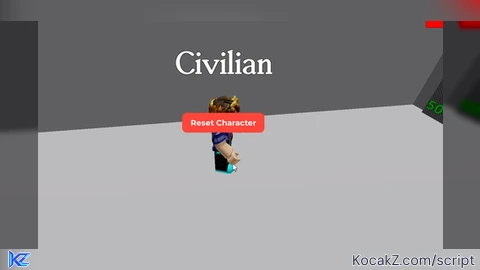
-- made by whatsanoun on scriptblox

local Players = game:GetService("Players")
local UserInputService = game:GetService("UserInputService")
local StarterGui = game:GetService("StarterGui")
local TweenService = game:GetService("TweenService")
local player = Players.LocalPlayer

local screenGui
local infoGuiDisplayed = false
local button
local lastPosition = UDim2.new(0.5, -100, 0.5, -25)
local resetCooldown = false

local function showNotification()
    pcall(function()
        StarterGui:SetCore("SendNotification", {
            Title = "Try to Die detected",
            Text = "Adding 6 seconds cooldown to avoid anti-cheat...",
            Duration = 3
        })
    end)
end

local function createGui()
    screenGui = Instance.new("ScreenGui")
    screenGui.Name = "ResetButtonGui"
    screenGui.Parent = player:WaitForChild("PlayerGui")

    button = Instance.new("TextButton")
    button.Size = UDim2.new(0, 200, 0, 50)
    button.Position = lastPosition
    button.Text = "Reset Character"
    button.BackgroundColor3 = Color3.fromRGB(255, 69, 58)
    button.TextColor3 = Color3.fromRGB(255, 255, 255)
    button.Font = Enum.Font.GothamBold
    button.TextSize = 28
    button.BorderSizePixel = 0
    button.AutoButtonColor = false
    button.Parent = screenGui

    local uiCorner = Instance.new("UICorner")
    uiCorner.CornerRadius = UDim.new(0, 15)
    uiCorner.Parent = button

    local dragging = false
    local dragStart
    local startPos

    button.InputBegan:Connect(function(input)
        if input.UserInputType == Enum.UserInputType.MouseButton1 then
            dragging = true
            dragStart = input.Position
            startPos = button.Position
        end
    end)

    button.InputEnded:Connect(function(input)
        if input.UserInputType == Enum.UserInputType.MouseButton1 then
            dragging = false
            lastPosition = button.Position
        end
    end)

    button.MouseButton1Click:Connect(function()
        if resetCooldown then
            return
        end
        resetCooldown = true
        player.Character:BreakJoints()
        wait(6)
        resetCooldown = false
    end)

    UserInputService.InputChanged:Connect(function(input)
        if dragging and input.UserInputType == Enum.UserInputType.MouseMovement then
            local delta = input.Position - dragStart
            local newPosition = UDim2.new(
                startPos.X.Scale,
                startPos.X.Offset + delta.X,
                startPos.Y.Scale,
                startPos.Y.Offset + delta.Y
            )

            local tweenInfo = TweenInfo.new(0.1, Enum.EasingStyle.Quad, Enum.EasingDirection.Out)
            local tween = TweenService:Create(button, tweenInfo, {Position = newPosition})
            tween:Play()
        end
    end)

    screenGui.Enabled = false
end

local function createInfoGui()
    if infoGuiDisplayed or UserInputService.TouchEnabled then
        createGui()
        screenGui.Enabled = true
        return
    end
    infoGuiDisplayed = true

    local infoGui = Instance.new("ScreenGui")
    infoGui.Name = "InfoGui"
    infoGui.Parent = player:WaitForChild("PlayerGui")

    local frame = Instance.new("Frame")
    frame.Size = UDim2.new(0, 350, 0, 200)
    frame.Position = UDim2.new(0.5, -175, 0.5, -100)
    frame.BackgroundColor3 = Color3.fromRGB(40, 40, 40)
    frame.Parent = infoGui

    local textLabel = Instance.new("TextLabel")
    textLabel.Size = UDim2.new(1, 0, 0.4, 0)
    textLabel.Position = UDim2.new(0, 0, 0.2, 0)
    textLabel.Text = "Press F to toggle"
    textLabel.TextColor3 = Color3.fromRGB(255, 255, 255)
    textLabel.Font = Enum.Font.GothamBold
    textLabel.TextSize = 28
    textLabel.BackgroundTransparency = 1
    textLabel.Parent = frame

    local okButton = Instance.new("TextButton")
    okButton.Size = UDim2.new(0.6, 0, 0.3, 0)
    okButton.Position = UDim2.new(0.2, 0, 0.55, 0)
    okButton.Text = "OK"
    okButton.BackgroundColor3 = Color3.fromRGB(0, 122, 255)
    okButton.TextColor3 = Color3.fromRGB(255, 255, 255)
    okButton.Font = Enum.Font.GothamBold
    okButton.TextSize = 22
    okButton.Parent = frame

    local uiCorner = Instance.new("UICorner")
    uiCorner.CornerRadius = UDim.new(0, 10)
    uiCorner.Parent = okButton

    okButton.MouseButton1Click:Connect(function()
        infoGui:Destroy()
        createGui()
        screenGui.Enabled = true
    end)
end

local function toggleUI()
    if screenGui then
        screenGui.Enabled = not screenGui.Enabled
    end
end

UserInputService.InputBegan:Connect(function(input, gameProcessed)
    if not gameProcessed and input.KeyCode == Enum.KeyCode.F then
        toggleUI()
    end
end)

player.CharacterAdded:Connect(function()
    if player:FindFirstChild("PlayerGui") then
        if player.PlayerGui:FindFirstChild("ResetButtonGui") then
            player.PlayerGui.ResetButtonGui:Destroy()
        end
    end
    createInfoGui()
end)

if game.PlaceId == 5901548022 then
    showNotification()
end

createInfoGui()


if it doesnt load execute again n
How