KeylessUniversal
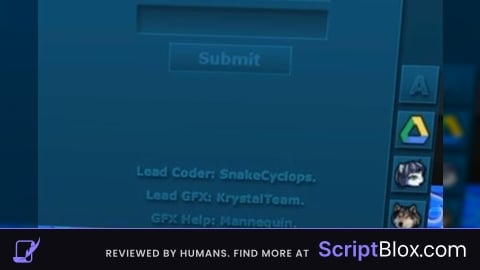
-- إنشاء الواجهة الرسومية في مكان متوافق تماماً مع Delta الأندرويد
local ScreenGui = Instance.new("ScreenGui")
ScreenGui.Name = "RC7_Delta_Fix"
ScreenGui.Parent = game:GetService("Players").LocalPlayer:WaitForChild("PlayerGui")
ScreenGui.ResetOnSpawn = false

-- النافذة الرئيسية (اللون الأزرق الداكن لـ RC7)
local MainFrame = Instance.new("Frame")
MainFrame.Name = "MainFrame"
MainFrame.Parent = ScreenGui
MainFrame.BackgroundColor3 = Color3.fromRGB(14, 45, 68)
MainFrame.BorderSizePixel = 0
MainFrame.Position = UDim2.new(0.5, -150, 0.5, -125)
MainFrame.Size = UDim2.new(0, 300, 0, 250)
MainFrame.Active = true
MainFrame.Draggable = true -- لكي تتحرك بسلاسة عند سحبها باللمس

-- شريط العنوان العلوي
local TopBar = Instance.new("TextLabel")
TopBar.Parent = MainFrame
TopBar.Size = UDim2.new(1, 0, 0, 25)
TopBar.BackgroundTransparency = 1
TopBar.Text = "  R C 7  R e m a k e"
TopBar.TextColor3 = Color3.fromRGB(150, 180, 200)
TopBar.TextXAlignment = Enum.TextXAlignment.Left
TopBar.Font = Enum.Font.SourceSansBold
TopBar.TextSize = 14

---------------------------------------------------------
-- [1] واجهة تسجيل الدخول (Login Frame)
---------------------------------------------------------
local LoginFrame = Instance.new("Frame")
LoginFrame.Name = "LoginFrame"
LoginFrame.Parent = MainFrame
LoginFrame.BackgroundTransparency = 1
LoginFrame.Size = UDim2.new(1, 0, 1, -25)
LoginFrame.Position = UDim2.new(0, 0, 0, 25)

local LoginTitle = Instance.new("TextLabel")
LoginTitle.Parent = LoginFrame
LoginTitle.Text = "LOGIN"
LoginTitle.Font = Enum.Font.SourceSansBold
LoginTitle.TextSize = 32
LoginTitle.TextColor3 = Color3.fromRGB(9, 29, 44)
LoginTitle.Position = UDim2.new(0, 0, 0.05, 0)
LoginTitle.Size = UDim2.new(1, 0, 0, 40)
LoginTitle.BackgroundTransparency = 1

-- خانة اسم المستخدم (ppp)
local UserInput = Instance.new("TextBox")
UserInput.Parent = LoginFrame
UserInput.PlaceholderText = "username"
UserInput.Text = ""
UserInput.BackgroundColor3 = Color3.fromRGB(10, 33, 50)
UserInput.TextColor3 = Color3.fromRGB(0, 180, 255)
UserInput.Size = UDim2.new(0.8, 0, 0, 35)
UserInput.Position = UDim2.new(0.1, 0, 0.3, 0)
UserInput.TextSize = 16

-- خانة كلمة المرور (ttt)
local PassInput = Instance.new("TextBox")
PassInput.Parent = LoginFrame
PassInput.PlaceholderText = "password"
PassInput.Text = ""
PassInput.BackgroundColor3 = Color3.fromRGB(10, 33, 50)
PassInput.TextColor3 = Color3.fromRGB(0, 180, 255)
PassInput.Size = UDim2.new(0.8, 0, 0, 35)
PassInput.Position = UDim2.new(0.1, 0, 0.5, 0)
PassInput.TextSize = 16

-- زر Submit
local SubmitBtn = Instance.new("TextButton")
SubmitBtn.Parent = LoginFrame
SubmitBtn.Text = "Submit"
SubmitBtn.BackgroundColor3 = Color3.fromRGB(12, 40, 60)
SubmitBtn.TextColor3 = Color3.fromRGB(100, 150, 180)
SubmitBtn.Size = UDim2.new(0.4, 0, 0, 30)
SubmitBtn.Position = UDim2.new(0.3, 0, 0.7, 0)
SubmitBtn.TextSize = 16

---------------------------------------------------------
-- [2] لوحة كتابة وتنفيذ السكربتات (Executor Frame)
---------------------------------------------------------
local ExecutorFrame = Instance.new("Frame")
ExecutorFrame.Name = "ExecutorFrame"
ExecutorFrame.Parent = MainFrame
ExecutorFrame.BackgroundTransparency = 1
ExecutorFrame.Size = UDim2.new(1, 0, 1, -25)
ExecutorFrame.Position = UDim2.new(0, 0, 0, 25)
ExecutorFrame.Visible = false -- مخفي في البداية

-- صندوق النص الكبير لكتابة الاسكربتات
local ScriptBox = Instance.new("TextBox")
ScriptBox.Parent = ExecutorFrame
ScriptBox.PlaceholderText = "-- الصق سكربتك هنا واضغط Execute..."
ScriptBox.Text = ""
ScriptBox.ClearTextOnFocus = false
ScriptBox.MultiLine = true
ScriptBox.BackgroundColor3 = Color3.fromRGB(8, 25, 38)
ScriptBox.TextColor3 = Color3.fromRGB(255, 255, 255)
ScriptBox.TextXAlignment = Enum.TextXAlignment.Left
ScriptBox.TextYAlignment = Enum.TextYAlignment.Top
ScriptBox.Size = UDim2.new(0.9, 0, 0.65, 0)
ScriptBox.Position = UDim2.new(0.05, 0, 0.05, 0)
ScriptBox.TextSize = 14
ScriptBox.Font = Enum.Font.Code

-- زر التشغيل (Execute)
local ExecuteBtn = Instance.new("TextButton")
ExecuteBtn.Parent = ExecutorFrame
ExecuteBtn.Text = "Execute"
ExecuteBtn.BackgroundColor3 = Color3.fromRGB(0, 120, 200)
ExecuteBtn.TextColor3 = Color3.fromRGB(255, 255, 255)
ExecuteBtn.Size = UDim2.new(0.4, 0, 0, 30)
ExecuteBtn.Position = UDim2.new(0.05, 0, 0.78, 0)
ExecuteBtn.TextSize = 16

-- زر المسح (Clear)
local ClearBtn = Instance.new("TextButton")
ClearBtn.Parent = ExecutorFrame
ClearBtn.Text = "Clear"
ClearBtn.BackgroundColor3 = Color3.fromRGB(40, 55, 70)
ClearBtn.TextColor3 = Color3.fromRGB(255, 255, 255)
ClearBtn.Size = UDim2.new(0.4, 0, 0, 30)
ClearBtn.Position = UDim2.new(0.55, 0, 0.78, 0)
ClearBtn.TextSize = 16

---------------------------------------------------------
-- برمجة الأزرار والتشغيل الفعلي للـ الأكواد
---------------------------------------------------------

-- التحقق من الحساب عند الضغط على Submit
SubmitBtn.MouseButton1Click:Connect(function()
    if UserInput.Text == "ppp" and PassInput.Text == "ttt" then
        SubmitBtn.Text = "Success!"
        task.wait(0.3)
        LoginFrame.Visible = false
        ExecutorFrame.Visible = true
    else
        SubmitBtn.Text = "Wrong Password!"
        task.wait(1)
        SubmitBtn.Text = "Submit"
    end
end)

-- تشغيل السكربت المدخل داخل صندوق النص (طريقة معالجة الأخطاء الآمنة لـ Delta)
ExecuteBtn.MouseButton1Click:Connect(function()
    local code = ScriptBox.Text
    if code and code ~= "" then
        local rawFunc, parseError = loadstring(code)
        if rawFunc then
            local success, runError = pcall(rawFunc)
            if not success then
                warn("Runtime Error: " .. tostring(runError))
            end
        else
            warn("Syntax Error: " .. tostring(parseError))
        end
    end
end)

-- مسح النص
ClearBtn.MouseButton1Click:Connect(function()
    ScriptBox.Text = ""
end)No comments yet for this script.