


KeylessUniversal
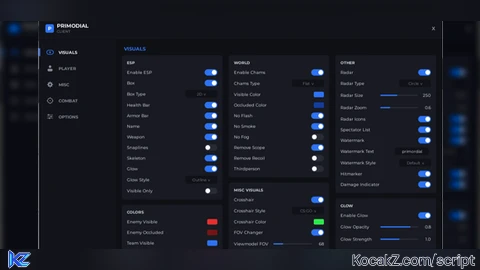
-- Primordial Client Menu for Roblox
-- Complete 3-Column Content Across All Tabs + Header Cleaned

local Players = game:GetService("Players")
local TweenService = game:GetService("TweenService")
local UserInputService = game:GetService("UserInputService")

local player = Players.LocalPlayer
local playerGui = player:WaitForChild("PlayerGui")

-- Destroy any previous UI instance
if playerGui:FindFirstChild("PrimordialMenuGui") then
    playerGui.PrimordialMenuGui:Destroy()
end

local screenGui = Instance.new("ScreenGui")
screenGui.Name = "PrimordialMenuGui"
screenGui.ResetOnSpawn = false
screenGui.Enabled = true
screenGui.Parent = playerGui

-- Color Palette
local C = {
    MainBg       = Color3.fromRGB(15, 16, 21),
    HeaderBg     = Color3.fromRGB(18, 19, 25),
    SidebarBg    = Color3.fromRGB(18, 19, 25),
    CardBg       = Color3.fromRGB(24, 26, 34),
    CardHeader   = Color3.fromRGB(210, 215, 225),
    AccentBlue   = Color3.fromRGB(45, 115, 245),
    TextWhite    = Color3.fromRGB(240, 243, 250),
    TextMuted    = Color3.fromRGB(130, 135, 150),
    ToggleOff    = Color3.fromRGB(40, 43, 54),
    ToggleOn     = Color3.fromRGB(45, 115, 245),
    InputBg      = Color3.fromRGB(16, 17, 23),
    BtnBg        = Color3.fromRGB(26, 28, 38),
}

-- Main Window (950 x 630 px)
local mainFrame = Instance.new("Frame")
mainFrame.Name = "MainFrame"
mainFrame.Size = UDim2.new(0, 950, 0, 630)
mainFrame.Position = UDim2.new(0.5, -475, 0.5, -315)
mainFrame.BackgroundColor3 = C.MainBg
mainFrame.BorderSizePixel = 0
mainFrame.ClipsDescendants = true
mainFrame.Parent = screenGui

local mainCorner = Instance.new("UICorner")
mainCorner.CornerRadius = UDim.new(0, 6)
mainCorner.Parent = mainFrame

-- Dragging Logic
local dragging, dragStart, startPos
mainFrame.InputBegan:Connect(function(input)
    if input.UserInputType == Enum.UserInputType.MouseButton1 or input.UserInputType == Enum.UserInputType.Touch then
        dragging = true
        dragStart = input.Position
        startPos = mainFrame.Position
    end
end)
mainFrame.InputEnded:Connect(function(input)
    if input.UserInputType == Enum.UserInputType.MouseButton1 or input.UserInputType == Enum.UserInputType.Touch then
        dragging = false
    end
end)
UserInputService.InputChanged:Connect(function(input)
    if dragging and (input.UserInputType == Enum.UserInputType.MouseMovement or input.UserInputType == Enum.UserInputType.Touch) then
        local delta = input.Position - dragStart
        mainFrame.Position = UDim2.new(startPos.X.Scale, startPos.X.Offset + delta.X, startPos.Y.Scale, startPos.Y.Offset + delta.Y)
    end
end)

--------------------------------------------------------------------------------
-- PURE VECTOR ICON BUILDERS
--------------------------------------------------------------------------------

-- 1. Eye Icon (Visuals)
local function createEyeIcon(parent, color)
    local container = Instance.new("Frame")
    container.Size = UDim2.new(0, 16, 0, 16)
    container.Position = UDim2.new(0, 18, 0.5, -8)
    container.BackgroundTransparency = 1
    container.Parent = parent

    local eye = Instance.new("Frame")
    eye.Size = UDim2.new(0, 14, 0, 8)
    eye.Position = UDim2.new(0.5, -7, 0.5, -4)
    eye.BackgroundTransparency = 1
    eye.Parent = container

    local corner = Instance.new("UICorner")
    corner.CornerRadius = UDim.new(0.5, 0)
    corner.Parent = eye

    local stroke = Instance.new("UIStroke")
    stroke.Name = "IconStroke"
    stroke.Color = color
    stroke.Thickness = 1.5
    stroke.Parent = eye

    local pupil = Instance.new("Frame")
    pupil.Name = "IconFill"
    pupil.Size = UDim2.new(0, 4, 0, 4)
    pupil.Position = UDim2.new(0.5, -2, 0.5, -2)
    pupil.BackgroundColor3 = color
    pupil.BorderSizePixel = 0
    pupil.Parent = eye

    local pupilCorner = Instance.new("UICorner")
    pupilCorner.CornerRadius = UDim.new(1, 0)
    pupilCorner.Parent = pupil

    return container
end

-- 2. Person Icon (Player)
local function createUserIcon(parent, color)
    local container = Instance.new("Frame")
    container.Size = UDim2.new(0, 16, 0, 16)
    container.Position = UDim2.new(0, 18, 0.5, -8)
    container.BackgroundTransparency = 1
    container.Parent = parent

    local head = Instance.new("Frame")
    head.Name = "IconFill"
    head.Size = UDim2.new(0, 6, 0, 6)
    head.Position = UDim2.new(0.5, -3, 0, 1)
    head.BackgroundColor3 = color
    head.BorderSizePixel = 0
    head.Parent = container

    local headCorner = Instance.new("UICorner")
    headCorner.CornerRadius = UDim.new(1, 0)
    headCorner.Parent = head

    local body = Instance.new("Frame")
    body.Name = "IconFill"
    body.Size = UDim2.new(0, 12, 0, 6)
    body.Position = UDim2.new(0.5, -6, 0, 9)
    body.BackgroundColor3 = color
    body.BorderSizePixel = 0
    body.Parent = container

    local bodyCorner = Instance.new("UICorner")
    bodyCorner.CornerRadius = UDim.new(0, 3)
    bodyCorner.Parent = body

    return container
end

-- 3. Gear Icon (Misc) - 8-Tooth Mechanical Gear Wheel
local function createGearIcon(parent, color)
    local container = Instance.new("Frame")
    container.Size = UDim2.new(0, 16, 0, 16)
    container.Position = UDim2.new(0, 18, 0.5, -8)
    container.BackgroundTransparency = 1
    container.Parent = parent

    local teeth = {
        {Size = Vector2.new(2, 2), Pos = UDim2.new(0.5, -1, 0, 1)},
        {Size = Vector2.new(2, 2), Pos = UDim2.new(0.5, -1, 1, -3)},
        {Size = Vector2.new(2, 2), Pos = UDim2.new(0, 1, 0.5, -1)},
        {Size = Vector2.new(2, 2), Pos = UDim2.new(1, -3, 0.5, -1)},
        {Size = Vector2.new(2, 2), Pos = UDim2.new(0, 3, 0, 3)},
        {Size = Vector2.new(2, 2), Pos = UDim2.new(1, -5, 0, 3)},
        {Size = Vector2.new(2, 2), Pos = UDim2.new(0, 3, 1, -5)},
        {Size = Vector2.new(2, 2), Pos = UDim2.new(1, -5, 1, -5)},
    }
    for _, t in ipairs(teeth) do
        local tooth = Instance.new("Frame")
        tooth.Name = "IconFill"
        tooth.Size = UDim2.new(0, t.Size.X, 0, t.Size.Y)
        tooth.Position = t.Pos
        tooth.BackgroundColor3 = color
        tooth.BorderSizePixel = 0
        tooth.Parent = container
    end

    local gearBody = Instance.new("Frame")
    gearBody.Name = "IconFill"
    gearBody.Size = UDim2.new(0, 10, 0, 10)
    gearBody.Position = UDim2.new(0.5, -5, 0.5, -5)
    gearBody.BackgroundColor3 = color
    gearBody.BorderSizePixel = 0
    gearBody.Parent = container

    local gearCorner = Instance.new("UICorner")
    gearCorner.CornerRadius = UDim.new(1, 0)
    gearCorner.Parent = gearBody

    local hole = Instance.new("Frame")
    hole.Name = "Hole"
    hole.Size = UDim2.new(0, 4, 0, 4)
    hole.Position = UDim2.new(0.5, -2, 0.5, -2)
    hole.BackgroundColor3 = C.SidebarBg
    hole.BorderSizePixel = 0
    hole.Parent = gearBody

    local holeCorner = Instance.new("UICorner")
    holeCorner.CornerRadius = UDim.new(1, 0)
    holeCorner.Parent = hole

    return container
end

-- 4. Target / Crosshair Icon (Combat)
local function createTargetIcon(parent, color)
    local container = Instance.new("Frame")
    container.Size = UDim2.new(0, 16, 0, 16)
    container.Position = UDim2.new(0, 18, 0.5, -8)
    container.BackgroundTransparency = 1
    container.Parent = parent

    local circle = Instance.new("Frame")
    circle.Size = UDim2.new(0, 10, 0, 10)
    circle.Position = UDim2.new(0.5, -5, 0.5, -5)
    circle.BackgroundTransparency = 1
    circle.Parent = container

    local corner = Instance.new("UICorner")
    corner.CornerRadius = UDim.new(1, 0)
    corner.Parent = circle

    local stroke = Instance.new("UIStroke")
    stroke.Name = "IconStroke"
    stroke.Color = color
    stroke.Thickness = 1.5
    stroke.Parent = circle

    local centerDot = Instance.new("Frame")
    centerDot.Name = "IconFill"
    centerDot.Size = UDim2.new(0, 2, 0, 2)
    centerDot.Position = UDim2.new(0.5, -1, 0.5, -1)
    centerDot.BackgroundColor3 = color
    centerDot.BorderSizePixel = 0
    centerDot.Parent = container

    local dotCorner = Instance.new("UICorner")
    dotCorner.CornerRadius = UDim.new(1, 0)
    dotCorner.Parent = centerDot

    local ticks = {
        {Size = Vector2.new(1.5, 3), Pos = UDim2.new(0.5, -0.75, 0, 0)},
        {Size = Vector2.new(1.5, 3), Pos = UDim2.new(0.5, -0.75, 1, -3)},
        {Size = Vector2.new(3, 1.5), Pos = UDim2.new(0, 0, 0.5, -0.75)},
        {Size = Vector2.new(3, 1.5), Pos = UDim2.new(1, -3, 0.5, -0.75)},
    }
    for _, t in ipairs(ticks) do
        local tick = Instance.new("Frame")
        tick.Name = "IconFill"
        tick.Size = UDim2.new(0, t.Size.X, 0, t.Size.Y)
        tick.Position = t.Pos
        tick.BackgroundColor3 = color
        tick.BorderSizePixel = 0
        tick.Parent = container
    end

    return container
end

-- 5. Sliders Icon (Options)
local function createSlidersIcon(parent, color)
    local container = Instance.new("Frame")
    container.Size = UDim2.new(0, 16, 0, 16)
    container.Position = UDim2.new(0, 18, 0.5, -8)
    container.BackgroundTransparency = 1
    container.Parent = parent

    local yPos = {3, 7, 11}
    local knobX = {3, 9, 5}

    for i = 1, 3 do
        local line = Instance.new("Frame")
        line.Name = "IconFill"
        line.Size = UDim2.new(0, 14, 0, 1.5)
        line.Position = UDim2.new(0.5, -7, 0, yPos[i])
        line.BackgroundColor3 = color
        line.BorderSizePixel = 0
        line.Parent = container

        local knob = Instance.new("Frame")
        knob.Name = "IconFill"
        knob.Size = UDim2.new(0, 3.5, 0, 3.5)
        knob.Position = UDim2.new(0, knobX[i], 0, yPos[i] - 1)
        knob.BackgroundColor3 = color
        knob.BorderSizePixel = 0
        knob.Parent = container
    end

    return container
end

local ICON_BUILDERS = {
    Visuals = createEyeIcon,
    Player  = createUserIcon,
    Misc    = createGearIcon,
    Combat  = createTargetIcon,
    Options = createSlidersIcon,
}

--------------------------------------------------------------------------------
-- TOP HEADER BAR
--------------------------------------------------------------------------------
local header = Instance.new("Frame")
header.Name = "Header"
header.Size = UDim2.new(1, 0, 0, 46)
header.BackgroundColor3 = C.HeaderBg
header.BorderSizePixel = 0
header.Parent = mainFrame

-- Logo Emblem
local logoEmblem = Instance.new("Frame")
logoEmblem.Size = UDim2.new(0, 20, 0, 20)
logoEmblem.Position = UDim2.new(0, 15, 0.5, -10)
logoEmblem.BackgroundColor3 = C.AccentBlue
logoEmblem.BorderSizePixel = 0
logoEmblem.Parent = header

local emblemCorner = Instance.new("UICorner")
emblemCorner.CornerRadius = UDim.new(0, 4)
emblemCorner.Parent = logoEmblem

local emblemTxt = Instance.new("TextLabel")
emblemTxt.Size = UDim2.new(1, 0, 1, 0)
emblemTxt.BackgroundTransparency = 1
emblemTxt.Text = "P"
emblemTxt.TextColor3 = Color3.fromRGB(255, 255, 255)
emblemTxt.TextSize = 13
emblemTxt.Font = Enum.Font.GothamBold
emblemTxt.Parent = logoEmblem

local logoTitle = Instance.new("TextLabel")
logoTitle.Size = UDim2.new(0, 120, 0, 18)
logoTitle.Position = UDim2.new(0, 42, 0, 7)
logoTitle.BackgroundTransparency = 1
logoTitle.Text = "PRIMODIAL"
logoTitle.TextColor3 = C.TextWhite
logoTitle.TextSize = 14
logoTitle.Font = Enum.Font.GothamBold
logoTitle.TextXAlignment = Enum.TextXAlignment.Left
logoTitle.Parent = header

local logoSub = Instance.new("TextLabel")
logoSub.Size = UDim2.new(0, 120, 0, 12)
logoSub.Position = UDim2.new(0, 42, 0, 24)
logoSub.BackgroundTransparency = 1
logoSub.Text = "CLIENT"
logoSub.TextColor3 = C.TextMuted
logoSub.TextSize = 9
logoSub.Font = Enum.Font.GothamMedium
logoSub.TextXAlignment = Enum.TextXAlignment.Left
logoSub.Parent = header

-- Header Actions (Only Close Button)
local actionsFrame = Instance.new("Frame")
actionsFrame.Size = UDim2.new(0, 50, 1, 0)
actionsFrame.Position = UDim2.new(1, -50, 0, 0)
actionsFrame.BackgroundTransparency = 1
actionsFrame.Parent = header

local closeBtn = Instance.new("TextButton")
closeBtn.Size = UDim2.new(0, 26, 0, 26)
closeBtn.Position = UDim2.new(1, -34, 0.5, -13)
closeBtn.BackgroundTransparency = 1
closeBtn.Text = "X"
closeBtn.TextColor3 = C.TextMuted
closeBtn.TextSize = 13
closeBtn.Font = Enum.Font.GothamBold
closeBtn.Parent = actionsFrame

closeBtn.MouseButton1Click:Connect(function()
    screenGui.Enabled = not screenGui.Enabled
end)

local divider = Instance.new("Frame")
divider.Size = UDim2.new(1, 0, 0, 1)
divider.Position = UDim2.new(0, 0, 1, -1)
divider.BackgroundColor3 = Color3.fromRGB(28, 30, 38)
divider.BorderSizePixel = 0
divider.Parent = header

--------------------------------------------------------------------------------
-- LEFT SIDEBAR
--------------------------------------------------------------------------------
local sidebar = Instance.new("Frame")
sidebar.Name = "Sidebar"
sidebar.Size = UDim2.new(0, 180, 1, -46)
sidebar.Position = UDim2.new(0, 0, 0, 46)
sidebar.BackgroundColor3 = C.SidebarBg
sidebar.BorderSizePixel = 0
sidebar.Parent = mainFrame

local navList = Instance.new("Frame")
navList.Name = "NavList"
navList.Size = UDim2.new(1, 0, 1, -120)
navList.Position = UDim2.new(0, 0, 0, 15)
navList.BackgroundTransparency = 1
navList.Parent = sidebar

local navLayout = Instance.new("UIListLayout")
navLayout.SortOrder = Enum.SortOrder.LayoutOrder
navLayout.Padding = UDim.new(0, 2)
navLayout.Parent = navList

-- Single Animated Sliding Indicator Bar
local indicatorBar = Instance.new("Frame")
indicatorBar.Name = "SlidingIndicatorBar"
indicatorBar.Size = UDim2.new(0, 3, 0, 18)
indicatorBar.Position = UDim2.new(0, 0, 0, 24)
indicatorBar.BackgroundColor3 = C.AccentBlue
indicatorBar.BorderSizePixel = 0
indicatorBar.ZIndex = 10
indicatorBar.Parent = sidebar

-- Profile Card
local profileCard = Instance.new("Frame")
profileCard.Size = UDim2.new(1, -24, 0, 48)
profileCard.Position = UDim2.new(0, 12, 1, -85)
profileCard.BackgroundColor3 = C.CardBg
profileCard.BorderSizePixel = 0
profileCard.Parent = sidebar

local profCorner = Instance.new("UICorner")
profCorner.CornerRadius = UDim.new(0, 6)
profCorner.Parent = profileCard

local avatarImg = Instance.new("ImageLabel")
avatarImg.Size = UDim2.new(0, 32, 0, 32)
avatarImg.Position = UDim2.new(0, 8, 0.5, -16)
avatarImg.BackgroundColor3 = Color3.fromRGB(35, 38, 48)
avatarImg.BorderSizePixel = 0
avatarImg.Parent = profileCard

local imgCorner = Instance.new("UICorner")
imgCorner.CornerRadius = UDim.new(0, 4)
imgCorner.Parent = avatarImg

pcall(function()
    local thumb = Players:GetUserThumbnailAsync(player.UserId, Enum.ThumbnailType.HeadShot, Enum.ThumbnailSize.Size420x420)
    avatarImg.Image = thumb
end)

local profName = Instance.new("TextLabel")
profName.Size = UDim2.new(1, -48, 0, 16)
profName.Position = UDim2.new(0, 46, 0, 8)
profName.BackgroundTransparency = 1
profName.Text = player.Name
profName.TextColor3 = C.TextWhite
profName.TextSize = 11
profName.Font = Enum.Font.GothamBold
profName.TextXAlignment = Enum.TextXAlignment.Left
profName.Parent = profileCard

local profRole = Instance.new("TextLabel")
profRole.Size = UDim2.new(1, -48, 0, 14)
profRole.Position = UDim2.new(0, 46, 0, 24)
profRole.BackgroundTransparency = 1
profRole.Text = "user"
profRole.TextColor3 = C.TextMuted
profRole.TextSize = 10
profRole.Font = Enum.Font.Gotham
profRole.TextXAlignment = Enum.TextXAlignment.Left
profRole.Parent = profileCard

local footerVer = Instance.new("TextLabel")
footerVer.Size = UDim2.new(1, -24, 0, 24)
footerVer.Position = UDim2.new(0, 12, 1, -30)
footerVer.BackgroundTransparency = 1
footerVer.Text = "PRIMODIAL CLIENT\nv1.0.0"
footerVer.TextColor3 = Color3.fromRGB(90, 95, 110)
footerVer.TextSize = 9
footerVer.Font = Enum.Font.Gotham
footerVer.TextXAlignment = Enum.TextXAlignment.Left
footerVer.Parent = sidebar

--------------------------------------------------------------------------------
-- MAIN CONTENT AREA
--------------------------------------------------------------------------------
local contentArea = Instance.new("Frame")
contentArea.Name = "ContentArea"
contentArea.Size = UDim2.new(1, -180, 1, -46)
contentArea.Position = UDim2.new(0, 180, 0, 46)
contentArea.BackgroundTransparency = 1
contentArea.Parent = mainFrame

local activeTabTitle = Instance.new("TextLabel")
activeTabTitle.Size = UDim2.new(1, -30, 0, 25)
activeTabTitle.Position = UDim2.new(0, 20, 0, 12)
activeTabTitle.BackgroundTransparency = 1
activeTabTitle.Text = "VISUALS"
activeTabTitle.TextColor3 = C.AccentBlue
activeTabTitle.TextSize = 13
activeTabTitle.Font = Enum.Font.GothamBold
activeTabTitle.TextXAlignment = Enum.TextXAlignment.Left
activeTabTitle.Parent = contentArea

local tabPages = {}
local tabButtons = {}

local function animateIndicator(btn, immediate)
    task.defer(function()
        local targetY = btn.AbsolutePosition.Y - sidebar.AbsolutePosition.Y + (btn.AbsoluteSize.Y / 2) - 9
        if immediate then
            indicatorBar.Position = UDim2.new(0, 0, 0, targetY)
        else
            TweenService:Create(indicatorBar, TweenInfo.new(0.25, Enum.EasingStyle.Quart, Enum.EasingDirection.Out), {
                Position = UDim2.new(0, 0, 0, targetY)
            }):Play()
        end
    end)
end

local function registerTab(name, isDefault)
    local btn = Instance.new("TextButton")
    btn.Size = UDim2.new(1, 0, 0, 36)
    btn.BackgroundTransparency = 1
    btn.Text = ""
    btn.Parent = navList

    local activeColor = isDefault and C.AccentBlue or C.TextMuted
    local iconContainer = ICON_BUILDERS[name](btn, activeColor)

    local txt = Instance.new("TextLabel")
    txt.Size = UDim2.new(1, -48, 1, 0)
    txt.Position = UDim2.new(0, 46, 0, 0)
    txt.BackgroundTransparency = 1
    txt.Text = name:upper()
    txt.TextColor3 = isDefault and C.TextWhite or C.TextMuted
    txt.TextSize = 11
    txt.Font = Enum.Font.GothamBold
    txt.TextXAlignment = Enum.TextXAlignment.Left
    txt.Parent = btn

    local page = Instance.new("ScrollingFrame")
    page.Name = name .. "Page"
    page.Size = UDim2.new(1, -30, 1, -48)
    page.Position = UDim2.new(0, 15, 0, 40)
    page.BackgroundTransparency = 1
    page.BorderSizePixel = 0
    page.ScrollBarThickness = 3
    page.ScrollBarImageColor3 = C.CardBg
    page.Visible = isDefault
    page.CanvasSize = UDim2.new(0, 0, 0, 0)
    page.AutomaticCanvasSize = Enum.AutomaticSize.Y
    page.Parent = contentArea

    local col1 = Instance.new("Frame")
    col1.Size = UDim2.new(0.32, 0, 0, 0)
    col1.Position = UDim2.new(0, 0, 0, 0)
    col1.BackgroundTransparency = 1
    col1.AutomaticSize = Enum.AutomaticSize.Y
    col1.Parent = page

    local col2 = Instance.new("Frame")
    col2.Size = UDim2.new(0.32, 0, 0, 0)
    col2.Position = UDim2.new(0.34, 0, 0, 0)
    col2.BackgroundTransparency = 1
    col2.AutomaticSize = Enum.AutomaticSize.Y
    col2.Parent = page

    local col3 = Instance.new("Frame")
    col3.Size = UDim2.new(0.32, 0, 0, 0)
    col3.Position = UDim2.new(0.68, 0, 0, 0)
    col3.BackgroundTransparency = 1
    col3.AutomaticSize = Enum.AutomaticSize.Y
    col3.Parent = page

    for _, col in ipairs({col1, col2, col3}) do
        local layout = Instance.new("UIListLayout")
        layout.SortOrder = Enum.SortOrder.LayoutOrder
        layout.Padding = UDim.new(0, 12)
        layout.Parent = col
    end

    tabPages[name] = {page = page, cols = {col1, col2, col3}}
    tabButtons[name] = {btn = btn, iconContainer = iconContainer, txt = txt}

    btn.MouseButton1Click:Connect(function()
        activeTabTitle.Text = name:upper()
        animateIndicator(btn, false)

        for tName, data in pairs(tabPages) do
            data.page.Visible = (tName == name)
        end
        for tName, b in pairs(tabButtons) do
            local active = (tName == name)
            TweenService:Create(b.txt, TweenInfo.new(0.2), {
                TextColor3 = active and C.TextWhite or C.TextMuted
            }):Play()

            local c = active and C.AccentBlue or C.TextMuted
            for _, desc in ipairs(b.iconContainer:GetDescendants()) do
                if desc:IsA("UIStroke") then
                    desc.Color = c
                elseif desc:IsA("Frame") and desc.Name == "IconFill" then
                    desc.BackgroundColor3 = c
                end
            end
        end
    end)

    return tabPages[name].cols
end

--------------------------------------------------------------------------------
-- UI COMPONENT BUILDERS
--------------------------------------------------------------------------------
local function createSection(parentCol, title)
    local card = Instance.new("Frame")
    card.BackgroundColor3 = C.CardBg
    card.BorderSizePixel = 0
    card.AutomaticSize = Enum.AutomaticSize.Y
    card.Size = UDim2.new(1, 0, 0, 0)
    card.Parent = parentCol

    local cardCorner = Instance.new("UICorner")
    cardCorner.CornerRadius = UDim.new(0, 5)
    cardCorner.Parent = card

    local padding = Instance.new("UIPadding")
    padding.PaddingTop = UDim.new(0, 10)
    padding.PaddingLeft = UDim.new(0, 12)
    padding.PaddingRight = UDim.new(0, 12)
    padding.PaddingBottom = UDim.new(0, 12)
    padding.Parent = card

    local layout = Instance.new("UIListLayout")
    layout.SortOrder = Enum.SortOrder.LayoutOrder
    layout.Padding = UDim.new(0, 7)
    layout.Parent = card

    local headerLabel = Instance.new("TextLabel")
    headerLabel.Size = UDim2.new(1, 0, 0, 14)
    headerLabel.BackgroundTransparency = 1
    headerLabel.Text = title:upper()
    headerLabel.TextColor3 = C.CardHeader
    headerLabel.TextSize = 10
    headerLabel.Font = Enum.Font.GothamBold
    headerLabel.TextXAlignment = Enum.TextXAlignment.Left
    headerLabel.Parent = card

    return card
end

local function addToggle(card, text, defaultState)
    local row = Instance.new("Frame")
    row.Size = UDim2.new(1, 0, 0, 18)
    row.BackgroundTransparency = 1
    row.Parent = card

    local label = Instance.new("TextLabel")
    label.Size = UDim2.new(1, -36, 1, 0)
    label.BackgroundTransparency = 1
    label.Text = text
    label.TextColor3 = C.TextWhite
    label.TextSize = 11
    label.Font = Enum.Font.Gotham
    label.TextXAlignment = Enum.TextXAlignment.Left
    label.Parent = row

    local toggleBtn = Instance.new("TextButton")
    toggleBtn.Size = UDim2.new(0, 30, 0, 15)
    toggleBtn.Position = UDim2.new(1, -30, 0.5, -7)
    toggleBtn.BackgroundColor3 = defaultState and C.ToggleOn or C.ToggleOff
    toggleBtn.Text = ""
    toggleBtn.Parent = row

    local btnCorner = Instance.new("UICorner")
    btnCorner.CornerRadius = UDim.new(1, 0)
    btnCorner.Parent = toggleBtn

    local dot = Instance.new("Frame")
    dot.Size = UDim2.new(0, 11, 0, 11)
    dot.Position = defaultState and UDim2.new(1, -13, 0.5, -5) or UDim2.new(0, 2, 0.5, -5)
    dot.BackgroundColor3 = Color3.fromRGB(255, 255, 255)
    dot.BorderSizePixel = 0
    dot.Parent = toggleBtn

    local dotCorner = Instance.new("UICorner")
    dotCorner.CornerRadius = UDim.new(1, 0)
    dotCorner.Parent = dot

    local state = defaultState
    toggleBtn.MouseButton1Click:Connect(function()
        state = not state
        local targetPos = state and UDim2.new(1, -13, 0.5, -5) or UDim2.new(0, 2, 0.5, -5)
        local targetColor = state and C.ToggleOn or C.ToggleOff
        TweenService:Create(dot, TweenInfo.new(0.12), {Position = targetPos}):Play()
        TweenService:Create(toggleBtn, TweenInfo.new(0.12), {BackgroundColor3 = targetColor}):Play()
    end)
end

local function addDropdown(card, text, selectedVal)
    local row = Instance.new("Frame")
    row.Size = UDim2.new(1, 0, 0, 20)
    row.BackgroundTransparency = 1
    row.Parent = card

    local label = Instance.new("TextLabel")
    label.Size = UDim2.new(1, -80, 1, 0)
    label.BackgroundTransparency = 1
    label.Text = text
    label.TextColor3 = C.TextWhite
    label.TextSize = 11
    label.Font = Enum.Font.Gotham
    label.TextXAlignment = Enum.TextXAlignment.Left
    label.Parent = row

    local dropBtn = Instance.new("TextButton")
    dropBtn.Size = UDim2.new(0, 75, 0, 18)
    dropBtn.Position = UDim2.new(1, -75, 0.5, -9)
    dropBtn.BackgroundColor3 = C.InputBg
    dropBtn.BorderSizePixel = 0
    dropBtn.Text = selectedVal .. "  v"
    dropBtn.TextColor3 = C.TextMuted
    dropBtn.TextSize = 10
    dropBtn.Font = Enum.Font.Gotham
    dropBtn.Parent = row

    local corner = Instance.new("UICorner")
    corner.CornerRadius = UDim.new(0, 4)
    corner.Parent = dropBtn
end

local function addColorBox(card, text, colorVal)
    local row = Instance.new("Frame")
    row.Size = UDim2.new(1, 0, 0, 18)
    row.BackgroundTransparency = 1
    row.Parent = card

    local label = Instance.new("TextLabel")
    label.Size = UDim2.new(1, -30, 1, 0)
    label.BackgroundTransparency = 1
    label.Text = text
    label.TextColor3 = C.TextWhite
    label.TextSize = 11
    label.Font = Enum.Font.Gotham
    label.TextXAlignment = Enum.TextXAlignment.Left
    label.Parent = row

    local colorBox = Instance.new("Frame")
    colorBox.Size = UDim2.new(0, 24, 0, 13)
    colorBox.Position = UDim2.new(1, -24, 0.5, -6)
    colorBox.BackgroundColor3 = colorVal
    colorBox.BorderSizePixel = 0
    colorBox.Parent = row

    local corner = Instance.new("UICorner")
    corner.CornerRadius = UDim.new(0, 3)
    corner.Parent = colorBox
end

local function addSlider(card, text, minVal, maxVal, defaultVal, isFloat)
    local row = Instance.new("Frame")
    row.Size = UDim2.new(1, 0, 0, 22)
    row.BackgroundTransparency = 1
    row.Parent = card

    local label = Instance.new("TextLabel")
    label.Size = UDim2.new(0.42, 0, 1, 0)
    label.BackgroundTransparency = 1
    label.Text = text
    label.TextColor3 = C.TextWhite
    label.TextSize = 11
    label.Font = Enum.Font.Gotham
    label.TextXAlignment = Enum.TextXAlignment.Left
    label.Parent = row

    local valLabel = Instance.new("TextLabel")
    valLabel.Size = UDim2.new(0, 35, 1, 0)
    valLabel.Position = UDim2.new(1, -35, 0, 0)
    valLabel.BackgroundTransparency = 1
    valLabel.Text = isFloat and string.format("%.1f", defaultVal) or tostring(math.floor(defaultVal))
    valLabel.TextColor3 = C.TextWhite
    valLabel.TextSize = 11
    valLabel.Font = Enum.Font.Gotham
    valLabel.TextXAlignment = Enum.TextXAlignment.Right
    valLabel.Parent = row

    local track = Instance.new("Frame")
    track.Size = UDim2.new(0.42, 0, 0, 3)
    track.Position = UDim2.new(0.44, 0, 0.5, -1)
    track.BackgroundColor3 = C.ToggleOff
    track.BorderSizePixel = 0
    track.Parent = row

    local trackCorner = Instance.new("UICorner")
    trackCorner.CornerRadius = UDim.new(1, 0)
    trackCorner.Parent = track

    local fill = Instance.new("Frame")
    local pct = (defaultVal - minVal) / (maxVal - minVal)
    fill.Size = UDim2.new(pct, 0, 1, 0)
    fill.BackgroundColor3 = C.AccentBlue
    fill.BorderSizePixel = 0
    fill.Parent = track

    local fillCorner = Instance.new("UICorner")
    fillCorner.CornerRadius = UDim.new(1, 0)
    fillCorner.Parent = fill

    local sliding = false
    local function update(input)
        local posX = input.Position.X - track.AbsolutePosition.X
        local clampedPct = math.clamp(posX / track.AbsoluteSize.X, 0, 1)
        fill.Size = UDim2.new(clampedPct, 0, 1, 0)
        local rawVal = minVal + (maxVal - minVal) * clampedPct
        if isFloat then
            valLabel.Text = string.format("%.1f", rawVal)
        else
            valLabel.Text = tostring(math.floor(rawVal))
        end
    end

    track.InputBegan:Connect(function(input)
        if input.UserInputType == Enum.UserInputType.MouseButton1 then
            sliding = true
            update(input)
        end
    end)
    track.InputEnded:Connect(function(input)
        if input.UserInputType == Enum.UserInputType.MouseButton1 then sliding = false end
    end)
    UserInputService.InputChanged:Connect(function(input)
        if sliding and input.UserInputType == Enum.UserInputType.MouseMovement then update(input) end
    end)
end

local function addTextInput(card, text, defaultVal)
    local row = Instance.new("Frame")
    row.Size = UDim2.new(1, 0, 0, 20)
    row.BackgroundTransparency = 1
    row.Parent = card

    local label = Instance.new("TextLabel")
    label.Size = UDim2.new(1, -85, 1, 0)
    label.BackgroundTransparency = 1
    label.Text = text
    label.TextColor3 = C.TextWhite
    label.TextSize = 11
    label.Font = Enum.Font.Gotham
    label.TextXAlignment = Enum.TextXAlignment.Left
    label.Parent = row

    local inputTxt = Instance.new("TextBox")
    inputTxt.Size = UDim2.new(0, 80, 0, 18)
    inputTxt.Position = UDim2.new(1, -85, 0.5, -9)
    inputTxt.BackgroundColor3 = C.InputBg
    inputTxt.BorderSizePixel = 0
    inputTxt.Text = defaultVal
    inputTxt.TextColor3 = C.TextWhite
    inputTxt.TextSize = 10
    inputTxt.Font = Enum.Font.Gotham
    inputTxt.Parent = row

    local corner = Instance.new("UICorner")
    corner.CornerRadius = UDim.new(0, 4)
    corner.Parent = inputTxt
end

--------------------------------------------------------------------------------
-- POPULATE TABS
--------------------------------------------------------------------------------
local visCols = registerTab("Visuals", true)
local plrCols = registerTab("Player", false)
local mscCols = registerTab("Misc", false)
local cbtCols = registerTab("Combat", false)
local optCols = registerTab("Options", false)

-----------------------------------
-- 1. VISUALS PAGE
-----------------------------------
local espCard = createSection(visCols[1], "ESP")
addToggle(espCard, "Enable ESP", true)
addToggle(espCard, "Box", true)
addDropdown(espCard, "Box Type", "2D")
addToggle(espCard, "Health Bar", true)
addToggle(espCard, "Armor Bar", true)
addToggle(espCard, "Name", true)
addToggle(espCard, "Weapon", true)
addToggle(espCard, "Snaplines", false)
addToggle(espCard, "Skeleton", true)
addToggle(espCard, "Glow", true)
addDropdown(espCard, "Glow Style", "Outline")
addToggle(espCard, "Visible Only", false)

local colorsCard = createSection(visCols[1], "COLORS")
addColorBox(colorsCard, "Enemy Visible", Color3.fromRGB(235, 45, 45))
addColorBox(colorsCard, "Enemy Occluded", Color3.fromRGB(120, 20, 20))
addColorBox(colorsCard, "Team Visible", Color3.fromRGB(45, 115, 245))
addColorBox(colorsCard, "Team Occluded", Color3.fromRGB(20, 60, 160))
addColorBox(colorsCard, "Glow Color", Color3.fromRGB(140, 45, 245))

local worldCard = createSection(visCols[2], "WORLD")
addToggle(worldCard, "Enable Chams", true)
addDropdown(worldCard, "Chams Type", "Flat")
addColorBox(worldCard, "Visible Color", Color3.fromRGB(45, 115, 245))
addColorBox(worldCard, "Occluded Color", Color3.fromRGB(20, 60, 160))
addToggle(worldCard, "No Flash", true)
addToggle(worldCard, "No Smoke", true)
addToggle(worldCard, "No Fog", false)
addToggle(worldCard, "Remove Scope", true)
addToggle(worldCard, "Remove Recoil", false)
addToggle(worldCard, "Thirdperson", false)

local miscVisCard = createSection(visCols[2], "MISC VISUALS")
addToggle(miscVisCard, "Crosshair", true)
addDropdown(miscVisCard, "Crosshair Style", "CS:GO")
addColorBox(miscVisCard, "Crosshair Color", Color3.fromRGB(45, 235, 75))
addToggle(miscVisCard, "FOV Changer", true)
addSlider(miscVisCard, "Viewmodel FOV", 50, 120, 68, false)

local otherCard = createSection(visCols[3], "OTHER")
addToggle(otherCard, "Radar", true)
addDropdown(otherCard, "Radar Type", "Circle")
addSlider(otherCard, "Radar Size", 50, 500, 250, false)
addSlider(otherCard, "Radar Zoom", 0.1, 2.0, 0.6, true)
addToggle(otherCard, "Radar Icons", true)
addToggle(otherCard, "Spectator List", true)
addToggle(otherCard, "Watermark", true)
addTextInput(otherCard, "Watermark Text", "primordial")
addDropdown(otherCard, "Watermark Style", "Default")
addToggle(otherCard, "Hitmarker", true)
addToggle(otherCard, "Damage Indicator", true)

local glowCard = createSection(visCols[3], "GLOW")
addToggle(glowCard, "Enable Glow", true)
addSlider(glowCard, "Glow Opacity", 0.0, 1.0, 0.8, true)
addSlider(glowCard, "Glow Strength", 0.0, 2.0, 1.0, true)

-----------------------------------
-- 2. COMBAT PAGE
-----------------------------------
local aimCard = createSection(cbtCols[1], "AIMBOT")
addToggle(aimCard, "Enable Aimbot", true)
addToggle(aimCard, "Silent Aim", false)
addDropdown(aimCard, "Aim Key", "MB2")
addToggle(aimCard, "Draw FOV", true)
addSlider(aimCard, "FOV Radius", 10, 500, 120, false)
addSlider(aimCard, "Smoothness", 1, 20, 5, false)

local targetCard = createSection(cbtCols[2], "TARGETING")
addToggle(targetCard, "Target Team", false)
addToggle(targetCard, "Target Invisible", false)
addDropdown(targetCard, "Priority", "Distance")
addDropdown(targetCard, "Hitbox", "Head")

local accCard = createSection(cbtCols[3], "ACCURACY")
addToggle(accCard, "No Recoil", true)
addToggle(accCard, "No Spread", true)
addToggle(accCard, "Auto Wall", false)
addToggle(accCard, "Rapid Fire", false)

-----------------------------------
-- 3. PLAYER PAGE
-----------------------------------
local moveCard = createSection(plrCols[1], "MOVEMENT")
addSlider(moveCard, "WalkSpeed", 16, 200, 16, false)
addSlider(moveCard, "JumpPower", 50, 300, 50, false)
addToggle(moveCard, "Infinite Jump", false)
addToggle(moveCard, "Noclip", false)

local charCard = createSection(plrCols[2], "CHARACTER")
addToggle(charCard, "God Mode", false)
addToggle(charCard, "Fly", false)
addSlider(charCard, "Fly Speed", 1, 10, 2, false)

-----------------------------------
-- 4. MISC PAGE
-----------------------------------
local srvCard = createSection(mscCols[1], "SERVER")
addToggle(srvCard, "Auto Rejoin", false)
addToggle(srvCard, "Server Hop", false)

local utlCard = createSection(mscCols[2], "UTILITIES")
addToggle(utlCard, "Bypass Anti-Cheat", true)
addToggle(utlCard, "Chat Spammer", false)

-----------------------------------
-- 5. OPTIONS PAGE
-----------------------------------
local uiCard = createSection(optCols[1], "UI CONFIG")
addDropdown(uiCard, "Theme", "Dark Blue")
addDropdown(uiCard, "Toggle Key", "Insert")
addSlider(uiCard, "UI Scale", 0.8, 1.5, 1.0, true)

-- Default active tab setup
task.defer(function()
    local firstBtn = tabButtons["Visuals"].btn
    if firstBtn then
        animateIndicator(firstBtn, true)
    end
end)

print("[Primordial Full Content + Clean Header] Applied successfully.")No comments yet for this script.
![[KEYLESS] Moondiety Script | 17+ supported Games](https://scriptblox.com/images/sb/0-1753093706828.png)

