

KeylessUniversal
--===============================================
-- CoolKid GUI v2.0 — Developer Admin Panel
-- Place as a LocalScript inside StarterGui
--===============================================
local Players = game:GetService("Players")
local UIS = game:GetService("UserInputService")
local TweenService = game:GetService("TweenService")
local RunService = game:GetService("RunService")
local Lighting = game:GetService("Lighting")
local Player = Players.LocalPlayer
local Mouse = Player:GetMouse()
--=== CONFIG ===--
local CONFIG = {
MainColor = Color3.fromRGB(25, 25, 35),
SecondaryColor = Color3.fromRGB(32, 32, 45),
AccentColor = Color3.fromRGB(130, 80, 255),
AccentColor2 = Color3.fromRGB(255, 85, 155),
TextColor = Color3.fromRGB(225, 225, 235),
DimTextColor = Color3.fromRGB(150, 150, 170),
ToggleOnColor = Color3.fromRGB(100, 255, 140),
ToggleOffColor = Color3.fromRGB(255, 70, 70),
Font = Enum.Font.GothamBold,
FontLight = Enum.Font.Gotham,
CornerRadius = UDim.new(0, 8),
AnimSpeed = 0.3,
Title = "CoolKid GUI",
Version = "v2.0",
ToggleKey = Enum.KeyCode.RightControl,
}
--=== STATE ===--
local State = {
Flying = false,
Noclip = false,
GodMode = false,
InfiniteJump = false,
Fullbright = false,
ESP = false,
Speed = 16,
JumpPower = 50,
FlySpeed = 60,
Gravity = 196.2,
OriginalGravity = workspace.Gravity,
}
--=== DESTROY OLD GUI ===--
local oldGui = Player.PlayerGui:FindFirstChild("CoolKidGui")
if oldGui then oldGui:Destroy() end
--=== CREATE SCREEN GUI ===--
local ScreenGui = Instance.new("ScreenGui")
ScreenGui.Name = "CoolKidGui"
ScreenGui.ResetOnSpawn = false
ScreenGui.ZIndexBehavior = Enum.ZIndexBehavior.Sibling
ScreenGui.Parent = Player.PlayerGui
--=== UTILITY FUNCTIONS ===--
local function Create(className, properties)
local inst = Instance.new(className)
for k, v in pairs(properties) do
if k ~= "Parent" then
inst[k] = v
end
end
if properties.Parent then
inst.Parent = properties.Parent
end
return inst
end
local function AddCorner(parent, radius)
return Create("UICorner", {
CornerRadius = radius or CONFIG.CornerRadius,
Parent = parent,
})
end
local function AddStroke(parent, color, thickness)
return Create("UIStroke", {
Color = color or CONFIG.AccentColor,
Thickness = thickness or 1.5,
Transparency = 0.5,
Parent = parent,
})
end
local function AddGradient(parent, c1, c2, rotation)
return Create("UIGradient", {
Color = ColorSequence.new(c1 or CONFIG.AccentColor, c2 or CONFIG.AccentColor2),
Rotation = rotation or 90,
Parent = parent,
})
end
local function AddPadding(parent, t, b, l, r)
return Create("UIPadding", {
PaddingTop = UDim.new(0, t or 6),
PaddingBottom = UDim.new(0, b or 6),
PaddingLeft = UDim.new(0, l or 8),
PaddingRight = UDim.new(0, r or 8),
Parent = parent,
})
end
local function Tween(obj, props, duration, style, direction)
local tween = TweenService:Create(
obj,
TweenInfo.new(duration or CONFIG.AnimSpeed, style or Enum.EasingStyle.Quart, direction or Enum.EasingDirection.Out),
props
)
tween:Play()
return tween
end
local function Ripple(button)
local ripple = Create("Frame", {
Name = "Ripple",
AnchorPoint = Vector2.new(0.5, 0.5),
BackgroundColor3 = Color3.new(1, 1, 1),
BackgroundTransparency = 0.7,
Position = UDim2.new(0.5, 0, 0.5, 0),
Size = UDim2.new(0, 0, 0, 0),
Parent = button,
})
AddCorner(ripple, UDim.new(1, 0))
local maxSize = math.max(button.AbsoluteSize.X, button.AbsoluteSize.Y) * 2.5
Tween(ripple, {Size = UDim2.new(0, maxSize, 0, maxSize), BackgroundTransparency = 1}, 0.5)
task.delay(0.5, function()
ripple:Destroy()
end)
end
local function GetCharacter()
return Player.Character or Player.CharacterAdded:Wait()
end
local function GetHumanoid()
local char = GetCharacter()
return char and char:FindFirstChildOfClass("Humanoid")
end
local function GetRootPart()
local char = GetCharacter()
return char and char:FindFirstChild("HumanoidRootPart")
end
local function Notify(text, duration)
local notif = Create("Frame", {
Name = "Notification",
AnchorPoint = Vector2.new(0.5, 1),
BackgroundColor3 = CONFIG.SecondaryColor,
Position = UDim2.new(0.5, 0, 1, 60),
Size = UDim2.new(0, 300, 0, 50),
Parent = ScreenGui,
})
AddCorner(notif)
AddStroke(notif)
local accentBar = Create("Frame", {
BackgroundColor3 = CONFIG.AccentColor,
Size = UDim2.new(0, 4, 0.7, 0),
Position = UDim2.new(0, 8, 0.15, 0),
Parent = notif,
})
AddCorner(accentBar, UDim.new(1, 0))
AddGradient(accentBar)
Create("TextLabel", {
Text = text,
Font = CONFIG.FontLight,
TextSize = 14,
TextColor3 = CONFIG.TextColor,
BackgroundTransparency = 1,
Position = UDim2.new(0, 22, 0, 0),
Size = UDim2.new(1, -30, 1, 0),
TextXAlignment = Enum.TextXAlignment.Left,
Parent = notif,
})
Tween(notif, {Position = UDim2.new(0.5, 0, 1, -20)}, 0.4, Enum.EasingStyle.Back)
task.delay(duration or 3, function()
Tween(notif, {Position = UDim2.new(0.5, 0, 1, 60)}, 0.3)
task.delay(0.35, function() notif:Destroy() end)
end)
end
--===========================================================
-- MAIN WINDOW
--===========================================================
local MainFrame = Create("Frame", {
Name = "MainFrame",
AnchorPoint = Vector2.new(0.5, 0.5),
BackgroundColor3 = CONFIG.MainColor,
Position = UDim2.new(0.5, 0, 0.5, 0),
Size = UDim2.new(0, 520, 0, 370),
ClipsDescendants = true,
Parent = ScreenGui,
})
AddCorner(MainFrame, UDim.new(0, 10))
AddStroke(MainFrame, CONFIG.AccentColor, 2)
-- Drop shadow
local Shadow = Create("ImageLabel", {
Name = "Shadow",
AnchorPoint = Vector2.new(0.5, 0.5),
BackgroundTransparency = 1,
Position = UDim2.new(0.5, 0, 0.5, 4),
Size = UDim2.new(1, 40, 1, 40),
Image = "rbxassetid://5554236805",
ImageColor3 = Color3.new(0, 0, 0),
ImageTransparency = 0.4,
ScaleType = Enum.ScaleType.Slice,
SliceCenter = Rect.new(23, 23, 277, 277),
ZIndex = -1,
Parent = MainFrame,
})
--=== TITLE BAR ===--
local TitleBar = Create("Frame", {
Name = "TitleBar",
BackgroundColor3 = CONFIG.SecondaryColor,
Size = UDim2.new(1, 0, 0, 38),
Parent = MainFrame,
})
AddCorner(TitleBar, UDim.new(0, 10))
-- Fix bottom corners of title bar
Create("Frame", {
BackgroundColor3 = CONFIG.SecondaryColor,
Size = UDim2.new(1, 0, 0, 14),
Position = UDim2.new(0, 0, 1, -14),
BorderSizePixel = 0,
Parent = TitleBar,
})
-- Accent line under title bar
local AccentLine = Create("Frame", {
BackgroundColor3 = CONFIG.AccentColor,
Size = UDim2.new(1, 0, 0, 2),
Position = UDim2.new(0, 0, 1, 0),
BorderSizePixel = 0,
Parent = TitleBar,
})
AddGradient(AccentLine)
-- Title icon (emoji placeholder)
Create("TextLabel", {
Text = "⚡",
Font = CONFIG.Font,
TextSize = 18,
TextColor3 = CONFIG.AccentColor,
BackgroundTransparency = 1,
Position = UDim2.new(0, 10, 0, 0),
Size = UDim2.new(0, 30, 1, 0),
Parent = TitleBar,
})
-- Title text
Create("TextLabel", {
Text = CONFIG.Title,
Font = CONFIG.Font,
TextSize = 15,
TextColor3 = CONFIG.TextColor,
BackgroundTransparency = 1,
Position = UDim2.new(0, 36, 0, 0),
Size = UDim2.new(0, 120, 1, 0),
TextXAlignment = Enum.TextXAlignment.Left,
Parent = TitleBar,
})
-- Version tag
Create("TextLabel", {
Text = CONFIG.Version,
Font = CONFIG.FontLight,
TextSize = 11,
TextColor3 = CONFIG.DimTextColor,
BackgroundTransparency = 1,
Position = UDim2.new(0, 155, 0, 0),
Size = UDim2.new(0, 40, 1, 0),
TextXAlignment = Enum.TextXAlignment.Left,
Parent = TitleBar,
})
-- Close button
local CloseBtn = Create("TextButton", {
Text = "✕",
Font = CONFIG.Font,
TextSize = 16,
TextColor3 = CONFIG.DimTextColor,
BackgroundColor3 = Color3.fromRGB(255, 50, 50),
BackgroundTransparency = 0.85,
Size = UDim2.new(0, 30, 0, 24),
Position = UDim2.new(1, -38, 0.5, -12),
Parent = TitleBar,
})
AddCorner(CloseBtn, UDim.new(0, 6))
-- Minimize button
local MinBtn = Create("TextButton", {
Text = "—",
Font = CONFIG.Font,
TextSize = 14,
TextColor3 = CONFIG.DimTextColor,
BackgroundColor3 = Color3.fromRGB(255, 200, 50),
BackgroundTransparency = 0.85,
Size = UDim2.new(0, 30, 0, 24),
Position = UDim2.new(1, -74, 0.5, -12),
Parent = TitleBar,
})
AddCorner(MinBtn, UDim.new(0, 6))
--=== DRAGGING ===--
do
local dragging, dragInput, dragStart, startPos
TitleBar.InputBegan:Connect(function(input)
if input.UserInputType == Enum.UserInputType.MouseButton1 or input.UserInputType == Enum.UserInputType.Touch then
dragging = true
dragStart = input.Position
startPos = MainFrame.Position
input.Changed:Connect(function()
if input.UserInputState == Enum.UserInputState.End then
dragging = false
end
end)
end
end)
TitleBar.InputChanged:Connect(function(input)
if input.UserInputType == Enum.UserInputType.MouseMovement or input.UserInputType == Enum.UserInputType.Touch then
dragInput = input
end
end)
UIS.InputChanged:Connect(function(input)
if input == dragInput and dragging then
local delta = input.Position - dragStart
MainFrame.Position = UDim2.new(
startPos.X.Scale, startPos.X.Offset + delta.X,
startPos.Y.Scale, startPos.Y.Offset + delta.Y
)
end
end)
end
--=== MINIMIZE / CLOSE ===--
local isMinimized = false
local fullSize = MainFrame.Size
MinBtn.MouseButton1Click:Connect(function()
Ripple(MinBtn)
isMinimized = not isMinimized
if isMinimized then
Tween(MainFrame, {Size = UDim2.new(0, 520, 0, 40)}, 0.3)
else
Tween(MainFrame, {Size = fullSize}, 0.3)
end
end)
CloseBtn.MouseButton1Click:Connect(function()
Ripple(CloseBtn)
Tween(MainFrame, {Size = UDim2.new(0, 0, 0, 0), BackgroundTransparency = 1}, 0.3)
task.delay(0.35, function()
ScreenGui:Destroy()
end)
end)
-- Hover effects
for _, btn in ipairs({CloseBtn, MinBtn}) do
btn.MouseEnter:Connect(function()
Tween(btn, {BackgroundTransparency = 0.3, TextColor3 = Color3.new(1,1,1)}, 0.15)
end)
btn.MouseLeave:Connect(function()
Tween(btn, {BackgroundTransparency = 0.85, TextColor3 = CONFIG.DimTextColor}, 0.15)
end)
end
--=== TAB CONTAINER (LEFT SIDEBAR) ===--
local Sidebar = Create("Frame", {
Name = "Sidebar",
BackgroundColor3 = CONFIG.SecondaryColor,
Position = UDim2.new(0, 0, 0, 40),
Size = UDim2.new(0, 120, 1, -40),
BorderSizePixel = 0,
Parent = MainFrame,
})
-- Fix corners
Create("Frame", {
BackgroundColor3 = CONFIG.SecondaryColor,
Size = UDim2.new(1, 0, 0, 10),
Position = UDim2.new(0, 0, 0, 0),
BorderSizePixel = 0,
Parent = Sidebar,
})
-- Bottom left corner
local sideCorner = Create("Frame", {
BackgroundColor3 = CONFIG.SecondaryColor,
Size = UDim2.new(1, 0, 1, 0),
Position = UDim2.new(0, 0, 0, 0),
BorderSizePixel = 0,
ClipsDescendants = true,
Parent = Sidebar,
})
AddCorner(sideCorner, UDim.new(0, 10))
local TabButtonContainer = Create("Frame", {
BackgroundTransparency = 1,
Position = UDim2.new(0, 0, 0, 10),
Size = UDim2.new(1, 0, 1, -10),
Parent = Sidebar,
})
local TabLayout = Create("UIListLayout", {
SortOrder = Enum.SortOrder.LayoutOrder,
Padding = UDim.new(0, 4),
Parent = TabButtonContainer,
})
AddPadding(TabButtonContainer, 6, 6, 6, 6)
--=== CONTENT AREA ===--
local ContentArea = Create("Frame", {
Name = "ContentArea",
BackgroundTransparency = 1,
Position = UDim2.new(0, 125, 0, 45),
Size = UDim2.new(1, -130, 1, -50),
ClipsDescendants = true,
Parent = MainFrame,
})
--===========================================================
-- TAB SYSTEM
--===========================================================
local Tabs = {}
local TabButtons = {}
local ActiveTab = nil
local function CreateTab(name, icon, layoutOrder)
-- Tab button
local tabBtn = Create("TextButton", {
Name = name .. "Tab",
Text = "",
BackgroundColor3 = CONFIG.MainColor,
BackgroundTransparency = 0.6,
Size = UDim2.new(1, 0, 0, 34),
LayoutOrder = layoutOrder or 0,
Parent = TabButtonContainer,
})
AddCorner(tabBtn, UDim.new(0, 7))
-- Icon
Create("TextLabel", {
Text = icon or "📁",
Font = CONFIG.Font,
TextSize = 14,
TextColor3 = CONFIG.DimTextColor,
BackgroundTransparency = 1,
Position = UDim2.new(0, 6, 0, 0),
Size = UDim2.new(0, 24, 1, 0),
Parent = tabBtn,
})
-- Label
local tabLabel = Create("TextLabel", {
Name = "Label",
Text = name,
Font = CONFIG.FontLight,
TextSize = 12,
TextColor3 = CONFIG.DimTextColor,
BackgroundTransparency = 1,
Position = UDim2.new(0, 32, 0, 0),
Size = UDim2.new(1, -36, 1, 0),
TextXAlignment = Enum.TextXAlignment.Left,
Parent = tabBtn,
})
-- Active indicator
local indicator = Create("Frame", {
Name = "Indicator",
BackgroundColor3 = CONFIG.AccentColor,
Size = UDim2.new(0, 3, 0.5, 0),
Position = UDim2.new(0, 0, 0.25, 0),
BackgroundTransparency = 1,
Parent = tabBtn,
})
AddCorner(indicator, UDim.new(1, 0))
AddGradient(indicator)
-- Tab content page
local tabPage = Create("ScrollingFrame", {
Name = name .. "Page",
BackgroundTransparency = 1,
Size = UDim2.new(1, 0, 1, 0),
CanvasSize = UDim2.new(0, 0, 0, 0),
ScrollBarThickness = 3,
ScrollBarImageColor3 = CONFIG.AccentColor,
Visible = false,
AutomaticCanvasSize = Enum.AutomaticSize.Y,
Parent = ContentArea,
})
local pageLayout = Create("UIListLayout", {
SortOrder = Enum.SortOrder.LayoutOrder,
Padding = UDim.new(0, 6),
Parent = tabPage,
})
AddPadding(tabPage, 4, 4, 4, 4)
Tabs[name] = tabPage
TabButtons[name] = {Button = tabBtn, Label = tabLabel, Indicator = indicator}
-- Click handler
tabBtn.MouseButton1Click:Connect(function()
Ripple(tabBtn)
-- Deactivate all
for tName, tData in pairs(TabButtons) do
Tween(tData.Button, {BackgroundTransparency = 0.6}, 0.2)
Tween(tData.Label, {TextColor3 = CONFIG.DimTextColor}, 0.2)
Tween(tData.Indicator, {BackgroundTransparency = 1}, 0.2)
Tabs[tName].Visible = false
end
-- Activate this one
Tween(tabBtn, {BackgroundTransparency = 0.1}, 0.2)
Tween(tabLabel, {TextColor3 = CONFIG.TextColor}, 0.2)
Tween(indicator, {BackgroundTransparency = 0}, 0.2)
tabPage.Visible = true
ActiveTab = name
end)
-- Hover
tabBtn.MouseEnter:Connect(function()
if ActiveTab ~= name then
Tween(tabBtn, {BackgroundTransparency = 0.3}, 0.15)
end
end)
tabBtn.MouseLeave:Connect(function()
if ActiveTab ~= name then
Tween(tabBtn, {BackgroundTransparency = 0.6}, 0.15)
end
end)
return tabPage
end
--===========================================================
-- UI ELEMENT BUILDERS
--===========================================================
local function CreateSection(parent, title, layoutOrder)
local section = Create("Frame", {
Name = title,
BackgroundColor3 = CONFIG.SecondaryColor,
Size = UDim2.new(1, 0, 0, 0),
AutomaticSize = Enum.AutomaticSize.Y,
LayoutOrder = layoutOrder or 0,
Parent = parent,
})
AddCorner(section)
AddStroke(section, CONFIG.AccentColor, 1)
-- Section title
Create("TextLabel", {
Text = " " .. title,
Font = CONFIG.Font,
TextSize = 13,
TextColor3 = CONFIG.AccentColor,
BackgroundTransparency = 1,
Size = UDim2.new(1, 0, 0, 28),
TextXAlignment = Enum.TextXAlignment.Left,
LayoutOrder = 0,
Parent = section,
})
local contentFrame = Create("Frame", {
Name = "Content",
BackgroundTransparency = 1,
Size = UDim2.new(1, 0, 0, 0),
AutomaticSize = Enum.AutomaticSize.Y,
LayoutOrder = 1,
Parent = section,
})
Create("UIListLayout", {
SortOrder = Enum.SortOrder.LayoutOrder,
Padding = UDim.new(0, 4),
Parent = contentFrame,
})
AddPadding(contentFrame, 0, 8, 10, 10)
Create("UIListLayout", {
SortOrder = Enum.SortOrder.LayoutOrder,
Padding = UDim.new(0, 0),
Parent = section,
})
return contentFrame
end
local function CreateToggle(parent, text, default, callback, layoutOrder)
local toggled = default or false
local toggleFrame = Create("Frame", {
BackgroundTransparency = 1,
Size = UDim2.new(1, 0, 0, 30),
LayoutOrder = layoutOrder or 0,
Parent = parent,
})
Create("TextLabel", {
Text = text,
Font = CONFIG.FontLight,
TextSize = 13,
TextColor3 = CONFIG.TextColor,
BackgroundTransparency = 1,
Position = UDim2.new(0, 0, 0, 0),
Size = UDim2.new(1, -56, 1, 0),
TextXAlignment = Enum.TextXAlignment.Left,
Parent = toggleFrame,
})
local toggleBg = Create("Frame", {
AnchorPoint = Vector2.new(1, 0.5),
BackgroundColor3 = toggled and CONFIG.ToggleOnColor or CONFIG.ToggleOffColor,
Position = UDim2.new(1, 0, 0.5, 0),
Size = UDim2.new(0, 44, 0, 22),
Parent = toggleFrame,
})
AddCorner(toggleBg, UDim.new(1, 0))
local toggleCircle = Create("Frame", {
AnchorPoint = Vector2.new(0, 0.5),
BackgroundColor3 = Color3.new(1, 1, 1),
Position = toggled and UDim2.new(1, -19, 0.5, 0) or UDim2.new(0, 3, 0.5, 0),
Size = UDim2.new(0, 16, 0, 16),
Parent = toggleBg,
})
AddCorner(toggleCircle, UDim.new(1, 0))
local toggleBtn = Create("TextButton", {
Text = "",
BackgroundTransparency = 1,
Size = UDim2.new(1, 0, 1, 0),
Parent = toggleFrame,
})
toggleBtn.MouseButton1Click:Connect(function()
toggled = not toggled
Tween(toggleBg, {BackgroundColor3 = toggled and CONFIG.ToggleOnColor or CONFIG.ToggleOffColor}, 0.2)
Tween(toggleCircle, {Position = toggled and UDim2.new(1, -19, 0.5, 0) or UDim2.new(0, 3, 0.5, 0)}, 0.2, Enum.EasingStyle.Back)
if callback then
callback(toggled)
end
end)
return toggleFrame
end
local function CreateSlider(parent, text, min, max, default, callback, layoutOrder)
local value = default or min
local sliderFrame = Create("Frame", {
BackgroundTransparency = 1,
Size = UDim2.new(1, 0, 0, 46),
LayoutOrder = layoutOrder or 0,
Parent = parent,
})
local label = Create("TextLabel", {
Text = text .. ": " .. tostring(value),
Font = CONFIG.FontLight,
TextSize = 13,
TextColor3 = CONFIG.TextColor,
BackgroundTransparency = 1,
Size = UDim2.new(1, 0, 0, 20),
TextXAlignment = Enum.TextXAlignment.Left,
Parent = sliderFrame,
})
local sliderBg = Create("Frame", {
BackgroundColor3 = Color3.fromRGB(45, 45, 60),
Position = UDim2.new(0, 0, 0, 26),
Size = UDim2.new(1, 0, 0, 16),
Parent = sliderFrame,
})
AddCorner(sliderBg, UDim.new(1, 0))
local sliderFill = Create("Frame", {
BackgroundColor3 = CONFIG.AccentColor,
Size = UDim2.new((value - min) / (max - min), 0, 1, 0),
Parent = sliderBg,
})
AddCorner(sliderFill, UDim.new(1, 0))
AddGradient(sliderFill)
local sliderKnob = Create("Frame", {
AnchorPoint = Vector2.new(0.5, 0.5),
BackgroundColor3 = Color3.new(1, 1, 1),
Position = UDim2.new((value - min) / (max - min), 0, 0.5, 0),
Size = UDim2.new(0, 14, 0, 14),
ZIndex = 2,
Parent = sliderBg,
})
AddCorner(sliderKnob, UDim.new(1, 0))
local sliderBtn = Create("TextButton", {
Text = "",
BackgroundTransparency = 1,
Size = UDim2.new(1, 0, 1, 0),
ZIndex = 3,
Parent = sliderBg,
})
local sliding = false
sliderBtn.MouseButton1Down:Connect(function()
sliding = true
end)
UIS.InputEnded:Connect(function(input)
if input.UserInputType == Enum.UserInputType.MouseButton1 then
sliding = false
end
end)
RunService.RenderStepped:Connect(function()
if sliding then
local mouseX = Mouse.X
local absPos = sliderBg.AbsolutePosition.X
local absSize = sliderBg.AbsoluteSize.X
local rel = math.clamp((mouseX - absPos) / absSize, 0, 1)
value = math.floor(min + (max - min) * rel)
sliderFill.Size = UDim2.new(rel, 0, 1, 0)
sliderKnob.Position = UDim2.new(rel, 0, 0.5, 0)
label.Text = text .. ": " .. tostring(value)
if callback then
callback(value)
end
end
end)
return sliderFrame
end
local function CreateButton(parent, text, callback, layoutOrder)
local btn = Create("TextButton", {
Text = text,
Font = CONFIG.Font,
TextSize = 13,
TextColor3 = CONFIG.TextColor,
BackgroundColor3 = CONFIG.MainColor,
Size = UDim2.new(1, 0, 0, 32),
LayoutOrder = layoutOrder or 0,
Parent = parent,
})
AddCorner(btn, UDim.new(0, 6))
AddStroke(btn, CONFIG.AccentColor, 1)
btn.MouseButton1Click:Connect(function()
Ripple(btn)
if callback then callback() end
end)
btn.MouseEnter:Connect(function()
Tween(btn, {BackgroundColor3 = CONFIG.AccentColor}, 0.15)
end)
btn.MouseLeave:Connect(function()
Tween(btn, {BackgroundColor3 = CONFIG.MainColor}, 0.15)
end)
return btn
end
local function CreateTextBox(parent, placeholder, callback, layoutOrder)
local frame = Create("Frame", {
BackgroundTransparency = 1,
Size = UDim2.new(1, 0, 0, 32),
LayoutOrder = layoutOrder or 0,
Parent = parent,
})
local box = Create("TextBox", {
PlaceholderText = placeholder or "Enter text...",
PlaceholderColor3 = CONFIG.DimTextColor,
Text = "",
Font = CONFIG.FontLight,
TextSize = 13,
TextColor3 = CONFIG.TextColor,
BackgroundColor3 = CONFIG.MainColor,
Size = UDim2.new(1, 0, 1, 0),
ClearTextOnFocus = false,
Parent = frame,
})
AddCorner(box, UDim.new(0, 6))
AddStroke(box, CONFIG.AccentColor, 1)
AddPadding(box, 0, 0, 8, 8)
box.FocusLost:Connect(function(enterPressed)
if enterPressed and callback then
callback(box.Text)
end
end)
return box
end
local function CreateDropdown(parent, text, options, callback, layoutOrder)
local opened = false
local selected = options[1] or "None"
local dropFrame = Create("Frame", {
BackgroundTransparency = 1,
Size = UDim2.new(1, 0, 0, 32),
ClipsDescendants = true,
LayoutOrder = layoutOrder or 0,
Parent = parent,
})
local dropBtn = Create("TextButton", {
Text = " " .. text .. ": " .. selected .. " ▼",
Font = CONFIG.FontLight,
TextSize = 13,
TextColor3 = CONFIG.TextColor,
TextXAlignment = Enum.TextXAlignment.Left,
BackgroundColor3 = CONFIG.MainColor,
Size = UDim2.new(1, 0, 0, 32),
Parent = dropFrame,
})
AddCorner(dropBtn, UDim.new(0, 6))
AddStroke(dropBtn, CONFIG.AccentColor, 1)
local optionContainer = Create("Frame", {
BackgroundColor3 = CONFIG.MainColor,
Position = UDim2.new(0, 0, 0, 34),
Size = UDim2.new(1, 0, 0, #options * 28),
Visible = false,
ZIndex = 10,
Parent = dropFrame,
})
AddCorner(optionContainer)
AddStroke(optionContainer, CONFIG.AccentColor, 1)
local optLayout = Create("UIListLayout", {
SortOrder = Enum.SortOrder.LayoutOrder,
Parent = optionContainer,
})
for i, opt in ipairs(options) do
local optBtn = Create("TextButton", {
Text = " " .. opt,
Font = CONFIG.FontLight,
TextSize = 12,
TextColor3 = CONFIG.DimTextColor,
TextXAlignment = Enum.TextXAlignment.Left,
BackgroundColor3 = CONFIG.MainColor,
BackgroundTransparency = 0.3,
Size = UDim2.new(1, 0, 0, 28),
LayoutOrder = i,
ZIndex = 11,
Parent = optionContainer,
})
optBtn.MouseEnter:Connect(function()
Tween(optBtn, {BackgroundColor3 = CONFIG.AccentColor, TextColor3 = CONFIG.TextColor}, 0.1)
end)
optBtn.MouseLeave:Connect(function()
Tween(optBtn, {BackgroundColor3 = CONFIG.MainColor, TextColor3 = CONFIG.DimTextColor}, 0.1)
end)
optBtn.MouseButton1Click:Connect(function()
selected = opt
dropBtn.Text = " " .. text .. ": " .. selected .. " ▼"
opened = false
optionContainer.Visible = false
Tween(dropFrame, {Size = UDim2.new(1, 0, 0, 32)}, 0.2)
if callback then callback(selected) end
end)
end
dropBtn.MouseButton1Click:Connect(function()
opened = not opened
optionContainer.Visible = opened
local targetH = opened and (34 + #options * 28) or 32
Tween(dropFrame, {Size = UDim2.new(1, 0, 0, targetH)}, 0.25)
end)
return dropFrame
end
--===========================================================
-- CREATE TABS & FEATURES
--===========================================================
-- ======= PLAYER TAB =======
local playerPage = CreateTab("Player", "🏃", 1)
do
local moveSection = CreateSection(playerPage, "Movement", 1)
CreateSlider(moveSection, "Walk Speed", 0, 500, 16, function(val)
State.Speed = val
local hum = GetHumanoid()
if hum then hum.WalkSpeed = val end
end, 1)
CreateSlider(moveSection, "Jump Power", 0, 500, 50, function(val)
State.JumpPower = val
local hum = GetHumanoid()
if hum then hum.JumpPower = val end
end, 2)
CreateToggle(moveSection, "Infinite Jump", false, function(on)
State.InfiniteJump = on
Notify(on and "Infinite Jump: ON" or "Infinite Jump: OFF")
end, 3)
CreateToggle(moveSection, "Noclip", false, function(on)
State.Noclip = on
Notify(on and "Noclip: ON" or "Noclip: OFF")
end, 4)
local charSection = CreateSection(playerPage, "Character", 2)
CreateToggle(charSection, "God Mode (local)", false, function(on)
State.GodMode = on
local hum = GetHumanoid()
if hum and on then
hum.MaxHealth = math.huge
hum.Health = math.huge
elseif hum then
hum.MaxHealth = 100
hum.Health = 100
end
Notify(on and "God Mode: ON" or "God Mode: OFF")
end, 1)
CreateButton(charSection, "Reset Character", function()
local hum = GetHumanoid()
if hum then hum.Health = 0 end
end, 2)
CreateButton(charSection, "Refresh (Respawn)", function()
Player:LoadCharacter()
end, 3)
end
-- ======= FLY TAB =======
local flyPage = CreateTab("Fly", "🕊️", 2)
do
local flySection = CreateSection(flyPage, "Flight Controls", 1)
CreateToggle(flySection, "Enable Fly (press E)", false, function(on)
State.Flying = on
Notify(on and "Fly: ON — Press E to toggle" or "Fly: OFF")
end, 1)
CreateSlider(flySection, "Fly Speed", 10, 500, 60, function(val)
State.FlySpeed = val
end, 2)
local gravSection = CreateSection(flyPage, "Gravity", 2)
CreateSlider(gravSection, "Gravity", 0, 800, 196, function(val)
State.Gravity = val
workspace.Gravity = val
end, 1)
CreateButton(gravSection, "Reset Gravity", function()
workspace.Gravity = State.OriginalGravity
Notify("Gravity reset to default")
end, 2)
CreateButton(gravSection, "Moon Gravity", function()
workspace.Gravity = 40
Notify("Moon gravity applied!")
end, 3)
CreateButton(gravSection, "Zero Gravity", function()
workspace.Gravity = 0
Notify("Zero gravity!")
end, 4)
end
-- ======= VISUALS TAB =======
local visualPage = CreateTab("Visuals", "👁️", 3)
do
local lightSection = CreateSection(visualPage, "Lighting", 1)
CreateToggle(lightSection, "Fullbright", false, function(on)
State.Fullbright = on
if on then
Lighting.Brightness = 3
Lighting.ClockTime = 14
Lighting.FogEnd = 100000
Lighting.GlobalShadows = false
for _, v in ipairs(Lighting:GetChildren()) do
if v:IsA("Atmosphere") or v:IsA("BloomEffect") or v:IsA("BlurEffect") then
v.Enabled = false
end
end
else
Lighting.Brightness = 1
Lighting.FogEnd = 10000
Lighting.GlobalShadows = true
for _, v in ipairs(Lighting:GetChildren()) do
if v:IsA("Atmosphere") or v:IsA("BloomEffect") or v:IsA("BlurEffect") then
v.Enabled = true
end
end
end
Notify(on and "Fullbright: ON" or "Fullbright: OFF")
end, 1)
CreateSlider(lightSection, "Time of Day", 0, 24, 14, function(val)
Lighting.ClockTime = val
end, 2)
CreateSlider(lightSection, "FOV", 30, 120, 70, function(val)
workspace.CurrentCamera.FieldOfView = val
end, 3)
local fxSection = CreateSection(visualPage, "Effects", 2)
CreateToggle(fxSection, "Player ESP (names)", false, function(on)
State.ESP = on
if on then
-- Create ESP
for _, plr in ipairs(Players:GetPlayers()) do
if plr ~= Player and plr.Character then
local head = plr.Character:FindFirstChild("Head")
if head and not head:FindFirstChild("ESPGui") then
local bg = Create("BillboardGui", {
Name = "ESPGui",
Adornee = head,
Size = UDim2.new(0, 120, 0, 30),
StudsOffset = Vector3.new(0, 2.5, 0),
AlwaysOnTop = true,
Parent = head,
})
Create("TextLabel", {
Text = plr.Name,
Font = CONFIG.Font,
TextSize = 14,
TextColor3 = CONFIG.AccentColor,
TextStrokeTransparency = 0.4,
BackgroundTransparency = 1,
Size = UDim2.new(1, 0, 1, 0),
Parent = bg,
})
end
end
end
else
for _, plr in ipairs(Players:GetPlayers()) do
if plr.Character then
local head = plr.Character:FindFirstChild("Head")
if head then
local eg = head:FindFirstChild("ESPGui")
if eg then eg:Destroy() end
end
end
end
end
Notify(on and "ESP: ON" or "ESP: OFF")
end, 1)
end
-- ======= TELEPORT TAB =======
local tpPage = CreateTab("Teleport", "🌀", 4)
do
local tpSection = CreateSection(tpPage, "Teleport to Player", 1)
local tpTarget = nil
local playerNames = {}
for _, p in ipairs(Players:GetPlayers()) do
if p ~= Player then
table.insert(playerNames, p.Name)
end
end
if #playerNames == 0 then table.insert(playerNames, "No players") end
CreateDropdown(tpSection, "Target", playerNames, function(name)
tpTarget = name
end, 1)
CreateButton(tpSection, "Teleport to Target", function()
if tpTarget then
local target = Players:FindFirstChild(tpTarget)
if target and target.Character and target.Character:FindFirstChild("HumanoidRootPart") then
local root = GetRootPart()
if root then
root.CFrame = target.Character.HumanoidRootPart.CFrame + Vector3.new(3, 0, 0)
Notify("Teleported to " .. tpTarget)
end
else
Notify("Target not found!")
end
end
end, 2)
local coordSection = CreateSection(tpPage, "Coordinate TP", 2)
local tpX, tpY, tpZ = 0, 100, 0
CreateTextBox(coordSection, "X coordinate", function(txt)
tpX = tonumber(txt) or 0
end, 1)
CreateTextBox(coordSection, "Y coordinate", function(txt)
tpY = tonumber(txt) or 100
end, 2)
CreateTextBox(coordSection, "Z coordinate", function(txt)
tpZ = tonumber(txt) or 0
end, 3)
CreateButton(coordSection, "Teleport to Coords", function()
local root = GetRootPart()
if root then
root.CFrame = CFrame.new(tpX, tpY, tpZ)
Notify("Teleported to " .. tpX .. ", " .. tpY .. ", " .. tpZ)
end
end, 4)
CreateButton(coordSection, "Copy Current Coords", function()
local root = GetRootPart()
if root then
local pos = root.Position
local coordStr = math.floor(pos.X) .. ", " .. math.floor(pos.Y) .. ", " .. math.floor(pos.Z)
Notify("Position: " .. coordStr)
end
end, 5)
end
-- ======= SERVER TAB =======
local serverPage = CreateTab("Server", "🖥️", 5)
do
local infoSection = CreateSection(serverPage, "Server Info", 1)
local serverInfo = Create("TextLabel", {
Text = "Loading server info...",
Font = CONFIG.FontLight,
TextSize = 12,
TextColor3 = CONFIG.DimTextColor,
BackgroundTransparency = 1,
Size = UDim2.new(1, 0, 0, 70),
TextXAlignment = Enum.TextXAlignment.Left,
TextYAlignment = Enum.TextYAlignment.Top,
TextWrapped = true,
LayoutOrder = 1,
Parent = infoSection,
})
task.spawn(function()
while ScreenGui.Parent do
local plrCount = #Players:GetPlayers()
local maxPlayers = Players.MaxPlayers
serverInfo.Text = string.format(
"Players: %d/%d\nGame ID: %s\nServer ID: %s\nPing: %.0f ms",
plrCount, maxPlayers,
tostring(game.PlaceId),
tostring(game.JobId):sub(1, 20) .. "...",
Player:GetNetworkPing() * 1000
)
task.wait(1)
end
end)
local actionSection = CreateSection(serverPage, "Actions", 2)
CreateButton(actionSection, "Rejoin Server", function()
Notify("Rejoining...")
task.delay(0.5, function()
game:GetService("TeleportService"):Teleport(game.PlaceId, Player)
end)
end, 1)
CreateButton(actionSection, "Copy Server Link", function()
Notify("Place ID: " .. tostring(game.PlaceId))
end, 2)
end
-- ======= SETTINGS TAB =======
local settingsPage = CreateTab("Settings", "⚙️", 6)
do
local uiSection = CreateSection(settingsPage, "UI Settings", 1)
CreateButton(uiSection, "Toggle Key: RightCtrl", function()
Notify("Press RightCtrl to show/hide the GUI")
end, 1)
CreateDropdown(uiSection, "Accent Color", {"Purple", "Blue", "Red", "Green", "Orange", "Pink"}, function(color)
local colors = {
Purple = Color3.fromRGB(130, 80, 255),
Blue = Color3.fromRGB(60, 140, 255),
Red = Color3.fromRGB(255, 60, 60),
Green = Color3.fromRGB(60, 255, 120),
Orange = Color3.fromRGB(255, 150, 30),
Pink = Color3.fromRGB(255, 85, 155),
}
CONFIG.AccentColor = colors[color] or CONFIG.AccentColor
Notify("Accent color changed to " .. color)
end, 2)
local credSection = CreateSection(settingsPage, "Credits", 2)
Create("TextLabel", {
Text = "CoolKid GUI v2.0\nDeveloper Admin Panel\n\nMade for game development & testing\n\nToggle: RightCtrl",
Font = CONFIG.FontLight,
TextSize = 12,
TextColor3 = CONFIG.DimTextColor,
BackgroundTransparency = 1,
Size = UDim2.new(1, 0, 0, 90),
TextXAlignment = Enum.TextXAlignment.Left,
TextYAlignment = Enum.TextYAlignment.Top,
TextWrapped = true,
LayoutOrder = 1,
Parent = credSection,
})
end
--===========================================================
-- ACTIVATE FIRST TAB
--===========================================================
TabButtons["Player"].Button.MouseButton1Click:Fire()
--===========================================================
-- CORE LOOPS / CONNECTIONS
--===========================================================
-- NOCLIP
RunService.Stepped:Connect(function()
if State.Noclip then
local char = GetCharacter()
if char then
for _, part in ipairs(char:GetDescendants()) do
if part:IsA("BasePart") then
part.CanCollide = false
end
end
end
end
end)
-- INFINITE JUMP
UIS.JumpRequest:Connect(function()
if State.InfiniteJump then
local hum = GetHumanoid()
if hum then
hum:ChangeState(Enum.HumanoidStateType.Jumping)
end
end
end)
-- FLY SYSTEM
do
local flyActive = false
local bodyVel, bodyGyro
local function startFly()
local root = GetRootPart()
local hum = GetHumanoid()
if not root or not hum then return end
flyActive = true
bodyVel = Instance.new("BodyVelocity")
bodyVel.MaxForce = Vector3.new(math.huge, math.huge, math.huge)
bodyVel.Velocity = Vector3.new(0, 0, 0)
bodyVel.Parent = root
bodyGyro = Instance.new("BodyGyro")
bodyGyro.MaxTorque = Vector3.new(math.huge, math.huge, math.huge)
bodyGyro.P = 9e4
bodyGyro.Parent = root
hum.PlatformStand = true
local cam = workspace.CurrentCamera
local conn
conn = RunService.RenderStepped:Connect(function()
if not flyActive then
conn:Disconnect()
return
end
local speed = State.FlySpeed
local dir = Vector3.new(0, 0, 0)
if UIS:IsKeyDown(Enum.KeyCode.W) then dir = dir + cam.CFrame.LookVector end
if UIS:IsKeyDown(Enum.KeyCode.S) then dir = dir - cam.CFrame.LookVector end
if UIS:IsKeyDown(Enum.KeyCode.A) then dir = dir - cam.CFrame.RightVector end
if UIS:IsKeyDown(Enum.KeyCode.D) then dir = dir + cam.CFrame.RightVector end
if UIS:IsKeyDown(Enum.KeyCode.Space) then dir = dir + Vector3.new(0, 1, 0) end
if UIS:IsKeyDown(Enum.KeyCode.LeftShift) then dir = dir - Vector3.new(0, 1, 0) end
if dir.Magnitude > 0 then
bodyVel.Velocity = dir.Unit * speed
else
bodyVel.Velocity = Vector3.new(0, 0, 0)
end
bodyGyro.CFrame = cam.CFrame
end)
end
local function stopFly()
flyActive = false
if bodyVel then bodyVel:Destroy() bodyVel = nil end
if bodyGyro then bodyGyro:Destroy() bodyGyro = nil end
local hum = GetHumanoid()
if hum then hum.PlatformStand = false end
end
UIS.InputBegan:Connect(function(input, gpe)
if gpe then return end
if input.KeyCode == Enum.KeyCode.E and State.Flying then
if flyActive then
stopFly()
Notify("Flight deactivated")
else
startFly()
Notify("Flight activated — WASD + Space/Shift")
end
end
end)
-- Stop fly on death
Player.CharacterAdded:Connect(function()
if flyActive then stopFly() end
end)
end
-- APPLY STATS ON RESPAWN
Player.CharacterAdded:Connect(function(char)
task.wait(0.5)
local hum = char:WaitForChild("Humanoid", 5)
if hum then
hum.WalkSpeed = State.Speed
hum.JumpPower = State.JumpPower
if State.GodMode then
hum.MaxHealth = math.huge
hum.Health = math.huge
end
end
end)
-- TOGGLE GUI VISIBILITY
UIS.InputBegan:Connect(function(input, gpe)
if gpe then return end
if input.KeyCode == CONFIG.ToggleKey then
MainFrame.Visible = not MainFrame.Visible
end
end)
-- OPEN ANIMATION
MainFrame.Size = UDim2.new(0, 0, 0, 0)
MainFrame.BackgroundTransparency = 1
Tween(MainFrame, {Size = fullSize, BackgroundTransparency = 0}, 0.5, Enum.EasingStyle.Back)
-- INITIAL NOTIFICATION
task.delay(1, function()
Notify("⚡ CoolKid GUI loaded! Press RightCtrl to toggle.", 4)
end)
print("[CoolKid GUI] Loaded successfully! Press RightCtrl to toggle.")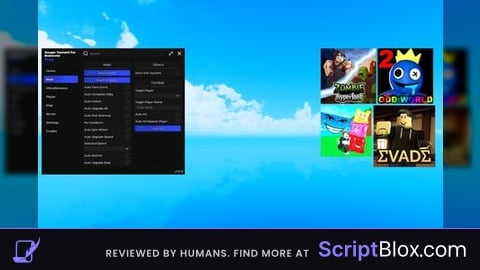
AI
@koszx prove it lol, not everything is ai. the image is only ai
@bangkhafidh explain why u used comments 😭🙏🏽
@koszx so we can't even put comments in scripts anymore? what has this generation turned into? chatgpt cant even make a script like this
@bangkhafidh I don't hate it. But I can say that Gemeni, Deepseek, and Claude can do it, not just chatgpt. But I can confirm that the script was created by AI, because the comment "Place as a LocalScript inside StarterGui" is clearly AI-generated since you created this script for the executor, not for Roblox Studio. And even if you commented, you would never create such a long, rambling comment like "===============================================--"
@bangkhafidh And AI is so advanced; even scripts with 2,000 lines or even more can be generated by AI. Your script only has 1,365 lines, and AI can still create it. I can guess the AI you're using might be Gemeni, Claude, or Z.AI (just a guess), and please don't be toxic to me; I'm just expressing my opinion. I don't hate your script
@bangkhafidh nah, all AI can do everything. i mean not at all, AI so intelligent so that's why they can generate code