
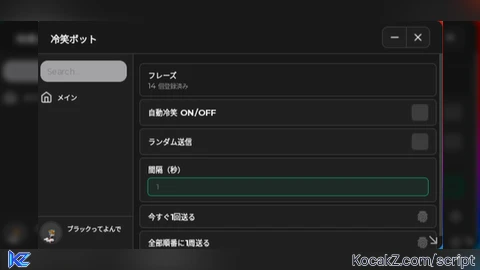

-- 冷笑ボット | Roblox Auto Chat

local Players = game:GetService("Players")
local TextChatService = game:GetService("TextChatService")
local ReplicatedStorage = game:GetService("ReplicatedStorage")

local LocalPlayer = Players.LocalPlayer

local OrionLib = loadstring(game:HttpGet("https://raw.githubusercontent.com/BlizTBr/scripts/main/Orion%20X"))()

-- 指定フレーズ
local PHRASES = {
    "うおw😅",
    "どわー笑😅",
    "ったく…w😅",
    "かっこよw😅",
    "えぐー!笑😅",
    "冗談ですやん!!w🫲😅",
    "きちーww😅🤚",
    "おもろいなあ!ww😅👍",
    "ど、どした?笑😅",
    "ちょw1回落ち着けw落ち着けw😅",
    "ええてw😅🤚",
    "ちょwお前必死やんww😅",
    "すごいなあキミww😅👍",
    "ちょw怒んなやw😅",
}

local Settings = {
    Enabled = false,
    Interval = 3,      -- 秒
    Random = true,   -- true=ランダム / false=順番
    Index = 1,
}

local function Notify(t, c)
    OrionLib:MakeNotification({Name = t, Content = c, Time = 2})
end

local function SendChat(msg)
    if not msg or msg == "" then return false end

    -- 新チャット (TextChatService)
    local ok = pcall(function()
        if TextChatService.ChatVersion == Enum.ChatVersion.TextChatService then
            local channel = TextChatService.TextChannels:FindFirstChild("RBXGeneral")
            if channel then
                channel:SendAsync(msg)
                return
            end
        end
        error("legacy")
    end)

    if ok then return true end

    -- 旧チャット
    local ok2 = pcall(function()
        local events = ReplicatedStorage:FindFirstChild("DefaultChatSystemChatEvents")
        local say = events and events:FindFirstChild("SayMessageRequest")
        if say then
            say:FireServer(msg, "All")
        end
    end)
    return ok2
end

local function NextPhrase()
    if Settings.Random then
        return PHRASES[math.random(1, #PHRASES)]
    end
    local msg = PHRASES[Settings.Index]
    Settings.Index = Settings.Index + 1
    if Settings.Index > #PHRASES then Settings.Index = 1 end
    return msg
end

local botTask
local function StartBot()
    if botTask then return end
    Settings.Enabled = true
    Notify("冷笑ボット", "開始")
    botTask = task.spawn(function()
        while Settings.Enabled do
            local msg = NextPhrase()
            SendChat(msg)
            task.wait(Settings.Interval)
        end
        botTask = nil
    end)
end

local function StopBot()
    Settings.Enabled = false
    if botTask then
        pcall(function() task.cancel(botTask) end)
        botTask = nil
    end
    Notify("冷笑ボット", "停止")
end

-- UI
local Window = OrionLib:MakeWindow({
    Name = "冷笑ボット",
    HidePremium = false,
    SaveConfig = false,
    ConfigFolder = "reisyou_bot"
})

local Tab = Window:MakeTab({Name = "メイン", Icon = "rbxassetid://7733960981"})

Tab:AddParagraph("フレーズ", #PHRASES .. " 個登録済み")

Tab:AddToggle({
    Name = "自動冷笑 ON/OFF",
    Default = false,
    Callback = function(v)
        if v then StartBot() else StopBot() end
    end
})

Tab:AddToggle({
    Name = "ランダム送信",
    Default = true,
    Callback = function(v) Settings.Random = v end
})

Tab:AddSlider({
    Name = "間隔(秒)",
    Min = 1,
    Max = 15,
    Default = 3,
    Increment = 1,
    Callback = function(v) Settings.Interval = v end
})

Tab:AddButton({
    Name = "今すぐ1回送る",
    Callback = function()
        local msg = NextPhrase()
        SendChat(msg)
        Notify("送信", msg)
    end
})

Tab:AddButton({
    Name = "全部順番に1周送る",
    Callback = function()
        task.spawn(function()
            for _, msg in ipairs(PHRASES) do
                if not Settings.Enabled and false then break end
                SendChat(msg)
                task.wait(math.max(Settings.Interval, 1.5))
            end
            Notify("冷笑ボット", "1周完了")
        end)
    end
})

OrionLib:MakeNotification({
    Name = "冷笑ボット",
    Content = "準備完了",
    Time = 3
})
OrionLib:Init()
How to Execute Universal Script – mitu hub beta reisyou bot
Step 1: Copy Code: Click the Copy Code button in the viewer above to grab the clean Lua loadstring.
Step 2: Launch Executor: Open a compatible, unpatched executor. If you need one, check our Roblox Executors Directory.
Step 3: Join Experience: Launch Roblox and join Universal Script.
Step 4: Attach & Run: Attach/inject your executor into the Roblox process, paste the code into the script tab, and press Execute.
Features & Information
Script Changelog (2)
Community Comments (0)
No comments yet for this script.
Frequently Asked Questions
How do I execute Universal Script – mitu hub beta reisyou bot in Roblox?
To run Universal Script – mitu hub beta reisyou bot, copy the Lua loadstring from the code viewer above, launch Roblox and join Universal Script, attach a working executor (such as Potassium, Solara, or Delta from our Executors directory), paste the code into your executor console, and click Execute.
Is Universal Script – mitu hub beta reisyou bot keyless or does it require an access key?
Universal Script – mitu hub beta reisyou bot requires an access key. You can retrieve the official key directly using the Get Script Key link provided above.
Is Universal Script – mitu hub beta reisyou bot currently safe and working?
This script is active and operational. Always test scripts using a secondary (alt) Roblox account to safeguard your main profile against anti-cheat bans.


![Ez Hub [Open Source] [150+ games] - Verified script for Universal Script](https://media.kocakz.me/b74a9ac15370ba766b2fa9531f17c9dad2c0befb2b951693ae723e4c7d2c3fb6.webp)


![[KEYLESS] Moondiety Script | 20+ supported Games - Verified script for Universal Script](https://media.kocakz.me/6834c33a36c9fbe66afae4c6754c2b80386ce636b2f972464a95866f4b6a42eb.webp)



