


KeylessUniversal
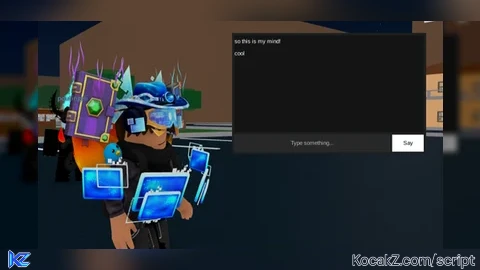
local player = game.Players.LocalPlayer
local playerGui = player:WaitForChild("PlayerGui")

-- 🪟 Main GUI
local screenGui = Instance.new("ScreenGui")
screenGui.Name = "MindChat"
screenGui.Parent = playerGui

-- 📦 Frame (chat window)
local frame = Instance.new("Frame")
frame.Size = UDim2.new(0, 400, 0, 250)
frame.Position = UDim2.new(0.5, -200, 0.5, -125)
frame.BackgroundColor3 = Color3.fromRGB(30, 30, 30)
frame.BorderSizePixel = 0
frame.Active = true
frame.Draggable = true
frame.Parent = screenGui

-- 📜 Chat display
local chatBox = Instance.new("ScrollingFrame")
chatBox.Size = UDim2.new(1, -10, 1, -50)
chatBox.Position = UDim2.new(0, 5, 0, 5)
chatBox.CanvasSize = UDim2.new(0, 0, 0, 0)
chatBox.BackgroundColor3 = Color3.fromRGB(20, 20, 20)
chatBox.BorderSizePixel = 0
chatBox.Parent = frame

local layout = Instance.new("UIListLayout")
layout.Parent = chatBox
layout.SortOrder = Enum.SortOrder.LayoutOrder

-- ✏️ Text input
local textBox = Instance.new("TextBox")
textBox.Size = UDim2.new(1, -80, 0, 35)
textBox.Position = UDim2.new(0, 5, 1, -40)
textBox.PlaceholderText = "Type something..."
textBox.Text = ""
textBox.BackgroundColor3 = Color3.fromRGB(40, 40, 40)
textBox.TextColor3 = Color3.new(1,1,1)
textBox.Parent = frame

-- 🔘 Say button
local button = Instance.new("TextButton")
button.Size = UDim2.new(0, 65, 0, 35)
button.Position = UDim2.new(1, -70, 1, -40)
button.Text = "Say"
button.BackgroundColor3 = Color3.fromRGB(255, 255, 255)
button.TextColor3 = Color3.new(0,0,0)
button.Parent = frame

-- 💬 Function to add message
local function addMessage(text)
	local label = Instance.new("TextLabel")
	label.Size = UDim2.new(1, -5, 0, 25)
	label.BackgroundTransparency = 1
	label.TextColor3 = Color3.new(1,1,1)
	label.TextXAlignment = Enum.TextXAlignment.Left
	label.Text = text
	label.Parent = chatBox

	-- update scrolling
	task.wait()
	chatBox.CanvasSize = UDim2.new(0, 0, 0, layout.AbsoluteContentSize.Y)
	chatBox.CanvasPosition = Vector2.new(0, chatBox.CanvasSize.Y.Offset)
end

-- 🧠 When button clicked
button.MouseButton1Click:Connect(function()
	if textBox.Text ~= "" then
		addMessage(textBox.Text)
		textBox.Text = ""
	end
end)

-- ⌨️ Press Enter to send
textBox.FocusLost:Connect(function(enterPressed)
	if enterPressed and textBox.Text ~= "" then
		addMessage(textBox.Text)
		textBox.Text = ""
	end
end)


ts ai gen </3