

KeylessUniversal
local player = game.Players.LocalPlayer

-- Create ScreenGui
local screenGui = Instance.new("ScreenGui")
local messageFrame = Instance.new("Frame")
local messageLabel = Instance.new("TextLabel")
local uiCorner = Instance.new("UICorner")
local uiGradient = Instance.new("UIGradient")
local uiStroke = Instance.new("UIStroke")

screenGui.Parent = player:WaitForChild("PlayerGui")

-- Style the frame
messageFrame.Size = UDim2.new(0.5, 0, 0.3, 0)
messageFrame.Position = UDim2.new(0.25, 0, 0.5, 0) -- Start lower for animation
messageFrame.BackgroundTransparency = 1 -- Fully transparent initially
messageFrame.Parent = screenGui

-- Add rounded corners to the frame
uiCorner.CornerRadius = UDim.new(0.1, 0) -- Rounded corners
uiCorner.Parent = messageFrame

-- Add a gradient background to the frame
uiGradient.Color = ColorSequence.new({
    ColorSequenceKeypoint.new(0, Color3.fromRGB(255, 140, 0)), -- Orange
    ColorSequenceKeypoint.new(1, Color3.fromRGB(255, 69, 0)) -- Red
})
uiGradient.Parent = messageFrame

-- Add a border stroke to the frame
uiStroke.Thickness = 2
uiStroke.Color = Color3.fromRGB(255, 255, 255) -- White border
uiStroke.Transparency = 1 -- Initially transparent
uiStroke.Parent = messageFrame

-- Style the text label
messageLabel.Size = UDim2.new(1, -20, 1, -20) -- Padding inside the frame
messageLabel.Position = UDim2.new(0, 10, 0, 10)
messageLabel.BackgroundTransparency = 1
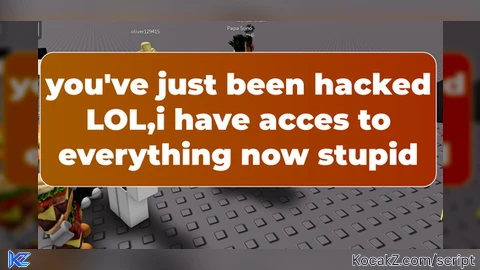
messageLabel.Text = "you've just been hacked LOL,i have acces to everything now stupid"
messageLabel.TextScaled = true
messageLabel.Font = Enum.Font.GothamBlack
messageLabel.TextColor3 = Color3.fromRGB(255, 255, 255) -- White text
messageLabel.TextTransparency = 1 -- Fully transparent initially
messageLabel.Parent = messageFrame

-- Animation for fade-in, scale, and slide-up (First Message)
messageFrame:TweenPosition(UDim2.new(0.25, 0, 0.35, 0), "Out", "Quad", 1, true) -- Slide up
messageFrame:TweenSize(UDim2.new(0.55, 0, 0.35, 0), "Out", "Quad", 1, true) -- Slight scale-up
for i = 1, 0, -0.1 do
    messageFrame.BackgroundTransparency = i
    uiStroke.Transparency = i
    messageLabel.TextTransparency = i
    wait(0.05)
end

-- Wait 3 seconds before transitioning to the next message
wait(3)

-- Fade out the first message
for i = 0, 1, 0.1 do
    messageLabel.TextTransparency = i
    wait(0.05)
end

-- Update the text to the second message
messageLabel.Text = "what im gonna do is steal your account passwords, your robux then ban you."
for i = 1, 0, -0.1 do
    messageLabel.TextTransparency = i
    wait(0.05)
end

-- Wait another 3 seconds
wait(3)

-- Fade out the second message
for i = 0, 1, 0.1 do
    messageLabel.TextTransparency = i
    wait(0.05)
end

-- Wait 5 seconds before showing the prank message
wait(0.5)

-- Update the text to the prank message
messageLabel.Text = "you think your safe on a alt account? think again buddy."
for i = 1, 0, -0.1 do
    messageLabel.TextTransparency = i
    wait(0.05)
end

-- Wait 3 seconds before fading out the final message
wait(3)

-- Fade out and slide down the frame
messageFrame:TweenPosition(UDim2.new(0.25, 0, 0.6, 0), "In", "Quad", 1, true) -- Slide down
messageFrame:TweenSize(UDim2.new(0.5, 0, 0.3, 0), "In", "Quad", 1, true) -- Scale back
for i = 0, 1, 0.1 do
    messageFrame.BackgroundTransparency = i
    uiStroke.Transparency = i
    messageLabel.TextTransparency = i
    wait(0.05)
end

-- Destroy the ScreenGui after the animation
screenGui:Destroy()


Prank your friends with this script!
local script, useless.
gpt
This script only displays on your screen.