
local player = game:GetService("Players").LocalPlayer
local character = player.Character or player.CharacterAdded:Wait()
local humanoid = character:WaitForChild("Humanoid")
local mouse = player:GetMouse()
local RunService = game:GetService("RunService")
local UIS = game:GetService("UserInputService")
local CoreGui = game:GetService("CoreGui")
local Camera = workspace.CurrentCamera
local CameraPart = nil

local flySpeed = 50
local walkSpeed = 16
local jumpPower = 50
local FOV = 70
local noClip = false
local flyEnabled = false
local espEnabled = false
local tracersEnabled = false
local chamsEnabled = false
local aimbotEnabled = false
local infiniteJumpEnabled = false
local expandHitboxes = false
local loopTeleportEnabled = false

local function createButton(parent, position, text, callback)
    local button = Instance.new("TextButton")
    button.Parent = parent
    button.Size = UDim2.new(0, 200, 0, 50)
    button.Position = position
    button.BackgroundColor3 = Color3.fromRGB(35, 35, 35)
    button.TextColor3 = Color3.fromRGB(0, 255, 0)
    button.Text = text
    button.MouseButton1Click:Connect(callback)
    return button
end

local ScreenGui = Instance.new("ScreenGui")
local Frame = Instance.new("Frame")
local ToggleButton = Instance.new("TextButton")

ScreenGui.Parent = CoreGui
Frame.Parent = ScreenGui
Frame.BackgroundColor3 = Color3.fromRGB(35, 35, 35)
Frame.Position = UDim2.new(0.5, -200, 0.5, -300)
Frame.Size = UDim2.new(0, 400, 0, 600)
Frame.Visible = true

ToggleButton.Parent = ScreenGui
ToggleButton.Size = UDim2.new(0, 120, 0, 50)
ToggleButton.Position = UDim2.new(0.9, 0, 0.9, 0)
ToggleButton.BackgroundColor3 = Color3.fromRGB(60, 60, 60
ToggleButton.TextColor3 = Color3.fromRGB(0, 255, 0)
ToggleButton.Text = "Toggle GUI"
ToggleButton.MouseButton1Click:Connect(function()
    Frame.Visible = not Frame.Visible
end)

local function toggleESP()
    espEnabled = not espEnabled
    for _, v in pairs(game:GetService("Players"):GetPlayers()) do
        if v ~= player then
            local highlight = v.Character:FindFirstChild("Highlight") or Instance.new("Highlight", v.Character)
            highlight.Enabled = espEnabled
        end
    end
end
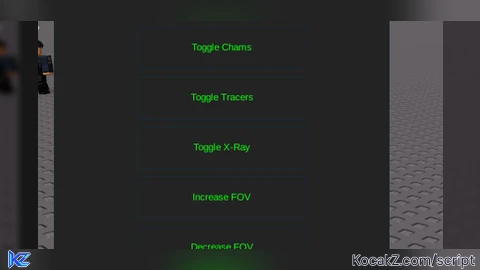
createButton(Frame, UDim2.new(0, 100, 0, 20), "Toggle ESP", toggleESP)

local function toggleChams()
    chamsEnabled = not chamsEnabled
    for _, v in pairs(game:GetService("Players"):GetPlayers()) do
        if v ~= player then
            for _, part in pairs(v.Character:GetChildren()) do
                if part:IsA("BasePart") then
                    part.Material = chamsEnabled and Enum.Material.Neon or Enum.Material.Plastic
                end
            end
        end
    end
end
createButton(Frame, UDim2.new(0, 100, 0, 80), "Toggle Chams", toggleChams)

local function toggleTracers()
    tracersEnabled = not tracersEnabled
   end
createButton(Frame, UDim2.new(0, 100, 0, 140), "Toggle Tracers", toggleTracers)

local function toggleXRay()
end
createButton(Frame, UDim2.new(0, 100, 0, 200), "Toggle X-Ray", toggleXRay)

local function increaseFOV()
    FOV = FOV + 10
    Camera.FieldOfView = FOV
end
createButton(Frame, UDim2.new(0, 100, 0, 260), "Increase FOV", increaseFOV)

local function decreaseFOV()
    FOV = FOV - 10
    Camera.FieldOfView = FOV
end
createButton(Frame, UDim2.new(0, 100, 0, 320), "Decrease FOV", decreaseFOV)

local function toggleNoClipCamera()
    noClip = not noClip
    RunService.Stepped:Connect(function()
        if noClip then
            for _, part in pairs(character:GetChildren()) do
                if part:IsA("BasePart") then
                    part.CanCollide = false
                end
            end
        end
    end)
end
createButton(Frame, UDim2.new(0, 100, 0, 380), "Toggle No-Clip Camera", toggleNoClipCamera)

local function toggleFly()
    flyEnabled = not flyEnabled
    if flyEnabled then
        CameraPart = Instance.new("Part", workspace)
        CameraPart.Size = Vector3.new(0.5, 0.5, 0.5)
        CameraPart.Anchored = true
        CameraPart.Transparency = 1
        RunService.RenderStepped:Connect(function()
            CameraPart.CFrame = Camera.CFrame * CFrame.new(0, 0, -flySpeed / 10)
            Camera.CameraSubject = CameraPart
        end)
    else
        Camera.CameraSubject = humanoid
        CameraPart:Destroy()
    end
end
createButton(Frame, UDim2.new(0, 100, 0, 440), "Toggle Fly", toggleFly)

local function increaseFlySpeed()
    flySpeed = flySpeed + 10
end
createButton(Frame, UDim2.new(0, 100, 0, 500), "Increase Fly Speed", increaseFlySpeed)

local function decreaseFlySpeed()
    flySpeed = flySpeed - 10
end
createButton(Frame, UDim2.new(0, 100, 0, 560), "Decrease Fly Speed", decreaseFlySpeed)

mouse.Button2Down:Connect(function()
    if UIS:IsKeyDown(Enum.KeyCode.LeftControl) then
        local pos = mouse.Hit.p
        character:SetPrimaryPartCFrame(CFrame.new(pos + Vector3.new(0, 5, 0)))
    end
end)

UIS.JumpRequest:Connect(function()
    if infiniteJumpEnabled then
        humanoid:ChangeState(Enum.HumanoidStateType.Jumping)
    end
end)

createButton(Frame, UDim2.new(0, 100, 0, 620), "Enable Infinite Jump", function()
    infiniteJumpEnabled = not infiniteJumpEnabled
end)
How to Execute Universal Script – mega gui features Its
Step 1: Copy Code: Click the Copy Code button in the viewer above to grab the clean Lua loadstring.
Step 2: Launch Executor: Open a compatible, unpatched executor. If you need one, check our Roblox Executors Directory.
Step 3: Join Experience: Launch Roblox and join Universal Script.
Step 4: Attach & Run: Attach/inject your executor into the Roblox process, paste the code into the script tab, and press Execute.
Features & Information
Community Comments (3)
Frequently Asked Questions
How do I execute Universal Script – mega gui features Its in Roblox?
To run Universal Script – mega gui features Its, copy the Lua loadstring from the code viewer above, launch Roblox and join Universal Script, attach a working executor (such as Potassium, Solara, or Delta from our Executors directory), paste the code into your executor console, and click Execute.
Is Universal Script – mega gui features Its keyless or does it require an access key?
Universal Script – mega gui features Its requires an access key. You can retrieve the official key directly using the Get Script Key link provided above.
Is Universal Script – mega gui features Its currently safe and working?
This script is active and operational. Always test scripts using a secondary (alt) Roblox account to safeguard your main profile against anti-cheat bans.


![Ez Hub [Open Source] [150+ games] - Verified script for Universal Script](https://media.kocakz.me/b74a9ac15370ba766b2fa9531f17c9dad2c0befb2b951693ae723e4c7d2c3fb6.webp)



![[KEYLESS] Moondiety Script | 20+ supported Games - Verified script for Universal Script](https://media.kocakz.me/6834c33a36c9fbe66afae4c6754c2b80386ce636b2f972464a95866f4b6a42eb.webp)




@kyletosh3 it works on solara, or what is ur problem?
no solara support? execute and does nothing
Please tell me, if any features have bugs