


KeylessUniversal
--[[
MADE BY SUS
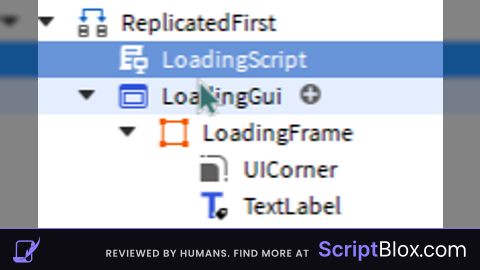
CHANGE THE "LoadingGui AND LoadingFrame TO YOUR GUIS"
THIS SCRIPT MUST BE IN REPLICATEDFIRST (ALSO THE GUIS ILL PROVIDE SCREENSHOTS)
.____    ________      _____  ________  .___ _______    ________  ___________.______________.____     ___________
|    |   \_____  \    /  _  \ \______ \ |   |\      \  /  _____/  \__    ___/|   \__    ___/|    |    \_   _____/
|    |    /   |   \  /  /_\  \ |    |  \|   |/   |   \/   \  ___    |    |   |   | |    |   |    |     |    __)_
|    |___/    |    \/    |    \|    `   \   /    |    \    \_\  \   |    |   |   | |    |   |    |___  |        \
|_______ \_______  /\____|__  /_______  /___\____|__  /\______  /   |____|   |___| |____|   |_______ \/_______  /
        \/       \/         \/        \/            \/        \/                                    \/        \/
--]]
local TweenService = game:GetService("TweenService")
local player = game.Players.LocalPlayer
local playerGui = player:WaitForChild("PlayerGui")

local gui = game.ReplicatedFirst:FindFirstChild("LoadingGui")
if gui then
	gui = gui:Clone()
	gui.Parent = playerGui
end

local frame = gui:WaitForChild("LoadingFrame")
local textLabel = frame:WaitForChild("TextLabel")

frame.BackgroundTransparency = 1
textLabel.TextTransparency = 1

TweenService:Create(frame, TweenInfo.new(1), {BackgroundTransparency = 0}):Play()
TweenService:Create(textLabel, TweenInfo.new(1), {TextTransparency = 0}):Play()

wait(5)

TweenService:Create(frame, TweenInfo.new(1), {BackgroundTransparency = 1}):Play()
TweenService:Create(textLabel, TweenInfo.new(1), {TextTransparency = 1}):Play()

wait(1)

-- your script you want to load here
btw must have gui2lua and convert the gui to a script and paste in the script that you used to make the loading title and paste it into the end of the GUI2LUA to make it work