

KeylessUniversal
--[[
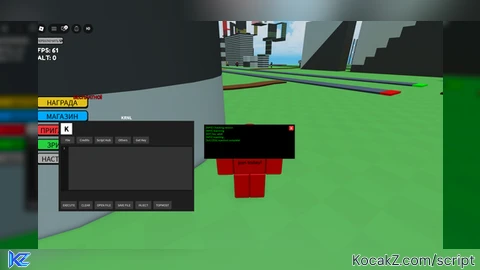
    KRNL Revial GUI Simulator
    Paste this script into any LocalScript (e.g., inside StarterGui)
]]

local player = game:GetService("Players").LocalPlayer
local userInputService = game:GetService("UserInputService")
local tweenService = game:GetService("TweenService")
local guiService = game:GetService("GuiService")
local textService = game:GetService("TextService")
local runService = game:GetService("RunService")

-- Создаем основной ScreenGui
local screenGui = Instance.new("ScreenGui")
screenGui.Name = "KRNL_Revial"
screenGui.ResetOnSpawn = false
screenGui.ZIndexBehavior = Enum.ZIndexBehavior.Sibling

-- Проверка на наличие уже существующего GUI (чтобы не было дубликатов)
for _, v in pairs(player:WaitForChild("PlayerGui"):GetChildren()) do
    if v.Name == "KRNL_Revial" then
        v:Destroy()
    end
end

screenGui.Parent = player:WaitForChild("PlayerGui")

-- Основные цвета
local colors = {
    bg = Color3.fromRGB(30, 30, 30),
    darkBg = Color3.fromRGB(20, 20, 20),
    lightBg = Color3.fromRGB(60, 60, 60),
    lightestBg = Color3.fromRGB(80, 80, 80),
    text = Color3.fromRGB(255, 255, 255),
    black = Color3.fromRGB(0, 0, 0),
    white = Color3.fromRGB(255, 255, 255),
    green = Color3.fromRGB(0, 255, 0),
    red = Color3.fromRGB(255, 50, 50)
}

-- Переменные состояния
local isInjected = false
local lineNumbers = {}
local currentScriptLines = {""}
local savedScripts = {} -- Хранилище для сохраненных скриптов
local hasValidKey = false -- Флаг наличия валидного ключа
local currentGeneratedKey = "" -- Текущий сгенерированный ключ

-- Функция для создания кнопки с эффектами
local function createButton(parent, text, size, position, callback)
    local button = Instance.new("TextButton")
    button.Name = text .. "Button"
    button.Size = size
    button.Position = position
    button.Text = text
    button.BackgroundColor3 = colors.lightBg
    button.TextColor3 = colors.text
    button.Font = Enum.Font.SourceSans
    button.TextSize = 16
    button.BorderSizePixel = 0
    button.AutoButtonColor = false
    button.Parent = parent

    -- Hover эффект
    button.MouseEnter:Connect(function()
        if not button.SelectionImageObject then
            tweenService:Create(button, TweenInfo.new(0.1), {BackgroundColor3 = colors.lightestBg}):Play()
        end
    end)

    button.MouseLeave:Connect(function()
        if not button.SelectionImageObject then
            tweenService:Create(button, TweenInfo.new(0.1), {BackgroundColor3 = colors.lightBg}):Play()
        end
    end)

    -- Эффект нажатия
    button.MouseButton1Down:Connect(function()
        tweenService:Create(button, TweenInfo.new(0.05), {BackgroundColor3 = colors.lightestBg}):Play()
    end)

    button.MouseButton1Up:Connect(function()
        tweenService:Create(button, TweenInfo.new(0.1), {BackgroundColor3 = colors.lightBg}):Play()
    end)

    button.MouseButton1Click:Connect(function()
        -- Быстрая вспышка при клике
        tweenService:Create(button, TweenInfo.new(0.1), {BackgroundColor3 = colors.lightestBg}):Play()
        task.wait(0.1)
        tweenService:Create(button, TweenInfo.new(0.1), {BackgroundColor3 = colors.lightBg}):Play()
        if callback then callback() end
    end)

    return button
end

-- Функция для обновления номеров строк
local function updateLineNumbers(textBox)
    local lines = {}
    for line in textBox.Text:gmatch("[^\r\n]+") do
        table.insert(lines, line)
    end
    if #lines == 0 then lines = {""} end

    currentScriptLines = lines

    -- Находим или создаем фрейм с номерами
    local lineNumFrame = textBox.Parent:FindFirstChild("LineNumbers")
    if lineNumFrame then
        lineNumFrame:ClearAllChildren()

        for i = 1, #lines do
            local numLabel = Instance.new("TextLabel")
            numLabel.Size = UDim2.new(1, 0, 0, 20)
            numLabel.Position = UDim2.new(0, 0, 0, (i-1)*20)
            numLabel.Text = tostring(i)
            numLabel.BackgroundTransparency = 1
            numLabel.TextColor3 = colors.text
            numLabel.Font = Enum.Font.SourceSans
            numLabel.TextSize = 14
            numLabel.Parent = lineNumFrame
        end
    end
end

-- Функция для создания выпадающего меню
local function createDropdown(parent, buttonText, items, position)
    local dropdownFrame = Instance.new("Frame")
    dropdownFrame.Name = buttonText .. "Dropdown"
    dropdownFrame.Size = UDim2.new(0, 120, 0, 0)
    dropdownFrame.Position = position
    dropdownFrame.BackgroundColor3 = colors.darkBg
    dropdownFrame.BorderSizePixel = 0
    dropdownFrame.Visible = false
    dropdownFrame.Parent = parent
    dropdownFrame.ClipsDescendants = true

    local layout = Instance.new("UIListLayout")
    layout.Parent = dropdownFrame
    layout.SortOrder = Enum.SortOrder.LayoutOrder
    layout.Padding = UDim.new(0, 1)

    layout:GetPropertyChangedSignal("AbsoluteContentSize"):Connect(function()
        dropdownFrame.Size = UDim2.new(0, 120, 0, layout.AbsoluteContentSize.Y)
    end)

    for _, item in pairs(items) do
        local btn = createButton(dropdownFrame, item, UDim2.new(1, 0, 0, 30), UDim2.new(0, 0, 0, 0), function()
            dropdownFrame.Visible = false
            if item == "Youtube" then
                print("Opening YouTube...")
            elseif item == "GitHub" then
                print("Opening GitHub...")
            elseif item == "Website" then
                print("Opening Website...")
            elseif item == "Inject" then
                simulateInjection()
            elseif item == "Kill Roblox" then
                game:Shutdown()
            end
        end)
        btn.BackgroundColor3 = colors.darkBg
        btn.TextColor3 = colors.text
        btn.TextXAlignment = Enum.TextXAlignment.Left
        btn.Parent = dropdownFrame
    end

    return dropdownFrame
end

-- Функция создания второго этапа (вставка ключа)
local function createSecondStage(parent, generatedKey)
    -- Очищаем контент
    for _, child in pairs(parent:GetChildren()) do
        if child.Name ~= "InstructionLabel" and child.Name ~= "TimerLabel" and child.Name ~= "ProgressBar" then
            child:Destroy()
        end
    end

    -- Скрываем элементы таймера
    local instructionLabel = parent:FindFirstChild("InstructionLabel")
    local timerLabel = parent:FindFirstChild("TimerLabel")
    local progressBar = parent:FindFirstChild("ProgressBar")

    if instructionLabel then instructionLabel.Visible = false end
    if timerLabel then timerLabel.Visible = false end
    if progressBar then progressBar.Visible = false end

    -- Текст инструкции для второго этапа
    local stage2Label = Instance.new("TextLabel")
    stage2Label.Name = "Stage2Label"
    stage2Label.Size = UDim2.new(1, 0, 0, 30)
    stage2Label.Position = UDim2.new(0, 0, 0, 10)
    stage2Label.Text = "Paste your copied key below and click Continue:"
    stage2Label.BackgroundTransparency = 1
    stage2Label.TextColor3 = colors.text
    stage2Label.Font = Enum.Font.SourceSans
    stage2Label.TextSize = 16
    stage2Label.Parent = parent

    -- Поле для ввода ключа
    local keyInput = Instance.new("TextBox")
    keyInput.Name = "KeyInput"
    keyInput.Size = UDim2.new(0.8, -10, 0, 35)
    keyInput.Position = UDim2.new(0.1, 0, 0, 50)
    keyInput.BackgroundColor3 = colors.lightBg
    keyInput.TextColor3 = colors.text
    keyInput.Font = Enum.Font.SourceSans
    keyInput.TextSize = 16
    keyInput.PlaceholderText = "Paste your key here..."
    keyInput.ClearTextOnFocus = false
    keyInput.Parent = parent

    -- Кнопка Continue
    local continueBtn = Instance.new("TextButton")
    continueBtn.Name = "ContinueBtn"
    continueBtn.Size = UDim2.new(0, 120, 0, 40)
    continueBtn.Position = UDim2.new(0.5, -60, 0, 100)
    continueBtn.Text = "Continue"
    continueBtn.BackgroundColor3 = colors.green
    continueBtn.TextColor3 = colors.black
    continueBtn.Font = Enum.Font.SourceSansBold
    continueBtn.TextSize = 18
    continueBtn.BorderSizePixel = 0
    continueBtn.Parent = parent

    -- Hover эффект для Continue
    continueBtn.MouseEnter:Connect(function()
        tweenService:Create(continueBtn, TweenInfo.new(0.1), {BackgroundColor3 = Color3.fromRGB(0, 200, 0)}):Play()
    end)

    continueBtn.MouseLeave:Connect(function()
        tweenService:Create(continueBtn, TweenInfo.new(0.1), {BackgroundColor3 = colors.green}):Play()
    end)

    -- Функционал кнопки Continue
    continueBtn.MouseButton1Click:Connect(function()
        if keyInput.Text == generatedKey then
            hasValidKey = true

            -- Находим родительский браузер и закрываем его
            local browserFrame = parent.Parent
            if browserFrame then
                browserFrame:Destroy()
            end

            -- Показываем сообщение об успехе
            local successMsg = Instance.new("TextLabel")
            successMsg.Size = UDim2.new(0, 300, 0, 50)
            successMsg.Position = UDim2.new(0.5, -150, 0.5, -25)
            successMsg.Text = "Key activated successfully! INJECT is now available."
            successMsg.BackgroundColor3 = colors.green
            successMsg.TextColor3 = colors.black
            successMsg.Font = Enum.Font.SourceSansBold
            successMsg.TextSize = 16
            successMsg.Parent = screenGui

            task.wait(3)
            successMsg:Destroy()
        else
            -- Ошибка при неверном ключе
            keyInput.BackgroundColor3 = colors.red
            task.wait(0.3)
            keyInput.BackgroundColor3 = colors.lightBg
        end
    end)
end

-- Функция создания мини-браузера для получения ключа
local function createKeyBrowser()
    -- Проверяем, не открыт ли уже браузер
    if screenGui:FindFirstChild("KeyBrowser") then
        return
    end

    -- Генерируем ключ
    currentGeneratedKey = "KRNL-" .. string.format("%04d", math.random(1000, 9999)) .. "-" .. string.format("%04d", math.random(1000, 9999)) .. "-" .. string.format("%04d", math.random(1000, 9999))

    local browserFrame = Instance.new("Frame")
    browserFrame.Name = "KeyBrowser"
    browserFrame.Size = UDim2.new(0, 500, 0, 400)
    browserFrame.Position = UDim2.new(0.5, -250, 0.5, -200)
    browserFrame.BackgroundColor3 = colors.darkBg
    browserFrame.BorderSizePixel = 2
    browserFrame.BorderColor3 = colors.lightBg
    browserFrame.Parent = screenGui
    browserFrame.Active = true
    browserFrame.Draggable = true

    -- Заголовок
    local titleBar = Instance.new("Frame")
    titleBar.Size = UDim2.new(1, 0, 0, 30)
    titleBar.BackgroundColor3 = colors.lightBg
    titleBar.BorderSizePixel = 0
    titleBar.Parent = browserFrame

    local titleText = Instance.new("TextLabel")
    titleText.Size = UDim2.new(1, -30, 1, 0)
    titleText.Position = UDim2.new(0, 5, 0, 0)
    titleText.Text = "KRNL Key System - Step 1/2"
    titleText.BackgroundTransparency = 1
    titleText.TextColor3 = colors.text
    titleText.Font = Enum.Font.SourceSansBold
    titleText.TextSize = 18
    titleText.TextXAlignment = Enum.TextXAlignment.Left
    titleText.Parent = titleBar

    -- Кнопка закрытия
    local closeBtn = Instance.new("TextButton")
    closeBtn.Size = UDim2.new(0, 25, 0, 25)
    closeBtn.Position = UDim2.new(1, -30, 0, 2.5)
    closeBtn.Text = "X"
    closeBtn.BackgroundColor3 = colors.red
    closeBtn.TextColor3 = colors.text
    closeBtn.Font = Enum.Font.SourceSansBold
    closeBtn.TextSize = 18
    closeBtn.BorderSizePixel = 0
    closeBtn.Parent = titleBar

    -- Основной контент
    local contentFrame = Instance.new("Frame")
    contentFrame.Size = UDim2.new(1, -20, 1, -50)
    contentFrame.Position = UDim2.new(0, 10, 0, 40)
    contentFrame.BackgroundColor3 = colors.bg
    contentFrame.BorderSizePixel = 0
    contentFrame.Parent = browserFrame

    -- Инструкция (ШАГ 1)
    local instructionLabel = Instance.new("TextLabel")
    instructionLabel.Name = "InstructionLabel"
    instructionLabel.Size = UDim2.new(1, 0, 0, 30)
    instructionLabel.Position = UDim2.new(0, 0, 0, 10)
    instructionLabel.Text = "Please wait 20 seconds to generate your key..."
    instructionLabel.BackgroundTransparency = 1
    instructionLabel.TextColor3 = colors.text
    instructionLabel.Font = Enum.Font.SourceSans
    instructionLabel.TextSize = 16
    instructionLabel.Parent = contentFrame

    -- Таймер (ШАГ 1)
    local timerLabel = Instance.new("TextLabel")
    timerLabel.Name = "TimerLabel"
    timerLabel.Size = UDim2.new(1, 0, 0, 40)
    timerLabel.Position = UDim2.new(0, 0, 0, 45)
    timerLabel.Text = "20"
    timerLabel.BackgroundTransparency = 1
    timerLabel.TextColor3 = colors.green
    timerLabel.Font = Enum.Font.SourceSansBold
    timerLabel.TextSize = 48
    timerLabel.Parent = contentFrame

    -- Прогресс бар (ШАГ 1)
    local progressBar = Instance.new("Frame")
    progressBar.Name = "ProgressBar"
    progressBar.Size = UDim2.new(1, -20, 0, 10)
    progressBar.Position = UDim2.new(0, 10, 0, 100)
    progressBar.BackgroundColor3 = colors.darkBg
    progressBar.BorderSizePixel = 0
    progressBar.Parent = contentFrame

    local progressFill = Instance.new("Frame")
    progressFill.Name = "ProgressFill"
    progressFill.Size = UDim2.new(0, 0, 1, 0)
    progressFill.BackgroundColor3 = colors.green
    progressFill.BorderSizePixel = 0
    progressFill.Parent = progressBar

    -- Таймер обратного отсчета (ШАГ 1)
    local timeLeft = 20
    local totalTime = 20
    local startTime = tick()

    -- Функция обновления таймера
    local function updateTimer()
        local elapsedTime = tick() - startTime
        timeLeft = math.max(0, totalTime - math.floor(elapsedTime))

        timerLabel.Text = tostring(timeLeft)

        -- Обновляем прогресс бар
        local progress = elapsedTime / totalTime
        if progress > 1 then progress = 1 end
        progressFill.Size = UDim2.new(progress, 0, 1, 0)

        if timeLeft <= 0 then
            timerLabel.Text = "0"
            progressFill.Size = UDim2.new(1, 0, 1, 0)

            -- Обновляем заголовок
            titleText.Text = "KRNL Key System - Step 2/2"

            -- Показываем ключ и кнопку Copy (ШАГ 2)
            instructionLabel.Text = "Your key has been generated! Copy it below:"
            instructionLabel.Position = UDim2.new(0, 0, 0, 10)

            -- Поле с ключом
            local keyDisplay = Instance.new("TextBox")
            keyDisplay.Name = "KeyDisplay"
            keyDisplay.Size = UDim2.new(0.8, -10, 0, 35)
            keyDisplay.Position = UDim2.new(0.1, 0, 0, 50)
            keyDisplay.BackgroundColor3 = colors.lightBg
            keyDisplay.TextColor3 = colors.text
            keyDisplay.Font = Enum.Font.SourceSans
            keyDisplay.TextSize = 16
            keyDisplay.Text = currentGeneratedKey
            keyDisplay.TextEditable = false -- Нельзя редактировать
            keyDisplay.ClearTextOnFocus = false
            keyDisplay.Parent = contentFrame

            -- Кнопка Copy
            local copyBtn = Instance.new("TextButton")
            copyBtn.Name = "CopyBtn"
            copyBtn.Size = UDim2.new(0, 100, 0, 35)
            copyBtn.Position = UDim2.new(0.5, -50, 0, 95)
            copyBtn.Text = "Copy"
            copyBtn.BackgroundColor3 = colors.lightBg
            copyBtn.TextColor3 = colors.text
            copyBtn.Font = Enum.Font.SourceSans
            copyBtn.TextSize = 16
            copyBtn.BorderSizePixel = 0
            copyBtn.Parent = contentFrame

            -- Hover эффект для Copy
            copyBtn.MouseEnter:Connect(function()
                tweenService:Create(copyBtn, TweenInfo.new(0.1), {BackgroundColor3 = colors.lightestBg}):Play()
            end)

            copyBtn.MouseLeave:Connect(function()
                tweenService:Create(copyBtn, TweenInfo.new(0.1), {BackgroundColor3 = colors.lightBg}):Play()
            end)

            -- Функционал кнопки Copy
            copyBtn.MouseButton1Click:Connect(function()
                -- Копируем ключ
                local clipboard = setclipboard or toclipboard or function(text)
                    warn("Clipboard function not available. Key: " .. text)
                end

                if clipboard then
                    pcall(clipboard, currentGeneratedKey)
                end

                -- Визуальный эффект
                copyBtn.Text = "Copied!"
                copyBtn.BackgroundColor3 = colors.green
                copyBtn.TextColor3 = colors.black

                -- Переходим ко второму этапу
                task.wait(1)
                createSecondStage(contentFrame, currentGeneratedKey)
            end)

            -- Скрываем таймер и прогресс бар
            timerLabel.Visible = false
            progressBar.Visible = false

            return true
        end
        return false
    end

    -- Запускаем обновление через RunService
    local connection
    connection = runService.Heartbeat:Connect(function()
        local completed = updateTimer()
        if completed then
            connection:Disconnect()
        end
    end)

    -- Закрытие браузера
    closeBtn.MouseButton1Click:Connect(function()
        if connection then
            connection:Disconnect()
        end
        browserFrame:Destroy()
    end)
end

-- Функция симуляции инжекта
function simulateInjection()
    if not hasValidKey then
        -- Показываем предупреждение о необходимости ключа
        local warningMsg = Instance.new("TextLabel")
        warningMsg.Size = UDim2.new(0, 400, 0, 50)
        warningMsg.Position = UDim2.new(0.5, -200, 0.5, -25)
        warningMsg.Text = "You need to get a valid key first! Click 'Get Key' button."
        warningMsg.BackgroundColor3 = colors.red
        warningMsg.TextColor3 = colors.text
        warningMsg.Font = Enum.Font.SourceSans
        warningMsg.TextSize = 14
        warningMsg.Parent = screenGui

        task.wait(3)
        warningMsg:Destroy()
        return
    end

    if isInjected then
        print("Already injected!")
        return
    end

    -- Создаем консольное окно
    local consoleFrame = Instance.new("Frame")
    consoleFrame.Name = "Console"
    consoleFrame.Size = UDim2.new(0, 400, 0, 150)
    consoleFrame.Position = UDim2.new(0.5, -200, 0.5, -75)
    consoleFrame.BackgroundColor3 = Color3.fromRGB(0, 0, 0)
    consoleFrame.BorderSizePixel = 1
    consoleFrame.BorderColor3 = colors.lightBg
    consoleFrame.Parent = screenGui

    local consoleText = Instance.new("TextLabel")
    consoleText.Size = UDim2.new(1, -10, 1, -10)
    consoleText.Position = UDim2.new(0, 5, 0, 5)
    consoleText.BackgroundTransparency = 1
    consoleText.TextColor3 = Color3.fromRGB(0, 255, 0)
    consoleText.Font = Enum.Font.SourceSans
    consoleText.TextSize = 14
    consoleText.TextXAlignment = Enum.TextXAlignment.Left
    consoleText.TextYAlignment = Enum.TextYAlignment.Top
    consoleText.Text = "[INFO] Checking version.\n[INFO] Scanning.\n[KEY] Key valid!\n[INFO] Injecting...\n[SUCCESS] Injection complete!"
    consoleText.Parent = consoleFrame

    -- Анимация появления консоли
    consoleFrame.BackgroundTransparency = 1
    consoleText.TextTransparency = 1
    tweenService:Create(consoleFrame, TweenInfo.new(0.3), {BackgroundTransparency = 0}):Play()
    tweenService:Create(consoleText, TweenInfo.new(0.3), {TextTransparency = 0}):Play()

    -- Устанавливаем статус инжекта
    isInjected = true

    -- Добавляем кнопку закрытия
    local closeButton = Instance.new("TextButton")
    closeButton.Size = UDim2.new(0, 20, 0, 20)
    closeButton.Position = UDim2.new(1, -25, 0, 5)
    closeButton.Text = "X"
    closeButton.BackgroundColor3 = Color3.fromRGB(255, 50, 50)
    closeButton.TextColor3 = colors.text
    closeButton.Font = Enum.Font.SourceSansBold
    closeButton.TextSize = 16
    closeButton.BorderSizePixel = 0
    closeButton.Parent = consoleFrame

    closeButton.MouseButton1Click:Connect(function()
        tweenService:Create(consoleFrame, TweenInfo.new(0.3), {BackgroundTransparency = 1}):Play()
        tweenService:Create(consoleText, TweenInfo.new(0.3), {TextTransparency = 1}):Play()
        task.wait(0.3)
        consoleFrame:Destroy()
    end)

    -- Автоматически закрываем через 1 секунду
    task.wait(1)
    if consoleFrame and consoleFrame.Parent then
        tweenService:Create(consoleFrame, TweenInfo.new(0.3), {BackgroundTransparency = 1}):Play()
        tweenService:Create(consoleText, TweenInfo.new(0.3), {TextTransparency = 1}):Play()
        task.wait(0.3)
        consoleFrame:Destroy()
    end

    print("KRNL injected successfully!")
end

-- Функция выполнения скрипта
function executeScript(scriptText)
    if not isInjected then
        warn("No ready clients found. Make sure you've pressed Attach and waited for injection to complete.")
        local errorMsg = Instance.new("TextLabel")
        errorMsg.Size = UDim2.new(0, 400, 0, 50)
        errorMsg.Position = UDim2.new(0.5, -200, 0.5, -25)
        errorMsg.Text = "No ready clients found. Make sure you've pressed Attach and waited for injection to complete."
        errorMsg.BackgroundColor3 = Color3.fromRGB(255, 50, 50)
        errorMsg.TextColor3 = colors.text
        errorMsg.Font = Enum.Font.SourceSans
        errorMsg.TextSize = 14
        errorMsg.Parent = screenGui

        task.wait(3)
        errorMsg:Destroy()
        return
    end

    -- Симуляция выполнения
    local success, err = pcall(function()
        loadstring(scriptText)()
    end)

    if not success then
        warn("Script Error: " .. err)
    end
end

-- Функция сохранения файла
function saveFile(scriptText, fileName)
    if fileName and fileName ~= "" then
        savedScripts[fileName] = scriptText
        print("Saved script as: " .. fileName)
    end
end

-- Функция открытия файла
function openFile(fileName)
    return savedScripts[fileName] or ""
end

-- Создание основного фрейма
local mainFrame = Instance.new("Frame")
mainFrame.Name = "MainFrame"
mainFrame.Size = UDim2.new(0, 600, 0, 400)
mainFrame.Position = UDim2.new(0, 10, 0, 10)
mainFrame.BackgroundColor3 = colors.bg
mainFrame.BorderSizePixel = 0
mainFrame.Parent = screenGui
mainFrame.Active = true
mainFrame.Draggable = true

-- Заголовок
local titleLabel = Instance.new("TextLabel")
titleLabel.Size = UDim2.new(1, 0, 0, 30)
titleLabel.Position = UDim2.new(0, 0, 0, -30)
titleLabel.Text = "KRNL"
titleLabel.BackgroundTransparency = 1
titleLabel.TextColor3 = colors.text
titleLabel.Font = Enum.Font.SourceSansBold
titleLabel.TextSize = 24
titleLabel.Parent = mainFrame

-- K квадрат
local kSquare = Instance.new("Frame")
kSquare.Name = "KSquare"
kSquare.Size = UDim2.new(0, 50, 0, 50)
kSquare.Position = UDim2.new(0, 10, 0, 10)
kSquare.BackgroundColor3 = colors.white
kSquare.BorderSizePixel = 0
kSquare.Parent = mainFrame

local kLetter = Instance.new("TextLabel")
kLetter.Size = UDim2.new(1, 0, 1, 0)
kLetter.Text = "K"
kLetter.BackgroundTransparency = 1
kLetter.TextColor3 = colors.black
kLetter.Font = Enum.Font.SourceSansBold
kLetter.TextSize = 40
kLetter.Parent = kSquare

-- Панель кнопок
local buttonPanel = Instance.new("Frame")
buttonPanel.Name = "ButtonPanel"
buttonPanel.Size = UDim2.new(1, -20, 0, 30)
buttonPanel.Position = UDim2.new(0, 10, 0, 70)
buttonPanel.BackgroundTransparency = 1
buttonPanel.Parent = mainFrame

-- Кнопка File
local fileButton = createButton(buttonPanel, "File", UDim2.new(0, 60, 1, 0), UDim2.new(0, 0, 0, 0))
local fileDropdown = createDropdown(mainFrame, "File", {"Inject", "Kill Roblox"}, UDim2.new(0, 10, 0, 100))

fileButton.MouseButton1Click:Connect(function()
    fileDropdown.Visible = not fileDropdown.Visible
end)

-- Кнопка Credits
local creditsButton = createButton(buttonPanel, "Credits", UDim2.new(0, 70, 1, 0), UDim2.new(0, 70, 0, 0), function()
    print("KRNL Revial - Credits")
end)

-- Кнопка Script Hub
local scriptHubButton = createButton(buttonPanel, "Script Hub", UDim2.new(0, 80, 1, 0), UDim2.new(0, 150, 0, 0), function()
    print("Script Hub opened")
end)

-- Кнопка Others
local othersButton = createButton(buttonPanel, "Others", UDim2.new(0, 70, 1, 0), UDim2.new(0, 240, 0, 0))
local othersDropdown = createDropdown(mainFrame, "Others", {"Youtube", "GitHub", "Website"}, UDim2.new(0, 250, 0, 100))

othersButton.MouseButton1Click:Connect(function()
    othersDropdown.Visible = not othersDropdown.Visible
end)

-- Кнопка Get Key
local getKeyButton = createButton(buttonPanel, "Get Key", UDim2.new(0, 70, 1, 0), UDim2.new(0, 320, 0, 0), function()
    createKeyBrowser()
end)

-- Область для скрипта
local scriptArea = Instance.new("Frame")
scriptArea.Name = "ScriptArea"
scriptArea.Size = UDim2.new(1, -20, 0, 200)
scriptArea.Position = UDim2.new(0, 10, 0, 110)
scriptArea.BackgroundColor3 = colors.darkBg
scriptArea.BorderSizePixel = 0
scriptArea.Parent = mainFrame

-- Номера строк
local lineNumbers = Instance.new("Frame")
lineNumbers.Name = "LineNumbers"
lineNumbers.Size = UDim2.new(0, 30, 1, 0)
lineNumbers.BackgroundColor3 = colors.darkBg
lineNumbers.BorderSizePixel = 0
lineNumbers.Parent = scriptArea

-- Поле для ввода скрипта
local scriptBox = Instance.new("TextBox")
scriptBox.Name = "ScriptBox"
scriptBox.Size = UDim2.new(1, -35, 1, -10)
scriptBox.Position = UDim2.new(0, 35, 0, 5)
scriptBox.BackgroundColor3 = Color3.fromRGB(50, 50, 50)
scriptBox.TextColor3 = colors.text
scriptBox.Font = Enum.Font.SourceSans
scriptBox.TextSize = 14
scriptBox.TextXAlignment = Enum.TextXAlignment.Left
scriptBox.TextYAlignment = Enum.TextYAlignment.Top
scriptBox.ClearTextOnFocus = false
scriptBox.MultiLine = true
scriptBox.Text = "-- Welcome to KRNL's Revial!"
scriptBox.Parent = scriptArea

scriptBox:GetPropertyChangedSignal("Text"):Connect(function()
    updateLineNumbers(scriptBox)
end)

-- Нижняя панель
local bottomPanel = Instance.new("Frame")
bottomPanel.Name = "BottomPanel"
bottomPanel.Size = UDim2.new(1, -20, 0, 35)
bottomPanel.Position = UDim2.new(0, 10, 1, -45)
bottomPanel.BackgroundTransparency = 1
bottomPanel.Parent = mainFrame

-- Кнопка EXECUTE
local executeButton = createButton(bottomPanel, "EXECUTE", UDim2.new(0, 70, 1, 0), UDim2.new(0, 0, 0, 0), function()
    executeScript(scriptBox.Text)
end)

-- Кнопка CLEAR
local clearButton = createButton(bottomPanel, "CLEAR", UDim2.new(0, 60, 1, 0), UDim2.new(0, 80, 0, 0), function()
    scriptBox.Text = ""
end)

-- Кнопка OPEN FILE
local openFileButton = createButton(bottomPanel, "OPEN FILE", UDim2.new(0, 80, 1, 0), UDim2.new(0, 150, 0, 0), function()
    local fileName = "default"
    scriptBox.Text = openFile(fileName)
end)

-- Кнопка SAVE FILE
local saveFileButton = createButton(bottomPanel, "SAVE FILE", UDim2.new(0, 80, 1, 0), UDim2.new(0, 240, 0, 0), function()
    local fileName = "default"
    saveFile(scriptBox.Text, fileName)
end)

-- Кнопка INJECT
local injectButton = createButton(bottomPanel, "INJECT", UDim2.new(0, 70, 1, 0), UDim2.new(0, 330, 0, 0), function()
    simulateInjection()
end)

-- Кнопка TOPMOST
local topmostButton = createButton(bottomPanel, "TOPMOST", UDim2.new(0, 80, 1, 0), UDim2.new(0, 410, 0, 0), function()
    screenGui.Enabled = not screenGui.Enabled
    task.wait()
    screenGui.Enabled = true
end)

-- Инициализация номеров строк
updateLineNumbers(scriptBox)

-- Скрываем дропдауны при клике вне них
userInputService.InputBegan:Connect(function(input, gameProcessed)
    if gameProcessed then return end

    if input.UserInputType == Enum.UserInputType.MouseButton1 then
        fileDropdown.Visible = false
        othersDropdown.Visible = false
    end
end)

print("KRNL Revial GUI Loaded! Click 'Get Key' to activate INJECT.")


Ohio KRNL