
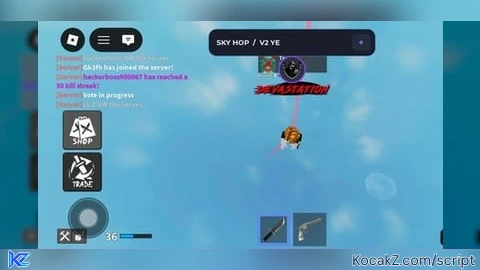
Universal Script – kktty.lol assist (PLEASE READ DESC

--// SKY HOP V2 YE
--// Dark Glass + Blue Accent | Mobile Friendly
--// Place in StarterPlayer > StarterPlayerScripts

local Players = game:GetService("Players")
local RunService = game:GetService("RunService")
local UserInputService = game:GetService("UserInputService")

local player = Players.LocalPlayer
local playerGui = player:WaitForChild("PlayerGui")

--==================================================
-- CONFIG
--==================================================

local DEFAULT_HEIGHT = 200
local MIN_HEIGHT, MAX_HEIGHT = 50, 500

local DEFAULT_DISTANCE = 75
local MIN_DISTANCE, MAX_DISTANCE = 50, 100

local DEFAULT_INTERVAL = 1
local MIN_INTERVAL, MAX_INTERVAL = 0.25, 5

local ACCENT = Color3.fromRGB(85, 145, 255)
local PANEL_COLOR = Color3.fromRGB(18, 20, 28)
local PANEL_TRANSPARENCY = 0.08

--==================================================
-- STATE
--==================================================

local height = DEFAULT_HEIGHT
local distance = DEFAULT_DISTANCE
local interval = DEFAULT_INTERVAL
local panelTransparency = PANEL_TRANSPARENCY

local hoverEnabled = false
local sideEnabled = false
local equipEnabled = false
local autoReturnEnabled = false

local character, humanoid, root, backpack
local anchorPosition
local sideDirection = Vector3.xAxis
local sideOffset = 0
local sideSign = 1
local sideTimer = 0
local equipTimer = 0

local activeSlider
local alive = true
local minimized = false
local characterGeneration = 0

--==================================================
-- CHARACTER HELPERS
--==================================================

local function getRoot()
    character = player.Character
    if not character then return false end

    humanoid = character:FindFirstChildOfClass("Humanoid")
    root = character:FindFirstChild("HumanoidRootPart")
    backpack = player:FindFirstChildOfClass("Backpack")

    return humanoid ~= nil and root ~= nil
end

local function stopMovement()
    hoverEnabled = false
    sideEnabled = false
    anchorPosition = nil
    sideOffset = 0
    sideTimer = 0
end

local function prepareAnchor()
    if not getRoot() then
        return false
    end

    anchorPosition = root.Position

    local look = root.CFrame.RightVector
    sideDirection = Vector3.new(look.X, 0, look.Z)

    if sideDirection.Magnitude < 0.01 then
        sideDirection = Vector3.xAxis
    else
        sideDirection = sideDirection.Unit
    end

    sideOffset = 0
    sideSign = 1
    sideTimer = 0

    return true
end

--==================================================
-- GUI
--==================================================

local oldGui = playerGui:FindFirstChild("SkyHopV2YE")
if oldGui then
    oldGui:Destroy()
end

local gui = Instance.new("ScreenGui")
gui.Name = "SkyHopV2YE"
gui.ResetOnSpawn = false
gui.IgnoreGuiInset = false
gui.DisplayOrder = 20
gui.Parent = playerGui

local main = Instance.new("Frame")
main.Name = "Main"
main.Size = UDim2.fromOffset(300, 440)
main.Position = UDim2.new(0.5, -150, 0.5, -220)
main.BackgroundColor3 = PANEL_COLOR
main.BackgroundTransparency = PANEL_TRANSPARENCY
main.BorderSizePixel = 0
main.Parent = gui

Instance.new("UICorner", main).CornerRadius = UDim.new(0, 14)

local stroke = Instance.new("UIStroke")
stroke.Color = ACCENT
stroke.Transparency = 0.55
stroke.Thickness = 1
stroke.Parent = main

local header = Instance.new("Frame")
header.Name = "Header"
header.Size = UDim2.new(1, 0, 0, 48)
header.BackgroundColor3 = Color3.fromRGB(25, 30, 43)
header.BorderSizePixel = 0
header.Parent = main

Instance.new("UICorner", header).CornerRadius = UDim.new(0, 14)

local title = Instance.new("TextLabel")
title.Size = UDim2.new(1, -90, 1, 0)
title.Position = UDim2.fromOffset(14, 0)
title.BackgroundTransparency = 1
title.Text = "SKY HOP  /  V2 YE"
title.TextColor3 = Color3.fromRGB(235, 240, 255)
title.TextSize = 15
title.Font = Enum.Font.GothamBold
title.TextXAlignment = Enum.TextXAlignment.Left
title.Parent = header

local minimize = Instance.new("TextButton")
minimize.Size = UDim2.fromOffset(34, 30)
minimize.Position = UDim2.new(1, -42, 0, 9)
minimize.Text = "—"
minimize.TextSize = 18
minimize.Font = Enum.Font.GothamBold
minimize.TextColor3 = ACCENT
minimize.BackgroundColor3 = Color3.fromRGB(38, 43, 59)
minimize.BorderSizePixel = 0
minimize.Parent = header

Instance.new("UICorner", minimize).CornerRadius = UDim.new(0, 8)

local body = Instance.new("ScrollingFrame")
body.Position = UDim2.fromOffset(10, 56)
body.Size = UDim2.new(1, -20, 1, -66)
body.BackgroundTransparency = 1
body.BorderSizePixel = 0
body.ScrollBarThickness = 3
body.ScrollBarImageColor3 = ACCENT
body.AutomaticCanvasSize = Enum.AutomaticSize.Y
body.CanvasSize = UDim2.new(0, 0, 0, 0)
body.ScrollingDirection = Enum.ScrollingDirection.Y
body.Parent = main

local list = Instance.new("UIListLayout")
list.Padding = UDim.new(0, 9)
list.SortOrder = Enum.SortOrder.LayoutOrder
list.Parent = body

local padding = Instance.new("UIPadding")
padding.PaddingBottom = UDim.new(0, 10)
padding.Parent = body

--==================================================
-- UI HELPERS
--==================================================

local function makeLabel(text, parent)
    local label = Instance.new("TextLabel")
    label.Size = UDim2.new(1, -4, 0, 24)
    label.BackgroundTransparency = 1
    label.Text = text
    label.TextColor3 = Color3.fromRGB(190, 199, 218)
    label.TextSize = 12
    label.Font = Enum.Font.GothamMedium
    label.TextXAlignment = Enum.TextXAlignment.Left
    label.Parent = parent or body
    return label
end

local function makeButton(text, parent, color)
    local button = Instance.new("TextButton")
    button.Size = UDim2.new(1, -4, 0, 38)
    button.BackgroundColor3 = Color3.fromRGB(30, 35, 48)
    button.BorderSizePixel = 0
    button.Text = text
    button.TextColor3 = Color3.fromRGB(235, 240, 255)
    button.TextSize = 12
    button.Font = Enum.Font.GothamSemibold
    button.AutoButtonColor = true
    button.Parent = parent or body

    Instance.new("UICorner", button).CornerRadius = UDim.new(0, 9)

    local outline = Instance.new("UIStroke")
    outline.Color = color or ACCENT
    outline.Transparency = 0.72
    outline.Parent = button

    return button
end

local function makeSlider(labelText, minVal, maxVal, initial, callback)
    local holder = Instance.new("Frame")
    holder.Size = UDim2.new(1, -4, 0, 55)
    holder.BackgroundTransparency = 1
    holder.Parent = body

    local label = Instance.new("TextLabel")
    label.Size = UDim2.new(1, 0, 0, 22)
    label.BackgroundTransparency = 1
    label.TextColor3 = Color3.fromRGB(215, 224, 243)
    label.Font = Enum.Font.GothamMedium
    label.TextSize = 12
    label.TextXAlignment = Enum.TextXAlignment.Left
    label.Parent = holder

    local bar = Instance.new("TextButton")
    bar.Position = UDim2.fromOffset(0, 30)
    bar.Size = UDim2.new(1, 0, 0, 16)
    bar.Text = ""
    bar.BackgroundColor3 = Color3.fromRGB(42, 47, 62)
    bar.BorderSizePixel = 0
    bar.AutoButtonColor = false
    bar.Parent = holder

    Instance.new("UICorner", bar).CornerRadius = UDim.new(1, 0)

    local fill = Instance.new("Frame")
    fill.Name = "AccentFill"
    fill.BackgroundColor3 = ACCENT
    fill.BorderSizePixel = 0
    fill.Size = UDim2.new(
        (initial - minVal) / (maxVal - minVal), 0, 1, 0
    )
    fill.Parent = bar

    Instance.new("UICorner", fill).CornerRadius = UDim.new(1, 0)

    local knob = Instance.new("Frame")
    knob.Size = UDim2.fromOffset(12, 12)
    knob.AnchorPoint = Vector2.new(0.5, 0.5)
    knob.Position = UDim2.new(fill.Size.X.Scale, 0, 0.5, 0)
    knob.BackgroundColor3 = Color3.new(1, 1, 1)
    knob.BorderSizePixel = 0
    knob.Parent = bar

    Instance.new("UICorner", knob).CornerRadius = UDim.new(1, 0)

    local value = initial

    local function setFromX(x)
        local width = bar.AbsoluteSize.X
        if width <= 0 then return end

        local alpha = math.clamp(
            (x - bar.AbsolutePosition.X) / width, 0, 1
        )

        value = minVal + (maxVal - minVal) * alpha
        value = math.floor(value * 100 + 0.5) / 100

        local shown = value
        if maxVal > 5 then
            shown = math.floor(value + 0.5)
        end

        fill.Size = UDim2.new(alpha, 0, 1, 0)
        knob.Position = UDim2.new(alpha, 0, 0.5, 0)
        label.Text = labelText .. "  •  " .. tostring(shown)

        callback(value)
    end

    label.Text = labelText .. "  •  " .. tostring(initial)

    bar.InputBegan:Connect(function(input)
        if input.UserInputType == Enum.UserInputType.MouseButton1
        or input.UserInputType == Enum.UserInputType.Touch then
            activeSlider = bar
            setFromX(input.Position.X)
        end
    end)

    UserInputService.InputChanged:Connect(function(input)
        if activeSlider == bar and (
            input.UserInputType == Enum.UserInputType.MouseMovement
            or input.UserInputType == Enum.UserInputType.Touch
        ) then
            setFromX(input.Position.X)
        end
    end)

    UserInputService.InputEnded:Connect(function(input)
        if input.UserInputType == Enum.UserInputType.MouseButton1
        or input.UserInputType == Enum.UserInputType.Touch then
            activeSlider = nil
        end
    end)

    return holder
end

--==================================================
-- DRAGGING
--==================================================

local dragging = false
local dragInput
local dragStart
local startPosition

header.InputBegan:Connect(function(input)
    if input.UserInputType == Enum.UserInputType.MouseButton1
    or input.UserInputType == Enum.UserInputType.Touch then
        dragging = true
        dragStart = input.Position
        startPosition = main.Position

        input.Changed:Connect(function()
            if input.UserInputState == Enum.UserInputState.End then
                dragging = false
            end
        end)
    end
end)

header.InputChanged:Connect(function(input)
    if input.UserInputType == Enum.UserInputType.MouseMovement
    or input.UserInputType == Enum.UserInputType.Touch then
        dragInput = input
    end
end)

UserInputService.InputChanged:Connect(function(input)
    if dragging and (
        input == dragInput
        or input.UserInputType == Enum.UserInputType.Touch
    ) then
        local delta = input.Position - dragStart

        main.Position = UDim2.new(
            startPosition.X.Scale,
            startPosition.X.Offset + delta.X,
            startPosition.Y.Scale,
            startPosition.Y.Offset + delta.Y
        )
    end
end)

minimize.Activated:Connect(function()
    minimized = not minimized
    body.Visible = not minimized

    main.Size = minimized
        and UDim2.fromOffset(300, 48)
        or UDim2.fromOffset(300, 440)

    minimize.Text = minimized and "+" or "—"
end)

--==================================================
-- MOVEMENT CONTROLS
--==================================================

local function updateButton(button, name, enabled)
    if not button then return end

    button.Text = name .. "     [" .. (enabled and "ON" or "OFF") .. "]"
    button.BackgroundColor3 = enabled
        and Color3.fromRGB(36, 57, 88)
        or Color3.fromRGB(30, 35, 48)
end

local hoverButton = makeButton("AUTO HOVER  [OFF]")
local sideButton = makeButton("SIDE TELEPORT  [OFF]")
local equipButton = makeButton("AUTO EQUIP SLOT 1  [OFF]")
local respawnButton = makeButton("AUTO RETURN ON RESPAWN  [OFF]")

local status = makeLabel("STATUS  •  Ready")
status.Size = UDim2.new(1, -4, 0, 30)

hoverButton.Activated:Connect(function()
    if not hoverEnabled then
        if not prepareAnchor() then return end
        hoverEnabled = true
    else
        hoverEnabled = false

        if getRoot() then
            anchorPosition = root.Position
            sideOffset = 0
        end
    end

    updateButton(hoverButton, "AUTO HOVER", hoverEnabled)
end)

sideButton.Activated:Connect(function()
    if not sideEnabled then
        if not anchorPosition then
            if not prepareAnchor() then return end
        end

        sideEnabled = true
        sideOffset = 0
        sideSign = 1
        sideTimer = 0
    else
        sideEnabled = false
        sideOffset = 0
    end

    updateButton(sideButton, "SIDE TELEPORT", sideEnabled)
end)

equipButton.Activated:Connect(function()
    equipEnabled = not equipEnabled
    updateButton(equipButton, "AUTO EQUIP SLOT 1", equipEnabled)
end)

respawnButton.Activated:Connect(function()
    autoReturnEnabled = not autoReturnEnabled

    updateButton(
        respawnButton,
        "AUTO RETURN ON RESPAWN",
        autoReturnEnabled
    )

    status.Text = autoReturnEnabled
        and "STATUS  •  Auto return enabled"
        or "STATUS  •  Auto return disabled"
end)

--==================================================
-- SETTINGS
--==================================================

makeLabel("MOVEMENT SETTINGS")

makeSlider("Hover height (studs)", MIN_HEIGHT, MAX_HEIGHT,
    DEFAULT_HEIGHT, function(v)
        height = v
    end)

makeSlider("Side distance (studs)", MIN_DISTANCE, MAX_DISTANCE,
    DEFAULT_DISTANCE, function(v)
        distance = v
    end)

makeSlider("Side interval (seconds)", MIN_INTERVAL, MAX_INTERVAL,
    DEFAULT_INTERVAL, function(v)
        interval = v
    end)

makeLabel("APPEARANCE")

makeSlider("Panel transparency (%)", 0, 70, 8, function(v)
    panelTransparency = v / 100
    main.BackgroundTransparency = panelTransparency
end)

local accentButton = makeButton("CHANGE ACCENT COLOR")

local accentColors = {
    Color3.fromRGB(85, 145, 255),
    Color3.fromRGB(175, 110, 255),
    Color3.fromRGB(65, 220, 190),
    Color3.fromRGB(255, 135, 160),
    Color3.fromRGB(255, 190, 85),
}

local accentIndex = 1

accentButton.Activated:Connect(function()
    accentIndex = accentIndex % #accentColors + 1
    ACCENT = accentColors[accentIndex]

    stroke.Color = ACCENT
    accentButton.TextColor3 = ACCENT
    body.ScrollBarImageColor3 = ACCENT

    for _, obj in ipairs(gui:GetDescendants()) do
        if obj:IsA("UIStroke") then
            obj.Color = ACCENT
        elseif obj:IsA("Frame") and obj.Name == "AccentFill" then
            obj.BackgroundColor3 = ACCENT
        end
    end
end)

--==================================================
-- RESPAWN HANDLING
--==================================================

player.CharacterAdded:Connect(function(char)
    characterGeneration += 1
    local thisGeneration = characterGeneration

    -- Stop movement using the previous character.
    stopMovement()

    character = char
    humanoid = nil
    root = nil

    status.Text = "STATUS  •  Waiting for character"

    task.spawn(function()
        local newHumanoid = char:WaitForChild("Humanoid", 10)
        local newRoot = char:WaitForChild("HumanoidRootPart", 10)

        if thisGeneration ~= characterGeneration then
            return
        end

        if not newHumanoid or not newRoot then
            status.Text = "STATUS  •  Character unavailable"
            return
        end

        humanoid = newHumanoid
        root = newRoot
        backpack = player:FindFirstChildOfClass("Backpack")

        if autoReturnEnabled and humanoid.Health > 0 then
            -- Use the new spawn point as the anchor.
            anchorPosition = root.Position

            local look = root.CFrame.RightVector
            sideDirection = Vector3.new(look.X, 0, look.Z)

            if sideDirection.Magnitude < 0.01 then
                sideDirection = Vector3.xAxis
            else
                sideDirection = sideDirection.Unit
            end

            sideOffset = 0
            sideSign = 1
            sideTimer = 0

            -- Resume hovering with the selected height.
            hoverEnabled = true
            sideEnabled = false

            updateButton(hoverButton, "AUTO HOVER", true)
            updateButton(sideButton, "SIDE TELEPORT", false)

            status.Text = "STATUS  •  Returning to sky"
        else
            updateButton(hoverButton, "AUTO HOVER", false)
            updateButton(sideButton, "SIDE TELEPORT", false)

            status.Text = "STATUS  •  Respawned"
        end
    end)
end)

-- Initialize the current character if it already exists.
if player.Character then
    character = player.Character
    humanoid = character:FindFirstChildOfClass("Humanoid")
    root = character:FindFirstChild("HumanoidRootPart")
    backpack = player:FindFirstChildOfClass("Backpack")
end

--==================================================
-- MOVEMENT LOOP
--==================================================

RunService.Heartbeat:Connect(function(dt)
    if not alive then return end

    if hoverEnabled or sideEnabled then
        if not getRoot() or humanoid.Health <= 0 then
            stopMovement()

            updateButton(hoverButton, "AUTO HOVER", false)
            updateButton(sideButton, "SIDE TELEPORT", false)

            status.Text = "STATUS  •  Waiting for character"
            return
        end

        if not anchorPosition then
            if not prepareAnchor() then return end
        end

        if sideEnabled then
            sideTimer += dt

            if sideTimer >= interval then
                sideTimer %= interval
                sideSign = -sideSign
                sideOffset = distance * sideSign
            end
        else
            sideOffset = 0
        end

        local targetPosition =
            anchorPosition
            + Vector3.new(0, hoverEnabled and height or 0, 0)
            + sideDirection * sideOffset

        -- Client-side character positioning.
        local rotation = root.CFrame - root.Position
        root.CFrame = CFrame.new(targetPosition) * rotation

        root.AssemblyLinearVelocity = Vector3.zero
        root.AssemblyAngularVelocity = Vector3.zero

        status.Text = "STATUS  •  "
            .. (hoverEnabled and "Hovering" or "Ground mode")
            .. (sideEnabled and " / Side movement" or "")
    end

    -- Automatically equip the first available Tool.
    if equipEnabled then
        equipTimer += dt

        if equipTimer >= 0.25 then
            equipTimer = 0

            if getRoot() and humanoid.Health > 0 and backpack then
                local equippedTool =
                    character:FindFirstChildOfClass("Tool")

                if not equippedTool then
                    for _, item in ipairs(backpack:GetChildren()) do
                        if item:IsA("Tool") then
                            pcall(function()
                                humanoid:EquipTool(item)
                            end)
                            break
                        end
                    end
                end
            end
        end
    end
end)

print("[SKY HOP V2 YE] Loaded successfully.")
How to Execute Universal Script – kktty.lol assist (PLEASE READ DESC
Step 1: Copy Code: Click the Copy Code button in the viewer above to grab the clean Lua loadstring.
Step 2: Launch Executor: Open a compatible, unpatched executor. If you need one, check our Roblox Executors Directory.
Step 3: Join Experience: Launch Roblox and join Universal Script.
Step 4: Attach & Run: Attach/inject your executor into the Roblox process, paste the code into the script tab, and press Execute.
Features & Information
Script Changelog (1)
Community Comments (4)
Frequently Asked Questions
How do I execute Universal Script – kktty.lol assist (PLEASE READ DESC in Roblox?
To run Universal Script – kktty.lol assist (PLEASE READ DESC, copy the Lua loadstring from the code viewer above, launch Roblox and join Universal Script, attach a working executor (such as Potassium, Solara, or Delta from our Executors directory), paste the code into your executor console, and click Execute.
Is Universal Script – kktty.lol assist (PLEASE READ DESC keyless or does it require an access key?
Universal Script – kktty.lol assist (PLEASE READ DESC requires an access key. You can retrieve the official key directly using the Get Script Key link provided above.
Is Universal Script – kktty.lol assist (PLEASE READ DESC currently safe and working?
This script is active and operational. Always test scripts using a secondary (alt) Roblox account to safeguard your main profile against anti-cheat bans.


![Ez Hub [Open Source] [150+ games] - Verified script for Universal Script](https://media.kocakz.me/b74a9ac15370ba766b2fa9531f17c9dad2c0befb2b951693ae723e4c7d2c3fb6.webp)



![[KEYLESS] Moondiety Script | 20+ supported Games - Verified script for Universal Script](https://media.kocakz.me/6834c33a36c9fbe66afae4c6754c2b80386ce636b2f972464a95866f4b6a42eb.webp)




Love you too homie
Jokes aside “use it kat” you should have written all supported games alike
@QueueSherlock i cant be bothered to find all the support games but ill try once i upload v3
@TheRealCheese not all, just more than one to call it universal or hub