


Key RequiredUniversal
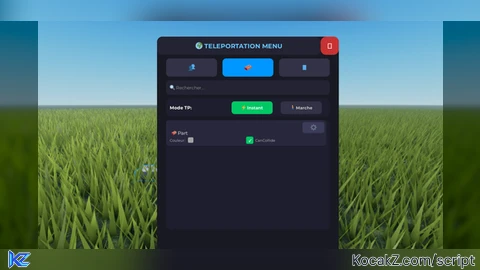
local player = game.Players.LocalPlayer
local playerGui = player:WaitForChild("PlayerGui")

local screenGui = Instance.new("ScreenGui")
screenGui.Name = "TeleportMenuGui"
screenGui.ResetOnSpawn = false
screenGui.Parent = playerGui

-- Bouton d'ouverture
local toggleButton = Instance.new("TextButton")
toggleButton.Size = UDim2.new(0, 200, 0, 50)
toggleButton.Position = UDim2.new(0.5, -100, 0, 10)
toggleButton.BackgroundColor3 = Color3.fromRGB(40, 40, 60)
toggleButton.BorderSizePixel = 0
toggleButton.Font = Enum.Font.GothamBold
toggleButton.Text = "🌍 TELEPORT MENU"
toggleButton.TextColor3 = Color3.fromRGB(255, 255, 255)
toggleButton.TextSize = 16
toggleButton.Parent = screenGui

local toggleCorner = Instance.new("UICorner")
toggleCorner.CornerRadius = UDim.new(0, 10)
toggleCorner.Parent = toggleButton

-- Frame principale
local mainFrame = Instance.new("Frame")
mainFrame.Size = UDim2.new(0, 500, 0, 650)
mainFrame.Position = UDim2.new(0.5, -250, 0.5, -325)
mainFrame.BackgroundColor3 = Color3.fromRGB(25, 25, 35)
mainFrame.BorderSizePixel = 0
mainFrame.Visible = false
mainFrame.Parent = screenGui

local mainCorner = Instance.new("UICorner")
mainCorner.CornerRadius = UDim.new(0, 15)
mainCorner.Parent = mainFrame

-- Titre
local mainTitle = Instance.new("TextLabel")
mainTitle.Size = UDim2.new(1, -50, 0, 50)
mainTitle.Position = UDim2.new(0, 0, 0, 0)
mainTitle.BackgroundColor3 = Color3.fromRGB(35, 35, 50)
mainTitle.BorderSizePixel = 0
mainTitle.Font = Enum.Font.GothamBold
mainTitle.Text = "🌍 TELEPORTATION MENU"
mainTitle.TextColor3 = Color3.fromRGB(100, 200, 255)
mainTitle.TextSize = 20
mainTitle.Parent = mainFrame

local titleCorner = Instance.new("UICorner")
titleCorner.CornerRadius = UDim.new(0, 15)
titleCorner.Parent = mainTitle

-- Bouton fermeture
local closeButton = Instance.new("TextButton")
closeButton.Size = UDim2.new(0, 50, 0, 50)
closeButton.Position = UDim2.new(1, -50, 0, 0)
closeButton.BackgroundColor3 = Color3.fromRGB(200, 50, 50)
closeButton.BorderSizePixel = 0
closeButton.Font = Enum.Font.GothamBold
closeButton.Text = "✕"
closeButton.TextColor3 = Color3.fromRGB(255, 255, 255)
closeButton.TextSize = 24
closeButton.Parent = mainFrame

local closeCorner = Instance.new("UICorner")
closeCorner.CornerRadius = UDim.new(0, 15)
closeCorner.Parent = closeButton

-- Tabs
local tabFrame = Instance.new("Frame")
tabFrame.Size = UDim2.new(0.9, 0, 0, 50)
tabFrame.Position = UDim2.new(0.05, 0, 0, 60)
tabFrame.BackgroundTransparency = 1
tabFrame.Parent = mainFrame

local playersTab = Instance.new("TextButton")
playersTab.Size = UDim2.new(0.31, 0, 1, 0)
playersTab.Position = UDim2.new(0, 0, 0, 0)
playersTab.BackgroundColor3 = Color3.fromRGB(0, 150, 255)
playersTab.BorderSizePixel = 0
playersTab.Font = Enum.Font.GothamBold
playersTab.Text = "👥"
playersTab.TextColor3 = Color3.fromRGB(255, 255, 255)
playersTab.TextSize = 20
playersTab.Parent = tabFrame

local playersTabCorner = Instance.new("UICorner")
playersTabCorner.CornerRadius = UDim.new(0, 10)
playersTabCorner.Parent = playersTab

local partsTab = Instance.new("TextButton")
partsTab.Size = UDim2.new(0.31, 0, 1, 0)
partsTab.Position = UDim2.new(0.345, 0, 0, 0)
partsTab.BackgroundColor3 = Color3.fromRGB(50, 50, 70)
partsTab.BorderSizePixel = 0
partsTab.Font = Enum.Font.GothamBold
partsTab.Text = "🧱"
partsTab.TextColor3 = Color3.fromRGB(200, 200, 200)
partsTab.TextSize = 20
partsTab.Parent = tabFrame

local partsTabCorner = Instance.new("UICorner")
partsTabCorner.CornerRadius = UDim.new(0, 10)
partsTabCorner.Parent = partsTab

local guiTab = Instance.new("TextButton")
guiTab.Size = UDim2.new(0.31, 0, 1, 0)
guiTab.Position = UDim2.new(0.69, 0, 0, 0)
guiTab.BackgroundColor3 = Color3.fromRGB(50, 50, 70)
guiTab.BorderSizePixel = 0
guiTab.Font = Enum.Font.GothamBold
guiTab.Text = "📱"
guiTab.TextColor3 = Color3.fromRGB(200, 200, 200)
guiTab.TextSize = 20
guiTab.Parent = tabFrame

local guiTabCorner = Instance.new("UICorner")
guiTabCorner.CornerRadius = UDim.new(0, 10)
guiTabCorner.Parent = guiTab

-- Barre de recherche
local searchFrame = Instance.new("Frame")
searchFrame.Size = UDim2.new(0.9, 0, 0, 40)
searchFrame.Position = UDim2.new(0.05, 0, 0, 120)
searchFrame.BackgroundColor3 = Color3.fromRGB(35, 35, 50)
searchFrame.BorderSizePixel = 0
searchFrame.Parent = mainFrame

local searchCorner = Instance.new("UICorner")
searchCorner.CornerRadius = UDim.new(0, 10)
searchCorner.Parent = searchFrame

local searchBox = Instance.new("TextBox")
searchBox.Size = UDim2.new(1, -20, 1, -10)
searchBox.Position = UDim2.new(0, 10, 0, 5)
searchBox.BackgroundTransparency = 1
searchBox.Font = Enum.Font.Gotham
searchBox.PlaceholderText = "🔍 Rechercher..."
searchBox.PlaceholderColor3 = Color3.fromRGB(150, 150, 150)
searchBox.Text = ""
searchBox.TextColor3 = Color3.fromRGB(255, 255, 255)
searchBox.TextSize = 14
searchBox.TextXAlignment = Enum.TextXAlignment.Left
searchBox.ClearTextOnFocus = false
searchBox.Parent = searchFrame

-- Frame mode de téléportation
local modeFrame = Instance.new("Frame")
modeFrame.Size = UDim2.new(0.9, 0, 0, 50)
modeFrame.Position = UDim2.new(0.05, 0, 0, 170)
modeFrame.BackgroundColor3 = Color3.fromRGB(30, 30, 45)
modeFrame.BorderSizePixel = 0
modeFrame.Parent = mainFrame

local modeCorner = Instance.new("UICorner")
modeCorner.CornerRadius = UDim.new(0, 10)
modeCorner.Parent = modeFrame

local modeLabel = Instance.new("TextLabel")
modeLabel.Size = UDim2.new(0.4, 0, 1, 0)
modeLabel.Position = UDim2.new(0, 10, 0, 0)
modeLabel.BackgroundTransparency = 1
modeLabel.Font = Enum.Font.GothamBold
modeLabel.Text = "Mode TP:"
modeLabel.TextColor3 = Color3.fromRGB(255, 255, 255)
modeLabel.TextSize = 14
modeLabel.TextXAlignment = Enum.TextXAlignment.Left
modeLabel.Parent = modeFrame

local instantButton = Instance.new("TextButton")
instantButton.Size = UDim2.new(0.25, 0, 0, 35)
instantButton.Position = UDim2.new(0.4, 0, 0.5, -17.5)
instantButton.BackgroundColor3 = Color3.fromRGB(0, 200, 100)
instantButton.BorderSizePixel = 0
instantButton.Font = Enum.Font.GothamBold
instantButton.Text = "⚡ Instant"
instantButton.TextColor3 = Color3.fromRGB(255, 255, 255)
instantButton.TextSize = 13
instantButton.Parent = modeFrame

local instantCorner = Instance.new("UICorner")
instantCorner.CornerRadius = UDim.new(0, 8)
instantCorner.Parent = instantButton

local walkButton = Instance.new("TextButton")
walkButton.Size = UDim2.new(0.25, 0, 0, 35)
walkButton.Position = UDim2.new(0.7, 0, 0.5, -17.5)
walkButton.BackgroundColor3 = Color3.fromRGB(50, 50, 70)
walkButton.BorderSizePixel = 0
walkButton.Font = Enum.Font.GothamBold
walkButton.Text = "🚶 Marche"
walkButton.TextColor3 = Color3.fromRGB(200, 200, 200)
walkButton.TextSize = 13
walkButton.Parent = modeFrame

local walkCorner = Instance.new("UICorner")
walkCorner.CornerRadius = UDim.new(0, 8)
walkCorner.Parent = walkButton

-- ScrollingFrame pour les joueurs
local playersScroll = Instance.new("ScrollingFrame")
playersScroll.Size = UDim2.new(0.9, 0, 0, 300)
playersScroll.Position = UDim2.new(0.05, 0, 0, 230)
playersScroll.BackgroundColor3 = Color3.fromRGB(30, 30, 45)
playersScroll.BorderSizePixel = 0
playersScroll.ScrollBarThickness = 8
playersScroll.CanvasSize = UDim2.new(0, 0, 0, 0)
playersScroll.Visible = true
playersScroll.Parent = mainFrame

local playersScrollCorner = Instance.new("UICorner")
playersScrollCorner.CornerRadius = UDim.new(0, 12)
playersScrollCorner.Parent = playersScroll

local playersLayout = Instance.new("UIListLayout")
playersLayout.SortOrder = Enum.SortOrder.Name
playersLayout.Padding = UDim.new(0, 5)
playersLayout.Parent = playersScroll

-- ScrollingFrame pour les parts
local partsScroll = Instance.new("ScrollingFrame")
partsScroll.Size = UDim2.new(0.9, 0, 0, 300)
partsScroll.Position = UDim2.new(0.05, 0, 0, 230)
partsScroll.BackgroundColor3 = Color3.fromRGB(30, 30, 45)
partsScroll.BorderSizePixel = 0
partsScroll.ScrollBarThickness = 8
partsScroll.CanvasSize = UDim2.new(0, 0, 0, 0)
partsScroll.Visible = false
partsScroll.Parent = mainFrame

local partsScrollCorner = Instance.new("UICorner")
partsScrollCorner.CornerRadius = UDim.new(0, 12)
partsScrollCorner.Parent = partsScroll

local partsLayout = Instance.new("UIListLayout")
partsLayout.SortOrder = Enum.SortOrder.Name
partsLayout.Padding = UDim.new(0, 5)
partsLayout.Parent = partsScroll

-- ScrollingFrame pour le PlayerGui
local guiScroll = Instance.new("ScrollingFrame")
guiScroll.Size = UDim2.new(0.9, 0, 0, 300)
guiScroll.Position = UDim2.new(0.05, 0, 0, 230)
guiScroll.BackgroundColor3 = Color3.fromRGB(30, 30, 45)
guiScroll.BorderSizePixel = 0
guiScroll.ScrollBarThickness = 8
guiScroll.CanvasSize = UDim2.new(0, 0, 0, 0)
guiScroll.Visible = false
guiScroll.Parent = mainFrame

local guiScrollCorner = Instance.new("UICorner")
guiScrollCorner.CornerRadius = UDim.new(0, 12)
guiScrollCorner.Parent = guiScroll

local guiLayout = Instance.new("UIListLayout")
guiLayout.SortOrder = Enum.SortOrder.Name
guiLayout.Padding = UDim.new(0, 5)
guiLayout.Parent = guiScroll

-- Crédit
local creditLabel = Instance.new("TextLabel")
creditLabel.Size = UDim2.new(1, 0, 0, 20)
creditLabel.Position = UDim2.new(0, 0, 1, -25)
creditLabel.BackgroundTransparency = 1
creditLabel.Font = Enum.Font.GothamBold
creditLabel.Text = "Éditeur: jecheatpaspromisje"
creditLabel.TextColor3 = Color3.fromRGB(100, 200, 255)
creditLabel.TextSize = 12
creditLabel.Parent = mainFrame

-- Bouton de refresh
local refreshButton = Instance.new("TextButton")
refreshButton.Size = UDim2.new(0.9, 0, 0, 40)
refreshButton.Position = UDim2.new(0.05, 0, 0, 590)
refreshButton.BackgroundColor3 = Color3.fromRGB(0, 180, 100)
refreshButton.BorderSizePixel = 0
refreshButton.Font = Enum.Font.GothamBold
refreshButton.Text = "🔄 ACTUALISER"
refreshButton.TextColor3 = Color3.fromRGB(255, 255, 255)
refreshButton.TextSize = 16
refreshButton.Parent = mainFrame

local refreshCorner = Instance.new("UICorner")
refreshCorner.CornerRadius = UDim.new(0, 10)
refreshCorner.Parent = refreshButton

-- Bouton STOP pour mode marche
local stopWalkButton = Instance.new("TextButton")
stopWalkButton.Size = UDim2.new(0.9, 0, 0, 40)
stopWalkButton.Position = UDim2.new(0.05, 0, 0, 590)
stopWalkButton.BackgroundColor3 = Color3.fromRGB(200, 50, 50)
stopWalkButton.BorderSizePixel = 0
stopWalkButton.Font = Enum.Font.GothamBold
stopWalkButton.Text = "⏹ ARRÊTER LA MARCHE"
stopWalkButton.TextColor3 = Color3.fromRGB(255, 255, 255)
stopWalkButton.TextSize = 16
stopWalkButton.Visible = false
stopWalkButton.Parent = mainFrame

local stopWalkCorner = Instance.new("UICorner")
stopWalkCorner.CornerRadius = UDim.new(0, 10)
stopWalkCorner.Parent = stopWalkButton

-- Fonctions
local function getCharacter()
    return player.Character or player.CharacterAdded:Wait()
end

local function teleportTo(position)
    local char = getCharacter()
    local hrp = char:FindFirstChild("HumanoidRootPart")
    if hrp then
        hrp.CFrame = position
    end
end

local function walkTeleportTo(targetPosition)
    walkTeleporting = true
    stopWalkButton.Visible = true
    refreshButton.Visible = false

    task.spawn(function()
        local char = getCharacter()
        local hrp = char:FindFirstChild("HumanoidRootPart")

        if hrp then
            local startPos = hrp.Position
            local endPos = targetPosition.Position
            local distance = (endPos - startPos).Magnitude
            local steps = math.ceil(distance / 10) -- 10 studs par step

            for i = 1, steps do
                if not walkTeleporting then break end

                local alpha = i / steps
                local newPos = startPos:Lerp(endPos, alpha)
                hrp.CFrame = CFrame.new(newPos) * CFrame.Angles(0, targetPosition.Rotation.Y, 0)
                task.wait(0.05)
            end

            -- Position finale
            if walkTeleporting then
                hrp.CFrame = targetPosition
            end
        end

        walkTeleporting = false
        stopWalkButton.Visible = false
        refreshButton.Visible = true
    end)
end

local function createPlayerButton(targetPlayer)
    local button = Instance.new("TextButton")
    button.Size = UDim2.new(1, -10, 0, 80)
    button.BackgroundColor3 = Color3.fromRGB(40, 40, 60)
    button.BorderSizePixel = 0
    button.Font = Enum.Font.Gotham
    button.TextColor3 = Color3.fromRGB(255, 255, 255)
    button.TextSize = 15
    button.TextXAlignment = Enum.TextXAlignment.Left
    button.TextYAlignment = Enum.TextYAlignment.Top
    button.TextTruncate = Enum.TextTruncate.AtEnd

    -- Texte du joueur avec stats
    local playerText = "👤 " .. targetPlayer.Name

    -- Récupérer l'équipe
    if targetPlayer.Team then
        local teamColor = targetPlayer.Team.TeamColor.Color
        button.BorderSizePixel = 3
        button.BorderColor3 = teamColor
        playerText = playerText .. "\n🎯 " .. targetPlayer.Team.Name
    end

    -- Récupérer les leaderstats
    local leaderstats = targetPlayer:FindFirstChild("leaderstats")
    if leaderstats then
        for _, stat in pairs(leaderstats:GetChildren()) do
            playerText = playerText .. "\n📊 " .. stat.Name .. ": " .. tostring(stat.Value)
        end
    end

    button.Text = playerText

    local padding = Instance.new("UIPadding")
    padding.PaddingLeft = UDim.new(0, 10)
    padding.PaddingTop = UDim.new(0, 5)
    padding.Parent = button

    local corner = Instance.new("UICorner")
    corner.CornerRadius = UDim.new(0, 8)
    corner.Parent = button

    -- Bouton spectateur
    local spectateButton = Instance.new("TextButton")
    spectateButton.Size = UDim2.new(0, 35, 0, 35)
    spectateButton.Position = UDim2.new(1, -40, 1, -40)
    spectateButton.BackgroundColor3 = Color3.fromRGB(255, 150, 0)
    spectateButton.BorderSizePixel = 0
    spectateButton.Font = Enum.Font.GothamBold
    spectateButton.Text = "👁️"
    spectateButton.TextColor3 = Color3.fromRGB(255, 255, 255)
    spectateButton.TextSize = 18
    spectateButton.Parent = button

    local spectateCorner = Instance.new("UICorner")
    spectateCorner.CornerRadius = UDim.new(0, 8)
    spectateCorner.Parent = spectateButton

    -- Téléportation normale
    button.MouseButton1Click:Connect(function()
        if targetPlayer.Character then
            local hrp = targetPlayer.Character:FindFirstChild("HumanoidRootPart")
            if hrp then
                local targetCFrame = hrp.CFrame * CFrame.new(0, 0, 3)

                if teleportMode == "instant" then
                    teleportTo(targetCFrame)
                else
                    walkTeleportTo(targetCFrame)
                end

                button.BackgroundColor3 = Color3.fromRGB(0, 200, 100)
                task.wait(0.3)
                button.BackgroundColor3 = Color3.fromRGB(40, 40, 60)
            end
        end
    end)

    -- Mode spectateur
    spectateButton.MouseButton1Click:Connect(function()
        if spectatorMode and spectatedPlayer == targetPlayer then
            -- Arrêter le spectateur
            spectatorMode = false
            spectatedPlayer = nil
            spectateButton.BackgroundColor3 = Color3.fromRGB(255, 150, 0)
            spectateButton.Text = "👁️"
        else
            -- Démarrer le spectateur
            spectatorMode = true
            spectatedPlayer = targetPlayer
            spectateButton.BackgroundColor3 = Color3.fromRGB(0, 255, 100)
            spectateButton.Text = "⏹"

            -- Boucle de suivi
            task.spawn(function()
                while spectatorMode and spectatedPlayer == targetPlayer do
                    if targetPlayer.Character then
                        local hrp = targetPlayer.Character:FindFirstChild("HumanoidRootPart")
                        if hrp then
                            local char = getCharacter()
                            local myHrp = char:FindFirstChild("HumanoidRootPart")
                            if myHrp then
                                myHrp.CFrame = hrp.CFrame * CFrame.new(0, 3, 5)
                            end
                        end
                    end
                    task.wait(0.1)
                end

                -- Reset du bouton si on sort de la boucle
                if spectatedPlayer == targetPlayer then
                    spectateButton.BackgroundColor3 = Color3.fromRGB(255, 150, 0)
                    spectateButton.Text = "👁️"
                end
            end)
        end
    end)

    button.MouseEnter:Connect(function()
        button.BackgroundColor3 = Color3.fromRGB(60, 60, 90)
    end)

    button.MouseLeave:Connect(function()
        button.BackgroundColor3 = Color3.fromRGB(40, 40, 60)
    end)

    spectateButton.MouseEnter:Connect(function()
        if spectatorMode and spectatedPlayer == targetPlayer then
            spectateButton.BackgroundColor3 = Color3.fromRGB(255, 80, 80)
        else
            spectateButton.BackgroundColor3 = Color3.fromRGB(255, 180, 50)
        end
    end)

    spectateButton.MouseLeave:Connect(function()
        if spectatorMode and spectatedPlayer == targetPlayer then
            spectateButton.BackgroundColor3 = Color3.fromRGB(0, 255, 100)
        else
            spectateButton.BackgroundColor3 = Color3.fromRGB(255, 150, 0)
        end
    end)

    button.Parent = playersScroll
end

local function createPartButton(part)
    local frame = Instance.new("Frame")
    frame.Size = UDim2.new(1, -10, 0, 70)
    frame.BackgroundColor3 = Color3.fromRGB(40, 40, 60)
    frame.BorderSizePixel = 0
    frame.Parent = partsScroll

    local frameCorner = Instance.new("UICorner")
    frameCorner.CornerRadius = UDim.new(0, 8)
    frameCorner.Parent = frame

    local button = Instance.new("TextButton")
    button.Size = UDim2.new(0.7, 0, 1, 0)
    button.Position = UDim2.new(0, 0, 0, 0)
    button.BackgroundTransparency = 1
    button.Font = Enum.Font.Gotham
    button.Text = "🧱 " .. part.Name
    button.TextColor3 = Color3.fromRGB(255, 255, 255)
    button.TextSize = 15
    button.TextXAlignment = Enum.TextXAlignment.Left
    button.TextTruncate = Enum.TextTruncate.AtEnd
    button.Parent = frame

    local padding = Instance.new("UIPadding")
    padding.PaddingLeft = UDim.new(0, 15)
    padding.Parent = button

    -- Bouton paramètres
    local settingsButton = Instance.new("TextButton")
    settingsButton.Size = UDim2.new(0, 60, 0, 30)
    settingsButton.Position = UDim2.new(1, -65, 0, 5)
    settingsButton.BackgroundColor3 = Color3.fromRGB(60, 60, 90)
    settingsButton.BorderSizePixel = 0
    settingsButton.Font = Enum.Font.GothamBold
    settingsButton.Text = "⚙️"
    settingsButton.TextColor3 = Color3.fromRGB(255, 255, 255)
    settingsButton.TextSize = 18
    settingsButton.Parent = frame

    local settingsCorner = Instance.new("UICorner")
    settingsCorner.CornerRadius = UDim.new(0, 6)
    settingsCorner.Parent = settingsButton

    -- Couleur et CanCollide
    local colorLabel = Instance.new("TextLabel")
    colorLabel.Size = UDim2.new(0.3, 0, 0, 20)
    colorLabel.Position = UDim2.new(0, 10, 1, -25)
    colorLabel.BackgroundTransparency = 1
    colorLabel.Font = Enum.Font.Gotham
    colorLabel.Text = "Couleur: "
    colorLabel.TextColor3 = Color3.fromRGB(200, 200, 200)
    colorLabel.TextSize = 11
    colorLabel.TextXAlignment = Enum.TextXAlignment.Left
    colorLabel.Parent = frame

    local colorBox = Instance.new("Frame")
    colorBox.Size = UDim2.new(0, 15, 0, 15)
    colorBox.Position = UDim2.new(0, 60, 1, -23)
    colorBox.BackgroundColor3 = part.Color
    colorBox.BorderSizePixel = 1
    colorBox.BorderColor3 = Color3.fromRGB(255, 255, 255)
    colorBox.Parent = frame

    local colorBoxCorner = Instance.new("UICorner")
    colorBoxCorner.CornerRadius = UDim.new(0, 3)
    colorBoxCorner.Parent = colorBox

    local collideCheck = Instance.new("TextButton")
    collideCheck.Size = UDim2.new(0, 20, 0, 20)
    collideCheck.Position = UDim2.new(0.5, 0, 1, -25)
    collideCheck.BackgroundColor3 = part.CanCollide and Color3.fromRGB(0, 200, 100) or Color3.fromRGB(100, 100, 100)
    collideCheck.BorderSizePixel = 0
    collideCheck.Font = Enum.Font.GothamBold
    collideCheck.Text = part.CanCollide and "✓" or ""
    collideCheck.TextColor3 = Color3.fromRGB(255, 255, 255)
    collideCheck.TextSize = 14
    collideCheck.Parent = frame

    local collideCorner = Instance.new("UICorner")
    collideCorner.CornerRadius = UDim.new(0, 4)
    collideCorner.Parent = collideCheck

    local collideLabel = Instance.new("TextLabel")
    collideLabel.Size = UDim2.new(0, 80, 0, 20)
    collideLabel.Position = UDim2.new(0.5, 25, 1, -25)
    collideLabel.BackgroundTransparency = 1
    collideLabel.Font = Enum.Font.Gotham
    collideLabel.Text = "CanCollide"
    collideLabel.TextColor3 = Color3.fromRGB(200, 200, 200)
    collideLabel.TextSize = 11
    collideLabel.TextXAlignment = Enum.TextXAlignment.Left
    collideLabel.Parent = frame

    -- Events
    button.MouseButton1Click:Connect(function()
        if part:IsA("BasePart") then
            local targetCFrame = part.CFrame * CFrame.new(0, 5, 0)

            if teleportMode == "instant" then
                teleportTo(targetCFrame)
            else
                walkTeleportTo(targetCFrame)
            end

            frame.BackgroundColor3 = Color3.fromRGB(0, 200, 100)
            task.wait(0.3)
            frame.BackgroundColor3 = Color3.fromRGB(40, 40, 60)
        end
    end)

    collideCheck.MouseButton1Click:Connect(function()
        part.CanCollide = not part.CanCollide
        collideCheck.BackgroundColor3 = part.CanCollide and Color3.fromRGB(0, 200, 100) or Color3.fromRGB(100, 100, 100)
        collideCheck.Text = part.CanCollide and "✓" or ""
    end)

    settingsButton.MouseButton1Click:Connect(function()
        -- Afficher plus d'infos (à implémenter si besoin)
        settingsButton.BackgroundColor3 = Color3.fromRGB(0, 200, 100)
        task.wait(0.2)
        settingsButton.BackgroundColor3 = Color3.fromRGB(60, 60, 90)
    end)

    button.MouseEnter:Connect(function()
        frame.BackgroundColor3 = Color3.fromRGB(60, 60, 90)
    end)

    button.MouseLeave:Connect(function()
        frame.BackgroundColor3 = Color3.fromRGB(40, 40, 60)
    end)
end

local function refreshPlayers()
    -- Nettoyer la liste
    for _, child in pairs(playersScroll:GetChildren()) do
        if child:IsA("TextButton") then
            child:Destroy()
        end
    end

    -- Trouver tous les joueurs dans le workspace (avec Humanoid)
    local playerCount = 0
    for _, obj in pairs(workspace:GetDescendants()) do
        if obj:IsA("Humanoid") and obj.Parent then
            local model = obj.Parent
            -- Vérifier que c'est bien un personnage de joueur
            local targetPlayer = game.Players:GetPlayerFromCharacter(model)
            if targetPlayer and targetPlayer ~= player then
                createPlayerButton(targetPlayer)
                playerCount = playerCount + 1
            end
        end
    end

    -- Ajuster la taille du canvas
    playersScroll.CanvasSize = UDim2.new(0, 0, 0, playerCount * 85)
end

local function refreshParts()
    -- Nettoyer la liste
    for _, child in pairs(partsScroll:GetChildren()) do
        if child:IsA("Frame") then
            child:Destroy()
        end
    end

    local searchText = searchBox.Text:lower()

    -- Trouver toutes les parts dans le workspace
    local partCount = 0
    for _, obj in pairs(workspace:GetDescendants()) do
        if obj:IsA("BasePart") and obj.Name ~= "Terrain" then
            -- Ignorer les parts des personnages
            local isPlayerPart = false
            local parent = obj.Parent
            while parent do
                if parent:FindFirstChild("Humanoid") then
                    isPlayerPart = true
                    break
                end
                parent = parent.Parent
            end

            -- Filtre de recherche
            local matchesSearch = searchText == "" or obj.Name:lower():find(searchText, 1, true)

            if not isPlayerPart and matchesSearch then
                createPartButton(obj)
                partCount = partCount + 1
            end
        end
    end

    -- Ajuster la taille du canvas
    partsScroll.CanvasSize = UDim2.new(0, 0, 0, partCount * 75)
end

local function createGuiItem(guiObject, depth)
    local frame = Instance.new("Frame")
    frame.Size = UDim2.new(1, -10, 0, 35)
    frame.BackgroundColor3 = Color3.fromRGB(40, 40, 60)
    frame.BorderSizePixel = 0
    frame.Parent = guiScroll

    local frameCorner = Instance.new("UICorner")
    frameCorner.CornerRadius = UDim.new(0, 6)
    frameCorner.Parent = frame

    local indent = depth * 20

    -- Indicateur de hiérarchie
    if depth > 0 then
        local indicator = Instance.new("TextLabel")
        indicator.Size = UDim2.new(0, indent, 1, 0)
        indicator.Position = UDim2.new(0, 0, 0, 0)
        indicator.BackgroundTransparency = 1
        indicator.Font = Enum.Font.Gotham
        indicator.Text = string.rep("  └ ", depth)
        indicator.TextColor3 = Color3.fromRGB(100, 100, 150)
        indicator.TextSize = 10
        indicator.TextXAlignment = Enum.TextXAlignment.Left
        indicator.Parent = frame
    end

    local label = Instance.new("TextLabel")
    label.Size = UDim2.new(0.6, -indent, 1, 0)
    label.Position = UDim2.new(0, indent, 0, 0)
    label.BackgroundTransparency = 1
    label.Font = Enum.Font.Gotham
    label.Text = guiObject.Name
    label.TextColor3 = Color3.fromRGB(255, 255, 255)
    label.TextSize = 12
    label.TextXAlignment = Enum.TextXAlignment.Left
    label.TextTruncate = Enum.TextTruncate.AtEnd
    label.Parent = frame

    local padding = Instance.new("UIPadding")
    padding.PaddingLeft = UDim.new(0, 5)
    padding.Parent = label

    -- Checkbox Enabled
    if guiObject:IsA("GuiObject") and guiObject:FindFirstChild("Enabled") ~= nil or guiObject.ClassName == "ScreenGui" then
        -- Ne pas permettre de désactiver notre propre GUI
        local isOurGui = guiObject == screenGui or guiObject:IsDescendantOf(screenGui)

        local enabledCheck = Instance.new("TextButton")
        enabledCheck.Size = UDim2.new(0, 20, 0, 20)
        enabledCheck.Position = UDim2.new(0.65, 0, 0.5, -10)
        local isEnabled = guiObject.Enabled
        enabledCheck.BackgroundColor3 = isEnabled and Color3.fromRGB(0, 200, 100) or Color3.fromRGB(100, 100, 100)
        enabledCheck.BorderSizePixel = 0
        enabledCheck.Font = Enum.Font.GothamBold
        enabledCheck.Text = isEnabled and "✓" or ""
        enabledCheck.TextColor3 = Color3.fromRGB(255, 255, 255)
        enabledCheck.TextSize = 12
        enabledCheck.Parent = frame

        local enabledCorner = Instance.new("UICorner")
        enabledCorner.CornerRadius = UDim.new(0, 4)
        enabledCorner.Parent = enabledCheck

        local enabledLabel = Instance.new("TextLabel")
        enabledLabel.Size = UDim2.new(0, 30, 1, 0)
        enabledLabel.Position = UDim2.new(0.65, -35, 0, 0)
        enabledLabel.BackgroundTransparency = 1
        enabledLabel.Font = Enum.Font.Gotham
        enabledLabel.Text = "E"
        enabledLabel.TextColor3 = Color3.fromRGB(150, 150, 150)
        enabledLabel.TextSize = 10
        enabledLabel.Parent = frame

        if not isOurGui then
            enabledCheck.MouseButton1Click:Connect(function()
                guiObject.Enabled = not guiObject.Enabled
                enabledCheck.BackgroundColor3 = guiObject.Enabled and Color3.fromRGB(0, 200, 100) or Color3.fromRGB(100, 100, 100)
                enabledCheck.Text = guiObject.Enabled and "✓" or ""
            end)
        else
            enabledCheck.BackgroundColor3 = Color3.fromRGB(60, 60, 60)
        end
    end

    -- Checkbox Visible
    if guiObject:IsA("GuiObject") then
        -- Ne pas permettre de cacher notre propre GUI
        local isOurGui = guiObject == screenGui or guiObject:IsDescendantOf(screenGui)

        local visibleCheck = Instance.new("TextButton")
        visibleCheck.Size = UDim2.new(0, 20, 0, 20)
        visibleCheck.Position = UDim2.new(0.85, 0, 0.5, -10)
        local isVisible = guiObject.Visible
        visibleCheck.BackgroundColor3 = isVisible and Color3.fromRGB(0, 200, 100) or Color3.fromRGB(100, 100, 100)
        visibleCheck.BorderSizePixel = 0
        visibleCheck.Font = Enum.Font.GothamBold
        visibleCheck.Text = isVisible and "✓" or ""
        visibleCheck.TextColor3 = Color3.fromRGB(255, 255, 255)
        visibleCheck.TextSize = 12
        visibleCheck.Parent = frame

        local visibleCorner = Instance.new("UICorner")
        visibleCorner.CornerRadius = UDim.new(0, 4)
        visibleCorner.Parent = visibleCheck

        local visibleLabel = Instance.new("TextLabel")
        visibleLabel.Size = UDim2.new(0, 30, 1, 0)
        visibleLabel.Position = UDim2.new(0.85, -35, 0, 0)
        visibleLabel.BackgroundTransparency = 1
        visibleLabel.Font = Enum.Font.Gotham
        visibleLabel.Text = "V"
        visibleLabel.TextColor3 = Color3.fromRGB(150, 150, 150)
        visibleLabel.TextSize = 10
        visibleLabel.Parent = frame

        if not isOurGui then
            visibleCheck.MouseButton1Click:Connect(function()
                guiObject.Visible = not guiObject.Visible
                visibleCheck.BackgroundColor3 = guiObject.Visible and Color3.fromRGB(0, 200, 100) or Color3.fromRGB(100, 100, 100)
                visibleCheck.Text = guiObject.Visible and "✓" or ""
            end)
        else
            visibleCheck.BackgroundColor3 = Color3.fromRGB(60, 60, 60)
        end
    end
end

local function refreshGui()
    -- Nettoyer la liste
    for _, child in pairs(guiScroll:GetChildren()) do
        if child:IsA("Frame") then
            child:Destroy()
        end
    end

    local itemCount = 0

    -- Fonction récursive pour parcourir la hiérarchie
    local function addGuiHierarchy(guiObject, depth)
        createGuiItem(guiObject, depth)
        itemCount = itemCount + 1

        -- Parcourir les enfants directs uniquement
        for _, child in pairs(guiObject:GetChildren()) do
            if child:IsA("GuiObject") or child:IsA("UIListLayout") or child:IsA("UIPadding") or child:IsA("UICorner") then
                addGuiHierarchy(child, depth + 1)
            end
        end
    end

    -- Parcourir PlayerGui (sauf notre propre GUI)
    for _, gui in pairs(playerGui:GetChildren()) do
        if (gui:IsA("ScreenGui") or gui:IsA("GuiBase2d")) and gui ~= screenGui then
            addGuiHierarchy(gui, 0)
        end
    end

    guiScroll.CanvasSize = UDim2.new(0, 0, 0, itemCount * 40)
end

-- Events des tabs
playersTab.MouseButton1Click:Connect(function()
    playersScroll.Visible = true
    partsScroll.Visible = false
    guiScroll.Visible = false
    searchFrame.Visible = false
    modeFrame.Visible = true
    playersTab.BackgroundColor3 = Color3.fromRGB(0, 150, 255)
    playersTab.TextColor3 = Color3.fromRGB(255, 255, 255)
    partsTab.BackgroundColor3 = Color3.fromRGB(50, 50, 70)
    partsTab.TextColor3 = Color3.fromRGB(200, 200, 200)
    guiTab.BackgroundColor3 = Color3.fromRGB(50, 50, 70)
    guiTab.TextColor3 = Color3.fromRGB(200, 200, 200)
    refreshPlayers()
end)

partsTab.MouseButton1Click:Connect(function()
    playersScroll.Visible = false
    partsScroll.Visible = true
    guiScroll.Visible = false
    searchFrame.Visible = true
    modeFrame.Visible = true
    partsTab.BackgroundColor3 = Color3.fromRGB(0, 150, 255)
    partsTab.TextColor3 = Color3.fromRGB(255, 255, 255)
    playersTab.BackgroundColor3 = Color3.fromRGB(50, 50, 70)
    playersTab.TextColor3 = Color3.fromRGB(200, 200, 200)
    guiTab.BackgroundColor3 = Color3.fromRGB(50, 50, 70)
    guiTab.TextColor3 = Color3.fromRGB(200, 200, 200)
    refreshParts()
end)

guiTab.MouseButton1Click:Connect(function()
    playersScroll.Visible = false
    partsScroll.Visible = false
    guiScroll.Visible = true
    searchFrame.Visible = false
    modeFrame.Visible = false
    guiTab.BackgroundColor3 = Color3.fromRGB(0, 150, 255)
    guiTab.TextColor3 = Color3.fromRGB(255, 255, 255)
    playersTab.BackgroundColor3 = Color3.fromRGB(50, 50, 70)
    playersTab.TextColor3 = Color3.fromRGB(200, 200, 200)
    partsTab.BackgroundColor3 = Color3.fromRGB(50, 50, 70)
    partsTab.TextColor3 = Color3.fromRGB(200, 200, 200)
    refreshGui()
end)

-- Mode de téléportation
instantButton.MouseButton1Click:Connect(function()
    teleportMode = "instant"
    instantButton.BackgroundColor3 = Color3.fromRGB(0, 200, 100)
    instantButton.TextColor3 = Color3.fromRGB(255, 255, 255)
    walkButton.BackgroundColor3 = Color3.fromRGB(50, 50, 70)
    walkButton.TextColor3 = Color3.fromRGB(200, 200, 200)
end)

walkButton.MouseButton1Click:Connect(function()
    teleportMode = "walk"
    walkButton.BackgroundColor3 = Color3.fromRGB(0, 200, 100)
    walkButton.TextColor3 = Color3.fromRGB(255, 255, 255)
    instantButton.BackgroundColor3 = Color3.fromRGB(50, 50, 70)
    instantButton.TextColor3 = Color3.fromRGB(200, 200, 200)
end)

-- Arrêter la marche
stopWalkButton.MouseButton1Click:Connect(function()
    walkTeleporting = false
    stopWalkButton.Visible = false
    refreshButton.Visible = true
end)

-- Recherche
searchBox:GetPropertyChangedSignal("Text"):Connect(function()
    if partsScroll.Visible then
        refreshParts()
    end
end)

-- Bouton refresh
refreshButton.MouseButton1Click:Connect(function()
    if playersScroll.Visible then
        refreshPlayers()
    elseif partsScroll.Visible then
        refreshParts()
    elseif guiScroll.Visible then
        refreshGui()
    end
    refreshButton.BackgroundColor3 = Color3.fromRGB(0, 255, 150)
    task.wait(0.2)
    refreshButton.BackgroundColor3 = Color3.fromRGB(0, 180, 100)
end)

-- Toggle menu
toggleButton.MouseButton1Click:Connect(function()
    mainFrame.Visible = true
    toggleButton.Visible = false
    refreshPlayers()
end)

closeButton.MouseButton1Click:Connect(function()
    mainFrame.Visible = false
    toggleButton.Visible = true
end)

-- Effets hover
toggleButton.MouseEnter:Connect(function()
    toggleButton.BackgroundColor3 = Color3.fromRGB(60, 60, 90)
end)

toggleButton.MouseLeave:Connect(function()
    toggleButton.BackgroundColor3 = Color3.fromRGB(40, 40, 60)
end)

closeButton.MouseEnter:Connect(function()
    closeButton.BackgroundColor3 = Color3.fromRGB(255, 70, 70)
end)

closeButton.MouseLeave:Connect(function()
    closeButton.BackgroundColor3 = Color3.fromRGB(200, 50, 50)
end)

refreshButton.MouseEnter:Connect(function()
    refreshButton.BackgroundColor3 = Color3.fromRGB(0, 220, 120)
end)

refreshButton.MouseLeave:Connect(function()
    refreshButton.BackgroundColor3 = Color3.fromRGB(0, 180, 100)
end)

stopWalkButton.MouseEnter:Connect(function()
    stopWalkButton.BackgroundColor3 = Color3.fromRGB(255, 80, 80)
end)

stopWalkButton.MouseLeave:Connect(function()
    stopWalkButton.BackgroundColor3 = Color3.fromRGB(200, 50, 50)
end)

-- Charger les joueurs au démarrage
refreshPlayers()
searchFrame.Visible = falseNo comments yet for this script.


