

Key RequiredUniversal
--[[
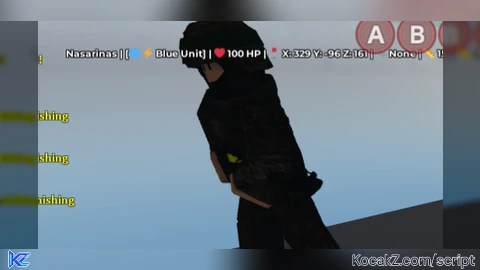
    Universal Player Info ESP Script for Roblox
    Works with any injector (Synapse X, Krnl, ScriptWare, etc.)
    Displays detailed information above all players' heads
    Includes custom team/group support
]]

local Players = game:GetService("Players")
local RunService = game:GetService("RunService")
local Camera = workspace.CurrentCamera
local LocalPlayer = Players.LocalPlayer

-- Configuration
local Settings = {
    Enabled = true,
    ShowName = true,
    ShowPosition = true,
    ShowTool = true,
    ShowHealth = true,
    ShowDistance = true,
    ShowTeam = true, -- NEW: Show team/group
    TextSize = 14,
    Font = Enum.Font.GothamBold,
    TextColor = Color3.fromRGB(255, 255, 255),
    OutlineColor = Color3.fromRGB(0, 0, 0),
    UpdateRate = 0.1,

    -- Team color settings
    UseTeamColors = true, -- Color text based on team
    DefaultTeamColor = Color3.fromRGB(255, 255, 255)
}

-- Store GUI elements
local PlayerLabels = {}

-- Custom team detection system
local CustomTeams = {}

-- Function to detect player's team/group (supports both native and custom systems)
local function GetPlayerTeam(player)
    -- Check native Roblox team first
    if player.Team then
        return {
            Name = player.Team.Name,
            Color = player.Team.TeamColor and player.Team.TeamColor.Color or Settings.DefaultTeamColor,
            Type = "Native"
        }
    end

    -- Check for common group systems
    local character = player.Character
    if character then
        -- Check for group value in character
        local groupValue = character:FindFirstChild("Group") or character:FindFirstChild("Team")
        if groupValue and groupValue:IsA("StringValue") then
            return {
                Name = groupValue.Value,
                Color = Settings.DefaultTeamColor,
                Type = "Custom"
            }
        end

        -- Check for number-based team values
        local teamValue = character:FindFirstChild("TeamNumber") or character:FindFirstChild("GroupId")
        if teamValue and teamValue:IsA("NumberValue") then
            local teamNum = teamValue.Value
            -- Try to get custom team name from our registry
            if CustomTeams[teamNum] then
                return {
                    Name = CustomTeams[teamNum].Name,
                    Color = CustomTeams[teamNum].Color,
                    Type = "Custom"
                }
            else
                return {
                    Name = "Team " .. teamNum,
                    Color = Settings.DefaultTeamColor,
                    Type = "Custom"
                }
            end
        end
    end

    -- Check for leaderstats team
    local leaderstats = player:FindFirstChild("leaderstats")
    if leaderstats then
        local teamStat = leaderstats:FindFirstChild("Team") or leaderstats:FindFirstChild("Group")
        if teamStat and (teamStat:IsA("StringValue") or teamStat:IsA("NumberValue")) then
            if teamStat:IsA("StringValue") then
                return {
                    Name = teamStat.Value,
                    Color = Settings.DefaultTeamColor,
                    Type = "Custom"
                }
            else
                return {
                    Name = "Team " .. teamStat.Value,
                    Color = Settings.DefaultTeamColor,
                    Type = "Custom"
                }
            end
        end
    end

    -- Check for custom group system via attributes
    local success, groupName = pcall(function()
        return player:GetAttribute("Group") or player:GetAttribute("Team") or player:GetAttribute("Faction")
    end)

    if success and groupName then
        return {
            Name = groupName,
            Color = Settings.DefaultTeamColor,
            Type = "Custom"
        }
    end

    return nil -- No team found
end

-- Function to register custom teams (for game developers to use)
local function RegisterCustomTeam(teamId, teamName, teamColor)
    CustomTeams[teamId] = {
        Name = teamName,
        Color = teamColor or Settings.DefaultTeamColor
    }
end

-- Example custom team registration (uncomment and modify for your game)
--[[
RegisterCustomTeam(1, "Red Team", Color3.fromRGB(255, 50, 50))
RegisterCustomTeam(2, "Blue Team", Color3.fromRGB(50, 50, 255))
RegisterCustomTeam(3, "Green Team", Color3.fromRGB(50, 255, 50))
RegisterCustomTeam(4, "Yellow Team", Color3.fromRGB(255, 255, 50))
]]

-- Function to get team color for text
local function GetTeamColor(player)
    if not Settings.UseTeamColors then
        return Settings.TextColor
    end

    local team = GetPlayerTeam(player)
    if team then
        return team.Color
    end

    return Settings.TextColor
end

-- Function to format team name with emoji
local function FormatTeamName(team)
    if not team then return "" end

    local teamEmojis = {
        ["Red"] = "🔴",
        ["Blue"] = "🔵",
        ["Green"] = "🟢",
        ["Yellow"] = "🟡",
        ["Purple"] = "🟣",
        ["Orange"] = "🟠",
        ["Pink"] = "💗",
        ["Brown"] = "🟤"
    }

    local teamName = team.Name
    local emoji = ""

    -- Add emoji for common team names
    for name, icon in pairs(teamEmojis) do
        if teamName:find(name, 1, true) then
            emoji = icon .. " "
            break
        end
    end

    -- Add custom indicator based on team type
    if team.Type == "Native" then
        return emoji .. "🏆 " .. teamName
    elseif team.Type == "Custom" then
        return emoji .. "⚡ " .. teamName
    else
        return emoji .. teamName
    end
end

-- Function to get current tool in hand
local function GetCurrentTool(player)
    local character = player.Character
    if not character then return "None" end

    local tool = character:FindFirstChildOfClass("Tool")
    if tool then
        return tool.Name
    end

    local hopperBin = character:FindFirstChildOfClass("HopperBin")
    if hopperBin then
        return hopperBin.Name
    end

    return "None"
end

-- Function to get player health
local function GetPlayerHealth(player)
    local character = player.Character
    if not character then return 0 end

    local humanoid = character:FindFirstChildOfClass("Humanoid")
    if humanoid then
        return math.floor(humanoid.Health)
    end

    return 0
end

-- Function to format position
local function FormatPosition(position)
    return string.format("X: %.0f Y: %.0f Z: %.0f", position.X, position.Y, position.Z)
end

-- Function to calculate distance
local function GetDistance(position)
    local cameraPos = Camera.CFrame.Position
    return math.floor((position - cameraPos).Magnitude)
end

-- Function to create or update label for a player
local function UpdatePlayerLabel(player)
    if not Settings.Enabled then return end

    -- Skip local player
    if player == LocalPlayer then return end

    local character = player.Character
    if not character or not character:FindFirstChild("HumanoidRootPart") then
        -- Remove label if player doesn't have character
        if PlayerLabels[player] then
            PlayerLabels[player]:Destroy()
            PlayerLabels[player] = nil
        end
        return
    end

    -- Get player info
    local name = player.Name
    local position = character.HumanoidRootPart.Position
    local tool = GetCurrentTool(player)
    local health = GetPlayerHealth(player)
    local distance = GetDistance(position)
    local formattedPos = FormatPosition(position)
    local team = GetPlayerTeam(player)

    -- Build info text
    local infoText = {}

    if Settings.ShowName then
        table.insert(infoText, name)
    end

    if Settings.ShowTeam and team then
        local teamFormatted = FormatTeamName(team)
        table.insert(infoText, "[" .. teamFormatted .. "]")
    end

    if Settings.ShowHealth then
        table.insert(infoText, string.format("❤️ %d HP", health))
    end

    if Settings.ShowPosition then
        table.insert(infoText, string.format("📍 %s", formattedPos))
    end

    if Settings.ShowTool then
        table.insert(infoText, string.format("🔧 %s", tool))
    end

    if Settings.ShowDistance then
        table.insert(infoText, string.format("📏 %d studs", distance))
    end

    local fullText = table.concat(infoText, " | ")

    -- Determine text color based on team
    local textColor = GetTeamColor(player)

    -- Create or update BillboardGui
    if not PlayerLabels[player] then
        local billboardGui = Instance.new("BillboardGui")
        billboardGui.Adornee = character:FindFirstChild("HumanoidRootPart")
        billboardGui.Size = UDim2.new(0, 500, 0, 60)
        billboardGui.StudsOffset = Vector3.new(0, 2.5, 0)
        billboardGui.AlwaysOnTop = true
        billboardGui.ZIndexBehavior = Enum.ZIndexBehavior.Sibling

        local textLabel = Instance.new("TextLabel")
        textLabel.Size = UDim2.new(1, 0, 1, 0)
        textLabel.BackgroundTransparency = 1
        textLabel.TextScaled = false
        textLabel.TextSize = Settings.TextSize
        textLabel.Font = Settings.Font
        textLabel.TextColor3 = textColor
        textLabel.TextStrokeTransparency = 0
        textLabel.TextStrokeColor3 = Settings.OutlineColor
        textLabel.Text = fullText
        textLabel.Parent = billboardGui

        billboardGui.Parent = character

        PlayerLabels[player] = {
            Gui = billboardGui,
            Label = textLabel,
            CurrentTeam = team
        }
    else
        -- Update existing label
        PlayerLabels[player].Label.Text = fullText
        PlayerLabels[player].Label.TextColor3 = textColor

        -- Update team info if changed
        if team and (not PlayerLabels[player].CurrentTeam or PlayerLabels[player].CurrentTeam.Name ~= team.Name) then
            PlayerLabels[player].CurrentTeam = team
        end
    end
end

-- Function to remove all labels
local function ClearAllLabels()
    for player, data in pairs(PlayerLabels) do
        if data and data.Gui then
            data.Gui:Destroy()
        end
    end
    PlayerLabels = {}
end

-- Function to update all players
local function UpdateAllPlayers()
    if not Settings.Enabled then
        ClearAllLabels()
        return
    end

    for _, player in ipairs(Players:GetPlayers()) do
        UpdatePlayerLabel(player)
    end
end

-- Handle player added
local function OnPlayerAdded(player)
    player.CharacterAdded:Connect(function()
        task.wait(0.5) -- Wait for character to fully load
        UpdatePlayerLabel(player)
    end)

    player.CharacterRemoving:Connect(function()
        if PlayerLabels[player] then
            PlayerLabels[player].Gui:Destroy()
            PlayerLabels[player] = nil
        end
    end)

    -- Listen for team changes (for native Roblox teams)
    if player.Team then
        local teamConnection
        teamConnection = player:GetPropertyChangedSignal("Team"):Connect(function()
            UpdatePlayerLabel(player)
        end)

        -- Store connection for cleanup
        if not player._teamConnection then
            player._teamConnection = teamConnection
        end
    end
end

-- Handle player removed
local function OnPlayerRemoved(player)
    if PlayerLabels[player] then
        PlayerLabels[player].Gui:Destroy()
        PlayerLabels[player] = nil
    end
end

-- Setup GUI controls (toggle with Insert key)
local function SetupControls()
    local userInputService = game:GetService("UserInputService")

    userInputService.InputBegan:Connect(function(input, gameProcessed)
        if gameProcessed then return end

        if input.KeyCode == Enum.KeyCode.Insert then
            Settings.Enabled = not Settings.Enabled
            if Settings.Enabled then
                UpdateAllPlayers()
                print("[ESP] Enabled")
            else
                ClearAllLabels()
                print("[ESP] Disabled")
            end
        end

        -- Add more controls
        if input.KeyCode == Enum.KeyCode.RightControl then
            -- Toggle team colors
            Settings.UseTeamColors = not Settings.UseTeamColors
            print("[ESP] Team colors: " .. tostring(Settings.UseTeamColors))
            UpdateAllPlayers()
        end
    end)
end

-- Main loop for continuous updates
local function StartUpdateLoop()
    task.spawn(function()
        while true do
            if Settings.Enabled then
                UpdateAllPlayers()
            end
            task.wait(Settings.UpdateRate)
        end
    end)
end

-- Initialize ESP
local function Initialize()
    -- Clear any existing labels
    ClearAllLabels()

    -- Setup players
    for _, player in ipairs(Players:GetPlayers()) do
        OnPlayerAdded(player)
    end

    -- Connect events
    Players.PlayerAdded:Connect(OnPlayerAdded)
    Players.PlayerRemoving:Connect(OnPlayerRemoved)

    -- Setup controls
    SetupControls()

    -- Start update loop
    StartUpdateLoop()

    print("[ESP] Script loaded successfully")
    print("[ESP] Press INSERT to toggle ESP on/off")
    print("[ESP] Press RIGHT CONTROL to toggle team colors")
    print("[ESP] Team detection supports native and custom systems")

    -- Export functions for custom team registration
    _G.RegisterCustomTeam = RegisterCustomTeam
    _G.ESP_Settings = Settings
end

-- Run the script
Initialize()


thanks