
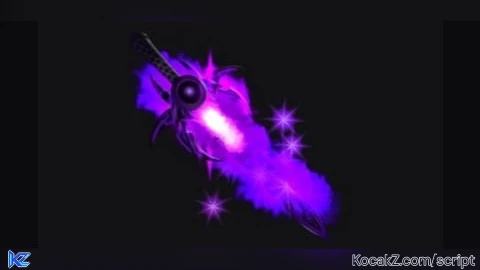
-- Rayfield UI - Filtered Universal Tool Loader with Runic Greatsword
local success, Rayfield = pcall(function()
    return loadstring(game:HttpGet('https://sirius.menu/rayfield'))()
end)

if not success or not Rayfield then
    pcall(function()
        Rayfield = loadstring(game:HttpGet('https://raw.githubusercontent.com/shlexware/Rayfield/main/source'))()
    end)
end

local Players = game:GetService("Players")
local LocalPlayer = Players.LocalPlayer

local SWORD_ASSETS = {
    ["Runic Greatsword"] = 139273228493616,
    ["Azure Sword"] = 10288498712,
    ["Sword Coil"] = 124393086297115,
    ["Overseer's Sword"] = 52045984,
    ["Rainbow Star Sword"] = 8287295251,
    ["Bloodlust Demon Sword"] = 256836794,
    ["Sword Mesh"] = 10001892703,
    ["Error Sword"] = 12151969733,
    ["Crowbar Weapon"] = 118433966457105,
    ["Water Sword"] = 9156439687,
    ["Classic Delete Tool"] = 3205241096,
    ["Trowel"] = 9016251,
    ["RB Battles Green Sword"] = 12155036417,
    ["Sword of Power"] = 6511965658
}

local selectedSwordName = "Runic Greatsword"
local isOn = false
local currentTool = nil

if not Rayfield then return end

local Window = Rayfield:CreateWindow({
   Name = "Ultimate Sword Arsenal - Updated",
   LoadingTitle = "Delta Executor",
   LoadingSubtitle = "Runic Greatsword Added",
   ConfigurationSaving = { Enabled = false },
   Discord = { Enabled = false },
   KeySystem = false
})

local Tab = Window:CreateTab("Main", 4483362458)

Tab:CreateDropdown({
   Name = "Select Sword",
   Options = {
      "Runic Greatsword",
      "Azure Sword",
      "Sword Coil",
      "Overseer's Sword",
      "Rainbow Star Sword",
      "Bloodlust Demon Sword",
      "Sword Mesh",
      "Error Sword",
      "Crowbar Weapon",
      "Water Sword",
      "Classic Delete Tool",
      "Trowel",
      "RB Battles Green Sword",
      "Sword of Power"
   },
   CurrentOption = {"Runic Greatsword"},
   MultipleOptions = false,
   Flag = "SwordDropdown",
   Callback = function(Option)
      selectedSwordName = type(Option) == "table" and Option[1] or Option
      if isOn then
         giveSwordTool()
      end
   end,
})

Tab:CreateToggle({
   Name = "ON/OFF",
   CurrentValue = false,
   Flag = "OnOffToggle",
   Callback = function(Value)
      isOn = Value
      if Value then
         giveSwordTool()
      else
         removeSword()
      end
   end,
})

Tab:CreateButton({
   Name = "Lunge Dash",
   Callback = function()
      local char = LocalPlayer.Character
      if not char then return end
      local humanoid = char:FindFirstChildOfClass("Humanoid")
      local animator = humanoid and humanoid:FindFirstChildOfClass("Animator")
      local rootPart = char:FindFirstChild("HumanoidRootPart")
      if not humanoid or not rootPart then return end

      pcall(function()
         local anim = Instance.new("Animation")
         anim.AnimationId = "rbxassetid://522638767"

         local track = animator and animator:LoadAnimation(anim) or humanoid:LoadAnimation(anim)
         track.Priority = Enum.AnimationPriority.Action
         track:Play()

         local dashBoost = Instance.new("BodyVelocity")
         dashBoost.MaxForce = Vector3.new(30000, 0, 30000)
         dashBoost.Velocity = rootPart.CFrame.LookVector * 50
         dashBoost.Parent = rootPart
         task.delay(0.25, function()
            if dashBoost then dashBoost:Destroy() end
         end)
      end)
   end,
})

function removeSword()
    if currentTool then
        currentTool:Destroy()
        currentTool = nil
    end
end

function giveSwordTool()
    removeSword()

    local character = LocalPlayer.Character
    local backpack = LocalPlayer:FindFirstChild("Backpack")
    if not character or not backpack then return end

    local humanoid = character:FindFirstChildOfClass("Humanoid")
    if not humanoid then return end

    local assetId = SWORD_ASSETS[selectedSwordName]
    if not assetId then return end

    local success, objects = pcall(function()
        return game:GetObjects("rbxassetid://" .. tostring(assetId))
    end)

    if not success or not objects or #objects == 0 then
        pcall(function()
            objects = game:GetObjects("https://assetdelivery.roblox.com/v1/asset?id=" .. tostring(assetId))
        end)
    end

    local tool
    if success and objects and #objects > 0 then
        local rawObject = objects[1]
        if rawObject:IsA("Tool") then
            tool = rawObject
        else
            tool = Instance.new("Tool")
            tool.Name = selectedSwordName
            rawObject.Parent = tool
        end
    else
        tool = Instance.new("Tool")
        tool.Name = selectedSwordName
        local handle = Instance.new("Part")
        handle.Name = "Handle"
        handle.Size = Vector3.new(0.6, 4, 0.6)
        handle.Parent = tool
    end

    local handle = tool:FindFirstChild("Handle") or tool:FindFirstChildWhichIsA("BasePart", true)
    if not handle then
        handle = Instance.new("Part")
        handle.Name = "Handle"
        handle.Size = Vector3.new(0.6, 4, 0.6)
        handle.Parent = tool
    else
        handle.Name = "Handle"
    end

    for _, part in ipairs(tool:GetDescendants()) do
        if part:IsA("BasePart") then
            part.CanCollide = false
        end
    end

    currentTool = tool
    tool.Parent = backpack

    task.wait(0.1)
    if tool.Parent == backpack and humanoid then
        humanoid:EquipTool(tool)
    end
end

LocalPlayer.CharacterAdded:Connect(function(char)
    task.wait(1.5)
    if isOn then
        giveSwordTool()
    end
end)

Rayfield:Notify({
   Title = "Arsenal Ready",
   Content = "Added Runic Greatsword to the dropdown list!",
   Duration = 3,
   Image = 4483362458,
})
How to Execute Universal Script – Sword
Step 1: Copy Code: Click the Copy Code button in the viewer above to grab the clean Lua loadstring.
Step 2: Launch Executor: Open a compatible, unpatched executor. If you need one, check our Roblox Executors Directory.
Step 3: Join Experience: Launch Roblox and join Universal Script.
Step 4: Attach & Run: Attach/inject your executor into the Roblox process, paste the code into the script tab, and press Execute.
Features & Information
Community Comments (0)
No comments yet for this script.
Frequently Asked Questions
How do I execute Universal Script – Sword in Roblox?
To run Universal Script – Sword, copy the Lua loadstring from the code viewer above, launch Roblox and join Universal Script, attach a working executor (such as Potassium, Solara, or Delta from our Executors directory), paste the code into your executor console, and click Execute.
Is Universal Script – Sword keyless or does it require an access key?
Universal Script – Sword requires an access key. You can retrieve the official key directly using the Get Script Key link provided above.
Is Universal Script – Sword currently safe and working?
This script is active and operational. Always test scripts using a secondary (alt) Roblox account to safeguard your main profile against anti-cheat bans.


![Ez Hub [Open Source] [150+ games] - Verified script for Universal Script](https://media.kocakz.me/b74a9ac15370ba766b2fa9531f17c9dad2c0befb2b951693ae723e4c7d2c3fb6.webp)



![[KEYLESS] Moondiety Script | 20+ supported Games - Verified script for Universal Script](https://media.kocakz.me/6834c33a36c9fbe66afae4c6754c2b80386ce636b2f972464a95866f4b6a42eb.webp)



