


KeylessUniversal
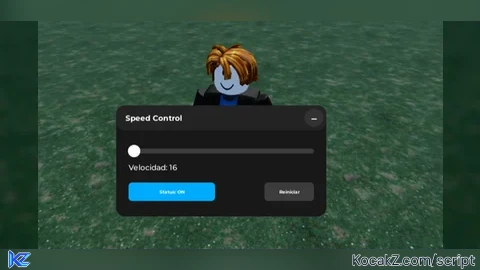
-- Speed Control UI - MOBILE & PC COMPATIBLE
-- LocalScript

local Players = game:GetService("Players")
local UIS = game:GetService("UserInputService")
local TweenService = game:GetService("TweenService")
local RunService = game:GetService("RunService")

local player = Players.LocalPlayer
local playerGui = player:WaitForChild("PlayerGui")

-- ============== CONFIG ==============
local WIDTH, HEIGHT = 340, 180
local COLLAPSED_WIDTH, COLLAPSED_HEIGHT = 180, 40

local MIN_SPEED = 1
local MAX_SPEED = 500
local NORMAL_SPEED = 16

-- ============== STATE ==============
local targetSpeed = NORMAL_SPEED
local savedSpeed = NORMAL_SPEED
local scriptEnabled = false
local minimized = true
local humanoid
local heartbeatConnection
local detectedSpeeds = {} -- Detectar múltiples velocidades
local detectionActive = true

-- ============== CLEAN OLD UI ==============
local old = playerGui:FindFirstChild("SpeedUI")
if old then old:Destroy() end

-- ============== GUI ROOT ==============
local gui = Instance.new("ScreenGui")
gui.Name = "SpeedUI"
gui.ResetOnSpawn = false
gui.Parent = playerGui

local frame = Instance.new("Frame")
frame.Size = UDim2.fromOffset(COLLAPSED_WIDTH, COLLAPSED_HEIGHT)
frame.Position = UDim2.fromScale(0.5, 0.4)
frame.AnchorPoint = Vector2.new(0.5, 0.5)
frame.BackgroundColor3 = Color3.fromRGB(24, 24, 24)
frame.BorderSizePixel = 0
frame.Active = true
frame.Parent = gui
Instance.new("UICorner", frame).CornerRadius = UDim.new(0, 14)

-- ============== TOP BAR (DRAGGABLE AREA) ==============
local topBar = Instance.new("Frame")
topBar.Size = UDim2.new(1, 0, 0, 40)
topBar.BackgroundColor3 = Color3.fromRGB(35, 35, 35)
topBar.BorderSizePixel = 0
topBar.Parent = frame
Instance.new("UICorner", topBar).CornerRadius = UDim.new(0, 14)

local title = Instance.new("TextLabel")
title.Text = "Speed Control"
title.Font = Enum.Font.GothamBold
title.TextSize = 16
title.TextColor3 = Color3.fromRGB(255, 255, 255)
title.BackgroundTransparency = 1
title.Size = UDim2.new(1, -60, 1, 0)
title.Position = UDim2.fromOffset(15, 0)
title.TextXAlignment = Enum.TextXAlignment.Left
title.Parent = topBar

local minimizeBtn = Instance.new("TextButton")
minimizeBtn.Size = UDim2.fromOffset(30, 30)
minimizeBtn.Position = UDim2.new(1, -35, 0.5, -15)
minimizeBtn.Text = "+"
minimizeBtn.Font = Enum.Font.GothamBold
minimizeBtn.TextSize = 24
minimizeBtn.BackgroundColor3 = Color3.fromRGB(50, 50, 50)
minimizeBtn.TextColor3 = Color3.fromRGB(255, 255, 255)
minimizeBtn.BorderSizePixel = 0
minimizeBtn.Parent = topBar
Instance.new("UICorner", minimizeBtn).CornerRadius = UDim.new(1, 0)

-- ============== CONTENT ==============
local content = Instance.new("Frame")
content.Position = UDim2.fromOffset(0, 40)
content.Size = UDim2.new(1, 0, 1, -40)
content.BackgroundTransparency = 1
content.ClipsDescendants = true
content.Visible = false
content.Parent = frame

-- Slider
local sliderBack = Instance.new("Frame")
sliderBack.Size = UDim2.new(1, -40, 0, 8)
sliderBack.Position = UDim2.fromOffset(20, 30)
sliderBack.BackgroundColor3 = Color3.fromRGB(60, 60, 60)
sliderBack.Parent = content
Instance.new("UICorner", sliderBack).CornerRadius = UDim.new(1, 0)

local sliderFill = Instance.new("Frame")
sliderFill.Size = UDim2.new(0, 0, 1, 0)
sliderFill.BackgroundColor3 = Color3.fromRGB(0, 170, 255)
sliderFill.Parent = sliderBack
Instance.new("UICorner", sliderFill).CornerRadius = UDim.new(1, 0)

local knob = Instance.new("Frame")
knob.Size = UDim2.fromOffset(20, 20)
knob.Position = UDim2.new(0, -10, 0.5, -10)
knob.BackgroundColor3 = Color3.fromRGB(255, 255, 255)
knob.Parent = sliderBack
Instance.new("UICorner", knob).CornerRadius = UDim.new(1, 0)

local valueLabel = Instance.new("TextLabel")
valueLabel.Position = UDim2.fromOffset(20, 50)
valueLabel.Size = UDim2.new(1, -40, 0, 20)
valueLabel.BackgroundTransparency = 1
valueLabel.Text = "Speed: 16"
valueLabel.Font = Enum.Font.GothamBold
valueLabel.TextSize = 16
valueLabel.TextColor3 = Color3.fromRGB(255, 255, 255)
valueLabel.TextXAlignment = Enum.TextXAlignment.Left
valueLabel.Parent = content

local toggleBtn = Instance.new("TextButton")
toggleBtn.Size = UDim2.fromOffset(140, 30)
toggleBtn.Position = UDim2.fromOffset(20, 85)
toggleBtn.BackgroundColor3 = Color3.fromRGB(150, 50, 50)
toggleBtn.Text = "Status: OFF"
toggleBtn.Font = Enum.Font.GothamBold
toggleBtn.TextSize = 16
toggleBtn.TextColor3 = Color3.fromRGB(255, 255, 255)
toggleBtn.Parent = content
Instance.new("UICorner", toggleBtn).CornerRadius = UDim.new(0, 6)

local resetBtn = Instance.new("TextButton")
resetBtn.Size = UDim2.fromOffset(80, 30)
resetBtn.Position = UDim2.fromOffset(240, 85)
resetBtn.BackgroundColor3 = Color3.fromRGB(60, 60, 60)
resetBtn.Text = "Reset"
resetBtn.Font = Enum.Font.GothamBold
resetBtn.TextSize = 16
resetBtn.TextColor3 = Color3.fromRGB(255, 255, 255)
resetBtn.Parent = content
Instance.new("UICorner", resetBtn).CornerRadius = UDim.new(0, 6)

-- ============== CLAMP POSITION TO SCREEN ==============
local function clampFrameToScreen()
	local screenSize = frame.Parent.AbsoluteSize
	local frameSize = frame.AbsoluteSize

	local posX = frame.Position.X.Offset
	local posY = frame.Position.Y.Offset

	local margin = 10

	if posX - frameSize.X / 2 < margin then
		posX = frameSize.X / 2 + margin
	elseif posX + frameSize.X / 2 > screenSize.X - margin then
		posX = screenSize.X - frameSize.X / 2 - margin
	end

	if posY - frameSize.Y / 2 < margin then
		posY = frameSize.Y / 2 + margin
	elseif posY + frameSize.Y / 2 > screenSize.Y - margin then
		posY = screenSize.Y - frameSize.Y / 2 - margin
	end

	frame.Position = UDim2.new(0, posX, 0, posY)
end

-- ============== UNIVERSAL DRAG SYSTEM (MOBILE/PC) ==============
local function makeDraggable(obj, target)
	local dragging, dragStart, startPos

	obj.InputBegan:Connect(function(input)
		if input.UserInputType == Enum.UserInputType.MouseButton1 or input.UserInputType == Enum.UserInputType.Touch then
			dragging = true
			dragStart = input.Position
			startPos = target.Position

			input.Changed:Connect(function()
				if input.UserInputState == Enum.UserInputState.End then
					dragging = false
					clampFrameToScreen()
				end
			end)
		end
	end)

	UIS.InputChanged:Connect(function(input)
		if dragging and (input.UserInputType == Enum.UserInputType.MouseMovement or input.UserInputType == Enum.UserInputType.Touch) then
			local delta = input.Position - dragStart
			target.Position = UDim2.new(0, startPos.X.Offset + delta.X, 0, startPos.Y.Offset + delta.Y)
		end
	end)
end

makeDraggable(topBar, frame)

-- ============== SLIDER LOGIC ==============
local function updateSlider(p)
	local p = math.clamp(p, 0, 1)
	local speed = math.floor(MIN_SPEED + (MAX_SPEED - MIN_SPEED) * p + 0.5)
	targetSpeed = speed
	savedSpeed = speed
	sliderFill.Size = UDim2.new(p, 0, 1, 0)
	knob.Position = UDim2.new(p, -10, 0.5, -10)
	valueLabel.Text = "Speed: " .. speed
end

local sliderActive = false
local function handleSlider(input)
	local ap = sliderBack.AbsolutePosition
	local as = sliderBack.AbsoluteSize
	local percentage = (input.Position.X - ap.X) / as.X
	updateSlider(percentage)
end

sliderBack.InputBegan:Connect(function(input)
	if input.UserInputType == Enum.UserInputType.MouseButton1 or input.UserInputType == Enum.UserInputType.Touch then
		sliderActive = true
		handleSlider(input)
	end
end)

UIS.InputChanged:Connect(function(input)
	if sliderActive and (input.UserInputType == Enum.UserInputType.MouseMovement or input.UserInputType == Enum.UserInputType.Touch) then
		handleSlider(input)
	end
end)

UIS.InputEnded:Connect(function(input)
	if input.UserInputType == Enum.UserInputType.MouseButton1 or input.UserInputType == Enum.UserInputType.Touch then
		sliderActive = false
	end
end)

-- ============== TOGGLE ==============
local function updateStatus()
	if scriptEnabled then
		toggleBtn.Text = "Status: ON"
		toggleBtn.BackgroundColor3 = Color3.fromRGB(0, 170, 255)
	else
		toggleBtn.Text = "Status: OFF"
		toggleBtn.BackgroundColor3 = Color3.fromRGB(150, 50, 50)
	end
end

local function enableScript()
	scriptEnabled = true
	detectionActive = false -- Dejar de detectar cuando está activo
	updateStatus()

	if heartbeatConnection then
		heartbeatConnection:Disconnect()
	end

	heartbeatConnection = RunService.Heartbeat:Connect(function()
		local char = player.Character
		if char then
			humanoid = char:FindFirstChildOfClass("Humanoid")
			if humanoid then
				humanoid.WalkSpeed = targetSpeed
			end
		end
	end)
end

local function disableScript()
	scriptEnabled = false
	updateStatus()

	if heartbeatConnection then
		heartbeatConnection:Disconnect()
		heartbeatConnection = nil
	end

	-- Restaurar todas las velocidades detectadas
	local char = player.Character
	if char then
		humanoid = char:FindFirstChildOfClass("Humanoid")
		if humanoid then
			-- Si se detectaron múltiples velocidades, restaurar la menor (caminar)
			if #detectedSpeeds > 0 then
				table.sort(detectedSpeeds)
				humanoid.WalkSpeed = detectedSpeeds[1]
			end
		end
	end

	-- Reactivar detección después de 2 segundos
	detectionActive = true
end

toggleBtn.MouseButton1Click:Connect(function()
	if scriptEnabled then
		disableScript()
	else
		enableScript()
	end
end)

minimizeBtn.MouseButton1Click:Connect(function()
	minimized = not minimized
	content.Visible = not minimized

	local targetSize = minimized and UDim2.fromOffset(COLLAPSED_WIDTH, COLLAPSED_HEIGHT) or UDim2.fromOffset(WIDTH, HEIGHT)
	TweenService:Create(frame, TweenInfo.new(0.3), {Size = targetSize}):Play()
	minimizeBtn.Text = minimized and "+" or "–"

	task.wait(0.3)
	clampFrameToScreen()
end)

resetBtn.MouseButton1Click:Connect(function()
	updateSlider((NORMAL_SPEED - MIN_SPEED) / (MAX_SPEED - MIN_SPEED))
end)

-- PC Hotkey (CTRL)
UIS.InputBegan:Connect(function(input, gp)
	if gp then return end
	if input.KeyCode == Enum.KeyCode.LeftControl then
		if scriptEnabled then
			disableScript()
		else
			enableScript()
		end
	end
end)

-- ============== DETECT MULTIPLE SPEEDS ==============
RunService.Heartbeat:Connect(function()
	if detectionActive and not scriptEnabled then
		local char = player.Character
		if char then
			humanoid = char:FindFirstChildOfClass("Humanoid")
			if humanoid then
				local currentSpeed = humanoid.WalkSpeed

				-- Agregar velocidad si es diferente de las detectadas
				local isNew = true
				for _, speed in ipairs(detectedSpeeds) do
					if math.abs(speed - currentSpeed) < 0.1 then
						isNew = false
						break
					end
				end

				if isNew and currentSpeed > 0 then
					table.insert(detectedSpeeds, currentSpeed)
				end
			end
		end
	end
end)

-- Init
updateSlider((NORMAL_SPEED - MIN_SPEED) / (MAX_SPEED - MIN_SPEED))
updateStatus()
clampFrameToScreen()No comments yet for this script.


