


KeylessUniversal
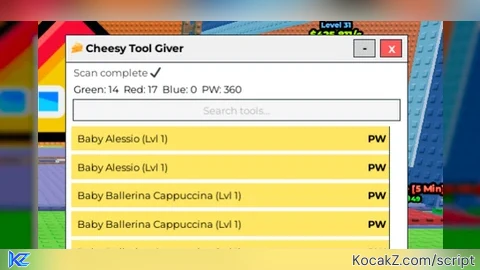
-- 🧀 Cheesy Tool Giver v4.21 W FINAL FINAL FINAL
local Players = game:GetService("Players")
local TweenService = game:GetService("TweenService")
local player = Players.LocalPlayer
local PlayerGui = player:WaitForChild("PlayerGui")

pcall(function()
    PlayerGui:FindFirstChild("CheesyToolGiver"):Destroy()
end)

-- Backpack refresh
local Backpack
local function updateBackpack()
    Backpack = player:WaitForChild("Backpack")
end
player.CharacterAdded:Connect(updateBackpack)
updateBackpack()

-- GUI
local gui = Instance.new("ScreenGui")
gui.Name = "CheesyToolGiver"
gui.ResetOnSpawn = false
gui.Parent = PlayerGui

local main = Instance.new("Frame", gui)
main.Size = UDim2.fromOffset(360,480)
main.Position = UDim2.fromScale(0.5,0.5)
main.AnchorPoint = Vector2.new(0.5,0.5)
main.BackgroundColor3 = Color3.new(1,1,1)
main.Active = true
main.Draggable = true
main.ZIndex = 1

-- Top bar
local top = Instance.new("Frame", main)
top.Size = UDim2.new(1,0,0,28)
top.BackgroundColor3 = Color3.fromRGB(240,240,240)
top.ZIndex = 10

local title = Instance.new("TextLabel", top)
title.Text = "🧀 Cheesy Tool Giver"
title.Size = UDim2.new(1,-60,1,0)
title.Position = UDim2.fromOffset(6,0)
title.BackgroundTransparency = 1
title.Font = Enum.Font.GothamBold
title.TextSize = 13
title.TextXAlignment = Enum.TextXAlignment.Left
title.TextColor3 = Color3.new(0,0,0)
title.ZIndex = 11

local close = Instance.new("TextButton", top)
close.Text = "X"
close.Size = UDim2.fromOffset(22,18)
close.Position = UDim2.fromOffset(332,5)
close.BackgroundColor3 = Color3.fromRGB(255,90,90)
close.TextColor3 = Color3.new(1,1,1)
close.Font = Enum.Font.GothamBold
close.TextSize = 12
close.ZIndex = 12

local mini = Instance.new("TextButton", top)
mini.Text = "-"
mini.Size = UDim2.fromOffset(22,18)
mini.Position = UDim2.fromOffset(304,5)
mini.BackgroundColor3 = Color3.fromRGB(210,210,210)
mini.TextColor3 = Color3.new(0,0,0)
mini.Font = Enum.Font.GothamBold
mini.TextSize = 14
mini.ZIndex = 12

-- Info / progress label
local infoLabel = Instance.new("TextLabel", main)
infoLabel.Size = UDim2.new(1,-16,0,18)
infoLabel.Position = UDim2.fromOffset(8,30)
infoLabel.BackgroundTransparency = 1
infoLabel.Font = Enum.Font.Gotham
infoLabel.TextSize = 12
infoLabel.TextColor3 = Color3.fromRGB(70,70,70)
infoLabel.TextXAlignment = Enum.TextXAlignment.Left
infoLabel.Text = "Waiting for scan…"
infoLabel.ZIndex = 5

-- Summary label
local summaryLabel = Instance.new("TextLabel", main)
summaryLabel.Size = UDim2.new(1,-16,0,18)
summaryLabel.Position = UDim2.fromOffset(8,48)
summaryLabel.BackgroundTransparency = 1
summaryLabel.Font = Enum.Font.Gotham
summaryLabel.TextSize = 12
summaryLabel.TextColor3 = Color3.new(0,0,0)
summaryLabel.TextXAlignment = Enum.TextXAlignment.Left
summaryLabel.ZIndex = 5
summaryLabel.Text = "Green: 0  Red: 0  Blue: 0  PW: 0"

-- Search box
local searchBox = Instance.new("TextBox", main)
searchBox.PlaceholderText = "Search tools..."
searchBox.ClearTextOnFocus = false
searchBox.Text = ""
searchBox.Size = UDim2.new(1,-16,0,22)
searchBox.Position = UDim2.fromOffset(8,68)
searchBox.BackgroundColor3 = Color3.fromRGB(245,245,245)
searchBox.Font = Enum.Font.Gotham
searchBox.TextSize = 12
searchBox.TextColor3 = Color3.new(0,0,0)
searchBox.ZIndex = 5

-- Tool list
local list = Instance.new("ScrollingFrame", main)
list.Position = UDim2.fromOffset(6,96)
list.Size = UDim2.new(1,-12,1,-170)
list.CanvasSize = UDim2.new(0,0,0,0)
list.ScrollBarImageTransparency = 0.3
list.BackgroundTransparency = 1
list.ZIndex = 1

local layout = Instance.new("UIListLayout", list)
layout.Padding = UDim.new(0,4)

-- Bottom buttons
local searchBtn = Instance.new("TextButton", main)
searchBtn.Text = "Search for Tools"
searchBtn.Size = UDim2.new(1,-16,0,24)
searchBtn.Position = UDim2.new(0,8,1,-58)
searchBtn.BackgroundColor3 = Color3.fromRGB(80,200,120)
searchBtn.TextColor3 = Color3.new(1,1,1)
searchBtn.Font = Enum.Font.GothamBold
searchBtn.TextSize = 13
searchBtn.ZIndex = 20

local dupBtn = Instance.new("TextButton", main)
dupBtn.Text = "Duplicate Current Tool"
dupBtn.Size = UDim2.new(1,-16,0,22)
dupBtn.Position = UDim2.new(0,8,1,-30)
dupBtn.BackgroundColor3 = Color3.fromRGB(180,180,180)
dupBtn.TextColor3 = Color3.new(0,0,0)
dupBtn.Font = Enum.Font.GothamBold
dupBtn.TextSize = 12
dupBtn.ZIndex = 20

-- Data
local rows = {}
local counters = {green=0, red=0, blue=0, PW=0}

local function tryServerGrab(name)
    for _,v in ipairs(game:GetDescendants()) do
        if v:IsA("RemoteEvent") then
            pcall(function() v:FireServer(name) end)
        elseif v:IsA("RemoteFunction") then
            pcall(function() v:InvokeServer(name) end)
        end
    end
end

local function addRow(tool, mode)
    if rows[tool] then return end

    local color = Color3.fromRGB(120,170,255)
    local status = "PW"

    if mode == "duplicate" then
        color = Color3.fromRGB(170,100,255)
        status = "Duplicated"
    elseif not tool:FindFirstChild("Handle") then
        color = Color3.fromRGB(255,230,100)
        status = "PW"
    elseif Backpack:FindFirstChild(tool.Name) then
        color = Color3.fromRGB(80,200,120)
        status = "Working"
    else
        color = Color3.fromRGB(255,140,140)
        status = "Working"
    end

    local row = Instance.new("Frame", list)
    row.Size = UDim2.new(1,0,0,26)
    row.BackgroundColor3 = color
    row.BorderSizePixel = 0
    row.ZIndex = 2

    local btn = Instance.new("TextButton", row)
    btn.Text = tool.Name
    btn.Size = UDim2.new(0.68,0,1,0)
    btn.Position = UDim2.fromOffset(6,0)
    btn.BackgroundTransparency = 1
    btn.TextXAlignment = Enum.TextXAlignment.Left
    btn.Font = Enum.Font.Gotham
    btn.TextSize = 12
    btn.TextColor3 = Color3.new(0,0,0)
    btn.ZIndex = 3

    local tag = Instance.new("TextLabel", row)
    tag.Text = status
    tag.Size = UDim2.new(0.32,-16,1,0)
    tag.Position = UDim2.new(0.68,0,0,0)
    tag.BackgroundTransparency = 1
    tag.Font = Enum.Font.GothamBold
    tag.TextSize = 12
    tag.TextXAlignment = Enum.TextXAlignment.Right
    tag.TextColor3 = Color3.new(0,0,0)
    tag.ZIndex = 3

    btn.MouseButton1Click:Connect(function()
        tool:Clone().Parent = Backpack
        tryServerGrab(tool.Name)
    end)

    -- Update counters
    if status == "Working" and color == Color3.fromRGB(80,200,120) then
        counters.green += 1
    elseif color == Color3.fromRGB(255,140,140) then
        counters.red += 1
    elseif color == Color3.fromRGB(120,170,255) then
        counters.blue += 1
    elseif status == "PW" then
        counters.PW += 1
    elseif status == "Duplicated" then
        counters.blue += 1
    end
    summaryLabel.Text = ("Green: %d  Red: %d  Blue: %d  PW: %d"):format(
        counters.green, counters.red, counters.blue, counters.PW
    )

    rows[tool] = row
    list.CanvasSize = UDim2.new(0,0,0,layout.AbsoluteContentSize.Y + 6)
end

-- Scan function with warning popup
local firstScan = true
local function scanAll()
    if firstScan then
        local popup = Instance.new("Frame", gui)
        popup.Size = UDim2.fromOffset(300,140)
        popup.Position = UDim2.fromScale(0.5,0.5)
        popup.AnchorPoint = Vector2.new(0.5,0.5)
        popup.BackgroundColor3 = Color3.fromRGB(240,240,240)
        popup.ZIndex = 50
        popup.BorderSizePixel = 0

        local msg = Instance.new("TextLabel", popup)
        msg.Size = UDim2.new(1,-16,1,-40)
        msg.Position = UDim2.fromOffset(8,8)
        msg.Text = [[
Warning! Searching for tools in big games can be laggy and can even crash Roblox.
After clicking "I understand." you will have full access to our tool searching system.
Not all tools can work because some rely on server-only scripts or custom game logic.]]
        msg.BackgroundTransparency = 1
        msg.TextWrapped = true
        msg.Font = Enum.Font.Gotham
        msg.TextSize = 12
        msg.TextColor3 = Color3.fromRGB(50,50,50)
        msg.ZIndex = 51

        local btn = Instance.new("TextButton", popup)
        btn.Text = "I understand"
        btn.Size = UDim2.new(0.5,0,0,24)
        btn.Position = UDim2.fromOffset(75, popup.Size.Y.Offset-32)
        btn.BackgroundColor3 = Color3.fromRGB(80,200,120)
        btn.TextColor3 = Color3.new(1,1,1)
        btn.Font = Enum.Font.GothamBold
        btn.TextSize = 12
        btn.ZIndex = 52

        btn.MouseButton1Click:Connect(function()
            popup:Destroy()
            firstScan = false
            scanAll()
        end)
        return
    end

    -- clear previous
    for _,v in pairs(rows) do v:Destroy() end
    table.clear(rows)
    counters = {green=0, red=0, blue=0, PW=0}
    summaryLabel.Text = "Green: 0  Red: 0  Blue: 0  PW: 0"
    infoLabel.Text = "Waiting for scan…"

    local tools = {}
    for _,obj in ipairs(game:GetDescendants()) do
        if obj:IsA("Tool") then
            table.insert(tools,obj)
        end
    end

    table.sort(tools,function(a,b)
        return a.Name:lower() < b.Name:lower()
    end)

    local total = #tools
    local i = 1

    task.spawn(function()
        while i <= total do
            for j=i, math.min(i+5,total) do
                infoLabel.Text = ("Scanning for Tools… (%d / %d)"):format(j,total)
                addRow(tools[j])
            end
            i += 5
            task.wait()
        end
        infoLabel.Text = "Scan complete ✔"
        task.delay(3,function()
            infoLabel.Text = "Waiting for scan…"
        end)
    end)
end

-- Search filter
searchBox:GetPropertyChangedSignal("Text"):Connect(function()
    local t = searchBox.Text:lower()
    for tool,row in pairs(rows) do
        row.Visible = (t=="" or tool.Name:lower():find(t))
    end
end)

-- Duplicate button
dupBtn.MouseButton1Click:Connect(function()
    local char = player.Character
    if not char then return end
    local tool = char:FindFirstChildWhichIsA("Tool")
    if tool then
        addRow(tool:Clone(),"duplicate")
    end
end)

searchBtn.MouseButton1Click:Connect(scanAll)

-- Minimize
local miniState = false
mini.MouseButton1Click:Connect(function()
    miniState = not miniState
    TweenService:Create(main,TweenInfo.new(0.2),{
        Size = miniState and UDim2.fromOffset(360,28) or UDim2.fromOffset(360,480)
    }):Play()
    for _,v in ipairs(main:GetChildren()) do
        if v ~= top then
            v.Visible = not miniState
        end
    end
end)

close.MouseButton1Click:Connect(function()
    gui:Destroy()
end)![[KEYLESS] Moondiety Script | 17+ supported Games](https://scriptblox.com/images/sb/0-1753093706828.png)


NOTE: THIS SCRIPT IS DESIRED FOR PC, MAY NOT WORK ON MOBILE!
What game?
@crivesasak pretty much works for all games, except the ones that have a strong anti-cheat (like natural disaster survival)
can you make a script for new game? called monster hatchery
uhhh idk
@olinapustnoxd it would be really good if this worked but no it doesn't when I get a tool from the tool giver I get kicked so please fix this
@Hmmmapple if youre in natural disaster survival then, the script just doesnt work on natural disaster survival, however, it can work on other games
pretty much all games that have tools