


KeylessUniversal
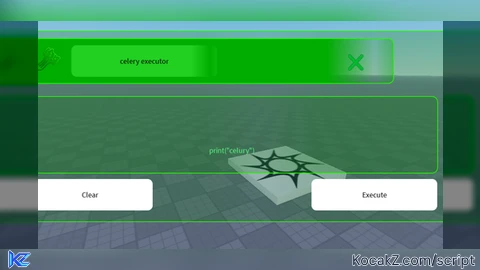
-- Gui to Lua
-- Version: 3.2
-- MADE BT Fz1nkidd
-- based off the game celery executor by xprofilem
-- Instances:

local Celery = Instance.new("ScreenGui")
local Frame = Instance.new("Frame")
local UICorner = Instance.new("UICorner")
local UIGradient = Instance.new("UIGradient")
local TopBar = Instance.new("Frame")
local UICorner_2 = Instance.new("UICorner")
local ImageLabel = Instance.new("ImageLabel")
local UIGradient_2 = Instance.new("UIGradient")
local TextLabel = Instance.new("TextLabel")
local UIGradient_3 = Instance.new("UIGradient")
local UICorner_3 = Instance.new("UICorner")
local midlebar = Instance.new("Frame")
local UICorner_4 = Instance.new("UICorner")
local UIGradient_4 = Instance.new("UIGradient")
local TextBox = Instance.new("TextBox")
local TextButton = Instance.new("TextButton")
local UICorner_5 = Instance.new("UICorner")
local TextButton_2 = Instance.new("TextButton")
local UICorner_6 = Instance.new("UICorner")
local ImageButton = Instance.new("ImageButton")

--Properties:

Celery.Name = "Celery"
Celery.Parent = game.Players.LocalPlayer:WaitForChild("PlayerGui")
Celery.ZIndexBehavior = Enum.ZIndexBehavior.Sibling

Frame.Parent = Celery
Frame.BackgroundColor3 = Color3.fromRGB(0, 172, 11)
Frame.BackgroundTransparency = 0.750
Frame.BorderColor3 = Color3.fromRGB(0, 0, 0)
Frame.BorderSizePixel = 0
Frame.Position = UDim2.new(0.174839079, 0, 0.0964125544, 0)
Frame.Size = UDim2.new(0, 695, 0, 302)

UICorner.Parent = Frame

UIGradient.Color = ColorSequence.new{ColorSequenceKeypoint.new(0.00, Color3.fromRGB(40, 171, 0)), ColorSequenceKeypoint.new(1.00, Color3.fromRGB(40, 171, 0))}
UIGradient.Rotation = 180
UIGradient.Transparency = NumberSequence.new{NumberSequenceKeypoint.new(0.00, 0.00), NumberSequenceKeypoint.new(0.30, 0.00), NumberSequenceKeypoint.new(0.43, 0.31), NumberSequenceKeypoint.new(0.57, 0.07), NumberSequenceKeypoint.new(1.00, 0.00)}
UIGradient.Parent = Frame

TopBar.Name = "TopBar"
TopBar.Parent = Frame
TopBar.BackgroundColor3 = Color3.fromRGB(0, 212, 0)
TopBar.BorderColor3 = Color3.fromRGB(0, 0, 0)
TopBar.BorderSizePixel = 0
TopBar.Position = UDim2.new(0.0201438852, 0, 0.0397351012, 0)
TopBar.Size = UDim2.new(0, 583, 0, 70)

UICorner_2.Parent = TopBar

ImageLabel.Parent = TopBar
ImageLabel.BackgroundColor3 = Color3.fromRGB(255, 255, 255)
ImageLabel.BackgroundTransparency = 1.000
ImageLabel.BorderColor3 = Color3.fromRGB(0, 0, 0)
ImageLabel.BorderSizePixel = 0
ImageLabel.Position = UDim2.new(0.0180012099, 0, 0.169403732, 0)
ImageLabel.Size = UDim2.new(0, 45, 0, 45)
ImageLabel.Image = "rbxassetid://18709260352"

UIGradient_2.Color = ColorSequence.new{ColorSequenceKeypoint.new(0.00, Color3.fromRGB(33, 208, 33)), ColorSequenceKeypoint.new(1.00, Color3.fromRGB(33, 208, 33))}
UIGradient_2.Offset = Vector2.new(0.400000006, 0.400000006)
UIGradient_2.Rotation = -180
UIGradient_2.Transparency = NumberSequence.new{NumberSequenceKeypoint.new(0.00, 0.00), NumberSequenceKeypoint.new(0.30, 0.00), NumberSequenceKeypoint.new(0.45, 1.00), NumberSequenceKeypoint.new(0.58, 0.00), NumberSequenceKeypoint.new(1.00, 0.00)}
UIGradient_2.Parent = TopBar

TextLabel.Parent = TopBar
TextLabel.BackgroundColor3 = Color3.fromRGB(255, 255, 255)
TextLabel.BorderColor3 = Color3.fromRGB(0, 0, 0)
TextLabel.BorderSizePixel = 0
TextLabel.Position = UDim2.new(0.121783875, 0, 0.142857149, 0)
TextLabel.Size = UDim2.new(0, 232, 0, 50)
TextLabel.Font = Enum.Font.SourceSans
TextLabel.Text = "celery executor"
TextLabel.TextColor3 = Color3.fromRGB(0, 0, 0)
TextLabel.TextSize = 14.000

UIGradient_3.Color = ColorSequence.new{ColorSequenceKeypoint.new(0.00, Color3.fromRGB(33, 208, 33)), ColorSequenceKeypoint.new(1.00, Color3.fromRGB(33, 208, 33))}
UIGradient_3.Offset = Vector2.new(0.400000006, 0.400000006)
UIGradient_3.Rotation = -180
UIGradient_3.Transparency = NumberSequence.new{NumberSequenceKeypoint.new(0.00, 0.00), NumberSequenceKeypoint.new(0.30, 0.00), NumberSequenceKeypoint.new(0.45, 1.00), NumberSequenceKeypoint.new(0.58, 0.00), NumberSequenceKeypoint.new(1.00, 0.00)}
UIGradient_3.Parent = TextLabel

UICorner_3.Parent = TextLabel

midlebar.Name = "midle bar"
midlebar.Parent = Celery
midlebar.BackgroundColor3 = Color3.fromRGB(0, 172, 11)
midlebar.BackgroundTransparency = 0.750
midlebar.BorderColor3 = Color3.fromRGB(0, 0, 0)
midlebar.BorderSizePixel = 0
midlebar.Position = UDim2.new(0.188021734, 0, 0.3295964, 0)
midlebar.Size = UDim2.new(0, 653, 0, 121)

UICorner_4.Parent = midlebar

UIGradient_4.Color = ColorSequence.new{ColorSequenceKeypoint.new(0.00, Color3.fromRGB(40, 171, 0)), ColorSequenceKeypoint.new(1.00, Color3.fromRGB(40, 171, 0))}
UIGradient_4.Rotation = 180
UIGradient_4.Transparency = NumberSequence.new{NumberSequenceKeypoint.new(0.00, 0.00), NumberSequenceKeypoint.new(0.30, 0.00), NumberSequenceKeypoint.new(0.43, 0.31), NumberSequenceKeypoint.new(0.57, 0.07), NumberSequenceKeypoint.new(1.00, 0.00)}
UIGradient_4.Parent = midlebar

TextBox.Parent = midlebar
TextBox.BackgroundColor3 = Color3.fromRGB(255, 255, 255)
TextBox.BackgroundTransparency = 1.000
TextBox.BorderColor3 = Color3.fromRGB(0, 0, 0)
TextBox.BorderSizePixel = 0
TextBox.Size = UDim2.new(0, 653, 0, 171)
TextBox.Font = Enum.Font.SourceSans
TextBox.Text = "print(\"celury\")"
TextBox.TextColor3 = Color3.fromRGB(85, 255, 127)
TextBox.TextSize = 14.000
TextBox.TextWrapped = true

TextButton.Parent = midlebar
TextButton.BackgroundColor3 = Color3.fromRGB(255, 255, 255)
TextButton.BorderColor3 = Color3.fromRGB(0, 0, 0)
TextButton.BorderSizePixel = 0
TextButton.Position = UDim2.new(0, 0, 1.08264458, 0)
TextButton.Size = UDim2.new(0, 200, 0, 50)
TextButton.Font = Enum.Font.SourceSans
TextButton.Text = "Clear"
TextButton.TextColor3 = Color3.fromRGB(0, 0, 0)
TextButton.TextSize = 14.000

UICorner_5.Parent = TextButton

TextButton_2.Parent = midlebar
TextButton_2.BackgroundColor3 = Color3.fromRGB(255, 255, 255)
TextButton_2.BorderColor3 = Color3.fromRGB(0, 0, 0)
TextButton_2.BorderSizePixel = 0
TextButton_2.Position = UDim2.new(0.693721294, 0, 1.08264458, 0)
TextButton_2.Size = UDim2.new(0, 200, 0, 50)
TextButton_2.Font = Enum.Font.SourceSans
TextButton_2.Text = "Execute"
TextButton_2.TextColor3 = Color3.fromRGB(0, 0, 0)
TextButton_2.TextSize = 14.000

UICorner_6.Parent = TextButton_2

ImageButton.Parent = Celery
ImageButton.BackgroundColor3 = Color3.fromRGB(255, 255, 255)
ImageButton.BackgroundTransparency = 1.000
ImageButton.BorderColor3 = Color3.fromRGB(0, 0, 0)
ImageButton.BorderSizePixel = 0
ImageButton.Position = UDim2.new(0.651787698, 0, 0.134529144, 0)
ImageButton.Size = UDim2.new(0, 62, 0, 65)
ImageButton.Image = "rbxassetid://130334254289066"
ImageButton.ImageColor3 = Color3.fromRGB(0, 188, 47)

-- Scripts:

local function GARDPL_fake_script() -- TextButton.Script
	local script = Instance.new('Script', TextButton)

	-- Script inside the Clear button
	local button = script.Parent
	local parent = button.Parent
	local textbox = parent:WaitForChild("TextBox")  -- Replace with the exact name of your textbox

	button.MouseButton1Click:Connect(function()
		textbox.Text = ""  -- Clear the textbox
	end)
end
coroutine.wrap(GARDPL_fake_script)()
local function IVVJHPR_fake_script() -- TextButton_2.Script
	local script = Instance.new('Script', TextButton_2)

	-- Script inside the Execute button
	local button = script.Parent
	local parent = button.Parent
	local textbox = parent:WaitForChild("TextBox")  -- The textbox where code is typed

	button.MouseButton1Click:Connect(function()
		local code = textbox.Text
		if code ~= "" then
			-- Try to load the code as a function
			local func, err = loadstring(code)
			if func then
				-- Execute safely using pcall to catch errors
				local success, result = pcall(func)
				if not success then
					warn("Error running code:", result)
				end
			else
				warn("Syntax error:", err)
			end
		end
	end)
end
coroutine.wrap(IVVJHPR_fake_script)()
local function QGFZZJ_fake_script() -- ImageButton.LocalScript
	local script = Instance.new('LocalScript', ImageButton)

	-- Script inside the Exit button
	local button = script.Parent

	button.MouseButton1Click:Connect(function()
		local player = game.Players.LocalPlayer
		local gui = player:WaitForChild("PlayerGui"):FindFirstChild("Celery")  -- Replace with your ScreenGui name
		if gui then
			gui:Destroy()
			print("succsesfully closed celery")
		end
	end)

end
coroutine.wrap(QGFZZJ_fake_script)()No comments yet for this script.


