


KeylessUniversal
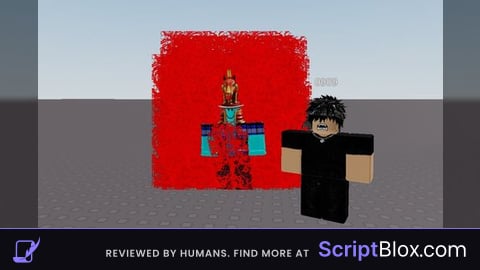
local p = game.Players.LocalPlayer
local char = p.Character or p.CharacterAdded:Wait()
-- This line ensures it finds your body regardless of the game type
local root = char:FindFirstChild("HumanoidRootPart") or char:FindFirstChild("Torso") or char:FindFirstChild("UpperTorso")

if root then
    local aura = Instance.new("ParticleEmitter")
    aura.Name = "AuraEffect"
    aura.Parent = root
    aura.Texture = "rbxassetid://6071575925"
    aura.Color = ColorSequence.new(Color3.fromRGB(255, 0, 0))
    aura.Size = NumberSequence.new(4)
    aura.Rate = 80
    aura.Lifetime = NumberRange.new(1)
    aura.Speed = NumberRange.new(1, 3)
    aura.AlwaysOnTop = true -- Helps mobile users see it better
    print("Aura Loaded Successfully!")
end

whats the point of this smh
The point is power up toggle?
gives you clean visual aura. cool?