

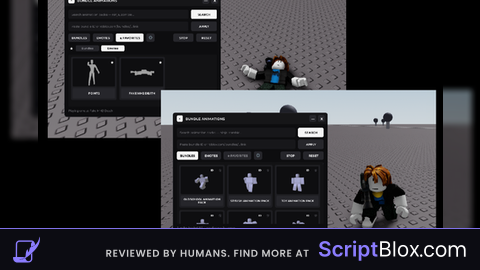
Keyless VerifiedUniversal
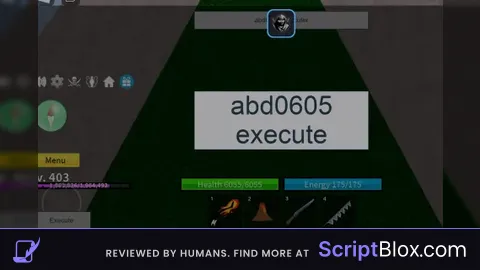
-- Create a ScreenGui for the GUI
local ScreenGui = Instance.new("ScreenGui")
ScreenGui.Name = "abd0605Executer"
ScreenGui.Parent = game.Players.LocalPlayer:WaitForChild("PlayerGui")

-- Create the execute button
local executeButton = Instance.new("TextButton")
executeButton.Name = "ExecuteButton"
executeButton.Text = "Execute"
executeButton.Position = UDim2.new(0, 10, 1, -40)
executeButton.Size = UDim2.new(0, 100, 0, 30)
executeButton.Parent = ScreenGui

-- Create the clear button
local clearButton = Instance.new("TextButton")
clearButton.Name = "ClearButton"
clearButton.Text = "Clear"
clearButton.Position = UDim2.new(1, -110, 1, -40)
clearButton.Size = UDim2.new(0, 100, 0, 30)
clearButton.Parent = ScreenGui

-- Create the TextBox
local textBox = Instance.new("TextBox")
textBox.Name = "ScriptTextBox"
textBox.PlaceholderText = "Enter Lua script here"
textBox.Position = UDim2.new(0.5, -150, 0.5, -50)
textBox.Size = UDim2.new(0, 300, 0, 100)
textBox.TextWrapped = true
textBox.TextScaled = true
textBox.Parent = ScreenGui

-- Create the top label
local topLabel = Instance.new("TextLabel")
topLabel.Name = "TopLabel"
topLabel.Text = "abd0605 Executer"
topLabel.Position = UDim2.new(0.5, -150, 0, 10)
topLabel.Size = UDim2.new(0, 300, 0, 30)
topLabel.Parent = ScreenGui

-- Create the screen cover
local cover = Instance.new("Frame")
cover.Name = "Cover"
cover.Size = UDim2.new(1, 0, 1, 0)
cover.BackgroundColor3 = Color3.new(0, 0, 0)
cover.BackgroundTransparency = 0.5
cover.Parent = ScreenGui

-- Create the execute text
local executeText = Instance.new("TextLabel")
executeText.Name = "ExecuteText"
executeText.Text = "abd0605 execute"
executeText.TextScaled = true
executeText.Position = UDim2.new(0.5, -150, 0.5, -50)
executeText.Size = UDim2.new(0, 300, 0, 100)
executeText.Parent = ScreenGui

-- Create the delete GUI button
local deleteButton = Instance.new("TextButton")
deleteButton.Name = "DeleteButton"
deleteButton.Text = "X"
deleteButton.TextScaled = true
deleteButton.Position = UDim2.new(1, -40, 0, 10)
deleteButton.Size = UDim2.new(0, 30, 0, 30)
deleteButton.BackgroundColor3 = Color3.new(1, 0, 0)
deleteButton.Parent = ScreenGui

-- Create the confirm delete GUI
local confirmDeleteGui = Instance.new("ScreenGui")
confirmDeleteGui.Name = "ConfirmDeleteGui"
confirmDeleteGui.IgnoreGuiInset = true
confirmDeleteGui.Parent = game.Players.LocalPlayer:WaitForChild("PlayerGui")
confirmDeleteGui.Enabled = false

local confirmFrame = Instance.new("Frame")
confirmFrame.Name = "ConfirmFrame"
confirmFrame.Size = UDim2.new(0, 300, 0, 200)
confirmFrame.Position = UDim2.new(0.5, -150, 0.5, -100)
confirmFrame.BackgroundColor3 = Color3.new(1, 1, 1)
confirmFrame.Parent = confirmDeleteGui

local confirmText = Instance.new("TextLabel")
confirmText.Name = "ConfirmText"
confirmText.Text = "Are you sure you want to delete the GUI?"
confirmText.Position = UDim2.new(0, 0, 0, 20)
confirmText.Size = UDim2.new(1, 0, 0, 50)
confirmText.Parent = confirmFrame

local yesButton = Instance.new("TextButton")
yesButton.Name = "YesButton"
yesButton.Text = "Yes"
yesButton.Position = UDim2.new(0, 20, 1, -60)
yesButton.Size = UDim2.new(0, 100, 0, 30)
yesButton.Parent = confirmFrame

local noButton = Instance.new("TextButton")
noButton.Name = "NoButton"
noButton.Text = "No"
noButton.Position = UDim2.new(1, -120, 1, -60)
noButton.Size = UDim2.new(0, 100, 0, 30)
noButton.Parent = confirmFrame

-- Functionality for the delete button
deleteButton.MouseButton1Click:Connect(function()
    confirmDeleteGui.Enabled = true
end)

-- Functionality for the yes button
yesButton.MouseButton1Click:Connect(function()
    ScreenGui:Destroy()
    confirmDeleteGui.Enabled = false
end)

-- Functionality for the no button
noButton.MouseButton1Click:Connect(function()
    confirmDeleteGui.Enabled = false
end)

-- Clear function for the clear button
clearButton.MouseButton1Click:Connect(function()
    textBox.Text = ""
end)

-- Execute function for the execute button
executeButton.MouseButton1Click:Connect(function()
    local script = loadstring(textBox.Text)
    if script then
        script()
    else
        warn("Invalid Lua script")
    end
end)

stop!!!!
this is fire