

Key RequiredUniversal
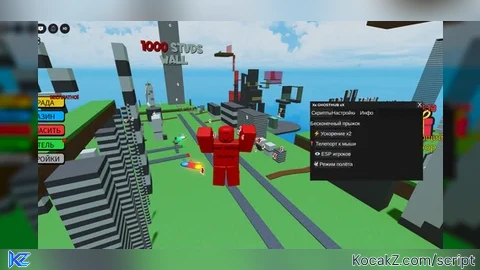
--[[
    ██   ██ ██   ██  ██████   ███████  ████████  ██   ██  ██    ██  ██████
    ██  ██  ██   ██  ██   ██  ██          ██     ██   ██  ███   ██  ██   ██
    █████   ██   ██  ██████   ███████     ██     ██   ██  ██ ██  ██  ██   ██
    ██  ██  ██   ██  ██   ██       ██     ██     ██   ██  ██  ██ ██  ██   ██
    ██   ██  █████   ██████   ███████     ██      █████   ██   ████  ██████

    GHOSTHUB X - Главный хаб скриптов
    Версия: 1.0
]]

-- Сервисы Roblox
local Players = game:GetService("Players")
local UserInputService = game:GetService("UserInputService")
local TweenService = game:GetService("TweenService")
local CoreGui = game:GetService("CoreGui")
local RunService = game:GetService("RunService")
local VirtualInputManager = game:GetService("VirtualInputManager")

-- Переменные
local Player = Players.LocalPlayer
local Mouse = Player:GetMouse()
local ScreenGui = Instance.new("ScreenGui")
local isDragging = false
local dragInput = nil
local dragStart = nil
local startPos = nil

-- Настройка GUI
ScreenGui.Name = "XxGHOSTHUBxX"
ScreenGui.Parent = CoreGui
ScreenGui.ResetOnSpawn = false
ScreenGui.ZIndexBehavior = Enum.ZIndexBehavior.Sibling

-- Функция для создания кнопок
local function createButton(parent, text, position, callback)
    local button = Instance.new("TextButton")
    button.Name = text .. "Button"
    button.Size = UDim2.new(0, 160, 0, 35)
    button.Position = position
    button.Text = text
    button.TextColor3 = Color3.new(1, 1, 1)
    button.TextSize = 16
    button.BackgroundColor3 = Color3.fromRGB(40, 40, 40)
    button.BorderSizePixel = 0
    button.AutoButtonColor = false
    button.Parent = parent

    -- Hover эффект
    button.MouseEnter:Connect(function()
        button.BackgroundColor3 = Color3.fromRGB(60, 60, 60)
    end)

    button.MouseLeave:Connect(function()
        button.BackgroundColor3 = Color3.fromRGB(40, 40, 40)
    end)

    button.MouseButton1Click:Connect(callback)

    return button
end

-- Функция для создания переключателя
local function createToggle(parent, text, position, defaultValue, callback)
    local frame = Instance.new("Frame")
    frame.Name = text .. "Toggle"
    frame.Size = UDim2.new(0, 180, 0, 30)
    frame.Position = position
    frame.BackgroundTransparency = 1
    frame.Parent = parent

    local label = Instance.new("TextLabel")
    label.Size = UDim2.new(0, 120, 0, 30)
    label.Position = UDim2.new(0, 0, 0, 0)
    label.Text = text
    label.TextColor3 = Color3.new(1, 1, 1)
    label.TextSize = 16
    label.TextXAlignment = Enum.TextXAlignment.Left
    label.BackgroundTransparency = 1
    label.Parent = frame

    local toggleBtn = Instance.new("TextButton")
    toggleBtn.Size = UDim2.new(0, 30, 0, 20)
    toggleBtn.Position = UDim2.new(0, 140, 0, 5)
    toggleBtn.Text = ""
    toggleBtn.BackgroundColor3 = defaultValue and Color3.fromRGB(0, 255, 0) or Color3.fromRGB(255, 0, 0)
    toggleBtn.BorderSizePixel = 0
    toggleBtn.Parent = frame

    local state = defaultValue

    toggleBtn.MouseButton1Click:Connect(function()
        state = not state
        toggleBtn.BackgroundColor3 = state and Color3.fromRGB(0, 255, 0) or Color3.fromRGB(255, 0, 0)
        callback(state)
    end)

    return frame
end

-- Создание основного окна
local MainFrame = Instance.new("Frame")
MainFrame.Name = "MainFrame"
MainFrame.Size = UDim2.new(0, 500, 0, 350)
MainFrame.Position = UDim2.new(0.5, -250, 0.5, -175)
MainFrame.BackgroundColor3 = Color3.fromRGB(20, 20, 20)
MainFrame.BorderSizePixel = 0
MainFrame.Active = true
MainFrame.Parent = ScreenGui

-- Украшение - градиентная полоска сверху
local TopBar = Instance.new("Frame")
TopBar.Name = "TopBar"
TopBar.Size = UDim2.new(1, 0, 0, 30)
TopBar.BackgroundColor3 = Color3.fromRGB(30, 30, 30)
TopBar.BorderSizePixel = 0
TopBar.Parent = MainFrame

local Title = Instance.new("TextLabel")
Title.Size = UDim2.new(0, 200, 1, 0)
Title.Position = UDim2.new(0, 10, 0, 0)
Title.Text = "Xx GHOSTHUB xX"
Title.TextColor3 = Color3.fromRGB(255, 255, 255)
Title.TextSize = 18
Title.TextXAlignment = Enum.TextXAlignment.Left
Title.BackgroundTransparency = 1
Title.Font = Enum.Font.GothamBold
Title.Parent = TopBar

local CloseButton = Instance.new("TextButton")
CloseButton.Size = UDim2.new(0, 30, 0, 30)
CloseButton.Position = UDim2.new(1, -30, 0, 0)
CloseButton.Text = "X"
CloseButton.TextColor3 = Color3.new(1, 1, 1)
CloseButton.TextSize = 20
CloseButton.BackgroundColor3 = Color3.fromRGB(50, 50, 50)
CloseButton.BorderSizePixel = 0
CloseButton.Parent = TopBar

CloseButton.MouseButton1Click:Connect(function()
    ScreenGui:Destroy()
end)

-- Вкладки
local TabFrame = Instance.new("Frame")
TabFrame.Name = "TabFrame"
TabFrame.Size = UDim2.new(1, 0, 1, -30)
TabFrame.Position = UDim2.new(0, 0, 0, 30)
TabFrame.BackgroundColor3 = Color3.fromRGB(25, 25, 25)
TabFrame.BorderSizePixel = 0
TabFrame.Parent = MainFrame

-- Контейнер для кнопок вкладок
local TabButtons = Instance.new("Frame")
TabButtons.Name = "TabButtons"
TabButtons.Size = UDim2.new(1, 0, 0, 40)
TabButtons.BackgroundColor3 = Color3.fromRGB(20, 20, 20)
TabButtons.BorderSizePixel = 0
TabButtons.Parent = TabFrame

-- Контейнер для контента вкладок
local TabContent = Instance.new("Frame")
TabContent.Name = "TabContent"
TabContent.Size = UDim2.new(1, 0, 1, -40)
TabContent.Position = UDim2.new(0, 0, 0, 40)
TabContent.BackgroundTransparency = 1
TabContent.Parent = TabFrame

-- Создание вкладок
local tabs = {"Скрипты", "Настройки", "Инфо"}
local currentTab = "Скрипты"

-- Функция переключения вкладок
local function switchTab(tabName)
    currentTab = tabName

    -- Очищаем контент
    for _, child in pairs(TabContent:GetChildren()) do
        child:Destroy()
    end

    if tabName == "Скрипты" then
        -- Вкладка со скриптами
        local ScriptsFrame = Instance.new("ScrollingFrame")
        ScriptsFrame.Size = UDim2.new(1, 0, 1, 0)
        ScriptsFrame.BackgroundTransparency = 1
        ScriptsFrame.CanvasSize = UDim2.new(0, 0, 0, 0)
        ScriptsFrame.ScrollBarThickness = 8
        ScriptsFrame.Parent = TabContent

        -- ТВОИ ЛОКАЛЬНЫЕ СКРИПТЫ
        -- Добавляй сюда свои скрипты!

        local yPos = 10

        -- Скрипт 1: Бесконечный прыжок
        createButton(ScriptsFrame, "∞ Бесконечный прыжок", UDim2.new(0, 20, 0, yPos), function()
            local infiniteJumpEnabled = true
            UserInputService.JumpRequest:Connect(function()
                if infiniteJumpEnabled then
                    Player.Character.Humanoid:ChangeState(Enum.HumanoidStateType.Jumping)
                end
            end)
            print("[GHOSTHUB] Бесконечный прыжок активирован")
        end)

        yPos = yPos + 45

        -- Скрипт 2: Скорость бега
        createButton(ScriptsFrame, "⚡ Ускорение x2", UDim2.new(0, 20, 0, yPos), function()
            if Player.Character and Player.Character:FindFirstChild("Humanoid") then
                Player.Character.Humanoid.WalkSpeed = 32
                wait(5)
                Player.Character.Humanoid.WalkSpeed = 16
            end
            print("[GHOSTHUB] Ускорение активировано на 5 секунд")
        end)

        yPos = yPos + 45

        -- Скрипт 3: Телепорт к курсору
        createButton(ScriptsFrame, "📍 Телепорт к мыши", UDim2.new(0, 20, 0, yPos), function()
            if Player.Character and Player.Character:FindFirstChild("HumanoidRootPart") then
                local targetPos = Mouse.Hit.Position + Vector3.new(0, 3, 0)
                Player.Character.HumanoidRootPart.CFrame = CFrame.new(targetPos)
            end
            print("[GHOSTHUB] Телепортация выполнена")
        end)

        yPos = yPos + 45

        -- Скрипт 4: ESP (обводка игроков)
        createButton(ScriptsFrame, "👁️ ESP игроков", UDim2.new(0, 20, 0, yPos), function()
            local espEnabled = true

            local function createESP(player)
                if player == Player then return end

                local highlight = Instance.new("Highlight")
                highlight.Name = "GHOST_ESP"
                highlight.FillColor = Color3.new(1, 0, 0)
                highlight.OutlineColor = Color3.new(1, 1, 1)
                highlight.FillTransparency = 0.5
                highlight.DepthMode = Enum.HighlightDepthMode.AlwaysOnTop

                local function onCharacterAdded(character)
                    highlight.Adornee = character
                    highlight.Parent = character
                end

                if player.Character then
                    onCharacterAdded(player.Character)
                end

                player.CharacterAdded:Connect(onCharacterAdded)
            end

            for _, player in pairs(Players:GetPlayers()) do
                createESP(player)
            end

            Players.PlayerAdded:Connect(createESP)
            print("[GHOSTHUB] ESP активирован")
        end)

        yPos = yPos + 45

        -- Скрипт 5: Полёт
        createButton(ScriptsFrame, "🕊️ Режим полёта", UDim2.new(0, 20, 0, yPos), function()
            local flying = false
            local bodyVelocity = Instance.new("BodyVelocity")
            bodyVelocity.Velocity = Vector3.new(0, 0, 0)
            bodyVelocity.MaxForce = Vector3.new(4000, 4000, 4000)

            UserInputService.InputBegan:Connect(function(input)
                if input.KeyCode == Enum.KeyCode.F then
                    flying = not flying
                    if flying then
                        if Player.Character and Player.Character:FindFirstChild("HumanoidRootPart") then
                            bodyVelocity.Parent = Player.Character.HumanoidRootPart
                        end
                        print("[GHOSTHUB] Полёт включен")
                    else
                        bodyVelocity.Parent = nil
                        print("[GHOSTHUB] Полёт выключен")
                    end
                end
            end)

            RunService.RenderStepped:Connect(function()
                if flying and Player.Character and Player.Character:FindFirstChild("HumanoidRootPart") then
                    local moveDirection = Vector3.new(0, 0, 0)

                    if UserInputService:IsKeyDown(Enum.KeyCode.W) then
                        moveDirection = moveDirection + Player.Character.HumanoidRootPart.CFrame.LookVector
                    end
                    if UserInputService:IsKeyDown(Enum.KeyCode.S) then
                        moveDirection = moveDirection - Player.Character.HumanoidRootPart.CFrame.LookVector
                    end
                    if UserInputService:IsKeyDown(Enum.KeyCode.A) then
                        moveDirection = moveDirection - Player.Character.HumanoidRootPart.CFrame.RightVector
                    end
                    if UserInputService:IsKeyDown(Enum.KeyCode.D) then
                        moveDirection = moveDirection + Player.Character.HumanoidRootPart.CFrame.RightVector
                    end
                    if UserInputService:IsKeyDown(Enum.KeyCode.Space) then
                        moveDirection = moveDirection + Vector3.new(0, 1, 0)
                    end
                    if UserInputService:IsKeyDown(Enum.KeyCode.LeftControl) then
                        moveDirection = moveDirection - Vector3.new(0, 1, 0)
                    end

                    bodyVelocity.Velocity = moveDirection * 50
                end
            end)

            print("[GHOSTHUB] Нажми F для включения/выключения полёта")
        end)

        yPos = yPos + 45

        -- Обновляем CanvasSize
        ScriptsFrame.CanvasSize = UDim2.new(0, 0, 0, yPos + 20)

    elseif tabName == "Настройки" then
        -- Вкладка настроек
        local SettingsFrame = Instance.new("Frame")
        SettingsFrame.Size = UDim2.new(1, 0, 1, 0)
        SettingsFrame.BackgroundTransparency = 1
        SettingsFrame.Parent = TabContent

        createToggle(SettingsFrame, "Авто-сохранение", UDim2.new(0, 20, 0, 20), true, function(state)
            print("[GHOSTHUB] Авто-сохранение:", state)
        end)

        createToggle(SettingsFrame, "Уведомления", UDim2.new(0, 20, 0, 60), true, function(state)
            print("[GHOSTHUB] Уведомления:", state)
        end)

    elseif tabName == "Инфо" then
        -- Информационная вкладка
        local InfoFrame = Instance.new("Frame")
        InfoFrame.Size = UDim2.new(1, 0, 1, 0)
        InfoFrame.BackgroundTransparency = 1
        InfoFrame.Parent = TabContent

        local InfoLabel = Instance.new("TextLabel")
        InfoLabel.Size = UDim2.new(1, -40, 0, 100)
        InfoLabel.Position = UDim2.new(0, 20, 0, 20)
        InfoLabel.Text = [[Xx GHOSTHUB xX
Версия: 1.0
Автор: Ваше имя

Главный хаб для управления
локальными скриптами в Roblox.

Нажми Insert для показа/скрытия]]
        InfoLabel.TextColor3 = Color3.new(1, 1, 1)
        InfoLabel.TextSize = 16
        InfoLabel.BackgroundTransparency = 1
        InfoLabel.TextXAlignment = Enum.TextXAlignment.Left
        InfoLabel.TextYAlignment = Enum.TextYAlignment.Top
        InfoLabel.Parent = InfoFrame
    end
end

-- Создание кнопок вкладок
for i, tabName in ipairs(tabs) do
    local tabButton = Instance.new("TextButton")
    tabButton.Name = tabName .. "Tab"
    tabButton.Size = UDim2.new(0, 100, 1, 0)
    tabButton.Position = UDim2.new(0, (i-1) * 100, 0, 0)
    tabButton.Text = tabName
    tabButton.TextColor3 = Color3.new(1, 1, 1)
    tabButton.TextSize = 16
    tabButton.BackgroundColor3 = i == 1 and Color3.fromRGB(40, 40, 40) or Color3.fromRGB(25, 25, 25)
    tabButton.BorderSizePixel = 0
    tabButton.Parent = TabButtons

    tabButton.MouseButton1Click:Connect(function()
        -- Сброс цвета всех кнопок
        for _, btn in pairs(TabButtons:GetChildren()) do
            if btn:IsA("TextButton") then
                btn.BackgroundColor3 = Color3.fromRGB(25, 25, 25)
            end
        end
        -- Подсветка активной вкладки
        tabButton.BackgroundColor3 = Color3.fromRGB(40, 40, 40)
        switchTab(tabName)
    end)
end

-- Загружаем первую вкладку
switchTab("Скрипты")

-- Функция перетаскивания окна
local function dragify(frame)
    frame.InputBegan:Connect(function(input)
        if input.UserInputType == Enum.UserInputType.MouseButton1 then
            isDragging = true
            dragStart = input.Position
            startPos = frame.Parent.Position

            input.Changed:Connect(function()
                if input.UserInputState == Enum.UserInputState.End then
                    isDragging = false
                end
            end)
        end
    end)

    frame.InputChanged:Connect(function(input)
        if input.UserInputType == Enum.UserInputType.MouseMovement then
            dragInput = input
        end
    end)
end

UserInputService.InputChanged:Connect(function(input)
    if input == dragInput and isDragging then
        local delta = input.Position - dragStart
        MainFrame.Position = UDim2.new(startPos.X.Scale, startPos.X.Offset + delta.X, startPos.Y.Scale, startPos.Y.Offset + delta.Y)
    end
end)

dragify(TopBar)

-- Горячая клавиша для открытия/закрытия (Insert)
UserInputService.InputBegan:Connect(function(input)
    if input.KeyCode == Enum.KeyCode.Insert then
        MainFrame.Visible = not MainFrame.Visible
    end
end)

-- Приветственное сообщение
print("====================================")
print("Xx GHOSTHUB xX успешно загружен!")
print("Нажми INSERT для открытия меню")
print("====================================")No comments yet for this script.


