

KeylessUniversal
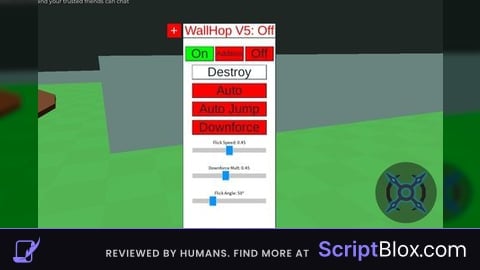
-- Create ScreenGui
local screenGui = Instance.new("ScreenGui")
screenGui.Parent = game.Players.LocalPlayer:WaitForChild("PlayerGui")
screenGui.ResetOnSpawn = false

-- Services
local UserInputService = game:GetService("UserInputService")
local Players = game:GetService("Players")
local Workspace = game:GetService("Workspace")
local RunService = game:GetService("RunService")

-- Player specific
local player = Players.LocalPlayer
local mouse = player:GetMouse()

-- Create Frame (GUI 1) - Height expanded to 415 to comfortably fit all three sliders
local frame = Instance.new("Frame")
frame.Parent = screenGui
frame.BackgroundColor3 = Color3.fromRGB(255, 255, 255)
frame.Size = UDim2.new(0, 200, 0, 415)
frame.Position = UDim2.new(0.5, -100, 0.5, -207)
frame.Active = true
frame.ClipsDescendants = false

-- ============================================================== --
-- Smooth Dragging Implementation
-- ============================================================== --
local dragging
local dragInput
local dragStart
local startPosition

local function update(input)
    local delta = input.Position - dragStart
    frame.Position = UDim2.new(startPosition.X.Scale, startPosition.X.Offset + delta.X, startPosition.Y.Scale, startPosition.Y.Offset + delta.Y)
end

frame.InputBegan:Connect(function(input)
    if input.UserInputType == Enum.UserInputType.MouseButton1 or input.UserInputType == Enum.UserInputType.Touch then
        dragging = true
        dragStart = input.Position
        startPosition = frame.Position

        input.Changed:Connect(function()
            if input.UserInputState == Enum.UserInputState.End then
                dragging = false
            end
        end)
    end
end)

frame.InputChanged:Connect(function(input)
    if input.UserInputType == Enum.UserInputType.MouseMovement or input.UserInputType == Enum.UserInputType.Touch then
        dragInput = input
    end
end)

UserInputService.InputChanged:Connect(function(input)
    if input == dragInput and dragging then
        update(input)
    end
end)
-- ============================================================== --

-- Calculate button positions (Top row)
local frameWidth = frame.Size.X.Offset
local buttonWidth = 60
local totalButtonWidth = buttonWidth * 3
local totalSpacing = frameWidth - totalButtonWidth
local spacing = totalSpacing / 4

local onButtonX = spacing
local additionButtonX = spacing + buttonWidth + spacing
local offButtonX = spacing + buttonWidth + spacing + buttonWidth + spacing

-- Create On Button
local onButton = Instance.new("TextButton")
onButton.Parent = frame
onButton.BackgroundColor3 = Color3.fromRGB(0, 255, 0)
onButton.Size = UDim2.new(0, buttonWidth, 0, 30)
onButton.Position = UDim2.new(0, onButtonX, 0, 20)
onButton.Text = "On"
onButton.TextScaled = true

-- Create Addition Button
local additionButton = Instance.new("TextButton")
additionButton.Parent = frame
additionButton.BackgroundColor3 = Color3.fromRGB(255, 0, 0)
additionButton.Size = UDim2.new(0, buttonWidth, 0, 30)
additionButton.Position = UDim2.new(0, additionButtonX, 0, 20)
additionButton.Text = "Addition"
additionButton.TextScaled = true
local additionToggle = false
local additionalFrame = nil
local jumpButtonInAddition = nil

-- Create Off Button
local offButton = Instance.new("TextButton")
offButton.Parent = frame
offButton.BackgroundColor3 = Color3.fromRGB(255, 0, 0)
offButton.Size = UDim2.new(0, buttonWidth, 0, 30)
offButton.Position = UDim2.new(0, offButtonX, 0, 20)
offButton.Text = "Off"
offButton.TextScaled = true

-- Create Destroy Button
local destroyButton = Instance.new("TextButton")
destroyButton.Parent = frame
destroyButton.BackgroundColor3 = Color3.fromRGB(255, 255, 255)
destroyButton.Size = UDim2.new(0, 160, 0, 30)
destroyButton.Position = UDim2.new(0, 20, 0, 60)
destroyButton.Text = "Destroy"
destroyButton.TextScaled = true

-- Create Auto Button
local autoButton = Instance.new("TextButton")
autoButton.Parent = frame
autoButton.BackgroundColor3 = Color3.fromRGB(255, 0, 0) -- Start Red (Off)
autoButton.Size = UDim2.new(0, 160, 0, 30)
autoButton.Position = UDim2.new(0, 20, 0, 100)
autoButton.Text = "Auto"
autoButton.TextScaled = true
local autoToggle = false

-- Create Auto Jump Button
local autoJumpButton = Instance.new("TextButton")
autoJumpButton.Parent = frame
autoJumpButton.BackgroundColor3 = Color3.fromRGB(255, 0, 0) -- Start Red (Off)
autoJumpButton.Size = UDim2.new(0, 160, 0, 30)
autoJumpButton.Position = UDim2.new(0, 20, 0, 140)
autoJumpButton.Text = "Auto Jump"
autoJumpButton.TextScaled = true
local autoJumpToggle = false

-- Create Downforce Toggle Button
local downforceButton = Instance.new("TextButton")
downforceButton.Parent = frame
downforceButton.BackgroundColor3 = Color3.fromRGB(255, 0, 0) -- Start Red (Off)
downforceButton.Size = UDim2.new(0, 160, 0, 30)
downforceButton.Position = UDim2.new(0, 20, 0, 180)
downforceButton.Text = "Downforce"
downforceButton.TextScaled = true
local downforceToggle = false

-- ============================================================== --
-- Flick Speed Slider Implementation
-- ============================================================== --
local sliderLabel = Instance.new("TextLabel")
sliderLabel.Parent = frame
sliderLabel.BackgroundTransparency = 1
sliderLabel.Size = UDim2.new(0, 160, 0, 15)
sliderLabel.Position = UDim2.new(0, 20, 0, 220)
sliderLabel.Text = "Flick Speed: 0.45"
sliderLabel.TextColor3 = Color3.fromRGB(0, 0, 0)
sliderLabel.TextSize = 12
sliderLabel.Font = Enum.Font.SourceSans

local sliderBackground = Instance.new("Frame")
sliderBackground.Parent = frame
sliderBackground.BackgroundColor3 = Color3.fromRGB(200, 200, 200)
sliderBackground.Size = UDim2.new(0, 160, 0, 10)
sliderBackground.Position = UDim2.new(0, 20, 0, 240)
sliderBackground.BorderSizePixel = 0

local sliderButton = Instance.new("TextButton")
sliderButton.Parent = sliderBackground
sliderButton.BackgroundColor3 = Color3.fromRGB(0, 150, 255)
sliderButton.Size = UDim2.new(0, 14, 0, 20)
sliderButton.Position = UDim2.new(0.5, -7, 0.5, -10)
sliderButton.Text = ""
sliderButton.BorderSizePixel = 0

local flickSpeed = 0.45
local sliderActive = false

sliderButton.InputBegan:Connect(function(input)
    if input.UserInputType == Enum.UserInputType.MouseButton1 or input.UserInputType == Enum.UserInputType.Touch then
        sliderActive = true
    end
end)

UserInputService.InputEnded:Connect(function(input)
    if input.UserInputType == Enum.UserInputType.MouseButton1 or input.UserInputType == Enum.UserInputType.Touch then
        sliderActive = false
    end
end)

local function updateSlider(input)
    local absoluteX = sliderBackground.AbsolutePosition.X
    local absoluteWidth = sliderBackground.AbsoluteSize.X
    local inputX = input.Position.X
    local scale = math.clamp((inputX - absoluteX) / absoluteWidth, 0, 1)

    flickSpeed = 0.1 + (scale * 0.7)
    sliderButton.Position = UDim2.new(scale, -7, 0.5, -10)
    sliderLabel.Text = string.format("Flick Speed: %.2f", flickSpeed)
end

UserInputService.InputChanged:Connect(function(input)
    if sliderActive and (input.UserInputType == Enum.UserInputType.MouseMovement or input.UserInputType == Enum.UserInputType.Touch) then
        updateSlider(input)
    end
end)

-- ============================================================== --
-- Downforce Slider Implementation
-- ============================================================== --
local downforceValue = 0.45
local dfSliderActive = false

local dfSliderLabel = Instance.new("TextLabel")
dfSliderLabel.Parent = frame
dfSliderLabel.BackgroundTransparency = 1
dfSliderLabel.Size = UDim2.new(0, 160, 0, 15)
dfSliderLabel.Position = UDim2.new(0, 20, 0, 275)
dfSliderLabel.Text = "Downforce Mult: 0.45"
dfSliderLabel.TextColor3 = Color3.fromRGB(0, 0, 0)
dfSliderLabel.TextSize = 12
dfSliderLabel.Font = Enum.Font.SourceSans

local dfSliderBackground = Instance.new("Frame")
dfSliderBackground.Parent = frame
dfSliderBackground.BackgroundColor3 = Color3.fromRGB(200, 200, 200)
dfSliderBackground.Size = UDim2.new(0, 160, 0, 10)
dfSliderBackground.Position = UDim2.new(0, 20, 0, 295)
dfSliderBackground.BorderSizePixel = 0

local dfSliderButton = Instance.new("TextButton")
dfSliderButton.Parent = dfSliderBackground
dfSliderButton.BackgroundColor3 = Color3.fromRGB(0, 150, 255)
dfSliderButton.Size = UDim2.new(0, 14, 0, 20)
dfSliderButton.Position = UDim2.new(0.45, -7, 0.5, -10)
dfSliderButton.Text = ""
dfSliderButton.BorderSizePixel = 0

dfSliderButton.InputBegan:Connect(function(input)
    if input.UserInputType == Enum.UserInputType.MouseButton1 or input.UserInputType == Enum.UserInputType.Touch then
        dfSliderActive = true
    end
end)

UserInputService.InputEnded:Connect(function(input)
    if input.UserInputType == Enum.UserInputType.MouseButton1 or input.UserInputType == Enum.UserInputType.Touch then
        dfSliderActive = false
    end
end)

local function updateDfSlider(input)
    local absoluteX = dfSliderBackground.AbsolutePosition.X
    local absoluteWidth = dfSliderBackground.AbsoluteSize.X
    local inputX = input.Position.X
    local scale = math.clamp((inputX - absoluteX) / absoluteWidth, 0, 1)

    downforceValue = scale
    dfSliderButton.Position = UDim2.new(scale, -7, 0.5, -10)
    dfSliderLabel.Text = string.format("Downforce Mult: %.2f", downforceValue)
end

UserInputService.InputChanged:Connect(function(input)
    if dfSliderActive and (input.UserInputType == Enum.UserInputType.MouseMovement or input.UserInputType == Enum.UserInputType.Touch) then
        updateDfSlider(input)
    end
end)

-- ============================================================== --
-- Angle Selector Slider Implementation
-- ============================================================== --
local flickAngleDegrees = 50
local angleSliderActive = false

local angleSliderLabel = Instance.new("TextLabel")
angleSliderLabel.Parent = frame
angleSliderLabel.BackgroundTransparency = 1
angleSliderLabel.Size = UDim2.new(0, 160, 0, 15)
angleSliderLabel.Position = UDim2.new(0, 20, 0, 330)
angleSliderLabel.Text = "Flick Angle: 50°"
angleSliderLabel.TextColor3 = Color3.fromRGB(0, 0, 0)
angleSliderLabel.TextSize = 12
angleSliderLabel.Font = Enum.Font.SourceSans

local angleSliderBackground = Instance.new("Frame")
angleSliderBackground.Parent = frame
angleSliderBackground.BackgroundColor3 = Color3.fromRGB(200, 200, 200)
angleSliderBackground.Size = UDim2.new(0, 160, 0, 10)
angleSliderBackground.Position = UDim2.new(0, 20, 0, 350)
angleSliderBackground.BorderSizePixel = 0

local angleSliderButton = Instance.new("TextButton")
angleSliderButton.Parent = angleSliderBackground
angleSliderButton.BackgroundColor3 = Color3.fromRGB(0, 150, 255)
angleSliderButton.Size = UDim2.new(0, 14, 0, 20)
angleSliderButton.Position = UDim2.new(50/180, -7, 0.5, -10)
angleSliderButton.Text = ""
angleSliderButton.BorderSizePixel = 0

angleSliderButton.InputBegan:Connect(function(input)
    if input.UserInputType == Enum.UserInputType.MouseButton1 or input.UserInputType == Enum.UserInputType.Touch then
        angleSliderActive = true
    end
end)

UserInputService.InputEnded:Connect(function(input)
    if input.UserInputType == Enum.UserInputType.MouseButton1 or input.UserInputType == Enum.UserInputType.Touch then
        angleSliderActive = false
    end
end)

local function updateAngleSlider(input)
    local absoluteX = angleSliderBackground.AbsolutePosition.X
    local absoluteWidth = angleSliderBackground.AbsoluteSize.X
    local inputX = input.Position.X
    local scale = math.clamp((inputX - absoluteX) / absoluteWidth, 0, 1)

    flickAngleDegrees = math.round(scale * 180)
    angleSliderButton.Position = UDim2.new(scale, -7, 0.5, -10)
    angleSliderLabel.Text = string.format("Flick Angle: %d°", flickAngleDegrees)
end

UserInputService.InputChanged:Connect(function(input)
    if angleSliderActive and (input.UserInputType == Enum.UserInputType.MouseMovement or input.UserInputType == Enum.UserInputType.Touch) then
        updateAngleSlider(input)
    end
end)
-- ============================================================== --

-- Create Status Indicator
local statusLabel = Instance.new("TextLabel")
statusLabel.Parent = frame
statusLabel.BackgroundColor3 = Color3.fromRGB(255, 255, 255)
statusLabel.Size = UDim2.new(0, 200, 0, 30)
statusLabel.Position = UDim2.new(0, 0, 0, -30)
statusLabel.Text = "WallHop V5: Off"
statusLabel.TextColor3 = Color3.fromRGB(255, 0, 0)
statusLabel.TextScaled = true

-- Create Plus Button
local plusButton = Instance.new("TextButton")
plusButton.Parent = frame
plusButton.BackgroundColor3 = Color3.fromRGB(255, 0, 0)
plusButton.Size = UDim2.new(0, 30, 0, 30)
plusButton.Position = UDim2.new(0, -35, 0, -30)
plusButton.Text = "+"
plusButton.TextColor3 = Color3.fromRGB(255, 255, 255)
plusButton.TextScaled = true
local plusButtonToggle = false
local plusFrame = nil
local selectButtonInPlusFrame = nil
local selectModeActive = false
local colorListLabelInPlusFrame = nil
local mouseClickConnection = nil
local selectedBrickColor = nil

-- Variables for Wallhop Functionality
local wallhopToggle = false
local InfiniteJumpEnabled = true
local raycastParams = RaycastParams.new()
raycastParams.FilterType = Enum.RaycastFilterType.Blacklist
local jumpConnection = nil
local autoJumpConnection = nil
local wallTouchJumpConnection = nil
local alignConnection = nil

-- ============================================================== --
-- Precise wall detection function (Humanoid Filtered)
-- ============================================================== --
local function getWallRaycastResult()
    local character = player.Character
    if not character then return nil end
    local humanoidRootPart = character:FindFirstChild("HumanoidRootPart")
    if not humanoidRootPart then return nil end

    raycastParams.FilterDescendantsInstances = {character}
    local detectionDistance = 2.5
    local closestHit = nil
    local minDistance = detectionDistance + 1
    local hrpCF = humanoidRootPart.CFrame

    local function isAHumanoid(instance)
        if not instance then return false end
        local model = instance:FindFirstAncestorOfClass("Model")
        if model and model:FindFirstChildOfClass("Humanoid") then
            return true
        end
        return false
    end

    for i = 0, 7 do
        local angle = math.rad(i * 45)
        local direction = (hrpCF * CFrame.Angles(0, angle, 0)).LookVector
        local ray = Workspace:Raycast(humanoidRootPart.Position, direction * detectionDistance, raycastParams)
        if ray and ray.Instance and not isAHumanoid(ray.Instance) and ray.Distance < minDistance then
            minDistance = ray.Distance
            closestHit = ray
        end
    end

    local blockCastSize = Vector3.new(1.5, 1, 0.5)
    local blockCastOffset = CFrame.new(0, -1, -0.5)
    local blockCastOriginCF = hrpCF * blockCastOffset
    local blockCastDirection = hrpCF.LookVector
    local blockCastDistance = 1.5
    local blockResult = Workspace:Blockcast(blockCastOriginCF, blockCastSize, blockCastDirection * blockCastDistance, raycastParams)

    if blockResult and blockResult.Instance and not isAHumanoid(blockResult.Instance) and blockResult.Distance < minDistance then
         minDistance = blockResult.Distance
         closestHit = blockResult
    end

    return closestHit
end

-- ============================================================== --
-- Auto-Align Assist Function
-- ============================================================== --
local function alignToNearestWall()
    if not wallhopToggle then return end
    local character = player.Character
    local rootPart = character and character:FindFirstChild("HumanoidRootPart")
    if not rootPart then return end

    local wallRayResult = getWallRaycastResult()
    if wallRayResult then
        local wallNormal = wallRayResult.Normal
        local targetLookDirection = -Vector3.new(wallNormal.X, 0, wallNormal.Z).Unit

        if targetLookDirection.Magnitude > 0.1 then
            rootPart.CFrame = CFrame.lookAt(rootPart.Position, rootPart.Position + targetLookDirection)
            print("Auto-Align: Squared up to wall surface.")
        end
    end
end

-- ======================================================================== --
-- Core Wall Jump Execution Function (Visual Flips and Snaps Removed)
-- ======================================================================== --
local function executeWallJump(wallRayResult, jumpType)
    if jumpType ~= "Button" and not InfiniteJumpEnabled then
        return
    end

    local character = player.Character
    local humanoid = character and character:FindFirstChildOfClass("Humanoid")
    local rootPart = character and character:FindFirstChild("HumanoidRootPart")
    local camera = Workspace.CurrentCamera

    if not (humanoid and rootPart and camera and humanoid:GetState() ~= Enum.HumanoidStateType.Dead and wallRayResult) then
        return
    end

    if jumpType ~= "Button" then
        InfiniteJumpEnabled = false
    end

    local maxInfluenceAngleRight = math.rad(20)
    local maxInfluenceAngleLeft  = math.rad(-100)

    local wallNormal = wallRayResult.Normal
    local baseDirectionAwayFromWall = Vector3.new(wallNormal.X, 0, wallNormal.Z).Unit
    if baseDirectionAwayFromWall.Magnitude < 0.1 then
         local dirToHit = (wallRayResult.Position - rootPart.Position) * Vector3.new(1,0,1)
         baseDirectionAwayFromWall = -dirToHit.Unit
         if baseDirectionAwayFromWall.Magnitude < 0.1 then
             baseDirectionAwayFromWall = -rootPart.CFrame.LookVector * Vector3.new(1, 0, 1)
             if baseDirectionAwayFromWall.Magnitude > 0.1 then baseDirectionAwayFromWall = baseDirectionAwayFromWall.Unit end
             if baseDirectionAwayFromWall.Magnitude < 0.1 then baseDirectionAwayFromWall = Vector3.new(0,0,1) end
         end
    end
    baseDirectionAwayFromWall = Vector3.new(baseDirectionAwayFromWall.X, 0, baseDirectionAwayFromWall.Z).Unit
    if baseDirectionAwayFromWall.Magnitude < 0.1 then baseDirectionAwayFromWall = Vector3.new(0,0,1) end

    local cameraLook = camera.CFrame.LookVector
    local horizontalCameraLook = Vector3.new(cameraLook.X, 0, cameraLook.Z).Unit
    if horizontalCameraLook.Magnitude < 0.1 then horizontalCameraLook = baseDirectionAwayFromWall end

    local dot = math.clamp(baseDirectionAwayFromWall:Dot(horizontalCameraLook), -1, 1)
    local angleBetween = math.acos(dot)
    local cross = baseDirectionAwayFromWall:Cross(horizontalCameraLook)
    local rotationSign = -math.sign(cross.Y)
    if rotationSign == 0 then angleBetween = 0 end

    local actualInfluenceAngle
    if rotationSign == 1 then
        actualInfluenceAngle = math.min(angleBetween, maxInfluenceAngleRight)
    elseif rotationSign == -1 then
        actualInfluenceAngle = math.min(angleBetween, maxInfluenceAngleLeft)
    else
        actualInfluenceAngle = 0
    end

    local adjustmentRotation = CFrame.Angles(0, actualInfluenceAngle * rotationSign, 0)
    local initialTargetLookDirection = adjustmentRotation * baseDirectionAwayFromWall

    -- Line up orientation seamlessly
    rootPart.CFrame = CFrame.lookAt(rootPart.Position, rootPart.Position + initialTargetLookDirection)
    RunService.Heartbeat:Wait()

    if humanoid and humanoid:GetState() ~= Enum.HumanoidStateType.Dead then
         humanoid:ChangeState(Enum.HumanoidStateType.Jumping)

         -- --- SEPARATE DOWNFORCE FEATURE ---
         if downforceToggle then
             task.spawn(function()
                 RunService.Heartbeat:Wait()
                 if rootPart and rootPart.Velocity.Y > 0 then
                     rootPart.AssemblyLinearVelocity = Vector3.new(rootPart.AssemblyLinearVelocity.X, rootPart.AssemblyLinearVelocity.Y * downforceValue, rootPart.AssemblyLinearVelocity.Z)
                 end
             end)
         end

         -- --- DYNAMIC FLICK CALCULATION ---
         -- Camera flick outward only activates if slider angle is greater than 0
         if flickAngleDegrees > 0 then
             local originalCamCF = camera.CFrame
             local flickAngle = math.rad(flickAngleDegrees)
             local dynamicSign = (math.random() > 0.5) and 1 or -1
             local flickCF = originalCamCF * CFrame.Angles(0, flickAngle * dynamicSign, 0)

             for t = 0, 1, flickSpeed do
                 camera.CFrame = originalCamCF:Lerp(flickCF, t)
                 RunService.Heartbeat:Wait()
             end
         end
    end

    if jumpType ~= "Button" then
        task.wait(0.1)
        InfiniteJumpEnabled = true
    end
end

-- Function for the "Jump" button in GUI 2
local function performFaceWallJump()
    local wallRayResult = getWallRaycastResult()
    if wallRayResult then
        executeWallJump(wallRayResult, "Button")
    else
        print("No nearby wall found for wall jump (Button).")
    end
end

-- Button Functions
onButton.MouseButton1Click:Connect(function()
    statusLabel.Text = "WallHop V5: On"
    statusLabel.TextColor3 = Color3.fromRGB(0, 255, 0)
    wallhopToggle = true
end)

offButton.MouseButton1Click:Connect(function()
    statusLabel.Text = "WallHop V5: Off"
    statusLabel.TextColor3 = Color3.fromRGB(255, 0, 0)
    wallhopToggle = false
end)

-- Addition Button Functionality (Creates/Destroys GUI 2)
additionButton.MouseButton1Click:Connect(function()
    additionToggle = not additionToggle
    if additionToggle then
        if not additionalFrame then
            additionButton.BackgroundColor3 = Color3.fromRGB(0, 255, 0)
            additionalFrame = Instance.new("Frame")
            additionalFrame.Name = "AdditionalWallHopFrame"
            additionalFrame.Parent = frame
            additionalFrame.BackgroundColor3 = Color3.fromRGB(200, 200, 200)
            additionalFrame.Size = UDim2.new(0, 200, 0, 100)
            additionalFrame.Position = UDim2.new(0, 0, 1, 0)
            additionalFrame.Active = false; additionalFrame.Draggable = false; additionalFrame.BorderSizePixel = 1

            jumpButtonInAddition = Instance.new("TextButton")
            jumpButtonInAddition.Name = "FaceWallJumpButton"; jumpButtonInAddition.Parent = additionalFrame
            jumpButtonInAddition.BackgroundColor3 = Color3.fromRGB(0, 150, 255)
            jumpButtonInAddition.Size = UDim2.new(0.8, 0, 0.4, 0)
            jumpButtonInAddition.Position = UDim2.new(0.1, 0, 0.3, 0)
            jumpButtonInAddition.Text = "Jump"; jumpButtonInAddition.TextColor3 = Color3.fromRGB(255,255,255)
            jumpButtonInAddition.TextScaled = true; jumpButtonInAddition.Active = true
            jumpButtonInAddition.MouseButton1Click:Connect(performFaceWallJump)
        end
    else
        if additionalFrame then
            additionButton.BackgroundColor3 = Color3.fromRGB(255, 0, 0)
            additionalFrame:Destroy(); additionalFrame = nil; jumpButtonInAddition = nil
        end
    end
end)

-- Auto Button Toggle Functionality
autoButton.MouseButton1Click:Connect(function()
    local desiredState = not autoToggle

    if desiredState == true then
        if selectedBrickColor then
            autoToggle = true
            autoButton.BackgroundColor3 = Color3.fromRGB(0, 255, 0)
            print("Auto toggled ON")
        else
            autoToggle = false
            autoButton.BackgroundColor3 = Color3.fromRGB(255, 0, 0)
            print("Auto toggle FAILED: No color selected in GUI 3 yet.")
            local currentStatusText = statusLabel.Text
            local currentStatusColor = statusLabel.TextColor3
            statusLabel.Text = "Auto requires color selection!"
            statusLabel.TextColor3 = Color3.fromRGB(255,100,0)
            task.wait(2)
            statusLabel.Text = currentStatusText
            statusLabel.TextColor3 = currentStatusColor
        end
    else
        autoToggle = false
        autoButton.BackgroundColor3 = Color3.fromRGB(255, 0, 0)
        print("Auto toggled OFF")
    end
end)

-- Auto Jump Button Toggle Functionality
autoJumpButton.MouseButton1Click:Connect(function()
    autoJumpToggle = not autoJumpToggle
    if autoJumpToggle then
        autoJumpButton.BackgroundColor3 = Color3.fromRGB(0, 255, 0)
        print("Auto Jump toggled ON")
    else
        autoJumpButton.BackgroundColor3 = Color3.fromRGB(255, 0, 0)
        print("Auto Jump toggled OFF")
    end
end)

-- Downforce Toggle Button Functionality
downforceButton.MouseButton1Click:Connect(function()
    downforceToggle = not downforceToggle
    if downforceToggle then
        downforceButton.BackgroundColor3 = Color3.fromRGB(0, 255, 0)
        print("Downforce toggled ON")
    else
        downforceButton.BackgroundColor3 = Color3.fromRGB(255, 0, 0)
        print("Downforce toggled OFF")
    end
end)

-- Plus Button Functionality
plusButton.MouseButton1Click:Connect(function()
    plusButtonToggle = not plusButtonToggle

    if plusButtonToggle then
        plusButton.BackgroundColor3 = Color3.fromRGB(0, 255, 0)

        if not plusFrame then
            print("Plus Button: Creating GUI 3")
            plusFrame = Instance.new("Frame")
            plusFrame.Name = "PlusFrame"; plusFrame.Parent = frame
            plusFrame.BackgroundColor3 = Color3.fromRGB(200, 200, 200)
            plusFrame.Size = UDim2.new(0, 200, 0, 100); plusFrame.Position = UDim2.new(0, -205, 0, 0)
            plusFrame.Active = false; plusFrame.Draggable = false; plusFrame.BorderSizePixel = 1
            plusFrame.Visible = true

            selectButtonInPlusFrame = Instance.new("TextButton")
            selectButtonInPlusFrame.Name = "SelectPlatformButton"; selectButtonInPlusFrame.Parent = plusFrame
            selectButtonInPlusFrame.BackgroundColor3 = Color3.fromRGB(255, 0, 0)
            selectButtonInPlusFrame.Size = UDim2.new(0, 80, 0, 30); selectButtonInPlusFrame.Position = UDim2.new(0, 10, 0, 10)
            selectButtonInPlusFrame.Text = "Select"; selectButtonInPlusFrame.TextScaled = true; selectButtonInPlusFrame.TextColor3 = Color3.fromRGB(255, 255, 255)

            colorListLabelInPlusFrame = Instance.new("TextLabel")
            colorListLabelInPlusFrame.Name = "ColorDisplayLabel"; colorListLabelInPlusFrame.Parent = plusFrame
            colorListLabelInPlusFrame.BackgroundColor3 = Color3.fromRGB(200, 200, 200); colorListLabelInPlusFrame.BackgroundTransparency = 0
            colorListLabelInPlusFrame.Size = UDim2.new(0, 180, 0, 50); colorListLabelInPlusFrame.Position = UDim2.new(0, 10, 0, 45)
            colorListLabelInPlusFrame.Text = "Click a part to detect color"; colorListLabelInPlusFrame.TextColor3 = Color3.new(1, 1, 1)
            colorListLabelInPlusFrame.TextScaled = true; colorListLabelInPlusFrame.BorderSizePixel = 1; colorListLabelInPlusFrame.BorderColor3 = Color3.new(0,0,0)

            selectButtonInPlusFrame.MouseButton1Click:Connect(function()
                selectModeActive = not selectModeActive

                if selectModeActive then
                    selectButtonInPlusFrame.BackgroundColor3 = Color3.fromRGB(0, 255, 0)
                    colorListLabelInPlusFrame.Text = "Click any part in the world"
                    print("Select Mode Activated")

                    if mouseClickConnection then mouseClickConnection:Disconnect(); mouseClickConnection = nil end

                    mouseClickConnection = mouse.Button1Down:Connect(function()
                        local target = mouse.Target
                        if target and target:IsA("BasePart") then
                            local part = target
                            local bColor = part.BrickColor
                            local colorValue = part.Color

                            selectedBrickColor = bColor
                            print("Stored selected BrickColor:", selectedBrickColor.Name)

                            colorListLabelInPlusFrame.Text = "Color: " .. bColor.Name
                            colorListLabelInPlusFrame.TextColor3 = colorValue
                            print("Detected Part:", part.Name, "Color:", bColor.Name)

                        else
                            print("Clicked invalid target or empty space.")
                        end
                    end)
                else
                    selectButtonInPlusFrame.BackgroundColor3 = Color3.fromRGB(255, 0, 0)
                    print("Select Mode Deactivated")
                    if mouseClickConnection then mouseClickConnection:Disconnect(); mouseClickConnection = nil end
                end
            end)
        else
            print("Plus Button: Showing existing GUI 3")
            plusFrame.Visible = true
        end

    else
        plusButton.BackgroundColor3 = Color3.fromRGB(255, 0, 0)
        if plusFrame then
            print("Plus Button: Hiding GUI 3")
            plusFrame.Visible = false
            if selectModeActive then
                selectModeActive = false
                if selectButtonInPlusFrame then selectButtonInPlusFrame.BackgroundColor3 = Color3.fromRGB(255, 0, 0) end
                if mouseClickConnection then mouseClickConnection:Disconnect(); mouseClickConnection = nil end
            end
        end
    end
end)

-- Auto Jump Heartbeat Loop
autoJumpConnection = RunService.Heartbeat:Connect(function(deltaTime)
    if not autoToggle then return end
    if not selectedBrickColor then return end
    if not wallhopToggle then return end

    local character = player.Character
    local humanoid = character and character:FindFirstChildOfClass("Humanoid")
    if not (humanoid and humanoid:GetState() ~= Enum.HumanoidStateType.Dead) then return end

    local wallRayResult = getWallRaycastResult()

    if wallRayResult and wallRayResult.Instance then
        local hitPart = wallRayResult.Instance
        if hitPart:IsA("BasePart") and hitPart.BrickColor == selectedBrickColor then
             executeWallJump(wallRayResult, "Auto")
        end
    end
end)

-- General "Auto Jump when touching a wall" Heartbeat Loop
wallTouchJumpConnection = RunService.Heartbeat:Connect(function()
    if not autoJumpToggle then return end

    local character = player.Character
    local humanoid = character and character:FindFirstChildOfClass("Humanoid")
    if not (humanoid and humanoid:GetState() ~= Enum.HumanoidStateType.Dead) then return end

    local wallRayResult = getWallRaycastResult()
    if wallRayResult and wallRayResult.Instance then
        humanoid.Jump = true
    end
end)

-- Listen for Auto-Align Key (Left Control)
alignConnection = UserInputService.InputBegan:Connect(function(input, gameProcessed)
    if gameProcessed then return end
    if input.KeyCode == Enum.KeyCode.LeftControl then
        alignToNearestWall()
    end
end)

-- Destroy Button Functionality
destroyButton.MouseButton1Click:Connect(function()
    if jumpConnection then jumpConnection:Disconnect(); jumpConnection = nil end
    if autoJumpConnection then autoJumpConnection:Disconnect(); autoJumpConnection = nil end
    if wallTouchJumpConnection then wallTouchJumpConnection:Disconnect(); wallTouchJumpConnection = nil end
    if mouseClickConnection then mouseClickConnection:Disconnect(); mouseClickConnection = nil end
    if alignConnection then alignConnection:Disconnect(); alignConnection = nil end

    if additionalFrame and additionalFrame.Parent then additionalFrame:Destroy() end
    if plusFrame and plusFrame.Parent then plusFrame:Destroy() end

    wallhopToggle = false; autoToggle = false; autoJumpToggle = false; downforceToggle = false; plusButtonToggle = false; additionToggle = false; selectModeActive = false
    selectedBrickColor = nil

    if screenGui and screenGui.Parent then screenGui:Destroy() end

    additionalFrame = nil; jumpButtonInAddition = nil;
    plusFrame = nil; selectButtonInPlusFrame = nil; colorListLabelInPlusFrame = nil;
    plusButton = nil; frame = nil; screenGui = nil; mouseClickConnection = nil; autoJumpConnection = nil; wallTouchJumpConnection = nil; alignConnection = nil
    print("GUI Destroyed.")
end)

-- Main Wallhop Function (Spacebar)
jumpConnection = UserInputService.JumpRequest:Connect(function()
    if not wallhopToggle then return end

    local wallRayResult = getWallRaycastResult()
    if wallRayResult then
        executeWallJump(wallRayResult, "Manual")
    end
end)

holy ai
ok
how?