
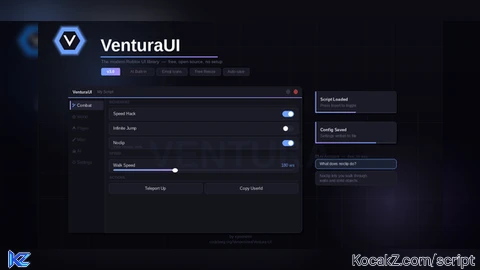

--[[
    VenturaUI v3.3  ·  Example Script
    by xyvenom  ·  codeberg.org/VenomVent/Ventura-UI

    1. Copy this into your executor
    2. Change the window options (name, accent colour, key, etc.)
    3. Add your own tabs and components
    4. Run it!
--]]

-- ── Load Library ──────────────────────────────────────────────────────────────
local Library = loadstring(game:HttpGet(
    "https://codeberg.org/VenomVent/Ventura-UI/raw/branch/main/VenturaLibrary.lua"
))()

-- ── Window ────────────────────────────────────────────────────────────────────
local GUI = Library:new({
    name        = "My Script",          -- title shown in the top bar
    subtitle    = "Loading...",         -- or a table of strings to cycle through
    accent      = Color3.fromRGB(110, 160, 255), -- theme accent colour
    toggleKey   = Enum.KeyCode.Insert,  -- show / hide the window
    minimizeKey = Enum.KeyCode.K,       -- collapse the window
    loadingTime = 1.5,                  -- seconds before tabs appear

    -- Key system (remove or set keyEnabled = false to skip the gate)
    keyEnabled   = false,
    key          = "MY-KEY-HERE",       -- string or table of valid keys
    onKeySuccess = function() print("Key accepted!") end,
    onKeyFail    = function() print("Key rejected.") end,
})

-- ── Services ──────────────────────────────────────────────────────────────────
local Players    = game:GetService("Players")
local RunService = game:GetService("RunService")
local UIS        = game:GetService("UserInputService")
local LP         = Players.LocalPlayer

local function char() return LP.Character end
local function hum()  local c = char(); return c and c:FindFirstChildOfClass("Humanoid") end
local function hrp()  local c = char(); return c and c:FindFirstChild("HumanoidRootPart") end

-- ════════════════════════════════════════════════════════════════════════════
--  TABS
-- ════════════════════════════════════════════════════════════════════════════

-- ── Tab 1: Player ─────────────────────────────────────────────────────────────
GUI:NavSection("MAIN")
local PlayerTab = GUI:CreateTab({ name = "Player", icon = "👤" })

PlayerTab:Section({ name = "Movement" })

-- Speed slider + toggle
local speedValue  = 16
local speedActive = false

local speedSlider = PlayerTab:Slider({
    name     = "Walk Speed",
    min      = 16, max = 350, default = 16,
    suffix   = " ws",
    callback = function(v)
        speedValue = v
        if speedActive then
            local h = hum()
            if h then h.WalkSpeed = v end
        end
    end,
})

PlayerTab:Toggle({
    name     = "Speed Hack",
    default  = false,
    callback = function(v)
        speedActive = v
        local h = hum()
        if h then h.WalkSpeed = v and speedValue or 16 end
    end,
})

PlayerTab:Slider({
    name     = "Jump Power",
    min      = 7, max = 300, default = 7,
    suffix   = " jp",
    callback = function(v)
        local h = hum()
        if h then h.JumpPower = v end
    end,
})

PlayerTab:Section({ name = "Extras" })

-- Noclip
local noclipConn
PlayerTab:Toggle({
    name        = "Noclip",
    description = "Walk through walls",
    default     = false,
    callback    = function(v)
        if noclipConn then noclipConn:Disconnect(); noclipConn = nil end
        if v then
            noclipConn = RunService.Stepped:Connect(function()
                local c = char(); if not c then return end
                for _, p in ipairs(c:GetDescendants()) do
                    if p:IsA("BasePart") then p.CanCollide = false end
                end
            end)
        end
    end,
})

-- Infinite jump
local jumpConn
PlayerTab:Toggle({
    name     = "Infinite Jump",
    default  = false,
    callback = function(v)
        if jumpConn then jumpConn:Disconnect(); jumpConn = nil end
        if v then
            jumpConn = UIS.JumpRequest:Connect(function()
                local h = hum()
                if h then h:ChangeState(Enum.HumanoidStateType.Jumping) end
            end)
        end
    end,
})

PlayerTab:Button({
    name     = "Teleport Up",
    callback = function()
        local r = hrp()
        if r then pcall(function() r.CFrame = r.CFrame + Vector3.new(0, 50, 0) end) end
    end,
})

-- ── Tab 2: World ──────────────────────────────────────────────────────────────
GUI:NavSection("WORLD")
local WorldTab = GUI:CreateTab({ name = "World", icon = "🌍" })
local Lighting = game:GetService("Lighting")

WorldTab:Section({ name = "Lighting" })

WorldTab:Slider({
    name = "Time of Day", min = 0, max = 24, default = 14, suffix = "h",
    callback = function(v) pcall(function() Lighting.ClockTime = v end) end,
})

WorldTab:Toggle({
    name     = "Fullbright",
    default  = false,
    callback = function(v)
        pcall(function()
            Lighting.Ambient        = v and Color3.fromRGB(255,255,255) or Color3.fromRGB(70,70,70)
            Lighting.OutdoorAmbient = v and Color3.fromRGB(255,255,255) or Color3.fromRGB(140,140,140)
            Lighting.Brightness     = v and 10 or 2
        end)
    end,
})

WorldTab:Slider({
    name = "Gravity", min = 0, max = 400, default = 196, suffix = " g",
    callback = function(v) pcall(function() workspace.Gravity = v end) end,
})

-- ── Tab 3: Misc ───────────────────────────────────────────────────────────────
GUI:NavSection("MISC")
local MiscTab = GUI:CreateTab({ name = "Misc", icon = "🔧" })

MiscTab:Section({ name = "Utilities" })

MiscTab:Button({
    name     = "Copy UserId",
    callback = function()
        pcall(function() setclipboard(tostring(LP.UserId)) end)
        GUI.notify("Copied", "UserId: " .. LP.UserId, 3)
    end,
})

-- Anti-AFK
local afkConn
MiscTab:Toggle({
    name        = "Anti-AFK",
    description = "Prevents inactivity kick",
    default     = false,
    callback    = function(v)
        if afkConn then afkConn:Disconnect(); afkConn = nil end
        if v then
            afkConn = LP.Idled:Connect(function()
                local vu = game:GetService("VirtualUser")
                pcall(function() vu:Button2Down(Vector2.new(0,0), workspace.CurrentCamera.CFrame) end)
                task.wait(0.1)
                pcall(function() vu:Button2Up(Vector2.new(0,0), workspace.CurrentCamera.CFrame) end)
            end)
        end
    end,
})

MiscTab:Separator()
MiscTab:Label({ text = "VenturaUI v3.3  •  by xyvenom" })
MiscTab:Label({ text = "Place: " .. tostring(game.Name) })

-- New in v3.3 — Chip, ControlHint, ButtonGrid demo
MiscTab:Section({ name = "v3.3 New Components" })
MiscTab:Chip({ text = "STABLE", color = Color3.fromRGB(60, 200, 100), icon = "✅" })
MiscTab:ControlHint({ name = "Toggle UI",   key = "Insert", description = "Show / hide the window" })
MiscTab:ControlHint({ name = "Minimize UI", key = "K",      description = "Collapse to titlebar" })
MiscTab:ButtonGrid({
    columns = 2,
    buttons = {
        { name = "Copy UserId", icon = "📋", callback = function()
            pcall(function() setclipboard(tostring(LP.UserId)) end)
            GUI.notify("Copied!", "UserId: " .. LP.UserId, 2, "success")
        end },
        { name = "Rejoin",     icon = "🔄", callback = function()
            pcall(function() game:GetService("TeleportService"):Teleport(game.PlaceId) end)
        end },
    }
})

-- ── Done ──────────────────────────────────────────────────────────────────────
task.delay(2, function()
    GUI.notify("My Script", "Loaded! Press Insert to toggle.", 4)
end)
How to Execute Universal Script – Ventura UI Lib (V4.1)
Step 1: Copy Code: Click the Copy Code button in the viewer above to grab the clean Lua loadstring.
Step 2: Launch Executor: Open a compatible, unpatched executor. If you need one, check our Roblox Executors Directory.
Step 3: Join Experience: Launch Roblox and join Universal Script.
Step 4: Attach & Run: Attach/inject your executor into the Roblox process, paste the code into the script tab, and press Execute.
Features & Information
Script Changelog (7)
Community Comments (14)
Frequently Asked Questions
How do I execute Universal Script – Ventura UI Lib (V4.1) in Roblox?
To run Universal Script – Ventura UI Lib (V4.1), copy the Lua loadstring from the code viewer above, launch Roblox and join Universal Script, attach a working executor (such as Potassium, Solara, or Delta from our Executors directory), paste the code into your executor console, and click Execute.
Is Universal Script – Ventura UI Lib (V4.1) keyless or does it require an access key?
Universal Script – Ventura UI Lib (V4.1) requires an access key. You can retrieve the official key directly using the Get Script Key link provided above.
Is Universal Script – Ventura UI Lib (V4.1) currently safe and working?
This script is active and operational. Always test scripts using a secondary (alt) Roblox account to safeguard your main profile against anti-cheat bans.


![Ez Hub [Open Source] [150+ games] - Verified script for Universal Script](https://media.kocakz.me/b74a9ac15370ba766b2fa9531f17c9dad2c0befb2b951693ae723e4c7d2c3fb6.webp)



![[KEYLESS] Moondiety Script | 20+ supported Games - Verified script for Universal Script](https://media.kocakz.me/6834c33a36c9fbe66afae4c6754c2b80386ce636b2f972464a95866f4b6a42eb.webp)




Love it! Please add a notification system.
this is good, but how do I enlarge the gui? it's too small
Reupdating the scripts ince it doesnt work!!
fix example script on your website, and i might use this
Ok it might be fixed now, also added a key system which you can turn on and off
@Conquerors_Scripts great
@jvva Check it out right now, its at its full potential!
@Conquerors_Scripts alright, ill look into it might even use it if its great can i have ur discord about docs questions
@jvva xyvenom
@jvva Fixed
@jvva Okay noted!
Promotion/promoting this script is a thank you in the description. Not required but i will thank you very much❤
W. because it easy to set up
LMK on your thoughts! ALSO.. should i add a key system?🔐 and what else should i add? - Venom