
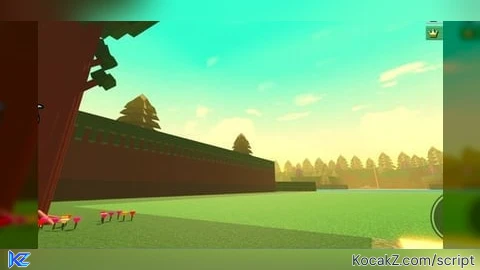

-- ═══════════════════════════════════════════════════════════
-- ULTIMATE ENVIRONMENTAL SYSTEM v6.3
-- (SHADERS + MOTION BLUR + FIREFLIES + DUST)
-- ═══════════════════════════════════════════════════════════

local Lighting = game:GetService("Lighting")
local Workspace = game:GetService("Workspace")
local RunService = game:GetService("RunService")
local TweenService = game:GetService("TweenService")
local Players = game:GetService("Players")

local LocalPlayer = Players.LocalPlayer
local Camera = Workspace.CurrentCamera

-- 1. ОЧИСТКА (Удаляем всё старое, включая лужи из прошлой версии)
for _, obj in ipairs(Lighting:GetChildren()) do
    if obj.Name:match("Shader_") then obj:Destroy() end
end
local oldFX = Workspace:FindFirstChild("EnvironmentFX")
if oldFX then oldFX:Destroy() end
local oldPuddles = Workspace:FindFirstChild("PuddleFolder")
if oldPuddles then oldPuddles:Destroy() end
local oldGrass = Workspace:FindFirstChild("InteractiveGrass")
if oldGrass then oldGrass:Destroy() end

local FXFolder = Instance.new("Folder")
FXFolder.Name = "EnvironmentFX"
FXFolder.Parent = Workspace

-- ═══════════════════════════════════════════════════════════
-- 2. УБИЙЦА РАЗМЫТИЯ (Не трогает Motion Blur)
-- ═══════════════════════════════════════════════════════════
task.spawn(function()
    while true do
        task.wait(0.5)
        for _, obj in ipairs(Lighting:GetChildren()) do
            if obj:IsA("BlurEffect") and obj.Name ~= "Shader_MotionBlur" then
                obj.Size = 0
            elseif obj:IsA("DepthOfFieldEffect") then
                obj.FarIntensity = 0; obj.NearIntensity = 0; obj.FocusDistance = 1000
            end
        end
    end
end)

-- ═══════════════════════════════════════════════════════════
-- 3. СОЗДАНИЕ ЭФФЕКТОВ
-- ═══════════════════════════════════════════════════════════
local CC = Instance.new("ColorCorrectionEffect"); CC.Name = "Shader_CC"; CC.Parent = Lighting
local Bloom = Instance.new("BloomEffect"); Bloom.Name = "Shader_Bloom"; Bloom.Parent = Lighting
local SunRays = Instance.new("SunRaysEffect"); SunRays.Name = "Shader_SunRays"; SunRays.Parent = Lighting
local Atmos = Instance.new("Atmosphere"); Atmos.Name = "Shader_Atmosphere"; Atmos.Parent = Lighting

local MotionBlur = Instance.new("BlurEffect")
MotionBlur.Name = "Shader_MotionBlur"
MotionBlur.Size = 0
MotionBlur.Parent = Lighting

-- ═══════════════════════════════════════════════════════════
-- 4. ПРОФИЛИ ПОГОДЫ
-- ═══════════════════════════════════════════════════════════
local NightProfile = {
    CC = {Brightness = 0.15, Contrast = 0.3, Saturation = -0.4, TintColor = Color3.fromRGB(100, 150, 255)},
    Bloom = {Intensity = 2, Size = 24, Threshold = 0.8},
    SunRays = {Intensity = 0.0, Spread = 0.1},
    Atmos = {Density = 0.2, Offset = 0.1, Color = Color3.fromRGB(30, 40, 60), Decay = Color3.fromRGB(10, 15, 30), Glare = 0, Haze = 0.5},
    LightingProps = {
        Ambient = Color3.fromRGB(80, 90, 130),
        OutdoorAmbient = Color3.fromRGB(90, 100, 140),
        Brightness = 2.5,
        ShadowSoftness = 0.5
    },
    FOV = 65
}

local DayProfile = {
    CC = {Brightness = 0.2, Contrast = 0.2, Saturation = 0.5, TintColor = Color3.fromRGB(255, 200, 150)},
    Bloom = {Intensity = 2, Size = 30, Threshold = 1},
    SunRays = {Intensity = 0.3, Spread = 0.5},
    Atmos = {Density = 0.25, Offset = 0.5, Color = Color3.fromRGB(255, 200, 100), Decay = Color3.fromRGB(200, 150, 50), Glare = 0.5, Haze = 2},
    LightingProps = {
        Ambient = Color3.fromRGB(120, 100, 80),
        OutdoorAmbient = Color3.fromRGB(180, 150, 120),
        Brightness = 3.5,
        ShadowSoftness = 0.1
    },
    FOV = 80
}

-- ═══════════════════════════════════════════════════════════
-- 5. ЛОГИКА ПЕРЕХОДА
-- ═══════════════════════════════════════════════════════════
local isNight = false
local currentState = "None"

local function ApplyProfile(profile, transitionTime)
    local tInfo = TweenInfo.new(transitionTime, Enum.EasingStyle.Sine, Enum.EasingDirection.InOut)
    TweenService:Create(CC, tInfo, profile.CC):Play()
    TweenService:Create(Bloom, tInfo, profile.Bloom):Play()
    TweenService:Create(SunRays, tInfo, profile.SunRays):Play()
    TweenService:Create(Atmos, tInfo, profile.Atmos):Play()
    TweenService:Create(Lighting, tInfo, profile.LightingProps):Play()
    TweenService:Create(Camera, tInfo, {FieldOfView = profile.FOV}):Play()
end

local initialTime = Lighting.ClockTime
if initialTime >= 18 or initialTime < 6 then
    isNight = true; currentState = "Night"; ApplyProfile(NightProfile, 0)
else
    isNight = false; currentState = "Day"; ApplyProfile(DayProfile, 0)
end

-- ═══════════════════════════════════════════════════════════
-- 6. ЖУКИ И ПЫЛЬ
-- ═══════════════════════════════════════════════════════════
local function SpawnFirefly()
    local part = Instance.new("Part")
    part.Name = "Firefly"
    part.Shape = Enum.PartType.Ball
    part.Size = Vector3.new(0.2, 0.2, 0.2)
    part.Material = Enum.Material.Neon
    part.Color = Color3.fromRGB(100, 255, 100)
    part.Anchored = true
    part.CanCollide = false
    part.Parent = FXFolder

    local light = Instance.new("PointLight")
    light.Color = part.Color
    light.Range = 12
    light.Brightness = 4
    light.Shadows = true
    light.Parent = part

    local rootPart = LocalPlayer.Character and LocalPlayer.Character:FindFirstChild("HumanoidRootPart")
    local basePos = rootPart and rootPart.Position or Camera.CFrame.Position
    part.Position = basePos + Vector3.new(math.random(-30, 30), math.random(-5, 10), math.random(-30, 30))

    local startTime = tick()
    local basePosition = part.Position

    local connection
    connection = RunService.Heartbeat:Connect(function()
        if not part.Parent then connection:Disconnect() return end
        if rootPart then
            local dist = (part.Position - rootPart.Position).Magnitude
            if dist < 10 then
                local dir = (part.Position - rootPart.Position).Unit
                basePosition = basePosition + dir * 2
            end
        end
        local timePassed = tick() - startTime
        local xOff = math.sin(timePassed * 2) * 5
        local yOff = math.cos(timePassed * 3) * 2 + math.sin(timePassed * 1) * 1
        local zOff = math.cos(timePassed * 2) * 5
        part.CFrame = CFrame.new(basePosition + Vector3.new(xOff, yOff, zOff))
    end)

    task.delay(math.random(15, 25), function()
        connection:Disconnect()
        if part and part.Parent then
            TweenService:Create(part, TweenInfo.new(2), {Transparency = 1}):Play()
            task.wait(2)
            part:Destroy()
        end
    end)
end

local function SpawnDust()
    local rootPart = LocalPlayer.Character and LocalPlayer.Character:FindFirstChild("HumanoidRootPart")
    if not rootPart then return end

    local spawnPos = rootPart.Position + Vector3.new(math.random(-40, 40), math.random(30, 50), math.random(-40, 40))
    local raycastParams = RaycastParams.new()
    raycastParams.FilterDescendantsInstances = {FXFolder, LocalPlayer.Character}
    raycastParams.FilterType = Enum.RaycastFilterType.Exclude
    local rayResult = Workspace:Raycast(spawnPos, Vector3.new(0, -100, 0), raycastParams)

    if rayResult then
        local dust = Instance.new("Part")
        dust.Name = "Dust"
        dust.Size = Vector3.new(0.15, 0.15, 0.15)
        dust.Color = Color3.fromRGB(255, 255, 255)
        dust.Material = Enum.Material.Neon
        dust.Anchored = true
        dust.CanCollide = false
        dust.Transparency = 0.5
        dust.CFrame = CFrame.new(spawnPos)
        dust.Parent = FXFolder

        local fallDistance = (spawnPos - rayResult.Position).Magnitude
        local fallTween = TweenService:Create(dust, TweenInfo.new(fallDistance / 15, Enum.EasingStyle.Linear), {
            CFrame = CFrame.new(rayResult.Position + Vector3.new(0, 0.05, 0))
        })
        fallTween:Play()

        fallTween.Completed:Connect(function()
            if dust and dust.Parent then
                local sparkles = Instance.new("ParticleEmitter")
                sparkles.Texture = "rbxassetid://241629851"
                sparkles.Rate = 30
                sparkles.Lifetime = NumberRange.new(0.5, 1)
                sparkles.Speed = NumberRange.new(2, 5)
                sparkles.SpreadAngle = Vector2.new(180, 180)
                sparkles.Size = NumberSequence.new(0.3)
                sparkles.Color = ColorSequence.new(Color3.fromRGB(200, 255, 200))
                sparkles.LightEmission = 1
                sparkles.Parent = dust

                task.wait(5)
                if dust and dust.Parent then
                    sparkles.Rate = 0
                    TweenService:Create(dust, TweenInfo.new(2, Enum.EasingStyle.Sine), {Transparency = 1}):Play()
                    task.wait(2)
                    if dust then dust:Destroy() end
                end
            end
        end)
    end
end

-- ═══════════════════════════════════════════════════════════
-- 7. ГЛАВНЫЕ ЦИКЛЫ
-- ═══════════════════════════════════════════════════════════
task.spawn(function()
    while true do
        local currentBugs = 0
        for _, v in ipairs(FXFolder:GetChildren()) do
            if v.Name == "Firefly" then currentBugs = currentBugs + 1 end
        end
        if currentState == "Night" and currentBugs < 15 then SpawnFirefly() end
        if currentState ~= "Night" then
            for _, v in ipairs(FXFolder:GetChildren()) do
                if v.Name == "Firefly" then v:Destroy() end
            end
        end
        task.wait(math.random(1, 2))
    end
end)

task.spawn(function()
    while true do
        SpawnDust()
        task.wait(math.random(1, 2))
    end
end)

local timeAccum = 0
local lastCamCFrame = Camera.CFrame
local currentBlur = 0

RunService.RenderStepped:Connect(function(deltaTime)
    timeAccum = timeAccum + deltaTime

    -- MOTION BLUR
    local currentCamCFrame = Camera.CFrame
    local posDelta = (currentCamCFrame.Position - lastCamCFrame.Position).Magnitude
    local rotDelta = (currentCamCFrame.LookVector - lastCamCFrame.LookVector).Magnitude
    local speed = posDelta + (rotDelta * 15)
    lastCamCFrame = currentCamCFrame

    local targetBlur = math.clamp(speed * 4, 0, 12)
    currentBlur = currentBlur + (targetBlur - currentBlur) * 0.15
    MotionBlur.Size = currentBlur

    -- Проверка Дня/Ночи
    local clock = Lighting.ClockTime
    local shouldBeNight = (clock >= 18 or clock < 6)

    if shouldBeNight ~= isNight then
        isNight = shouldBeNight
        if isNight then currentState = "Night"; ApplyProfile(NightProfile, 7)
        else currentState = "Day"; ApplyProfile(DayProfile, 7) end
    end

    if currentState == "Night" then
        Atmos.Density = NightProfile.Atmos.Density + math.sin(timeAccum * 0.8) * 0.02
        local shake = math.sin(timeAccum * 2) * 0.015
        Camera.CFrame = Camera.CFrame * CFrame.new(shake, shake, 0)
    elseif currentState == "Day" then
        SunRays.Intensity = DayProfile.SunRays.Intensity + math.sin(timeAccum * 2) * 0.15
        Bloom.Intensity = DayProfile.Bloom.Intensity + math.cos(timeAccum * 1.5) * 0.5
    end
end)

print("[MEGA SYSTEM] v6.3 Loaded. No Puddles. Pure Atmosphere.")
How to Execute Universal Script – shaders
Step 1: Copy Code: Click the Copy Code button in the viewer above to grab the clean Lua loadstring.
Step 2: Launch Executor: Open a compatible, unpatched executor. If you need one, check our Roblox Executors Directory.
Step 3: Join Experience: Launch Roblox and join Universal Script.
Step 4: Attach & Run: Attach/inject your executor into the Roblox process, paste the code into the script tab, and press Execute.
Features & Information
Script Changelog (1)
Community Comments (0)
No comments yet for this script.
Frequently Asked Questions
How do I execute Universal Script – shaders in Roblox?
To run Universal Script – shaders, copy the Lua loadstring from the code viewer above, launch Roblox and join Universal Script, attach a working executor (such as Potassium, Solara, or Delta from our Executors directory), paste the code into your executor console, and click Execute.
Is Universal Script – shaders keyless or does it require an access key?
Universal Script – shaders requires an access key. You can retrieve the official key directly using the Get Script Key link provided above.
Is Universal Script – shaders currently safe and working?
This script is active and operational. Always test scripts using a secondary (alt) Roblox account to safeguard your main profile against anti-cheat bans.


![Ez Hub [Open Source] [150+ games] - Verified script for Universal Script](https://media.kocakz.me/b74a9ac15370ba766b2fa9531f17c9dad2c0befb2b951693ae723e4c7d2c3fb6.webp)


![[KEYLESS] Moondiety Script | 20+ supported Games - Verified script for Universal Script](https://media.kocakz.me/6834c33a36c9fbe66afae4c6754c2b80386ce636b2f972464a95866f4b6a42eb.webp)



