

KeylessUniversal
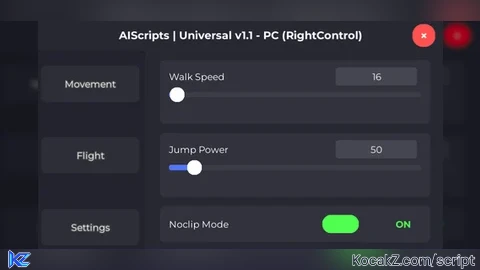
local Players = game:GetService("Players")
local UserInputService = game:GetService("UserInputService")
local RunService = game:GetService("RunService")
local TweenService = game:GetService("TweenService")
local CoreGui = game:GetService("CoreGui")
local player = Players.LocalPlayer
local isMobile = UserInputService.TouchEnabled and not UserInputService.MouseEnabled
local isPC = UserInputService.MouseEnabled
local function initializeAdminPanel(selectedDeviceType)
local ScreenGui = Instance.new("ScreenGui")
local MainFrame = Instance.new("Frame")
local Title = Instance.new("TextLabel")
local CloseButton = Instance.new("TextButton")
local HideButton = Instance.new("TextButton")
local TabButtons = Instance.new("Frame")
local ContentFrame = Instance.new("Frame")
local MobileToggleButton = nil
ScreenGui.Parent = CoreGui
ScreenGui.Name = "AdminPanel"
ScreenGui.ZIndexBehavior = Enum.ZIndexBehavior.Sibling
MainFrame.Name = "MainFrame"
MainFrame.Parent = ScreenGui
MainFrame.BackgroundColor3 = Color3.fromRGB(30, 30, 40)
MainFrame.BorderSizePixel = 0
if selectedDeviceType == "Mobile" then
MainFrame.Position = UDim2.new(0.1, 0, 0.1, 0)
MainFrame.Size = UDim2.new(0, 350, 0, 400)
MainFrame.Draggable = true
else
MainFrame.Position = UDim2.new(0.3, 0, 0.3, 0)
MainFrame.Size = UDim2.new(0, 450, 0, 350)
MainFrame.Draggable = false
end
MainFrame.Active = true
local mainCorner = Instance.new("UICorner")
mainCorner.CornerRadius = UDim.new(0, 8)
mainCorner.Parent = MainFrame
local mainStroke = Instance.new("UIStroke")
mainStroke.Color = Color3.fromRGB(80, 120, 255)
mainStroke.Thickness = 2
mainStroke.Parent = MainFrame
Title.Name = "Title"
Title.Parent = MainFrame
Title.BackgroundColor3 = Color3.fromRGB(40, 40, 50)
Title.BorderSizePixel = 0
Title.Size = UDim2.new(1, 0, 0, 35)
Title.Font = Enum.Font.GothamBold
Title.Text = "AIScripts | Universal v1.1 - " .. selectedDeviceType
Title.TextColor3 = Color3.fromRGB(255, 255, 255)
Title.TextSize = 14
local titleCorner = Instance.new("UICorner")
titleCorner.CornerRadius = UDim.new(0, 8)
titleCorner.Parent = Title
CloseButton.Name = "CloseButton"
CloseButton.Parent = Title
CloseButton.BackgroundColor3 = Color3.fromRGB(255, 80, 80)
CloseButton.BorderSizePixel = 0
CloseButton.Position = UDim2.new(0.92, 0, 0.15, 0)
CloseButton.Size = UDim2.new(0, 25, 0, 25)
CloseButton.Font = Enum.Font.GothamBold
CloseButton.Text = "×"
CloseButton.TextColor3 = Color3.fromRGB(255, 255, 255)
CloseButton.TextSize = 16
local closeCorner = Instance.new("UICorner")
closeCorner.CornerRadius = UDim.new(1, 0)
closeCorner.Parent = CloseButton
CloseButton.MouseButton1Click:Connect(function()
ScreenGui:Destroy()
if MobileToggleButton then
MobileToggleButton:Destroy()
end
end)
if selectedDeviceType == "Mobile" then
HideButton.Name = "HideButton"
HideButton.Parent = Title
HideButton.BackgroundColor3 = Color3.fromRGB(255, 180, 0)
HideButton.BorderSizePixel = 0
HideButton.Position = UDim2.new(0.8, 0, 0.15, 0)
HideButton.Size = UDim2.new(0, 25, 0, 25)
HideButton.Font = Enum.Font.GothamBold
HideButton.Text = "−"
HideButton.TextColor3 = Color3.fromRGB(255, 255, 255)
HideButton.TextSize = 18
local hideCorner = Instance.new("UICorner")
hideCorner.CornerRadius = UDim.new(1, 0)
hideCorner.Parent = HideButton
MobileToggleButton = Instance.new("TextButton")
MobileToggleButton.Name = "MobileToggle"
MobileToggleButton.Parent = ScreenGui
MobileToggleButton.BackgroundColor3 = Color3.fromRGB(20, 15, 30)
MobileToggleButton.BackgroundTransparency = 0.3
MobileToggleButton.BorderSizePixel = 0
MobileToggleButton.Size = UDim2.new(0, 65, 0, 65)
MobileToggleButton.Position = UDim2.new(0, 15, 0, 15)
MobileToggleButton.Font = Enum.Font.GothamBold
MobileToggleButton.Text = ""
MobileToggleButton.TextColor3 = Color3.fromRGB(255, 255, 255)
MobileToggleButton.TextSize = 14
MobileToggleButton.Visible = false
MobileToggleButton.ZIndex = 10
local toggleCorner = Instance.new("UICorner")
toggleCorner.CornerRadius = UDim.new(1, 0)
toggleCorner.Parent = MobileToggleButton
local toggleStroke = Instance.new("UIStroke")
toggleStroke.Color = Color3.fromRGB(180, 80, 220)
toggleStroke.Thickness = 3
toggleStroke.Transparency = 0.2
toggleStroke.Parent = MobileToggleButton
local innerGlow = Instance.new("UIStroke")
innerGlow.Name = "InnerGlow"
innerGlow.Color = Color3.fromRGB(220, 120, 255)
innerGlow.Thickness = 1.5
innerGlow.Transparency = 0.3
innerGlow.Parent = MobileToggleButton
local outerGlow = Instance.new("UIStroke")
outerGlow.Name = "OuterGlow"
outerGlow.Color = Color3.fromRGB(140, 60, 180)
outerGlow.Thickness = 5
outerGlow.Transparency = 0.7
outerGlow.Parent = MobileToggleButton
local aisLabel = Instance.new("TextLabel")
aisLabel.Name = "AISLabel"
aisLabel.Parent = MobileToggleButton
aisLabel.BackgroundTransparency = 1
aisLabel.Size = UDim2.new(1, 0, 0.6, 0)
aisLabel.Position = UDim2.new(0, 0, 0.1, 0)
aisLabel.Font = Enum.Font.GothamBold
aisLabel.Text = "A.I.S."
aisLabel.TextColor3 = Color3.fromRGB(255, 255, 255)
aisLabel.TextSize = 12
aisLabel.TextScaled = false
aisLabel.ZIndex = 11
local coderEmoji = Instance.new("TextLabel")
coderEmoji.Name = "CoderEmoji"
coderEmoji.Parent = MobileToggleButton
coderEmoji.BackgroundTransparency = 1
coderEmoji.Size = UDim2.new(1, 0, 0.4, 0)
coderEmoji.Position = UDim2.new(0, 0, 0.6, 0)
coderEmoji.Font = Enum.Font.GothamBold
coderEmoji.Text = "👨💻"
coderEmoji.TextColor3 = Color3.fromRGB(255, 255, 255)
coderEmoji.TextSize = 14
coderEmoji.ZIndex = 11
local function hideUI()
MainFrame.Visible = false
MobileToggleButton.Visible = true
end
local function showUI()
MainFrame.Visible = true
MobileToggleButton.Visible = false
end
HideButton.MouseButton1Click:Connect(function()
hideUI()
end)
MobileToggleButton.MouseButton1Click:Connect(function()
showUI()
end)
MobileToggleButton.MouseEnter:Connect(function()
TweenService:Create(MobileToggleButton, TweenInfo.new(0.3), {
BackgroundTransparency = 0.1,
Size = UDim2.new(0, 70, 0, 70)
}):Play()
TweenService:Create(toggleStroke, TweenInfo.new(0.3), {
Color = Color3.fromRGB(200, 100, 240),
Transparency = 0.1,
Thickness = 4
}):Play()
TweenService:Create(innerGlow, TweenInfo.new(0.3), {
Color = Color3.fromRGB(240, 150, 255),
Transparency = 0.1
}):Play()
TweenService:Create(outerGlow, TweenInfo.new(0.3), {
Color = Color3.fromRGB(160, 80, 200),
Transparency = 0.5
}):Play()
end)
MobileToggleButton.MouseLeave:Connect(function()
TweenService:Create(MobileToggleButton, TweenInfo.new(0.3), {
BackgroundTransparency = 0.3,
Size = UDim2.new(0, 65, 0, 65)
}):Play()
TweenService:Create(toggleStroke, TweenInfo.new(0.3), {
Color = Color3.fromRGB(180, 80, 220),
Transparency = 0.2,
Thickness = 3
}):Play()
TweenService:Create(innerGlow, TweenInfo.new(0.3), {
Color = Color3.fromRGB(220, 120, 255),
Transparency = 0.3
}):Play()
TweenService:Create(outerGlow, TweenInfo.new(0.3), {
Color = Color3.fromRGB(140, 60, 180),
Transparency = 0.7
}):Play()
end)
local pulseConnection
local function startPulseAnimation()
if pulseConnection then return end
pulseConnection = RunService.Heartbeat:Connect(function()
local time = tick()
local pulse = math.sin(time * 3) * 0.1 + 0.9
toggleStroke.Transparency = 0.2 + (1 - pulse) * 0.1
innerGlow.Transparency = 0.3 + (1 - pulse) * 0.1
end)
end
local function stopPulseAnimation()
if pulseConnection then
pulseConnection:Disconnect()
pulseConnection = nil
end
end
MobileToggleButton:GetPropertyChangedSignal("Visible"):Connect(function()
if MobileToggleButton.Visible then
startPulseAnimation()
else
stopPulseAnimation()
end
end)
end
TabButtons.Name = "TabButtons"
TabButtons.Parent = MainFrame
TabButtons.BackgroundColor3 = Color3.fromRGB(35, 35, 45)
TabButtons.BorderSizePixel = 0
TabButtons.Position = UDim2.new(0, 0, 0.1, 0)
if selectedDeviceType == "Mobile" then
TabButtons.Size = UDim2.new(0, 100, 0, 365)
else
TabButtons.Size = UDim2.new(0, 120, 0, 315)
end
local tabsCorner = Instance.new("UICorner")
tabsCorner.CornerRadius = UDim.new(0, 8)
tabsCorner.Parent = TabButtons
ContentFrame.Name = "ContentFrame"
ContentFrame.Parent = MainFrame
ContentFrame.BackgroundColor3 = Color3.fromRGB(40, 40, 50)
ContentFrame.BorderSizePixel = 0
if selectedDeviceType == "Mobile" then
ContentFrame.Position = UDim2.new(0.285, 0, 0.1, 0)
ContentFrame.Size = UDim2.new(0, 250, 0, 365)
else
ContentFrame.Position = UDim2.new(0.267, 0, 0.1, 0)
ContentFrame.Size = UDim2.new(0, 330, 0, 315)
end
ContentFrame.ClipsDescendants = true
local contentCorner = Instance.new("UICorner")
contentCorner.CornerRadius = UDim.new(0, 8)
contentCorner.Parent = ContentFrame
local noclipEnabled = false
local flyEnabled = false
local flySpeed = 50
local originalWalkSpeed = 16
local originalJumpPower = 50
local toggleKey = selectedDeviceType == "Mobile" and Enum.KeyCode.ButtonX or Enum.KeyCode.RightControl
local savedWalkSpeed = originalWalkSpeed
local savedJumpPower = originalJumpPower
local savedFlySpeed = flySpeed
local savedNoclip = false
local savedFly = false
local character, humanoid, rootPart
local function getCharacter()
character = player.Character
if character and character:FindFirstChild("Humanoid") and character:FindFirstChild("HumanoidRootPart") then
humanoid = character:FindFirstChildOfClass("Humanoid")
rootPart = character:FindFirstChild("HumanoidRootPart")
return character, humanoid, rootPart
end
return nil
end
getCharacter()
local tabs = {
"Movement",
"Flight",
"Settings"
}
local currentTab = "Movement"
local function isAnyTextBoxFocused()
return UserInputService:GetFocusedTextBox() ~= nil
end
local flyConnection
local bodyVelocity
local bodyGyro
local function toggleFly()
flyEnabled = not flyEnabled
savedFly = flyEnabled
if flyEnabled then
local char, hum, root = getCharacter()
if not root then
flyEnabled = false
return
end
if flyConnection then
flyConnection:Disconnect()
flyConnection = nil
end
if bodyVelocity then
bodyVelocity:Destroy()
bodyVelocity = nil
end
if bodyGyro then
bodyGyro:Destroy()
bodyGyro = nil
end
bodyVelocity = Instance.new("BodyVelocity")
bodyGyro = Instance.new("BodyGyro")
bodyVelocity.Parent = root
bodyVelocity.MaxForce = Vector3.new(40000, 40000, 40000)
bodyVelocity.Velocity = Vector3.new(0, 0, 0)
bodyGyro.Parent = root
bodyGyro.MaxTorque = Vector3.new(40000, 40000, 40000)
bodyGyro.P = 1000
bodyGyro.D = 50
flyConnection = RunService.Heartbeat:Connect(function()
if isAnyTextBoxFocused() then
if bodyVelocity then
bodyVelocity.Velocity = Vector3.new(0, 0, 0)
end
return
end
local currentChar, currentHum, currentRoot = getCharacter()
if not currentRoot or not bodyGyro or not bodyVelocity then
toggleFly()
return
end
local camera = workspace.CurrentCamera
if not camera then return end
local cameraCFrame = camera.CFrame
bodyGyro.CFrame = cameraCFrame
local direction = Vector3.new()
if selectedDeviceType == "PC" then
if UserInputService:IsKeyDown(Enum.KeyCode.W) then
direction = direction + cameraCFrame.LookVector * flySpeed
end
if UserInputService:IsKeyDown(Enum.KeyCode.S) then
direction = direction + cameraCFrame.LookVector * -flySpeed
end
if UserInputService:IsKeyDown(Enum.KeyCode.A) then
direction = direction + cameraCFrame.RightVector * -flySpeed
end
if UserInputService:IsKeyDown(Enum.KeyCode.D) then
direction = direction + cameraCFrame.RightVector * flySpeed
end
if UserInputService:IsKeyDown(Enum.KeyCode.Space) then
direction = direction + Vector3.new(0, flySpeed, 0)
end
if UserInputService:IsKeyDown(Enum.KeyCode.LeftShift) or UserInputService:IsKeyDown(Enum.KeyCode.RightShift) then
direction = direction + Vector3.new(0, -flySpeed, 0)
end
else
local touchPositions = UserInputService:GetTouches()
for _, touch in pairs(touchPositions) do
local viewportSize = workspace.CurrentCamera.ViewportSize
local joystickZone = Vector2.new(viewportSize.X * 0.1, viewportSize.Y * 0.7)
local joystickSize = Vector2.new(viewportSize.X * 0.3, viewportSize.Y * 0.3)
if touch.Position.X < joystickZone.x + joystickSize.x and
touch.Position.Y > joystickZone.y and
touch.Position.Y < joystickZone.y + joystickSize.y then
local joystickDelta = Vector2.new(
(touch.Position.X - joystickZone.x) / joystickSize.x - 0.5,
(touch.Position.Y - joystickZone.y) / joystickSize.y - 0.5
)
local magnitude = math.min(joystickDelta.Magnitude, 1)
if magnitude > 0.1 then
local normalizedDelta = joystickDelta.Unit * magnitude
direction = direction + (cameraCFrame.LookVector * -normalizedDelta.Y * flySpeed)
direction = direction + (cameraCFrame.RightVector * normalizedDelta.X * flySpeed)
end
break
end
end
if UserInputService:IsKeyDown(Enum.KeyCode.ButtonX) then
direction = direction + Vector3.new(0, flySpeed, 0)
end
if UserInputService:IsKeyDown(Enum.KeyCode.ButtonY) then
direction = direction + Vector3.new(0, -flySpeed, 0)
end
end
if bodyVelocity then
bodyVelocity.Velocity = direction
end
end)
if hum then
hum.PlatformStand = true
end
else
if flyConnection then
flyConnection:Disconnect()
flyConnection = nil
end
if bodyVelocity then
bodyVelocity:Destroy()
bodyVelocity = nil
end
if bodyGyro then
bodyGyro:Destroy()
bodyGyro = nil
end
local _, hum = getCharacter()
if hum then
hum.PlatformStand = false
end
end
updateContent()
end
local noclipConnection
local function toggleNoclip()
noclipEnabled = not noclipEnabled
savedNoclip = noclipEnabled
if noclipConnection then
noclipConnection:Disconnect()
noclipConnection = nil
end
if noclipEnabled then
noclipConnection = RunService.Stepped:Connect(function()
local char = getCharacter()
if char then
for _, part in pairs(char:GetDescendants()) do
if part:IsA("BasePart") then
part.CanCollide = false
end
end
end
end)
else
local char = getCharacter()
if char then
for _, part in pairs(char:GetDescendants()) do
if part:IsA("BasePart") then
part.CanCollide = true
end
end
end
end
end
local function createSlider(name, minValue, maxValue, defaultValue, callback)
local frame = Instance.new("Frame")
local label = Instance.new("TextLabel")
local valueBox = Instance.new("TextBox")
local slider = Instance.new("Frame")
local fill = Instance.new("Frame")
local sliderButton = Instance.new("TextButton")
local knob = Instance.new("Frame")
frame.Parent = ContentFrame
frame.BackgroundColor3 = Color3.fromRGB(50, 50, 60)
frame.BorderSizePixel = 0
frame.Size = UDim2.new(0.9, 0, 0, 70)
frame.Position = UDim2.new(0.05, 0, 0, 0)
local frameCorner = Instance.new("UICorner")
frameCorner.CornerRadius = UDim.new(0, 6)
frameCorner.Parent = frame
label.Parent = frame
label.BackgroundTransparency = 1
label.Position = UDim2.new(0, 10, 0, 8)
label.Size = UDim2.new(0.6, 0, 0, 20)
label.Font = Enum.Font.Gotham
label.Text = name
label.TextColor3 = Color3.fromRGB(255, 255, 255)
label.TextSize = selectedDeviceType == "Mobile" and 10 or 12
label.TextXAlignment = Enum.TextXAlignment.Left
valueBox.Parent = frame
valueBox.BackgroundColor3 = Color3.fromRGB(70, 70, 80)
valueBox.BorderSizePixel = 0
valueBox.Position = UDim2.new(0.65, 0, 0, 8)
valueBox.Size = UDim2.new(0.3, 0, 0, 20)
valueBox.Font = Enum.Font.Gotham
valueBox.Text = tostring(defaultValue)
valueBox.TextColor3 = Color3.fromRGB(255, 255, 255)
valueBox.TextSize = selectedDeviceType == "Mobile" and 10 or 12
valueBox.ClearTextOnFocus = false
local valueBoxCorner = Instance.new("UICorner")
valueBoxCorner.CornerRadius = UDim.new(0, 4)
valueBoxCorner.Parent = valueBox
slider.Parent = frame
slider.BackgroundColor3 = Color3.fromRGB(60, 60, 70)
slider.BorderSizePixel = 0
slider.Position = UDim2.new(0, 10, 0, 35)
slider.Size = UDim2.new(1, -20, 0, 6)
local sliderCorner = Instance.new("UICorner")
sliderCorner.CornerRadius = UDim.new(1, 0)
sliderCorner.Parent = slider
fill.Parent = slider
fill.BackgroundColor3 = Color3.fromRGB(80, 120, 255)
fill.BorderSizePixel = 0
fill.Size = UDim2.new((defaultValue - minValue) / (maxValue - minValue), 0, 1, 0)
local fillCorner = Instance.new("UICorner")
fillCorner.CornerRadius = UDim.new(1, 0)
fillCorner.Parent = fill
knob.Parent = slider
knob.BackgroundColor3 = Color3.fromRGB(255, 255, 255)
knob.BorderSizePixel = 0
knob.Size = UDim2.new(0, 16, 0, 16)
knob.Position = UDim2.new((defaultValue - minValue) / (maxValue - minValue), -8, 0.5, -8)
knob.ZIndex = 2
local knobCorner = Instance.new("UICorner")
knobCorner.CornerRadius = UDim.new(1, 0)
knobCorner.Parent = knob
sliderButton.Parent = slider
sliderButton.BackgroundTransparency = 1
sliderButton.Size = UDim2.new(1, 0, 4, 0)
sliderButton.Position = UDim2.new(0, 0, -1.5, 0)
sliderButton.Text = ""
sliderButton.ZIndex = 3
local currentValue = defaultValue
local isDragging = false
local function updateSlider(value)
local clampedValue = math.clamp(value, minValue, maxValue)
currentValue = clampedValue
local fillSize = (clampedValue - minValue) / (maxValue - minValue)
fill.Size = UDim2.new(fillSize, 0, 1, 0)
knob.Position = UDim2.new(fillSize, -8, 0.5, -8)
valueBox.Text = tostring(math.floor(clampedValue))
callback(clampedValue)
end
valueBox.FocusLost:Connect(function()
local text = valueBox.Text
local number = tonumber(text)
if number then
updateSlider(number)
else
valueBox.Text = tostring(currentValue)
end
end)
sliderButton.InputBegan:Connect(function(input)
if input.UserInputType == Enum.UserInputType.MouseButton1 or
(selectedDeviceType == "Mobile" and input.UserInputType == Enum.UserInputType.Touch) then
isDragging = true
local connection
connection = RunService.Heartbeat:Connect(function()
if not isDragging then
connection:Disconnect()
return
end
local inputPos
if selectedDeviceType == "Mobile" then
local touches = UserInputService:GetTouches()
if #touches > 0 then
inputPos = touches[1].Position
else
isDragging = false
return
end
else
inputPos = UserInputService:GetMouseLocation()
end
local sliderPos = slider.AbsolutePosition
local sliderSize = slider.AbsoluteSize
local relativeX = math.clamp((inputPos.X - sliderPos.X) / sliderSize.X, 0, 1)
local value = math.floor(minValue + (maxValue - minValue) * relativeX)
updateSlider(value)
end)
end
end)
UserInputService.InputEnded:Connect(function(input)
if (input.UserInputType == Enum.UserInputType.MouseButton1 and selectedDeviceType == "PC") or
(input.UserInputType == Enum.UserInputType.Touch and selectedDeviceType == "Mobile") then
isDragging = false
end
end)
return frame
end
local function createToggle(name, defaultValue, callback)
local frame = Instance.new("Frame")
local label = Instance.new("TextLabel")
local toggle = Instance.new("TextButton")
local status = Instance.new("TextLabel")
frame.Parent = ContentFrame
frame.BackgroundColor3 = Color3.fromRGB(50, 50, 60)
frame.BorderSizePixel = 0
frame.Size = UDim2.new(0.9, 0, 0, 40)
frame.Position = UDim2.new(0.05, 0, 0, 0)
local frameCorner = Instance.new("UICorner")
frameCorner.CornerRadius = UDim.new(0, 6)
frameCorner.Parent = frame
label.Parent = frame
label.BackgroundTransparency = 1
label.Position = UDim2.new(0, 10, 0, 10)
label.Size = UDim2.new(0.6, 0, 0, 20)
label.Font = Enum.Font.Gotham
label.Text = name
label.TextColor3 = Color3.fromRGB(255, 255, 255)
label.TextSize = selectedDeviceType == "Mobile" and 10 or 12
label.TextXAlignment = Enum.TextXAlignment.Left
toggle.Parent = frame
toggle.BackgroundColor3 = defaultValue and Color3.fromRGB(80, 255, 80) or Color3.fromRGB(255, 80, 80)
toggle.BorderSizePixel = 0
toggle.Position = UDim2.new(0.6, 0, 0.25, 0)
toggle.Size = UDim2.new(0, 40, 0, 20)
toggle.Font = Enum.Font.GothamBold
toggle.Text = ""
toggle.TextColor3 = Color3.fromRGB(255, 255, 255)
toggle.TextSize = 10
local toggleCorner = Instance.new("UICorner")
toggleCorner.CornerRadius = UDim.new(1, 0)
toggleCorner.Parent = toggle
status.Parent = frame
status.BackgroundTransparency = 1
status.Position = UDim2.new(0.8, 0, 0, 10)
status.Size = UDim2.new(0.2, 0, 0, 20)
status.Font = Enum.Font.GothamBold
status.Text = defaultValue and "ON" or "OFF"
status.TextColor3 = defaultValue and Color3.fromRGB(80, 255, 80) or Color3.fromRGB(255, 80, 80)
status.TextSize = selectedDeviceType == "Mobile" and 10 or 12
toggle.MouseButton1Click:Connect(function()
local newValue = not defaultValue
defaultValue = newValue
toggle.BackgroundColor3 = newValue and Color3.fromRGB(80, 255, 80) or Color3.fromRGB(255, 80, 80)
status.Text = newValue and "ON" or "OFF"
status.TextColor3 = newValue and Color3.fromRGB(80, 255, 80) or Color3.fromRGB(255, 80, 80)
callback(newValue)
end)
return frame
end
local function createKeybindButton(name, currentKey, callback)
local frame = Instance.new("Frame")
local label = Instance.new("TextLabel")
local keyButton = Instance.new("TextButton")
frame.Parent = ContentFrame
frame.BackgroundColor3 = Color3.fromRGB(50, 50, 60)
frame.BorderSizePixel = 0
frame.Size = UDim2.new(0.9, 0, 0, 40)
frame.Position = UDim2.new(0.05, 0, 0, 0)
local frameCorner = Instance.new("UICorner")
frameCorner.CornerRadius = UDim.new(0, 6)
frameCorner.Parent = frame
label.Parent = frame
label.BackgroundTransparency = 1
label.Position = UDim2.new(0, 10, 0, 10)
label.Size = UDim2.new(0.6, 0, 0, 20)
label.Font = Enum.Font.Gotham
label.Text = name
label.TextColor3 = Color3.fromRGB(255, 255, 255)
label.TextSize = selectedDeviceType == "Mobile" and 10 or 12
label.TextXAlignment = Enum.TextXAlignment.Left
keyButton.Parent = frame
keyButton.BackgroundColor3 = Color3.fromRGB(70, 70, 80)
keyButton.BorderSizePixel = 0
keyButton.Position = UDim2.new(0.6, 0, 0.15, 0)
keyButton.Size = UDim2.new(0.35, 0, 0, 25)
keyButton.Font = Enum.Font.Gotham
keyButton.Text = tostring(currentKey):gsub("Enum.KeyCode.", "")
keyButton.TextColor3 = Color3.fromRGB(255, 255, 255)
keyButton.TextSize = selectedDeviceType == "Mobile" and 10 or 12
local buttonCorner = Instance.new("UICorner")
buttonCorner.CornerRadius = UDim.new(0, 6)
buttonCorner.Parent = keyButton
local isSettingKey = false
keyButton.MouseButton1Click:Connect(function()
if isSettingKey then return end
isSettingKey = true
keyButton.Text = "Press any key..."
keyButton.BackgroundColor3 = Color3.fromRGB(80, 120, 255)
local keybindConnection
keybindConnection = UserInputService.InputBegan:Connect(function(input, gameProcessed)
if gameProcessed then return end
if input.UserInputType == Enum.UserInputType.Keyboard or (selectedDeviceType == "Mobile" and input.UserInputType == Enum.UserInputType.Gamepad1) then
keybindConnection:Disconnect()
local newKey = input.KeyCode or input.KeyCode
toggleKey = newKey
keyButton.Text = tostring(newKey):gsub("Enum.KeyCode.", "")
keyButton.BackgroundColor3 = Color3.fromRGB(70, 70, 80)
callback(newKey)
updateTitle()
isSettingKey = false
end
end)
wait(5)
if keybindConnection then
keybindConnection:Disconnect()
end
if isSettingKey then
keyButton.Text = tostring(toggleKey):gsub("Enum.KeyCode.", "")
keyButton.BackgroundColor3 = Color3.fromRGB(70, 70, 80)
isSettingKey = false
end
end)
return frame
end
local function updateTitle()
Title.Text = "AIScripts | Universal v1.1 - " .. selectedDeviceType .. " (" .. tostring(toggleKey):gsub("Enum.KeyCode.", "") .. ")"
end
local function updateContent()
for _, child in pairs(ContentFrame:GetChildren()) do
child:Destroy()
end
local yOffset = 10
if currentTab == "Movement" then
local currentWalkSpeed = savedWalkSpeed
local currentJumpPower = savedJumpPower
local char, hum = getCharacter()
if hum then
currentWalkSpeed = hum.WalkSpeed
currentJumpPower = hum.JumpPower
end
local walkSpeedFrame = createSlider("Walk Speed", 0, 500, currentWalkSpeed, function(value)
local _, humanoid = getCharacter()
if humanoid then
humanoid.WalkSpeed = value
savedWalkSpeed = value
end
end)
walkSpeedFrame.Position = UDim2.new(0.05, 0, 0, yOffset)
yOffset = yOffset + 80
local jumpPowerFrame = createSlider("Jump Power", 0, 500, currentJumpPower, function(value)
local _, humanoid = getCharacter()
if humanoid then
humanoid.JumpPower = value
savedJumpPower = value
end
end)
jumpPowerFrame.Position = UDim2.new(0.05, 0, 0, yOffset)
yOffset = yOffset + 80
local noclipFrame = createToggle("Noclip Mode", noclipEnabled, function(value)
toggleNoclip()
end)
noclipFrame.Position = UDim2.new(0.05, 0, 0, yOffset)
yOffset = yOffset + 50
local resetButton = Instance.new("TextButton")
resetButton.Parent = ContentFrame
resetButton.BackgroundColor3 = Color3.fromRGB(255, 80, 80)
resetButton.BorderSizePixel = 0
resetButton.Position = UDim2.new(0.05, 0, 0, yOffset)
resetButton.Size = UDim2.new(0.9, 0, 0, 30)
resetButton.Font = Enum.Font.Gotham
resetButton.Text = "Reset Settings"
resetButton.TextColor3 = Color3.fromRGB(255, 255, 255)
resetButton.TextSize = selectedDeviceType == "Mobile" and 10 or 12
local resetCorner = Instance.new("UICorner")
resetCorner.CornerRadius = UDim.new(0, 6)
resetCorner.Parent = resetButton
resetButton.MouseButton1Click:Connect(function()
local _, hum = getCharacter()
if hum then
hum.WalkSpeed = originalWalkSpeed
hum.JumpPower = originalJumpPower
savedWalkSpeed = originalWalkSpeed
savedJumpPower = originalJumpPower
end
if noclipEnabled then
toggleNoclip()
end
updateContent()
end)
elseif currentTab == "Flight" then
local flyToggle = createToggle("Flight Mode", flyEnabled, function(value)
toggleFly()
end)
flyToggle.Position = UDim2.new(0.05, 0, 0, yOffset)
yOffset = yOffset + 50
local flySpeedFrame = createSlider("Flight Speed", 1, 200, flySpeed, function(value)
flySpeed = value
savedFlySpeed = value
end)
flySpeedFrame.Position = UDim2.new(0.05, 0, 0, yOffset)
yOffset = yOffset + 80
local instruction = Instance.new("TextLabel")
instruction.Parent = ContentFrame
instruction.BackgroundTransparency = 1
instruction.Position = UDim2.new(0.05, 0, 0, yOffset)
instruction.Size = UDim2.new(0.9, 0, 0, 120)
instruction.Font = Enum.Font.Gotham
instruction.Text = selectedDeviceType == "Mobile" and
"Flight Controls:\n\nUse the built-in Roblox joystick to fly\n\nMove joystick to control flight direction\nButton X - Fly Up\nButton Y - Fly Down" or
"Flight Controls:\n\nW - Forward\nS - Backward\nA - Left\nD - Right\nSpace - Fly Up\nShift - Fly Down"
instruction.TextColor3 = Color3.fromRGB(200, 200, 200)
instruction.TextSize = selectedDeviceType == "Mobile" and 10 or 11
instruction.TextXAlignment = Enum.TextXAlignment.Left
instruction.TextYAlignment = Enum.TextYAlignment.Top
elseif currentTab == "Settings" then
if selectedDeviceType == "PC" then
local keybindFrame = createKeybindButton("Toggle Key", toggleKey, function(newKey)
toggleKey = newKey
end)
keybindFrame.Position = UDim2.new(0.05, 0, 0, yOffset)
yOffset = yOffset + 50
end
local info = Instance.new("TextLabel")
info.Parent = ContentFrame
info.BackgroundTransparency = 1
info.Position = UDim2.new(0.05, 0, 0, yOffset)
info.Size = UDim2.new(0.9, 0, 0, 150)
info.Font = Enum.Font.Gotham
info.Text = "AIScripts | Universal v1.1 - " .. selectedDeviceType .. "\n\nFeatures:\n• Walk Speed\n• Jump Power\n• Noclip Mode\n• Flight Mode"
info.TextColor3 = Color3.fromRGB(200, 200, 200)
info.TextSize = selectedDeviceType == "Mobile" and 10 or 12
info.TextXAlignment = Enum.TextXAlignment.Left
info.TextYAlignment = Enum.TextYAlignment.Top
end
end
local function createTabButton(name, position)
local button = Instance.new("TextButton")
button.Name = name .. "Tab"
button.Parent = TabButtons
button.BackgroundColor3 = Color3.fromRGB(45, 45, 55)
button.BorderSizePixel = 0
button.Position = UDim2.new(0.05, 0, position, 0)
button.Size = UDim2.new(0.9, 0, 0, 40)
button.Font = Enum.Font.Gotham
button.Text = name
button.TextColor3 = Color3.fromRGB(255, 255, 255)
button.TextSize = selectedDeviceType == "Mobile" and 10 or 12
local buttonCorner = Instance.new("UICorner")
buttonCorner.CornerRadius = UDim.new(0, 6)
buttonCorner.Parent = button
local buttonStroke = Instance.new("UIStroke")
buttonStroke.Color = Color3.fromRGB(80, 80, 80)
buttonStroke.Thickness = 1
buttonStroke.Parent = button
button.MouseEnter:Connect(function()
TweenService:Create(button, TweenInfo.new(0.2), {BackgroundColor3 = Color3.fromRGB(65, 65, 75)}):Play()
end)
button.MouseLeave:Connect(function()
TweenService:Create(button, TweenInfo.new(0.2), {BackgroundColor3 = Color3.fromRGB(45, 45, 55)}):Play()
end)
button.MouseButton1Click:Connect(function()
currentTab = name
updateContent()
end)
return button
end
local function restoreStates()
local char, hum = getCharacter()
if hum then
hum.WalkSpeed = savedWalkSpeed
hum.JumpPower = savedJumpPower
if savedNoclip and not noclipEnabled then
toggleNoclip()
end
if savedFly and not flyEnabled then
toggleFly()
end
flySpeed = savedFlySpeed
end
end
for i, tabName in ipairs(tabs) do
createTabButton(tabName, 0.05 + (i-1) * 0.25)
end
updateContent()
updateTitle()
player.CharacterAdded:Connect(function(newCharacter)
newCharacter:WaitForChild("HumanoidRootPart")
character = newCharacter
humanoid = newCharacter:WaitForChild("Humanoid")
rootPart = newCharacter:WaitForChild("HumanoidRootPart")
wait(0.5)
restoreStates()
updateContent()
end)
if selectedDeviceType == "PC" then
local toggleConnection
toggleConnection = UserInputService.InputBegan:Connect(function(input, gameProcessed)
if gameProcessed then return end
if input.KeyCode == toggleKey then
MainFrame.Visible = not MainFrame.Visible
end
end)
end
if selectedDeviceType == "PC" then
local isDraggingUI = false
local dragStartPos
local dragStartFramePos
local function startDragging()
isDraggingUI = true
dragStartPos = UserInputService:GetMouseLocation()
dragStartFramePos = MainFrame.Position
local connection
connection = RunService.Heartbeat:Connect(function()
if not isDraggingUI then
connection:Disconnect()
return
end
local mousePos = UserInputService:GetMouseLocation()
local delta = mousePos - dragStartPos
local newPos = UDim2.new(
dragStartFramePos.X.Scale,
dragStartFramePos.X.Offset + delta.X,
dragStartFramePos.Y.Scale,
dragStartFramePos.Y.Offset + delta.Y
)
MainFrame.Position = newPos
end)
end
Title.InputBegan:Connect(function(input)
if input.UserInputType == Enum.UserInputType.MouseButton1 then
startDragging()
end
end)
UserInputService.InputEnded:Connect(function(input)
if input.UserInputType == Enum.UserInputType.MouseButton1 then
isDraggingUI = false
end
end)
end
end
local deviceSelectionGui = Instance.new("ScreenGui")
deviceSelectionGui.Name = "DeviceSelection"
deviceSelectionGui.Parent = CoreGui
deviceSelectionGui.ZIndexBehavior = Enum.ZIndexBehavior.Sibling
local selectionFrame = Instance.new("Frame")
selectionFrame.Name = "SelectionFrame"
selectionFrame.Parent = deviceSelectionGui
selectionFrame.BackgroundColor3 = Color3.fromRGB(30, 30, 40)
selectionFrame.BorderSizePixel = 0
selectionFrame.Position = UDim2.new(0.35, 0, 0.4, 0)
selectionFrame.Size = UDim2.new(0, 300, 0, 200)
selectionFrame.AnchorPoint = Vector2.new(0.5, 0.5)
local selectionCorner = Instance.new("UICorner")
selectionCorner.CornerRadius = UDim.new(0, 8)
selectionCorner.Parent = selectionFrame
local selectionStroke = Instance.new("UIStroke")
selectionStroke.Color = Color3.fromRGB(80, 120, 255)
selectionStroke.Thickness = 2
selectionStroke.Parent = selectionFrame
local selectionTitle = Instance.new("TextLabel")
selectionTitle.Name = "SelectionTitle"
selectionTitle.Parent = selectionFrame
selectionTitle.BackgroundColor3 = Color3.fromRGB(40, 40, 50)
selectionTitle.BorderSizePixel = 0
selectionTitle.Size = UDim2.new(1, 0, 0, 40)
selectionTitle.Font = Enum.Font.GothamBold
selectionTitle.Text = "Select Your Device"
selectionTitle.TextColor3 = Color3.fromRGB(255, 255, 255)
selectionTitle.TextSize = 16
local titleCorner2 = Instance.new("UICorner")
titleCorner2.CornerRadius = UDim.new(0, 8)
titleCorner2.Parent = selectionTitle
local selectionText = Instance.new("TextLabel")
selectionText.Name = "SelectionText"
selectionText.Parent = selectionFrame
selectionText.BackgroundTransparency = 1
selectionText.Position = UDim2.new(0, 0, 0.2, 0)
selectionText.Size = UDim2.new(1, 0, 0, 40)
selectionText.Font = Enum.Font.Gotham
selectionText.Text = "Please select your device type:"
selectionText.TextColor3 = Color3.fromRGB(255, 255, 255)
selectionText.TextSize = 14
local pcButton = Instance.new("TextButton")
pcButton.Name = "PCButton"
pcButton.Parent = selectionFrame
pcButton.BackgroundColor3 = Color3.fromRGB(60, 120, 255)
pcButton.BorderSizePixel = 0
pcButton.Position = UDim2.new(0.1, 0, 0.45, 0)
pcButton.Size = UDim2.new(0.35, 0, 0, 40)
pcButton.Font = Enum.Font.GothamBold
pcButton.Text = "PC"
pcButton.TextColor3 = Color3.fromRGB(255, 255, 255)
pcButton.TextSize = 14
local pcCorner = Instance.new("UICorner")
pcCorner.CornerRadius = UDim.new(0, 6)
pcCorner.Parent = pcButton
local mobileButton = Instance.new("TextButton")
mobileButton.Name = "MobileButton"
mobileButton.Parent = selectionFrame
mobileButton.BackgroundColor3 = Color3.fromRGB(60, 120, 255)
mobileButton.BorderSizePixel = 0
mobileButton.Position = UDim2.new(0.55, 0, 0.45, 0)
mobileButton.Size = UDim2.new(0.35, 0, 0, 40)
mobileButton.Font = Enum.Font.GothamBold
mobileButton.Text = "Mobile"
mobileButton.TextColor3 = Color3.fromRGB(255, 255, 255)
mobileButton.TextSize = 14
local mobileCorner = Instance.new("UICorner")
mobileCorner.CornerRadius = UDim.new(0, 6)
mobileCorner.Parent = mobileButton
local autoDetectText = Instance.new("TextLabel")
autoDetectText.Name = "AutoDetectText"
autoDetectText.Parent = selectionFrame
autoDetectText.BackgroundTransparency = 1
autoDetectText.Position = UDim2.new(0, 0, 0.75, 0)
autoDetectText.Size = UDim2.new(1, 0, 0, 30)
autoDetectText.Font = Enum.Font.Gotham
autoDetectText.Text = "Auto-detected: " .. (isMobile and "Mobile" or "PC")
autoDetectText.TextColor3 = Color3.fromRGB(200, 200, 200)
autoDetectText.TextSize = 12
local selectedDeviceType = nil
local deviceSelected = false
pcButton.MouseButton1Click:Connect(function()
selectedDeviceType = "PC"
deviceSelected = true
deviceSelectionGui:Destroy()
initializeAdminPanel(selectedDeviceType)
end)
mobileButton.MouseButton1Click:Connect(function()
selectedDeviceType = "Mobile"
deviceSelected = true
deviceSelectionGui:Destroy()
initializeAdminPanel(selectedDeviceType)
end)
delay(5, function()
if not deviceSelected then
selectedDeviceType = isMobile and "Mobile" or "PC"
deviceSelectionGui:Destroy()
initializeAdminPanel(selectedDeviceType)
end
end)![[KEYLESS] Moondiety Script | 17+ supported Games](https://scriptblox.com/images/sb/0-1753093706828.png)


Hello everyone! This is my first roblox script, so I would really appreciate your criticism! Thank you for choosing me)
I know your name is AIScripter but consider making "easy" script like these yourself for learning and generally better understanding. If you wanna keep using ai atleast use an better model e.g. claude which you can use for free at lmarena.ai with limits tho.
@Alexchad, thank you for your concern about the learning process! I fully agree with you about the value of self-learning and the importance of deep understanding. At the same time, I see AI as a tool for automating routine tasks, which allows me to free up time and energy for more complex and interesting challenges. This is its main value for me.
Not gonna lie bro, a lot needs fixing, first off you kinda need mobile mode, and the reason for this is because more than half of these scripters using executors are on mobile, now for the part of the actual sript. 1. If you used the script, on mobile when you are trying to adjust the settings like speed, flight speed, jumppower, etc the scrollwheel follows you when ou are trying to enable it. 2. fix your flight mode, when you enable flight on mobile (idk abt pc) you just stay in place, you need to have it use the joystick to move around. 3. Its detected and you will get kicked or banned by anticheat if that game has a strict anticheat. 4. It should have a minimizing option and a moveable gui. 5. (havent tested anything else out) BUT.. you should probally add some extra features, like killing players, exploding players, teleporting to players, etc just to make it funner Rate my feedback 1-10 plsssssssssss I can also give you a sample script if you add me on discord at: NoThanks4444 Reason for Discord is because script wont fit in comment section.
@Master_Debater, Thank you so much for such a well-informed feedback, I didn't expect anyone to be as interested in my script as I am. I will definitely start fixing the issues you pointed out tomorrow morning. Thank you again!
Oh, I forgot about the rating. 11/10)
@AIScripter I also have a sample script for you, it6 has a lot of characters and cant be used in the comment section because the limit is 1800 characters, only if you want
@Master_Debater Can you upload it to GitHub, for example, and provide a link to the repository?
@AIScripter i can try, i might even be able to upload it here, i just needto do some more testing rq
@Master_Debater Okay, I'll look forward to your script). I'll fix mine according to your instructions.