

Key RequiredUniversal
-- Rayfield UI Universal Script (ESP + Key System + Fly + Noclip)

local Rayfield = loadstring(game:HttpGet('https://sirius.menu/rayfield'))()

-- Key System
local CorrectKey = "UNIVERSAL-KEY-123"
local KeyValid = false

local KeyWindow = Rayfield:CreateWindow({
   Name = "Key System",
   LoadingTitle = "Authenticating",
   LoadingSubtitle = "Enter Key",
   ConfigurationSaving = {Enabled = false}
})

local KeyTab = KeyWindow:CreateTab("Key", 4483362458)

KeyTab:CreateInput({
   Name = "Enter Key",
   PlaceholderText = "Key here...",
   RemoveTextAfterFocusLost = false,
   Callback = function(Text)
      if Text == CorrectKey then
         KeyValid = true
         Rayfield:Notify({Title = "Success", Content = "Correct Key!", Duration = 3})
      else
         Rayfield:Notify({Title = "Error", Content = "Wrong Key!", Duration = 3})
      end
   end,
})

repeat task.wait() until KeyValid

-- Main Window
local Window = Rayfield:CreateWindow({
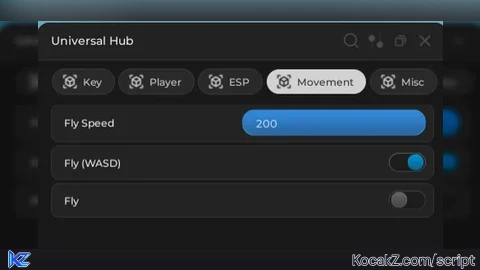
   Name = "Universal Hub",
   LoadingTitle = "Universal Hub",
   LoadingSubtitle = "by you",
   ConfigurationSaving = {
      Enabled = true,
      FolderName = "UniversalHub",
      FileName = "Config"
   }
})

-- Tabs
local PlayerTab = Window:CreateTab("Player", 4483362458)
local EspTab = Window:CreateTab("ESP", 4483362458)
local RivalsTab = Window:CreateTab("Movement", 4483362458)
local MiscTab = Window:CreateTab("Misc", 4483362458)

-- Player Features
PlayerTab:CreateSlider({
   Name = "WalkSpeed",
   Range = {16, 200},
   Increment = 1,
   CurrentValue = 16,
   Callback = function(Value)
      game.Players.LocalPlayer.Character.Humanoid.WalkSpeed = Value
   end,
})

-- Infinite Jump
_G.InfJump = false

PlayerTab:CreateToggle({
   Name = "Infinite Jump",
   CurrentValue = false,
   Callback = function(Value)
      _G.InfJump = Value
   end,
})

game:GetService("UserInputService").JumpRequest:Connect(function()
   if _G.InfJump then
      game.Players.LocalPlayer.Character:FindFirstChildOfClass("Humanoid"):ChangeState("Jumping")
   end
end)

-- Fly System (RIVALS Tab - WASD)
_G.FlySpeed = 50
_G.Flying = false

local UIS = game:GetService("UserInputService")
local RunService = game:GetService("RunService")

local flyKeys = {W=false, A=false, S=false, D=false, Space=false, Shift=false}

RivalsTab:CreateSlider({
   Name = "Fly Speed",
   Range = {10, 200},
   Increment = 5,
   CurrentValue = 50,
   Callback = function(Value)
      _G.FlySpeed = Value
   end,
})

RivalsTab:CreateToggle({
   Name = "Fly (WASD)",
   CurrentValue = false,
   Callback = function(Value)
      _G.Flying = Value
      local player = game.Players.LocalPlayer
      local char = player.Character or player.CharacterAdded:Wait()
      local hrp = char:WaitForChild("HumanoidRootPart")

      if Value then
         local bv = Instance.new("BodyVelocity")
         bv.MaxForce = Vector3.new(1e5,1e5,1e5)
         bv.Velocity = Vector3.zero
         bv.Parent = hrp

         local inputBegan = UIS.InputBegan:Connect(function(input, gpe)
            if gpe then return end
            if input.KeyCode == Enum.KeyCode.W then flyKeys.W = true end
            if input.KeyCode == Enum.KeyCode.A then flyKeys.A = true end
            if input.KeyCode == Enum.KeyCode.S then flyKeys.S = true end
            if input.KeyCode == Enum.KeyCode.D then flyKeys.D = true end
            if input.KeyCode == Enum.KeyCode.Space then flyKeys.Space = true end
            if input.KeyCode == Enum.KeyCode.LeftShift then flyKeys.Shift = true end
         end)

         local inputEnded = UIS.InputEnded:Connect(function(input)
            if input.KeyCode == Enum.KeyCode.W then flyKeys.W = false end
            if input.KeyCode == Enum.KeyCode.A then flyKeys.A = false end
            if input.KeyCode == Enum.KeyCode.S then flyKeys.S = false end
            if input.KeyCode == Enum.KeyCode.D then flyKeys.D = false end
            if input.KeyCode == Enum.KeyCode.Space then flyKeys.Space = false end
            if input.KeyCode == Enum.KeyCode.LeftShift then flyKeys.Shift = false end
         end)

         local loop
         loop = RunService.RenderStepped:Connect(function()
            if not _G.Flying then
               loop:Disconnect()
               inputBegan:Disconnect()
               inputEnded:Disconnect()
               bv:Destroy()
               return
            end

            local cam = workspace.CurrentCamera
            local dir = Vector3.zero

            if flyKeys.W then dir += cam.CFrame.LookVector end
            if flyKeys.S then dir -= cam.CFrame.LookVector end
            if flyKeys.A then dir -= cam.CFrame.RightVector end
            if flyKeys.D then dir += cam.CFrame.RightVector end
            if flyKeys.Space then dir += Vector3.new(0,1,0) end
            if flyKeys.Shift then dir -= Vector3.new(0,1,0) end

            if dir.Magnitude > 0 then
               bv.Velocity = dir.Unit * _G.FlySpeed
            else
               bv.Velocity = Vector3.zero
            end
         end)
      end
   end,
})

RivalsTab:CreateToggle({
   Name = "Fly",
   CurrentValue = false,
   Callback = function(Value)
      _G.Flying = Value
      local player = game.Players.LocalPlayer
      local char = player.Character
      local hrp = char:WaitForChild("HumanoidRootPart")

      if Value then
         local bv = Instance.new("BodyVelocity")
         bv.MaxForce = Vector3.new(1e5,1e5,1e5)
         bv.Velocity = Vector3.zero
         bv.Parent = hrp

         while _G.Flying do
            bv.Velocity = workspace.CurrentCamera.CFrame.LookVector * _G.FlySpeed
            task.wait()
         end

         bv:Destroy()
      end
   end,
})

-- ESP System
_G.ESPEnabled = false

local function CreateESP(player)
   if player ~= game.Players.LocalPlayer and player.Character then
      if not player.Character:FindFirstChild("Highlight") then
         local highlight = Instance.new("Highlight")
         highlight.FillColor = Color3.fromRGB(255, 0, 0)
         highlight.OutlineColor = Color3.fromRGB(255, 255, 255)
         highlight.Parent = player.Character
      end
   end
end

local function RemoveESP(player)
   if player.Character then
      for _,v in pairs(player.Character:GetChildren()) do
         if v:IsA("Highlight") then
            v:Destroy()
         end
      end
   end
end

EspTab:CreateToggle({
   Name = "Player ESP",
   CurrentValue = false,
   Callback = function(Value)
      _G.ESPEnabled = Value
      for _,plr in pairs(game.Players:GetPlayers()) do
         if Value then
            CreateESP(plr)
         else
            RemoveESP(plr)
         end
      end
   end,
})

-- Auto ESP on join
game.Players.PlayerAdded:Connect(function(plr)
   plr.CharacterAdded:Connect(function()
      task.wait(1)
      if _G.ESPEnabled then
         CreateESP(plr)
      end
   end)
end)

-- Misc
MiscTab:CreateButton({
   Name = "Rejoin",
   Callback = function()
      game:GetService("TeleportService"):Teleport(game.PlaceId, game.Players.LocalPlayer)
   end,
})

-- Anti AFK
local vu = game:GetService("VirtualUser")
game.Players.LocalPlayer.Idled:Connect(function()
   vu:Button2Down(Vector2.new(0,0),workspace.CurrentCamera.CFrame)
   task.wait(1)
   vu:Button2Up(Vector2.new(0,0),workspace.CurrentCamera.CFrame)
end)No comments yet for this script.


