


KeylessUniversal
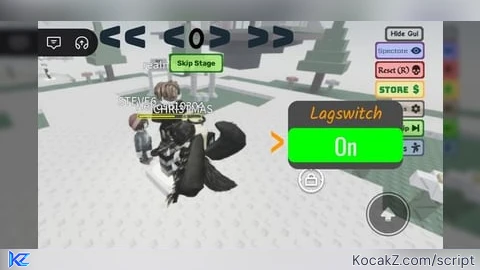
-- Based on CatAutism's Lagswitcher (ScriptBlox) script but remade to use UI elements rather than keyboard input
-- View the original here: https://scriptblox.com/script/Lagswitcher_758
-- Thanks for using this script
-- Have fun :3

Settings = settings().Network
local PlayerUI = game.Players.LocalPlayer.PlayerGui
if PlayerUI:FindFirstChild("Lagswitcher") ~= nil then
  PlayerUI.Lagswitcher:Destroy()
end
local UI = Instance.new("ScreenGui")
UI.Name = "Lagswitcher"
UI.ResetOnSpawn = false
UI.IgnoreGuiInset = true
UI.Parent = PlayerUI
local Content = Instance.new("Frame")
Content.Name = "Content"
Content.Size = UDim2.fromScale(0.25, 0.3)
Content.Position = UDim2.fromScale(1, 0.35)
Content.BackgroundColor3 = Color3.fromRGB(75, 75, 75)
Content.BackgroundTransparency = 0
Content.BorderSizePixel = 0
Content.Parent = UI
local ContentCorner = Instance.new("UICorner")
ContentCorner.CornerRadius = UDim.new(0.15, 0)
ContentCorner.Parent = Content
local Title = Instance.new("TextLabel")
Title.Text = "Lagswitch"
Title.Font = Enum.Font.Kalam
Title.TextColor3 = Color3.fromRGB(255, 150, 0)
Title.BackgroundTransparency = 1
Title.Size = UDim2.fromScale(1, 0.4)
Title.Position = UDim2.fromScale(0, 0)
Title.BorderSizePixel = 0
Title.TextScaled = true
Title.Parent = Content
if game.Lighting:FindFirstChild("LagswitchVFX") ~= nil then
  game.Lighting.LagswitchVFX:Destroy()
end
local VFX = Instance.new("ColorCorrectionEffect")
VFX.Saturation = -1
VFX.Brightness = 0
VFX.Contrast = 0
VFX.Name = "LagswitchVFX"
VFX.Enabled = false
VFX.Parent = game.Lighting
local Toggler = Instance.new("TextButton")
Toggler.BackgroundColor3 = Color3.fromRGB(255, 0, 0)
Toggler.Text = "Off"
Toggler.TextScaled = true
local TogglerCorner = Instance.new("UICorner")
TogglerCorner.CornerRadius = UDim.new(0.2, 0)
TogglerCorner.Parent = Toggler
Toggler.Font = Enum.Font.Oswald
Toggler.Size = UDim2.fromScale(1, 0.5)
Toggler.Position = UDim2.fromScale(0, 0.4)
Toggler.Parent = Content
Toggler.TextColor3 = Color3.fromRGB(255, 255, 255)
local Slider = Instance.new("TextButton")
Slider.BackgroundTransparency = 1
Slider.Text = "<"
Slider.TextScaled = true
Slider.Font = Enum.Font.Oswald
Slider.TextColor3 = Color3.fromRGB(255, 150, 0)
Slider.Size = UDim2.fromScale(0.2, 1)
Slider.Position = UDim2.fromScale(-0.2, 0)
Slider.Parent = Content
MenuClosedPosition = UDim2.fromScale(1, 0.35)
MenuOpenPosition = UDim2.fromScale(0.7, 0.35)
local IsActive = false
local MenuOpen = false
local EasingDirection = Enum.EasingDirection.Out
local EasingStyle = Enum.EasingStyle.Sine
Slider.MouseButton1Click:Connect(function()
  Slider.Interactable = false
  if MenuOpen then
    Slider.Text = "<"
    MenuOpen = false
    Content:TweenPosition(MenuClosedPosition, EasingDirection, EasingStyle, 0.5, true)
  else
    Slider.Text = ">"
    MenuOpen = true
    Content:TweenPosition(MenuOpenPosition, EasingDirection, EasingStyle, 0.5, true)
  end
  task.wait(1)
  Slider.Interactable = true
end)
Toggler.MouseButton1Click:Connect(function()
  Toggler.Interactable = false
  if IsActive then
    Toggler.Text = "Off"
    Toggler.BackgroundColor3 = Color3.fromRGB(255, 0, 0)
    VFX.Enabled = false
    Settings.IncomingReplicationLag = 0
    IsActive = false
  else
    Toggler.Text = "On"
    Toggler.BackgroundColor3 = Color3.fromRGB(0, 255, 0)
    VFX.Enabled = true
    Settings.IncomingReplicationLag = 1000
    IsActive = true
  end
  Toggler.Interactable = true
end)


it was a great working script but now it doesnt work.... once youve activated the lag switch people will now start moving and the script gets broken wish there was a fix or something but im gonna have to find another script like this until a fix comes..