

Key RequiredUniversal
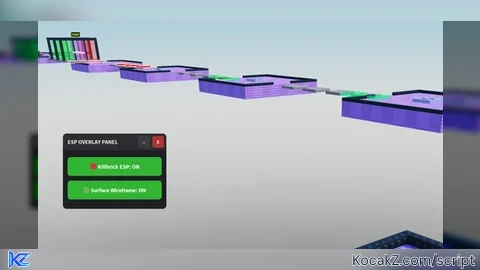
-- LocalScript inside StarterPlayerScripts
local Workspace = game:GetService("Workspace")
local Players = game:GetService("Players")
local UserInputService = game:GetService("UserInputService")

local localPlayer = Players.LocalPlayer
local playerGui = localPlayer:WaitForChild("PlayerGui")

-----------------------------------------
-- CONFIGURATION
-----------------------------------------
-- Change "Delete" to any key you want (e.g., Enum.KeyCode.V)
local TOGGLE_KEY = Enum.KeyCode.Delete

-----------------------------------------
-- STATE DATA
-----------------------------------------
local killbrickESPActive = false
local surfaceESPActive = false
local isMinimized = false

-----------------------------------------
-- UI CREATION
-----------------------------------------
local screenGui = Instance.new("ScreenGui")
screenGui.Name = "ESPControlMenu"
screenGui.ResetOnSpawn = false
screenGui.Parent = playerGui

-- Main Container Frame
local mainFrame = Instance.new("Frame")
mainFrame.Name = "MainFrame"
mainFrame.Size = UDim2.new(0, 220, 0, 160)
mainFrame.Position = UDim2.new(0, 20, 0, 20)
mainFrame.BackgroundColor3 = Color3.fromRGB(30, 30, 35)
mainFrame.BorderSizePixel = 0
mainFrame.Active = true
mainFrame.Draggable = true -- Drag via title bar or main frame
mainFrame.Parent = screenGui

local uiCorner = Instance.new("UICorner")
uiCorner.CornerRadius = UDim.new(0, 8)
uiCorner.Parent = mainFrame

-- Title Banner
local titleLabel = Instance.new("TextLabel")
titleLabel.Name = "TitleLabel"
titleLabel.Size = UDim2.new(1, 0, 0, 35)
titleLabel.BackgroundColor3 = Color3.fromRGB(45, 45, 50)
titleLabel.Text = "ESP OVERLAY PANEL"
titleLabel.TextColor3 = Color3.fromRGB(240, 240, 240)
titleLabel.Font = Enum.Font.SourceSansBold
titleLabel.TextSize = 14
titleLabel.TextXAlignment = Enum.TextXAlignment.Left
titleLabel.Position = UDim2.new(0, 0, 0, 0)
titleLabel.Parent = mainFrame

-- Padding for text inside Title
local padding = Instance.new("UIPadding")
padding.PaddingLeft = UDim.new(0, 10)
padding.Parent = titleLabel

local titleCorner = Instance.new("UICorner")
titleCorner.CornerRadius = UDim.new(0, 8)
titleCorner.Parent = titleLabel

-- Minimize Button (-)
local minimizeBtn = Instance.new("TextButton")
minimizeBtn.Name = "MinimizeButton"
minimizeBtn.Size = UDim2.new(0, 25, 0, 25)
minimizeBtn.Position = UDim2.new(1, -60, 0, 5)
minimizeBtn.BackgroundColor3 = Color3.fromRGB(60, 60, 65)
minimizeBtn.Text = "-"
minimizeBtn.TextColor3 = Color3.fromRGB(240, 240, 240)
minimizeBtn.Font = Enum.Font.SourceSansBold
minimizeBtn.TextSize = 16
minimizeBtn.BorderSizePixel = 0
minimizeBtn.Parent = titleLabel

local minCorner = Instance.new("UICorner")
minCorner.CornerRadius = UDim.new(0, 4)
minCorner.Parent = minimizeBtn

-- Close Button (X)
local closeBtn = Instance.new("TextButton")
closeBtn.Name = "CloseButton"
closeBtn.Size = UDim2.new(0, 25, 0, 25)
closeBtn.Position = UDim2.new(1, -30, 0, 5)
closeBtn.BackgroundColor3 = Color3.fromRGB(180, 50, 50)
closeBtn.Text = "X"
closeBtn.TextColor3 = Color3.fromRGB(255, 255, 255)
closeBtn.Font = Enum.Font.SourceSansBold
closeBtn.TextSize = 12
closeBtn.BorderSizePixel = 0
closeBtn.Parent = titleLabel

local closeCorner = Instance.new("UICorner")
closeCorner.CornerRadius = UDim.new(0, 4)
closeCorner.Parent = closeBtn

-- Content Window (Holds the toggles so they hide when minimized)
local contentFrame = Instance.new("Frame")
contentFrame.Name = "ContentFrame"
contentFrame.Size = UDim2.new(1, 0, 1, -35)
contentFrame.Position = UDim2.new(0, 0, 0, 35)
contentFrame.BackgroundTransparency = 1
contentFrame.BorderSizePixel = 0
contentFrame.Parent = mainFrame

-- Helper function to stylize toggle buttons
local function createToggleButton(name, text, positionY)
	local button = Instance.new("TextButton")
	button.Name = name
	button.Size = UDim2.new(1, -20, 0, 40)
	button.Position = UDim2.new(0, 10, 0, positionY)
	button.BackgroundColor3 = Color3.fromRGB(200, 50, 50)
	button.Text = text .. ": OFF"
	button.TextColor3 = Color3.fromRGB(255, 255, 255)
	button.Font = Enum.Font.SourceSansBold
	button.TextSize = 14
	button.BorderSizePixel = 0
	button.Parent = contentFrame

	local btnCorner = Instance.new("UICorner")
	btnCorner.CornerRadius = UDim.new(0, 6)
	btnCorner.Parent = button

	return button
end

local killbrickBtn = createToggleButton("KillbrickToggle", "🔴 Killbrick ESP", 15)
local surfaceBtn = createToggleButton("SurfaceToggle", "🟢 Surface Wireframe", 65)

-----------------------------------------
-- ESP RENDERING MANAGEMENT
-----------------------------------------
local function updateKillbrickESP(part)
	local existing = part:FindFirstChild("KillBrickESP")
	if killbrickESPActive then
		if not existing then
			local highlight = Instance.new("Highlight")
			highlight.Name = "KillBrickESP"
			highlight.FillColor = Color3.fromRGB(255, 0, 0)
			highlight.FillTransparency = 0.5
			highlight.OutlineColor = Color3.fromRGB(255, 255, 255)
			highlight.OutlineTransparency = 0
			highlight.DepthMode = Enum.HighlightDepthMode.AlwaysOnTop
			highlight.Parent = part
		end
	else
		if existing then existing:Destroy() end
	end
end

local function updateSurfaceESP(part)
	local existing = part:FindFirstChild("SurfaceMeshESP")
	if surfaceESPActive then
		if not existing then
			local boxAdornment = Instance.new("BoxHandleAdornment")
			boxAdornment.Name = "SurfaceMeshESP"
			boxAdornment.Size = part.Size
			boxAdornment.Color3 = Color3.fromRGB(0, 255, 127)
			boxAdornment.Transparency = 0.4
			boxAdornment.Adornee = part
			boxAdornment.AlwaysOnTop = true
			boxAdornment.ZIndex = 10
			boxAdornment.Parent = part
		end
	else
		if existing then existing:Destroy() end
	end
end

local function runGlobalESPScan()
	local character = localPlayer.Character

	for _, object in pairs(Workspace:GetDescendants()) do
		if object:IsA("BasePart") then
			if character and object:IsDescendantOf(character) then continue end

			local nameLower = string.lower(object.Name)
			local hasKillScript = object:FindFirstChildOfClass("Script") or object:FindFirstChildOfClass("LocalScript")
			if string.find(nameLower, "kill") or string.find(nameLower, "lava") or string.find(nameLower, "deadly") or hasKillScript then
				updateKillbrickESP(object)
			end

			if object.Transparency >= 0.95 and object.CanCollide == true then
				updateSurfaceESP(object)
			end
		end
	end
end

-----------------------------------------
-- WINDOW INTERACTION CONTROLS
-----------------------------------------

-- Minimize functionality
minimizeBtn.MouseButton1Click:Connect(function()
	isMinimized = not isMinimized
	if isMinimized then
		contentFrame.Visible = false
		mainFrame.Size = UDim2.new(0, 220, 0, 35) -- Collapse height to title bar only
		minimizeBtn.Text = "+"
	else
		contentFrame.Visible = true
		mainFrame.Size = UDim2.new(0, 220, 0, 160) -- Expand back to normal
		minimizeBtn.Text = "-"
	end
end)

-- Close Button functionality
closeBtn.MouseButton1Click:Connect(function()
	screenGui.Enabled = false
end)

-- Keyboard shortcut listener (Del Key)
UserInputService.InputBegan:Connect(function(input, gameProcessedEvent)
	-- gameProcessedEvent prevents toggling the menu if you are currently typing in chat
	if gameProcessedEvent then return end

	if input.KeyCode == TOGGLE_KEY then
		screenGui.Enabled = not screenGui.Enabled
	end
end)

-- Toggle Actions
killbrickBtn.MouseButton1Click:Connect(function()
	killbrickESPActive = not killbrickESPActive
	if killbrickESPActive then
		killbrickBtn.BackgroundColor3 = Color3.fromRGB(50, 180, 50)
		killbrickBtn.Text = "🔴 Killbrick ESP: ON"
	else
		killbrickBtn.BackgroundColor3 = Color3.fromRGB(200, 50, 50)
		killbrickBtn.Text = "🔴 Killbrick ESP: OFF"
	end
	runGlobalESPScan()
end)

surfaceBtn.MouseButton1Click:Connect(function()
	surfaceESPActive = not surfaceESPActive
	if surfaceESPActive then
		surfaceBtn.BackgroundColor3 = Color3.fromRGB(50, 180, 50)
		surfaceBtn.Text = "🟢 Surface Wireframe: ON"
	else
		surfaceBtn.BackgroundColor3 = Color3.fromRGB(200, 50, 50)
		surfaceBtn.Text = "🟢 Surface Wireframe: OFF"
	end
	runGlobalESPScan()
end)

-- Continuous background streaming sweep
task.spawn(function()
	while true do
		task.wait(3)
		runGlobalESPScan()
	end
end)


Game name please
@mexahu_20, apologies for the late response. The game name in the image is "Think Twice".