KeylessUniversal
--- this shit took forever, so i hope you like the script for its current stages <3
--- Made By ARKless :D

local Players = game:GetService("Players")
local UserInputService = game:GetService("UserInputService")
local TweenService = game:GetService("TweenService")

local LocalPlayer = Players.LocalPlayer
local PlayerGui = LocalPlayer:WaitForChild("PlayerGui")

local ESPEnabled = false
local UIVisible = true
local connections = {}

local ESPColor = Color3.fromRGB(0,120,255)
local AccentColor = Color3.fromRGB(120,120,120)

local gui = Instance.new("ScreenGui")
gui.Name = "ESP_UI"
gui.ResetOnSpawn = false
gui.IgnoreGuiInset = true
gui.Parent = PlayerGui

local main = Instance.new("Frame")
main.Size = UDim2.new(0,220,0,160)
main.Position = UDim2.new(0, 30, 0.5, -70)
main.BackgroundColor3 = Color3.fromRGB(20, 20, 25)
main.BorderSizePixel = 0
main.Parent = gui

local corner = Instance.new("UICorner")
corner.CornerRadius = UDim.new(0, 10)
corner.Parent = main

local stroke = Instance.new("UIStroke")
stroke.Color = AccentColor
stroke.Thickness = 1.5
stroke.Transparency = 0.2
stroke.Parent = main

local title = Instance.new("TextLabel")
title.Size = UDim2.new(1, -10, 0, 30)
title.Position = UDim2.new(0, 10, 0, 5)
title.BackgroundTransparency = 1
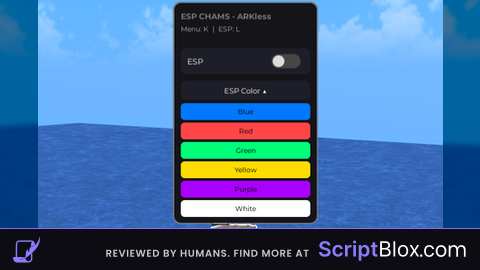
title.Text = "CHAMS BY ARKLESS"
title.TextColor3 = AccentColor
title.Font = Enum.Font.GothamBold
title.TextSize = 14
title.TextXAlignment = Enum.TextXAlignment.Left
title.Parent = main

local keybindLabel = Instance.new("TextLabel")
keybindLabel.Size = UDim2.new(1, -10, 0, 20)
keybindLabel.Position = UDim2.new(0, 10, 0, 30)
keybindLabel.BackgroundTransparency = 1
keybindLabel.Text = "Menu: K  |  ESP: L"
keybindLabel.TextColor3 = Color3.fromRGB(180, 180, 180)
keybindLabel.Font = Enum.Font.Gotham
keybindLabel.TextSize = 12
keybindLabel.TextXAlignment = Enum.TextXAlignment.Left
keybindLabel.Parent = main

local button = Instance.new("TextButton")
button.Size = UDim2.new(1, -20, 0, 40)
button.Position = UDim2.new(0, 10, 0, 70)
button.BackgroundColor3 = Color3.fromRGB(30,30,40)
button.Text = ""
button.Parent = main

local btnCorner = Instance.new("UICorner")
btnCorner.CornerRadius = UDim.new(0,8)
btnCorner.Parent = button


local espLabel = Instance.new("TextLabel")
espLabel.Size = UDim2.new(0.5,0,1,0)
espLabel.Position = UDim2.new(0,10,0,0)
espLabel.BackgroundTransparency = 1
espLabel.Text = "ESP"
espLabel.TextColor3 = Color3.fromRGB(255,255,255)
espLabel.Font = Enum.Font.Gotham
espLabel.TextSize = 14
espLabel.TextXAlignment = Enum.TextXAlignment.Left
espLabel.Parent = button


local toggleBack = Instance.new("Frame")
toggleBack.Size = UDim2.new(0,45,0,22)
toggleBack.Position = UDim2.new(1,-60,0.5,-11)
toggleBack.BackgroundColor3 = Color3.fromRGB(70,70,70)
toggleBack.Parent = button


local toggleCorner = Instance.new("UICorner")
toggleCorner.CornerRadius = UDim.new(1,0)
toggleCorner.Parent = toggleBack


local toggleCircle = Instance.new("Frame")
toggleCircle.Size = UDim2.new(0,18,0,18)
toggleCircle.Position = UDim2.new(0,2,0.5,-9)
toggleCircle.BackgroundColor3 = Color3.fromRGB(220,220,220)
toggleCircle.Parent = toggleBack


local circleCorner = Instance.new("UICorner")
circleCorner.CornerRadius = UDim.new(1,0)
circleCorner.Parent = toggleCircle

local dragging = false
local dragStart
local startPos

main.InputBegan:Connect(function(input)
	if input.UserInputType == Enum.UserInputType.MouseButton1 then
		dragging = true
		dragStart = input.Position
		startPos = main.Position
	end
end)

local dropdown = Instance.new("TextButton")
dropdown.Size = UDim2.new(1,-20,0,30)
dropdown.Position = UDim2.new(0,10,0,120)
dropdown.BackgroundColor3 = Color3.fromRGB(30,30,40)
dropdown.Text = "ESP Color ▼"
dropdown.TextColor3 = Color3.new(1,1,1)
dropdown.Font = Enum.Font.Gotham
dropdown.TextSize = 13
dropdown.Parent = main

local dropCorner = Instance.new("UICorner")
dropCorner.CornerRadius = UDim.new(0,8)
dropCorner.Parent = dropdown

local colorFrame = Instance.new("Frame")
colorFrame.Size = UDim2.new(1,-20,0,0)
colorFrame.Position = UDim2.new(0,10,0,155)
colorFrame.BackgroundTransparency = 1
colorFrame.ClipsDescendants = true
colorFrame.Parent = main

local layout = Instance.new("UIListLayout")
layout.Parent = colorFrame
layout.Padding = UDim.new(0,4)

local opened = false

local colors = {
	{"Blue", Color3.fromRGB(0,120,255)},
	{"Red", Color3.fromRGB(255,70,70)},
	{"Green", Color3.fromRGB(0,255,120)},
	{"Yellow", Color3.fromRGB(255,220,0)},
	{"Purple", Color3.fromRGB(170,0,255)},
	{"White", Color3.fromRGB(255,255,255)}
}

local function updateHighlights()
	for _,player in ipairs(Players:GetPlayers()) do
		if player.Character then
			local h = player.Character:FindFirstChild("AdminHighlight")
			if h then
				h.FillColor = ESPColor
				h.OutlineColor = ESPColor
			end
		end
	end
end

local colorButtons = {}

for _,info in ipairs(colors) do
	local b = Instance.new("TextButton")
	b.Size = UDim2.new(1,0,0,26)
	b.BackgroundColor3 = info[2]
	b.Text = info[1]
	b.TextColor3 = Color3.new(0,0,0)
	b.Font = Enum.Font.Gotham
	b.TextSize = 12
	b.Parent = colorFrame

    table.insert(colorButtons, b)

	local c = Instance.new("UICorner")
	c.CornerRadius = UDim.new(0,6)
	c.Parent = b

	b.MouseButton1Click:Connect(function()
		ESPColor = info[2]
		updateHighlights()
	end)
end

dropdown.MouseButton1Click:Connect(function()
	opened = not opened

	dropdown.Text = opened and "ESP Color ▲" or "ESP Color ▼"

	TweenService:Create(
		colorFrame,
		TweenInfo.new(0.2),
		{
			Size = UDim2.new(1,-20,0, opened and (#colors*30) or 0)
		}
	):Play()

	TweenService:Create(
		main,
		TweenInfo.new(0.2, Enum.EasingStyle.Quad, Enum.EasingDirection.Out),
		{
			Size = UDim2.new(0,220,0, opened and (160 + (#colors*30)) or 160)
		}
	):Play()
end)

main.InputEnded:Connect(function(input)
	if input.UserInputType == Enum.UserInputType.MouseButton1 then
		dragging = false
	end
end)

UserInputService.InputChanged:Connect(function(input)
	if dragging and input.UserInputType == Enum.UserInputType.MouseMovement then
		local delta = input.Position - dragStart
		main.Position = UDim2.new(
			startPos.X.Scale,
			startPos.X.Offset + delta.X,
			startPos.Y.Scale,
			startPos.Y.Offset + delta.Y
		)
	end
end)


local function setVisible(state)
	UIVisible = state

	if state then
		main.Visible = true
	end

	local t = TweenInfo.new(0.15, Enum.EasingStyle.Quad, Enum.EasingDirection.Out)

	local tweens = {
		TweenService:Create(main, t, {
			BackgroundTransparency = state and 0 or 1
		}),
		TweenService:Create(stroke, t, {
			Transparency = state and 0.2 or 1
		}),
		TweenService:Create(title, t, {
			TextTransparency = state and 0 or 1
		}),
		TweenService:Create(keybindLabel, t, {
			TextTransparency = state and 0 or 1
		}),
		TweenService:Create(button, t, {
			BackgroundTransparency = state and 0 or 1,
			TextTransparency = state and 0 or 1
		}),
		TweenService:Create(toggleBack, t, {
			BackgroundTransparency = state and 0 or 1
		}),
		TweenService:Create(toggleCircle, t, {
			BackgroundTransparency = state and 0 or 1
		}),
		TweenService:Create(espLabel, t, {
			TextTransparency = state and 0 or 1
		}),
        TweenService:Create(dropdown, t, {
            BackgroundTransparency = state and 0 or 1,
            TextTransparency = state and 0 or 1
        }),
        TweenService:Create(colorFrame, t, {
            BackgroundTransparency = state and 1 or 1
        }),
	}

    for _,btn in ipairs(colorButtons) do
	table.insert(tweens, TweenService:Create(btn, t, {
        BackgroundTransparency = state and 0 or 1,
        TextTransparency = state and 0 or 1
    }))
end
	for _, tween in ipairs(tweens) do
		tween:Play()
	end

	tweens[1].Completed:Connect(function()
		if not state then
			main.Visible = false
		end
	end)
end


local function addESP(player)
	if player == LocalPlayer then return end

	local function apply(character)
		local old = character:FindFirstChild("AdminHighlight")
		if old then old:Destroy() end

		local h = Instance.new("Highlight")
		h.Name = "AdminHighlight"
		h.FillColor = ESPColor
		h.OutlineColor = ESPColor
		h.FillTransparency = 0.65
		h.OutlineTransparency = 0
		h.DepthMode = Enum.HighlightDepthMode.AlwaysOnTop
		h.Parent = character
	end

	if player.Character then
		apply(player.Character)
	end

	connections[player] = player.CharacterAdded:Connect(apply)
end

local function clearESP()
	for player, conn in pairs(connections) do
		if conn then conn:Disconnect() end
		if player.Character then
			local h = player.Character:FindFirstChild("AdminHighlight")
			if h then h:Destroy() end
		end
	end
	table.clear(connections)
end

local function refreshESP()
	clearESP()
	if not ESPEnabled then return end

	for _, player in ipairs(Players:GetPlayers()) do
		addESP(player)
	end
end

Players.PlayerAdded:Connect(function(player)
	if player ~= LocalPlayer and ESPEnabled then
		addESP(player)
	end
end)

Players.PlayerRemoving:Connect(function(player)
	if connections[player] then
		connections[player]:Disconnect()
		connections[player] = nil
	end
end)


local function toggleESP()

	ESPEnabled = not ESPEnabled

	if ESPEnabled then

		TweenService:Create(toggleBack,TweenInfo.new(0.2),{
			BackgroundColor3 = Color3.fromRGB(170,170,170)
		}):Play()

		TweenService:Create(toggleCircle,TweenInfo.new(0.2),{
			Position = UDim2.new(1,-20,0.5,-9)
		}):Play()

		refreshESP()

	else

		TweenService:Create(toggleBack,TweenInfo.new(0.2),{
			BackgroundColor3 = Color3.fromRGB(70,70,70)
		}):Play()

		TweenService:Create(toggleCircle,TweenInfo.new(0.2),{
			Position = UDim2.new(0,2,0.5,-9)
		}):Play()

		clearESP()

	end

end


button.MouseButton1Click:Connect(function()
	toggleESP()
end)


UserInputService.InputBegan:Connect(function(input, gameProcessed)

	if gameProcessed then return end


	if input.KeyCode == Enum.KeyCode.K then
		setVisible(not UIVisible)
	end


	if input.KeyCode == Enum.KeyCode.L then
		toggleESP()
	end

end)No comments yet for this script.