


Key Required VerifiedUniversal
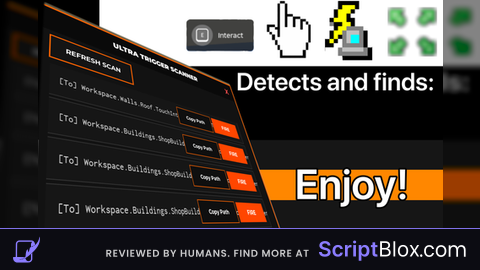
local CoreGui = game:GetService("CoreGui")
local Players = game:GetService("Players")
local LocalPlayer = Players.LocalPlayer

local ScreenGui = Instance.new("ScreenGui")
ScreenGui.Name = "UltraTriggerScannerV5"
ScreenGui.ResetOnSpawn = false
ScreenGui.Parent = CoreGui

local Frame = Instance.new("Frame")
Frame.Size = UDim2.new(0, 460, 0, 620)
Frame.Position = UDim2.new(0.5, -230, 0.5, -310)
Frame.BackgroundColor3 = Color3.fromRGB(18, 18, 18)        -- Main background black
Frame.BorderSizePixel = 3
Frame.BorderColor3 = Color3.fromRGB(255, 100, 0)          -- Orange border
Frame.Active = true
Frame.Draggable = true
Frame.Parent = ScreenGui

-- Title Bar (Black)
local Title = Instance.new("TextLabel")
Title.Size = UDim2.new(1, 0, 0, 45)
Title.BackgroundColor3 = Color3.fromRGB(10, 10, 10)
Title.BorderSizePixel = 0
Title.Text = "ULTRA TRIGGER SCANNER"
Title.TextColor3 = Color3.new(1, 1, 1)
Title.Font = Enum.Font.GothamBlack
Title.TextSize = 18
Title.Parent = Frame

-- Close Button
local Close = Instance.new("TextButton")
Close.Size = UDim2.new(0, 45, 0, 45)
Close.Position = UDim2.new(1, -45, 0, 0)
Close.BackgroundTransparency = 1
Close.Text = "x"
Close.TextColor3 = Color3.fromRGB(255, 80, 80)
Close.Font = Enum.Font.GothamBold
Close.TextSize = 22
Close.Parent = Frame
Close.MouseButton1Click:Connect(function() ScreenGui:Destroy() end)

-- Refresh Button (Black bg, white text)
local Refresh = Instance.new("TextButton")
Refresh.Size = UDim2.new(0, 140, 0, 38)
Refresh.Position = UDim2.new(0, 15, 0, 55)
Refresh.BackgroundColor3 = Color3.fromRGB(20, 20, 20)
Refresh.BorderColor3 = Color3.fromRGB(255, 100, 0)
Refresh.BorderSizePixel = 2
Refresh.Text = "REFRESH SCAN"
Refresh.TextColor3 = Color3.new(1, 1, 1)
Refresh.Font = Enum.Font.GothamBold
Refresh.TextSize = 14
Refresh.Parent = Frame

-- Scrolling Frame
local Scroll = Instance.new("ScrollingFrame")
Scroll.Size = UDim2.new(1, -30, 1, -115)
Scroll.Position = UDim2.new(0, 15, 0, 105)
Scroll.BackgroundTransparency = 1
Scroll.ScrollBarThickness = 8
Scroll.ScrollBarImageColor3 = Color3.fromRGB(255, 100, 0)
Scroll.Parent = Frame

local Layout = Instance.new("UIListLayout")
Layout.Padding = UDim.new(0, 6)
Layout.Parent = Scroll

-- Functions
local function copyPath(obj)
    setclipboard(tostring(obj))
    print("Copied →", tostring(obj))
end

local function trigger(obj)
    if obj:IsA("ProximityPrompt") then
        fireproximityprompt(obj)
    elseif obj:IsA("RemoteEvent") then
        obj:FireServer()
    elseif obj:IsA("ClickDetector") then
        fireclickdetector(obj)
    elseif obj:IsA("TouchTransmitter") then
        local part = obj.Parent
        local hrp = LocalPlayer.Character and LocalPlayer.Character:FindFirstChild("HumanoidRootPart")
        if part and hrp then
            firetouchinterest(part, hrp, 0)
            task.wait()
            firetouchinterest(part, hrp, 1)
        end
    end
    print("FIRED →", obj:GetFullName())
end

local function addEntry(obj)
    local display = obj.Name
    if obj:IsA("ProximityPrompt") and obj.ActionText ~= "" then
        display = obj.ActionText .. " ➜ " .. obj.Name
    end

    local btn = Instance.new("TextButton")
    btn.Size = UDim2.new(1, -10, 0, 48)
    btn.BackgroundColor3 = Color3.fromRGB(22, 22, 22)
    btn.BorderColor3 = Color3.fromRGB(50, 50, 50)
    btn.BorderSizePixel = 1
    btn.TextXAlignment = Enum.TextXAlignment.Left
    btn.Text = "  ["..obj.ClassName:sub(1,2).."] " .. obj:GetFullName() .. "    ➜    " .. display
    btn.TextColor3 = Color3.fromRGB(230, 230, 230)
    btn.Font = Enum.Font.Code
    btn.TextSize = 13
    btn.Parent = Scroll

    -- Copy Path Button (Black + White text)
    local copy = Instance.new("TextButton")
    copy.Size = UDim2.new(0, 90, 0, 32)
    copy.Position = UDim2.new(1, -185, 0.5, -16)
    copy.BackgroundColor3 = Color3.fromRGB(15, 15, 15)
    copy.BorderColor3 = Color3.fromRGB(255, 100, 0)
    copy.BorderSizePixel = 1
    copy.Text = "Copy Path"
    copy.TextColor3 = Color3.new(1,1,1)
    copy.Font = Enum.Font.GothamBold
    copy.TextSize = 11
    copy.Parent = btn
    copy.MouseButton1Click:Connect(function() copyPath(obj) end)

    -- FIRE Button (Orange accent)
    local fire = Instance.new("TextButton")
    fire.Size = UDim2.new(0, 80, 0, 32)
    fire.Position = UDim2.new(1, -90, 0.5, -16)
    fire.BackgroundColor3 = Color3.fromRGB(255, 70, 0)
    fire.BorderSizePixel = 0
    fire.Text = "FIRE"
    fire.TextColor3 = Color3.new(1,1,1)
    fire.Font = Enum.Font.GothamBold
    fire.TextSize = 13
    fire.Parent = btn
    fire.MouseButton1Click:Connect(function() trigger(obj) end)
end

local function scan()
    for _, v in Scroll:GetChildren() do
        if v:IsA("TextButton") then v:Destroy() end
    end
    for _, obj in ipairs(game:GetDescendants()) do
        if obj:IsA("ProximityPrompt") or obj:IsA("RemoteEvent") or obj:IsA("ClickDetector") or obj:IsA("TouchTransmitter") then
            addEntry(obj)
        end
    end
    Scroll.CanvasSize = UDim2.new(0, 0, 0, Layout.AbsoluteContentSize.Y + 20)
end

Refresh.MouseButton1Click:Connect(scan)
scan()
ai