

KeylessUniversal
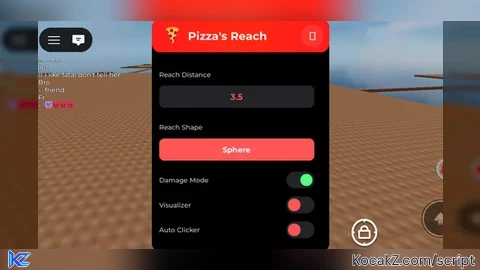
local active = true
local trueActive = true
local reachType = "Sphere"
local dmgEnabled = true
local visualizerEnabled = false
local autoClickerEnabled = false
local clickSpeed = 20
local visualizer = Instance.new("Part")
visualizer.BrickColor = BrickColor.new("Bright red")
visualizer.Transparency = 0.7
visualizer.Anchored = true
visualizer.CanCollide = false
visualizer.Size = Vector3.new(0.5,0.5,0.5)
visualizer.Material = Enum.Material.Neon
visualizer.BottomSurface = Enum.SurfaceType.Smooth
visualizer.TopSurface = Enum.SurfaceType.Smooth

repeat task.wait() until game:IsLoaded()
repeat task.wait() until game.Players.LocalPlayer

local ScreenGui = Instance.new("ScreenGui")
local OpenButton = Instance.new("TextButton")
local UICorner_Open = Instance.new("UICorner")
local MainFrame = Instance.new("Frame")
local UICorner = Instance.new("UICorner")
local TopBar = Instance.new("Frame")
local UICorner_2 = Instance.new("UICorner")
local Title = Instance.new("TextLabel")
local PizzaEmoji = Instance.new("TextLabel")
local CloseButton = Instance.new("TextButton")
local UICorner_3 = Instance.new("UICorner")
local ContentFrame = Instance.new("ScrollingFrame")
local ReachLabel = Instance.new("TextLabel")
local ReachInput = Instance.new("TextBox")
local UICorner_4 = Instance.new("UICorner")
local ShapeLabel = Instance.new("TextLabel")
local ShapeButton = Instance.new("TextButton")
local UICorner_5 = Instance.new("UICorner")
local DamageLabel = Instance.new("TextLabel")
local DamageToggle = Instance.new("TextButton")
local UICorner_6 = Instance.new("UICorner")
local DamageIndicator = Instance.new("Frame")
local UICorner_7 = Instance.new("UICorner")
local VisualizerLabel = Instance.new("TextLabel")
local VisualizerToggle = Instance.new("TextButton")
local UICorner_8 = Instance.new("UICorner")
local VisualizerIndicator = Instance.new("Frame")
local UICorner_9 = Instance.new("UICorner")
local AutoClickerLabel = Instance.new("TextLabel")
local AutoClickerToggle = Instance.new("TextButton")
local UICorner_AC = Instance.new("UICorner")
local AutoClickerIndicator = Instance.new("Frame")
local UICorner_AC2 = Instance.new("UICorner")
local ClickSpeedLabel = Instance.new("TextLabel")
local ClickSpeedInput = Instance.new("TextBox")
local UICorner_CS = Instance.new("UICorner")
local UIGradient = Instance.new("UIGradient")

ScreenGui.Name = "PizzasReach"
ScreenGui.ZIndexBehavior = Enum.ZIndexBehavior.Sibling
ScreenGui.DisplayOrder = 999999999
ScreenGui.ResetOnSpawn = false

OpenButton.Name = "OpenButton"
OpenButton.Parent = ScreenGui
OpenButton.AnchorPoint = Vector2.new(0, 0.5)
OpenButton.BackgroundColor3 = Color3.fromRGB(255, 85, 85)
OpenButton.BorderSizePixel = 0
OpenButton.Position = UDim2.new(0, 10, 0.5, 0)
OpenButton.Size = UDim2.new(0, 60, 0, 60)
OpenButton.Font = Enum.Font.GothamBold
OpenButton.Text = "🍕"
OpenButton.TextColor3 = Color3.fromRGB(255, 255, 255)
OpenButton.TextSize = 32
OpenButton.Visible = false
OpenButton.ZIndex = 10

UICorner_Open.CornerRadius = UDim.new(1, 0)
UICorner_Open.Parent = OpenButton

MainFrame.Name = "MainFrame"
MainFrame.Parent = ScreenGui
MainFrame.AnchorPoint = Vector2.new(0.5, 0.5)
MainFrame.BackgroundColor3 = Color3.fromRGB(0, 0, 0)
MainFrame.BorderSizePixel = 0
MainFrame.Position = UDim2.new(0.5, 0, 0.5, 0)
MainFrame.Size = UDim2.new(0, 320, 0, 420)
MainFrame.Active = true
MainFrame.Draggable = true
MainFrame.ZIndex = 1

UICorner.CornerRadius = UDim.new(0, 16)
UICorner.Parent = MainFrame

TopBar.Name = "TopBar"
TopBar.Parent = MainFrame
TopBar.BackgroundColor3 = Color3.fromRGB(255, 85, 85)
TopBar.BorderSizePixel = 0
TopBar.Size = UDim2.new(1, 0, 0, 60)
TopBar.ZIndex = 2

UICorner_2.CornerRadius = UDim.new(0, 16)
UICorner_2.Parent = TopBar

UIGradient.Color = ColorSequence.new{
    ColorSequenceKeypoint.new(0, Color3.fromRGB(255, 85, 85)),
    ColorSequenceKeypoint.new(0.5, Color3.fromRGB(255, 120, 50)),
    ColorSequenceKeypoint.new(1, Color3.fromRGB(255, 85, 85))
}
UIGradient.Rotation = 0
UIGradient.Parent = TopBar

PizzaEmoji.Name = "PizzaEmoji"
PizzaEmoji.Parent = TopBar
PizzaEmoji.BackgroundTransparency = 1
PizzaEmoji.Position = UDim2.new(0, 12, 0, 0)
PizzaEmoji.Size = UDim2.new(0, 50, 0, 60)
PizzaEmoji.Font = Enum.Font.GothamBold
PizzaEmoji.Text = "🍕"
PizzaEmoji.TextColor3 = Color3.fromRGB(255, 255, 255)
PizzaEmoji.TextSize = 32
PizzaEmoji.ZIndex = 3

Title.Name = "Title"
Title.Parent = TopBar
Title.BackgroundTransparency = 1
Title.Position = UDim2.new(0, 65, 0, 0)
Title.Size = UDim2.new(0, 180, 0, 60)
Title.Font = Enum.Font.GothamBold
Title.Text = "Pizza's Reach"
Title.TextColor3 = Color3.fromRGB(255, 255, 255)
Title.TextSize = 24
Title.TextXAlignment = Enum.TextXAlignment.Left
Title.ZIndex = 3

CloseButton.Name = "CloseButton"
CloseButton.Parent = TopBar
CloseButton.AnchorPoint = Vector2.new(1, 0.5)
CloseButton.BackgroundColor3 = Color3.fromRGB(255, 255, 255)
CloseButton.BackgroundTransparency = 0.9
CloseButton.Position = UDim2.new(1, -10, 0.5, 0)
CloseButton.Size = UDim2.new(0, 40, 0, 40)
CloseButton.Font = Enum.Font.GothamBold
CloseButton.Text = "✕"
CloseButton.TextColor3 = Color3.fromRGB(255, 255, 255)
CloseButton.TextSize = 24
CloseButton.ZIndex = 3

UICorner_3.CornerRadius = UDim.new(1, 0)
UICorner_3.Parent = CloseButton

ContentFrame.Name = "ContentFrame"
ContentFrame.Parent = MainFrame
ContentFrame.BackgroundTransparency = 1
ContentFrame.Position = UDim2.new(0, 0, 0, 70)
ContentFrame.Size = UDim2.new(1, 0, 1, -70)
ContentFrame.CanvasSize = UDim2.new(0, 0, 0, 430)
ContentFrame.ScrollBarThickness = 6
ContentFrame.ZIndex = 2

ReachLabel.Name = "ReachLabel"
ReachLabel.Parent = ContentFrame
ReachLabel.BackgroundTransparency = 1
ReachLabel.Position = UDim2.new(0, 20, 0, 15)
ReachLabel.Size = UDim2.new(0, 100, 0, 30)
ReachLabel.Font = Enum.Font.GothamSemibold
ReachLabel.Text = "Reach Distance"
ReachLabel.TextColor3 = Color3.fromRGB(200, 200, 200)
ReachLabel.TextSize = 14
ReachLabel.TextXAlignment = Enum.TextXAlignment.Left
ReachLabel.ZIndex = 3

ReachInput.Name = "ReachInput"
ReachInput.Parent = ContentFrame
ReachInput.BackgroundColor3 = Color3.fromRGB(35, 35, 40)
ReachInput.BorderSizePixel = 0
ReachInput.Position = UDim2.new(0, 20, 0, 50)
ReachInput.Size = UDim2.new(1, -40, 0, 40)
ReachInput.Font = Enum.Font.GothamBold
ReachInput.PlaceholderText = "Enter reach value..."
ReachInput.Text = "3.5"
ReachInput.TextColor3 = Color3.fromRGB(255, 85, 85)
ReachInput.TextSize = 18
ReachInput.ZIndex = 3

UICorner_4.CornerRadius = UDim.new(0, 10)
UICorner_4.Parent = ReachInput

ShapeLabel.Name = "ShapeLabel"
ShapeLabel.Parent = ContentFrame
ShapeLabel.BackgroundTransparency = 1
ShapeLabel.Position = UDim2.new(0, 20, 0, 110)
ShapeLabel.Size = UDim2.new(0, 100, 0, 30)
ShapeLabel.Font = Enum.Font.GothamSemibold
ShapeLabel.Text = "Reach Shape"
ShapeLabel.TextColor3 = Color3.fromRGB(200, 200, 200)
ShapeLabel.TextSize = 14
ShapeLabel.TextXAlignment = Enum.TextXAlignment.Left
ShapeLabel.ZIndex = 3

ShapeButton.Name = "ShapeButton"
ShapeButton.Parent = ContentFrame
ShapeButton.BackgroundColor3 = Color3.fromRGB(255, 85, 85)
ShapeButton.BorderSizePixel = 0
ShapeButton.Position = UDim2.new(0, 20, 0, 145)
ShapeButton.Size = UDim2.new(1, -40, 0, 40)
ShapeButton.Font = Enum.Font.GothamBold
ShapeButton.Text = "Sphere"
ShapeButton.TextColor3 = Color3.fromRGB(255, 255, 255)
ShapeButton.TextSize = 16
ShapeButton.ZIndex = 3

UICorner_5.CornerRadius = UDim.new(0, 10)
UICorner_5.Parent = ShapeButton

DamageLabel.Name = "DamageLabel"
DamageLabel.Parent = ContentFrame
DamageLabel.BackgroundTransparency = 1
DamageLabel.Position = UDim2.new(0, 20, 0, 205)
DamageLabel.Size = UDim2.new(0, 150, 0, 30)
DamageLabel.Font = Enum.Font.GothamSemibold
DamageLabel.Text = "Damage Mode"
DamageLabel.TextColor3 = Color3.fromRGB(200, 200, 200)
DamageLabel.TextSize = 14
DamageLabel.TextXAlignment = Enum.TextXAlignment.Left
DamageLabel.ZIndex = 3

DamageToggle.Name = "DamageToggle"
DamageToggle.Parent = ContentFrame
DamageToggle.BackgroundColor3 = Color3.fromRGB(35, 35, 40)
DamageToggle.BorderSizePixel = 0
DamageToggle.Position = UDim2.new(1, -70, 0, 205)
DamageToggle.Size = UDim2.new(0, 50, 0, 30)
DamageToggle.Font = Enum.Font.GothamBold
DamageToggle.Text = ""
DamageToggle.ZIndex = 3

UICorner_6.CornerRadius = UDim.new(1, 0)
UICorner_6.Parent = DamageToggle

DamageIndicator.Name = "DamageIndicator"
DamageIndicator.Parent = DamageToggle
DamageIndicator.AnchorPoint = Vector2.new(0, 0.5)
DamageIndicator.BackgroundColor3 = Color3.fromRGB(85, 255, 127)
DamageIndicator.BorderSizePixel = 0
DamageIndicator.Position = UDim2.new(0, 25, 0.5, 0)
DamageIndicator.Size = UDim2.new(0, 22, 0, 22)
DamageIndicator.ZIndex = 4

UICorner_7.CornerRadius = UDim.new(1, 0)
UICorner_7.Parent = DamageIndicator

VisualizerLabel.Name = "VisualizerLabel"
VisualizerLabel.Parent = ContentFrame
VisualizerLabel.BackgroundTransparency = 1
VisualizerLabel.Position = UDim2.new(0, 20, 0, 250)
VisualizerLabel.Size = UDim2.new(0, 150, 0, 30)
VisualizerLabel.Font = Enum.Font.GothamSemibold
VisualizerLabel.Text = "Visualizer"
VisualizerLabel.TextColor3 = Color3.fromRGB(200, 200, 200)
VisualizerLabel.TextSize = 14
VisualizerLabel.TextXAlignment = Enum.TextXAlignment.Left
VisualizerLabel.ZIndex = 3

VisualizerToggle.Name = "VisualizerToggle"
VisualizerToggle.Parent = ContentFrame
VisualizerToggle.BackgroundColor3 = Color3.fromRGB(35, 35, 40)
VisualizerToggle.BorderSizePixel = 0
VisualizerToggle.Position = UDim2.new(1, -70, 0, 250)
VisualizerToggle.Size = UDim2.new(0, 50, 0, 30)
VisualizerToggle.Font = Enum.Font.GothamBold
VisualizerToggle.Text = ""
VisualizerToggle.ZIndex = 3

UICorner_8.CornerRadius = UDim.new(1, 0)
UICorner_8.Parent = VisualizerToggle

VisualizerIndicator.Name = "VisualizerIndicator"
VisualizerIndicator.Parent = VisualizerToggle
VisualizerIndicator.AnchorPoint = Vector2.new(0, 0.5)
VisualizerIndicator.BackgroundColor3 = Color3.fromRGB(255, 85, 85)
VisualizerIndicator.BorderSizePixel = 0
VisualizerIndicator.Position = UDim2.new(0, 3, 0.5, 0)
VisualizerIndicator.Size = UDim2.new(0, 22, 0, 22)
VisualizerIndicator.ZIndex = 4

UICorner_9.CornerRadius = UDim.new(1, 0)
UICorner_9.Parent = VisualizerIndicator

AutoClickerLabel.Name = "AutoClickerLabel"
AutoClickerLabel.Parent = ContentFrame
AutoClickerLabel.BackgroundTransparency = 1
AutoClickerLabel.Position = UDim2.new(0, 20, 0, 295)
AutoClickerLabel.Size = UDim2.new(0, 150, 0, 30)
AutoClickerLabel.Font = Enum.Font.GothamSemibold
AutoClickerLabel.Text = "Auto Clicker"
AutoClickerLabel.TextColor3 = Color3.fromRGB(200, 200, 200)
AutoClickerLabel.TextSize = 14
AutoClickerLabel.TextXAlignment = Enum.TextXAlignment.Left
AutoClickerLabel.ZIndex = 3

AutoClickerToggle.Name = "AutoClickerToggle"
AutoClickerToggle.Parent = ContentFrame
AutoClickerToggle.BackgroundColor3 = Color3.fromRGB(35, 35, 40)
AutoClickerToggle.BorderSizePixel = 0
AutoClickerToggle.Position = UDim2.new(1, -70, 0, 295)
AutoClickerToggle.Size = UDim2.new(0, 50, 0, 30)
AutoClickerToggle.Font = Enum.Font.GothamBold
AutoClickerToggle.Text = ""
AutoClickerToggle.ZIndex = 3

UICorner_AC.CornerRadius = UDim.new(1, 0)
UICorner_AC.Parent = AutoClickerToggle

AutoClickerIndicator.Name = "AutoClickerIndicator"
AutoClickerIndicator.Parent = AutoClickerToggle
AutoClickerIndicator.AnchorPoint = Vector2.new(0, 0.5)
AutoClickerIndicator.BackgroundColor3 = Color3.fromRGB(255, 85, 85)
AutoClickerIndicator.BorderSizePixel = 0
AutoClickerIndicator.Position = UDim2.new(0, 3, 0.5, 0)
AutoClickerIndicator.Size = UDim2.new(0, 22, 0, 22)
AutoClickerIndicator.ZIndex = 4

UICorner_AC2.CornerRadius = UDim.new(1, 0)
UICorner_AC2.Parent = AutoClickerIndicator

ClickSpeedLabel.Name = "ClickSpeedLabel"
ClickSpeedLabel.Parent = ContentFrame
ClickSpeedLabel.BackgroundTransparency = 1
ClickSpeedLabel.Position = UDim2.new(0, 20, 0, 340)
ClickSpeedLabel.Size = UDim2.new(0, 100, 0, 30)
ClickSpeedLabel.Font = Enum.Font.GothamSemibold
ClickSpeedLabel.Text = "Click Speed (CPS)"
ClickSpeedLabel.TextColor3 = Color3.fromRGB(200, 200, 200)
ClickSpeedLabel.TextSize = 14
ClickSpeedLabel.TextXAlignment = Enum.TextXAlignment.Left
ClickSpeedLabel.ZIndex = 3

ClickSpeedInput.Name = "ClickSpeedInput"
ClickSpeedInput.Parent = ContentFrame
ClickSpeedInput.BackgroundColor3 = Color3.fromRGB(35, 35, 40)
ClickSpeedInput.BorderSizePixel = 0
ClickSpeedInput.Position = UDim2.new(0, 20, 0, 375)
ClickSpeedInput.Size = UDim2.new(1, -40, 0, 40)
ClickSpeedInput.Font = Enum.Font.GothamBold
ClickSpeedInput.PlaceholderText = "Enter CPS..."
ClickSpeedInput.Text = "20"
ClickSpeedInput.TextColor3 = Color3.fromRGB(255, 85, 85)
ClickSpeedInput.TextSize = 18
ClickSpeedInput.ZIndex = 3

UICorner_CS.CornerRadius = UDim.new(0, 10)
UICorner_CS.Parent = ClickSpeedInput

pcall(function()
    ScreenGui.Parent = game:GetService("CoreGui")
end)
if not ScreenGui.Parent then
    ScreenGui.Parent = game.Players.LocalPlayer:WaitForChild("PlayerGui")
end

local TweenService = game:GetService("TweenService")

local function toggleButton(btn, ind, en)
    local pos = en and UDim2.new(0, 25, 0.5, 0) or UDim2.new(0, 3, 0.5, 0)
    local col = en and Color3.fromRGB(85, 255, 127) or Color3.fromRGB(255, 85, 85)
    TweenService:Create(ind, TweenInfo.new(0.2, Enum.EasingStyle.Quad), {Position = pos, BackgroundColor3 = col}):Play()
end

DamageToggle.MouseButton1Click:Connect(function()
    dmgEnabled = not dmgEnabled
    toggleButton(DamageToggle, DamageIndicator, dmgEnabled)
end)

VisualizerToggle.MouseButton1Click:Connect(function()
    visualizerEnabled = not visualizerEnabled
    toggleButton(VisualizerToggle, VisualizerIndicator, visualizerEnabled)
end)

AutoClickerToggle.MouseButton1Click:Connect(function()
    autoClickerEnabled = not autoClickerEnabled
    toggleButton(AutoClickerToggle, AutoClickerIndicator, autoClickerEnabled)
end)

ClickSpeedInput.FocusLost:Connect(function()
    local speed = tonumber(ClickSpeedInput.Text)
    if speed and speed > 0 and speed <= 100 then
        clickSpeed = speed
    else
        ClickSpeedInput.Text = tostring(clickSpeed)
    end
end)

ShapeButton.MouseButton1Click:Connect(function()
    reachType = reachType == "Sphere" and "Line" or "Sphere"
    ShapeButton.Text = reachType
end)

CloseButton.MouseButton1Click:Connect(function()
    MainFrame.Visible = false
    OpenButton.Visible = true
end)

OpenButton.MouseButton1Click:Connect(function()
    OpenButton.Visible = false
    MainFrame.Visible = true
end)

game:GetService("UserInputService").InputBegan:Connect(function(inp, gpe)
    if gpe then return end
    if inp.KeyCode == Enum.KeyCode.H then
        if MainFrame.Visible then
            CloseButton.MouseButton1Click:Fire()
        else
            OpenButton.MouseButton1Click:Fire()
        end
    end
end)

local plr = game.Players.LocalPlayer

task.spawn(function()
    while trueActive do
        if autoClickerEnabled then
            local tool = plr.Character and plr.Character:FindFirstChildOfClass("Tool")
            if tool then
                tool:Activate()
            end
        end
        task.wait(1 / clickSpeed)
    end
end)

local function onHit(hit, handle)
    local victim = hit.Parent:FindFirstChildOfClass("Humanoid")
    if victim and victim.Parent.Name ~= plr.Name then
        if dmgEnabled then
            for _, v in pairs(hit.Parent:GetChildren()) do
                if v:IsA("Part") then
                    firetouchinterest(v, handle, 0)
                    firetouchinterest(v, handle, 1)
                end
            end
        else
            firetouchinterest(hit, handle, 0)
            firetouchinterest(hit, handle, 1)
        end
    end
end

local function getWhiteList()
    local wl = {}
    for _, v in pairs(game.Players:GetPlayers()) do
        if v ~= plr then
            local char = v.Character
            if char then
                for _, q in pairs(char:GetChildren()) do
                    if q:IsA("Part") then
                        table.insert(wl, q)
                    end
                end
            end
        end
    end
    return wl
end

game:GetService("RunService").RenderStepped:Connect(function()
    if not active or not trueActive then return end
    local s = plr.Character and plr.Character:FindFirstChildOfClass("Tool")
    if not s then visualizer.Parent = nil end
    if s then
        local handle = s:FindFirstChild("Handle") or s:FindFirstChildOfClass("Part")
        if handle then
            if visualizerEnabled then
                visualizer.Parent = workspace
            else
                visualizer.Parent = nil
            end
            local reach = tonumber(ReachInput.Text)
            if reach then
                if reachType == "Sphere" then
                    visualizer.Shape = Enum.PartType.Ball
                    visualizer.Size = Vector3.new(reach, reach, reach)
                    visualizer.CFrame = handle.CFrame
                    for _, v in pairs(game.Players:GetPlayers()) do
                        local hrp = v.Character and v.Character:FindFirstChild("HumanoidRootPart")
                        if hrp and handle then
                            local mag = (hrp.Position - handle.Position).magnitude
                            if mag <= reach then
                                onHit(hrp, handle)
                            end
                        end
                    end
                elseif reachType == "Line" then
                    local origin = (handle.CFrame * CFrame.new(0, 0, -2)).p
                    local ray = Ray.new(origin, handle.CFrame.lookVector * -reach)
                    local p, pos = workspace:FindPartOnRayWithWhitelist(ray, getWhiteList())
                    visualizer.Shape = Enum.PartType.Block
                    visualizer.Size = Vector3.new(1, 0.8, reach)
                    visualizer.CFrame = handle.CFrame * CFrame.new(0, 0, (reach / 2) + 2)
                    if p then
                        onHit(p, handle)
                    else
                        for _, v in pairs(handle:GetTouchingParts()) do
                            onHit(v, handle)
                        end
                    end
                end
            end
        end
    end
end)


Cool script. I have a lot of trouble finding actually good sword reach scripts :D
@theguyyoumetonrblx Thank you!
Work on any game?
@GaveDaniel it should
Works perfectly on Xeno best script ever + no key = 10/10
@RealCalemorer thank you