

KeylessUniversal
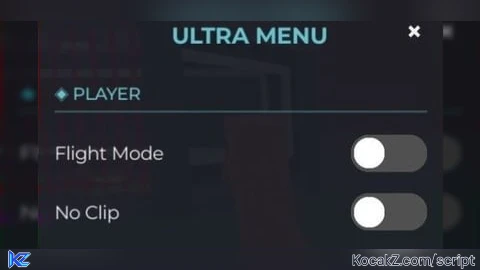
-- how add functions? 👇

-- https://pastefy.app/qXCARYTf (Tutorial)

local Player = game:GetService("Players").LocalPlayer
local UIS = game:GetService("UserInputService")
local TweenService = game:GetService("TweenService")

local Theme = {
    Background = Color3.fromRGB(28, 30, 38),
    Secondary = Color3.fromRGB(40, 42, 54),
    Accent = Color3.fromRGB(103, 194, 205),
    Text = Color3.fromRGB(240, 240, 240),
    ToggleOn = Color3.fromRGB(80, 250, 123),
    ToggleOff = Color3.fromRGB(80, 80, 80),
    Slider = Color3.fromRGB(163, 232, 83)
}

local ScreenGui = Instance.new("ScreenGui")
ScreenGui.Name = "UltraMenu_"..tostring(math.random(1000,9999))
ScreenGui.ResetOnSpawn = false
ScreenGui.Parent = Player:WaitForChild("PlayerGui")


local MainFrame = Instance.new("Frame")
MainFrame.Size = UDim2.new(0, 240, 0, 350)
MainFrame.Position = UDim2.new(0.5, -120, 0.5, -175)
MainFrame.AnchorPoint = Vector2.new(0.5, 0.5)
MainFrame.BackgroundColor3 = Theme.Background
MainFrame.BackgroundTransparency = 0.05
MainFrame.Visible = false


local UICorner = Instance.new("UICorner")
UICorner.CornerRadius = UDim.new(0, 10)
UICorner.Parent = MainFrame

local ScrollFrame = Instance.new("ScrollingFrame")
ScrollFrame.Size = UDim2.new(1, -10, 1, -50)
ScrollFrame.Position = UDim2.new(0, 5, 0, 40)
ScrollFrame.BackgroundTransparency = 1
ScrollFrame.ScrollBarThickness = 4
ScrollFrame.ScrollBarImageColor3 = Theme.Accent
ScrollFrame.ScrollBarImageTransparency = 0.5
ScrollFrame.CanvasSize = UDim2.new(0, 0, 0, 0)
ScrollFrame.AutomaticCanvasSize = Enum.AutomaticSize.Y

local Title = Instance.new("TextLabel")
Title.Text = "ULTRA MENU"
Title.Font = Enum.Font.GothamBold
Title.TextSize = 16
Title.TextColor3 = Theme.Accent
Title.Size = UDim2.new(1, -10, 0, 30)
Title.Position = UDim2.new(0, 10, 0, 5)
Title.BackgroundTransparency = 1

local CloseButton = Instance.new("TextButton")
CloseButton.Text = "×"
CloseButton.Font = Enum.Font.GothamBold
CloseButton.TextSize = 20
CloseButton.TextColor3 = Theme.Text
CloseButton.Size = UDim2.new(0, 25, 0, 25)
CloseButton.Position = UDim2.new(1, -30, 0, 5)
CloseButton.BackgroundTransparency = 1

local function CreateSection(title)
    local Section = Instance.new("Frame")
    Section.Size = UDim2.new(1, 0, 0, 30)
    Section.BackgroundTransparency = 1

    local Label = Instance.new("TextLabel")
    Label.Text = "◈ "..string.upper(title)
    Label.Font = Enum.Font.GothamMedium
    Label.TextSize = 12
    Label.TextColor3 = Theme.Accent
    Label.Size = UDim2.new(1, 0, 1, 0)
    Label.Position = UDim2.new(0, 5, 0, 0)
    Label.BackgroundTransparency = 1
    Label.TextXAlignment = Enum.TextXAlignment.Left

    local Line = Instance.new("Frame")
    Line.Size = UDim2.new(1, -10, 0, 1)
    Line.Position = UDim2.new(0, 5, 1, -5)
    Line.BackgroundColor3 = Theme.Accent
    Line.BackgroundTransparency = 0.7
    Line.BorderSizePixel = 0

    Label.Parent = Section
    Line.Parent = Section

    return Section
end

local function CreateToggle(name, callback)
    local ToggleFrame = Instance.new("Frame")
    ToggleFrame.Size = UDim2.new(1, 0, 0, 30)
    ToggleFrame.BackgroundTransparency = 1

    local Label = Instance.new("TextLabel")
    Label.Text = name
    Label.Font = Enum.Font.Gotham
    Label.TextSize = 13
    Label.TextColor3 = Theme.Text
    Label.Size = UDim2.new(0.7, 0, 1, 0)
    Label.Position = UDim2.new(0, 5, 0, 0)
    Label.BackgroundTransparency = 1
    Label.TextXAlignment = Enum.TextXAlignment.Left

    local Toggle = Instance.new("Frame")
    Toggle.Size = UDim2.new(0, 45, 0, 22)
    Toggle.Position = UDim2.new(1, -50, 0.5, -11)
    Toggle.BackgroundColor3 = Theme.ToggleOff

    local ToggleCorner = Instance.new("UICorner")
    ToggleCorner.CornerRadius = UDim.new(0, 11)
    ToggleCorner.Parent = Toggle
    local ToggleButton = Instance.new("TextButton")
    ToggleButton.Size = UDim2.new(1, 0, 1, 0)
    ToggleButton.BackgroundTransparency = 1
    ToggleButton.Text = ""

    local Circle = Instance.new("Frame")
    Circle.Size = UDim2.new(0, 18, 0, 18)
    Circle.Position = UDim2.new(0, 2, 0.5, -9)
    Circle.BackgroundColor3 = Color3.new(1, 1, 1)

    local CircleCorner = Instance.new("UICorner")
    CircleCorner.CornerRadius = UDim.new(0, 9)
    CircleCorner.Parent = Circle


    Circle.Parent = Toggle
    ToggleButton.Parent = Toggle
    Toggle.Parent = ToggleFrame
    Label.Parent = ToggleFrame


    local state = false

    ToggleButton.MouseButton1Click:Connect(function()
        state = not state
        TweenService:Create(Circle, TweenInfo.new(0.15), {
            Position = state and UDim2.new(1, -20, 0.5, -9) or UDim2.new(0, 2, 0.5, -9)
        }):Play()

        Toggle.BackgroundColor3 = state and Theme.ToggleOn or Theme.ToggleOff

        if callback then
            callback(state)
        end
    end)

    return ToggleFrame
end


local function CreateSlider(name, min, max, default, callback)
    local SliderFrame = Instance.new("Frame")
    SliderFrame.Size = UDim2.new(1, 0, 0, 50)
    SliderFrame.BackgroundTransparency = 1

    local Label = Instance.new("TextLabel")
    Label.Text = name
    Label.Font = Enum.Font.Gotham
    Label.TextSize = 13
    Label.TextColor3 = Theme.Text
    Label.Size = UDim2.new(1, -10, 0, 20)
    Label.Position = UDim2.new(0, 5, 0, 0)
    Label.BackgroundTransparency = 1
    Label.TextXAlignment = Enum.TextXAlignment.Left

    local ValueLabel = Instance.new("TextLabel")
    ValueLabel.Text = tostring(default)
    ValueLabel.Font = Enum.Font.GothamMedium
    ValueLabel.TextSize = 12
    ValueLabel.TextColor3 = Theme.Accent
    ValueLabel.Size = UDim2.new(0, 40, 0, 20)
    ValueLabel.Position = UDim2.new(1, -45, 0, 0)
    ValueLabel.BackgroundTransparency = 1
    ValueLabel.TextXAlignment = Enum.TextXAlignment.Right

    local Track = Instance.new("Frame")
    Track.Size = UDim2.new(1, -10, 0, 5)
    Track.Position = UDim2.new(0, 5, 0, 25)
    Track.BackgroundColor3 = Theme.Secondary
    Track.BorderSizePixel = 0

    local TrackCorner = Instance.new("UICorner")
    TrackCorner.CornerRadius = UDim.new(0, 3)
    TrackCorner.Parent = Track

    local Fill = Instance.new("Frame")
    Fill.Size = UDim2.new((default - min)/(max - min), 0, 1, 0)
    Fill.Position = UDim2.new(0, 0, 0, 0)
    Fill.BackgroundColor3 = Theme.Slider
    Fill.BorderSizePixel = 0

    local FillCorner = Instance.new("UICorner")
    FillCorner.CornerRadius = UDim.new(0, 3)
    FillCorner.Parent = Fill

    local Handle = Instance.new("Frame")
    Handle.Size = UDim2.new(0, 12, 0, 12)
    Handle.Position = UDim2.new((default - min)/(max - min), -6, 0.5, -6)
    Handle.BackgroundColor3 = Color3.new(1, 1, 1)
    Handle.BorderSizePixel = 0

    local HandleCorner = Instance.new("UICorner")
    HandleCorner.CornerRadius = UDim.new(0, 6)
    HandleCorner.Parent = Handle

    local SliderButton = Instance.new("TextButton")
    SliderButton.Size = UDim2.new(1, -10, 0, 20)
    SliderButton.Position = UDim2.new(0, 5, 0, 25)
    SliderButton.BackgroundTransparency = 1
    SliderButton.Text = ""
    SliderButton.ZIndex = 2

    Fill.Parent = Track
    Handle.Parent = Track
    Track.Parent = SliderFrame
    Label.Parent = SliderFrame
    ValueLabel.Parent = SliderFrame
    SliderButton.Parent = SliderFrame

    local dragging = false
    local value = default

    local function UpdateSlider(input)
        local pos = UDim2.new(
            math.clamp((input.Position.X - Track.AbsolutePosition.X) / Track.AbsoluteSize.X, 0, 1),
            0,
            0.5,
            -6
        )

        value = math.floor(min + (max - min) * pos.X.Scale + 0.5)
        ValueLabel.Text = tostring(value)
        Fill.Size = UDim2.new(pos.X.Scale, 0, 1, 0)
        Handle.Position = pos

        if callback then
            callback(value)
        end
    end

    SliderButton.MouseButton1Down:Connect(function()
        dragging = true
        UpdateSlider({Position = UIS:GetMouseLocation()})
    end)

    UIS.InputEnded:Connect(function(input)
        if input.UserInputType == Enum.UserInputType.MouseButton1 then
            dragging = false
        end
    end)

    UIS.InputChanged:Connect(function(input)
        if dragging and input.UserInputType == Enum.UserInputType.MouseMovement then
            UpdateSlider(input)
        end
    end)

    return SliderFrame
end

-- Section "Player"
local PlayerSection = CreateSection("Player")
PlayerSection.Parent = ScrollFrame

local FlyToggle = CreateToggle("Flight Mode", function(state)
    local humanoid = Player.Character and Player.Character:FindFirstChildOfClass("Humanoid")
    if humanoid then
        humanoid:ChangeState(state and Enum.HumanoidStateType.Flying or Enum.HumanoidStateType.Landed)
    end
end)
FlyToggle.Position = UDim2.new(0, 0, 0, 35)
FlyToggle.Parent = ScrollFrame

local NoclipToggle = CreateToggle("No Clip", function(state)
    local character = Player.Character
    if character then
        for _, part in ipairs(character:GetDescendants()) do
            if part:IsA("BasePart") then
                part.CanCollide = not state
            end
        end
    end
end)
NoclipToggle.Position = UDim2.new(0, 0, 0, 70)
NoclipToggle.Parent = ScrollFrame

local SpeedSlider = CreateSlider("Walk Speed", 16, 100, 16, function(value)
    local humanoid = Player.Character and Player.Character:FindFirstChildOfClass("Humanoid")
    if humanoid then
        humanoid.WalkSpeed = value
    end
end)
SpeedSlider.Position = UDim2.new(0, 0, 0, 105)
SpeedSlider.Parent = ScrollFrame

-- Секция "Visual"
local VisualSection = CreateSection("Visual")
VisualSection.Position = UDim2.new(0, 0, 0, 160)
VisualSection.Parent = ScrollFrame

local FullbrightToggle = CreateToggle("Fullbright", function(state)
    -- Реализация Fullbright
end)
FullbrightToggle.Position = UDim2.new(0, 0, 0, 195)
FullbrightToggle.Parent = ScrollFrame

local OpenButton = Instance.new("TextButton")
OpenButton.Name = "OpenButton"
OpenButton.Text = "[ MENU ]"
OpenButton.Font = Enum.Font.GothamBold
OpenButton.TextSize = 13
OpenButton.TextColor3 = Theme.Accent
OpenButton.Size = UDim2.new(0, 80, 0, 30)
OpenButton.Position = UDim2.new(0, 15, 0, 15)
OpenButton.BackgroundColor3 = Theme.Secondary
OpenButton.BackgroundTransparency = 0.3
OpenButton.BorderSizePixel = 0
OpenButton.Visible = true

local OpenCorner = Instance.new("UICorner")
OpenCorner.CornerRadius = UDim.new(0, 6)
OpenCorner.Parent = OpenButton

local function ToggleMenu()
    MainFrame.Visible = not MainFrame.Visible
    OpenButton.Visible = not MainFrame.Visible

    if MainFrame.Visible then
        MainFrame.Size = UDim2.new(0, 0, 0, 0)
        MainFrame.Visible = true
        TweenService:Create(MainFrame, TweenInfo.new(0.25), {
            Size = UDim2.new(0, 240, 0, 350)
        }):Play()
    end
end

CloseButton.MouseButton1Click:Connect(ToggleMenu)
OpenButton.MouseButton1Click:Connect(ToggleMenu)

UIS.InputBegan:Connect(function(input)
    if input.KeyCode == Enum.KeyCode.RightShift then
        ToggleMenu()
    end
end)

Title.Parent = MainFrame
CloseButton.Parent = MainFrame
ScrollFrame.Parent = MainFrame
MainFrame.Parent = ScreenGui
OpenButton.Parent = ScreenGui

ToggleMenu()![[KEYLESS] Moondiety Script | 17+ supported Games](https://scriptblox.com/images/sb/0-1753093706828.png)


Amazing🔥
Good