


KeylessUniversal
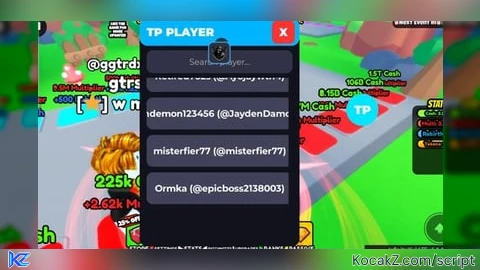
-- FINAL TP GUI - TOGGLE WORKS 100% - ALWAYS ON TOP - NEVER HIDDEN
-- LocalScript in StarterGui > TPPlayerGUI

local Players = game:GetService("Players")
local player = Players.LocalPlayer
local pgui = player:WaitForChild("PlayerGui")

-- MAIN GUI (CREATE FIRST!)
local gui = Instance.new("ScreenGui")
gui.Name = "TPPlayerGUI"
gui.ResetOnSpawn = false
gui.IgnoreGuiInset = true
gui.ZIndexBehavior = Enum.ZIndexBehavior.Sibling
gui.Parent = pgui

-- MAIN FRAME (350x500)
local frame = Instance.new("Frame")
frame.Size = UDim2.new(0, 350, 0, 500)
frame.Position = UDim2.new(0.5, -175, 0.5, -250)
frame.BackgroundColor3 = Color3.fromRGB(18, 18, 28)
frame.Visible = false
frame.ZIndex = 998
frame.Parent = gui
Instance.new("UICorner", frame).CornerRadius = UDim.new(0, 18)

-- TOP BAR
local top = Instance.new("Frame")
top.Size = UDim2.new(1, 0, 0, 60)
top.BackgroundColor3 = Color3.fromRGB(0, 180, 255)
top.ZIndex = 999
top.Parent = frame
Instance.new("UICorner", top).CornerRadius = UDim.new(0, 18)

local title = Instance.new("TextLabel")
title.Text = "TP PLAYER"
title.Size = UDim2.new(1, -70, 1, 0)
title.Position = UDim2.new(0, 15, 0, 0)
title.BackgroundTransparency = 1
title.TextColor3 = Color3.new(1,1,1)
title.Font = Enum.Font.GothamBlack
title.TextSize = 30
title.TextXAlignment = Enum.TextXAlignment.Left
title.ZIndex = 999
title.Parent = top

local close = Instance.new("TextButton")
close.Text = "X"
close.Size = UDim2.new(0, 50, 0, 50)
close.Position = UDim2.new(1, -60, 0, 5)
close.BackgroundColor3 = Color3.fromRGB(255, 50, 50)
close.TextColor3 = Color3.new(1,1,1)
close.Font = Enum.Font.GothamBlack
close.TextSize = 30
close.ZIndex = 999
close.Parent = top
Instance.new("UICorner", close).CornerRadius = UDim.new(0, 12)

-- SEARCH
local search = Instance.new("TextBox")
search.PlaceholderText = "Search player..."
search.Size = UDim2.new(1, -30, 0, 50)
search.Position = UDim2.new(0, 15, 0, 70)
search.BackgroundColor3 = Color3.fromRGB(50, 50, 70)
search.TextColor3 = Color3.new(1,1,1)
search.Font = Enum.Font.Gotham
search.TextSize = 22
search.ZIndex = 999
search.Parent = frame
Instance.new("UICorner", search).CornerRadius = UDim.new(0, 14)

local icon = Instance.new("ImageLabel")
icon.Image = "rbxassetid://7743874874"
icon.Size = UDim2.new(0, 38, 0, 38)
icon.Position = UDim2.new(0, 10, 0.5, -19)
icon.BackgroundTransparency = 1
icon.ZIndex = 999
icon.Parent = search

-- SCROLL
local scroll = Instance.new("ScrollingFrame")
scroll.Size = UDim2.new(1, -30, 1, -140)
scroll.Position = UDim2.new(0, 15, 0, 130)
scroll.BackgroundTransparency = 1
scroll.ScrollBarThickness = 8
scroll.AutomaticCanvasSize = Enum.AutomaticSize.Y
scroll.ZIndex = 999
scroll.Parent = frame

local layout = Instance.new("UIListLayout")
layout.Padding = UDim.new(0, 12)
layout.SortOrder = Enum.SortOrder.Name
layout.Parent = scroll

-- SOUNDS
local click = Instance.new("Sound", gui)
click.SoundId = "rbxassetid://5355281692"
local whoosh = Instance.new("Sound", gui)
whoosh.SoundId = "rbxassetid://1847667156"

-- TOGGLE BUTTON - ALWAYS ON TOP!
local toggleBtn = Instance.new("TextButton")
toggleBtn.Name = "Toggle"
toggleBtn.Text = "TP"
toggleBtn.Size = UDim2.new(0, 70, 0, 70)
toggleBtn.Position = UDim2.new(1, -90, 1, -90)
toggleBtn.BackgroundColor3 = Color3.fromRGB(0, 230, 255)
toggleBtn.TextColor3 = Color3.new(1,1,1)
toggleBtn.Font = Enum.Font.GothamBlack
toggleBtn.TextSize = 32
toggleBtn.ZIndex = 999
toggleBtn.Parent = gui
Instance.new("UICorner", toggleBtn).CornerRadius = UDim.new(1, 0)

-- DRAG TOGGLE
local dragging = false
toggleBtn.InputBegan:Connect(function(input)
    if input.UserInputType == Enum.UserInputType.MouseButton1 or input.UserInputType == Enum.UserInputType.Touch then
        dragging = true
        local start = input.Position
        local orig = toggleBtn.Position
        local conn = input.Changed:Connect(function()
            if input.UserInputState == Enum.UserInputState.End then
                dragging = false
                conn:Disconnect()
            end
        end)
        while dragging do
            local delta = input.Position - start
            toggleBtn.Position = UDim2.new(orig.X.Scale, orig.X.Offset + delta.X, orig.Y.Scale, orig.Y.Offset + delta.Y)
            task.wait()
        end
    end
end)

-- PLAYER BUTTONS
local buttons = {}

local function createButton(plr)
    if plr == player or buttons[plr] then return end

    local btn = Instance.new("TextButton")
    btn.Size = UDim2.new(1, 0, 0, 70)
    btn.BackgroundColor3 = Color3.fromRGB(65, 65, 90)
    btn.Text = plr.DisplayName .. " (@" .. plr.Name .. ")"
    btn.TextColor3 = Color3.new(1,1,1)
    btn.Font = Enum.Font.GothamBold
    btn.TextSize = 24
    btn.ZIndex = 999
    btn.Parent = scroll
    Instance.new("UICorner", btn).CornerRadius = UDim.new(0, 14)

    btn.MouseButton1Click:Connect(function()
        click:Play()
        local target = plr.Character
        if target and target:FindFirstChild("HumanoidRootPart") then
            whoosh:Play()
            player.Character.HumanoidRootPart.CFrame = target.HumanoidRootPart.CFrame + Vector3.new(0, 5, 0)
        end
    end)

    buttons[plr] = btn
end

local function removePlayer(plr)
    if buttons[plr] then
        buttons[plr]:Destroy()
        buttons[plr] = nil
    end
end

-- ADD PLAYERS
task.spawn(function()
    for _, p in Players:GetPlayers() do
        if p ~= player then createButton(p) end
    end
    Players.PlayerAdded:Connect(function(p)
        task.wait(0.5)
        createButton(p)
    end)
    Players.PlayerRemoving:Connect(removePlayer)
end)

-- SEARCH
search:GetPropertyChangedSignal("Text"):Connect(function()
    local q = search.Text:lower()
    for plr, btn in pairs(buttons) do
        btn.Visible = (q == "" or plr.Name:lower():find(q) or plr.DisplayName:lower():find(q))
    end
end)

-- DRAG FRAME
top.InputBegan:Connect(function(input)
    if input.UserInputType == Enum.UserInputType.MouseButton1 or input.UserInputType == Enum.UserInputType.Touch then
        local draggingFrame = true
        local start = input.Position
        local orig = frame.Position
        click:Play()
        local conn = input.Changed:Connect(function()
            if input.UserInputState == Enum.UserInputState.End then
                draggingFrame = false
                conn:Disconnect()
            end
        end)
        while draggingFrame do
            local delta = input.Position - start
            frame.Position = UDim2.new(orig.X.Scale, orig.X.Offset + delta.X, orig.Y.Scale, orig.Y.Offset + delta.Y)
            task.wait()
        end
    end
end)

-- TOGGLE - NOW 100% WORKS!
local isOpen = false
toggleBtn.MouseButton1Click:Connect(function()
    click:Play()
    isOpen = not isOpen
    frame.Visible = isOpen
    if isOpen then
        search.Text = ""
        search:CaptureFocus()
    end
end)

close.MouseButton1Click:Connect(function()
    click:Play()
    frame.Visible = false
    isOpen = false
end)

-- RESPAWN
player.CharacterAdded:Connect(function(char)
    task.wait(1)
    player.Character.HumanoidRootPart.CFrame = player.Character.HumanoidRootPart.CFrame
end)

print("TP GUI FINAL - TOGGLE WORKS 100% - ALWAYS ON TOP!")No comments yet for this script.


