


KeylessUniversal
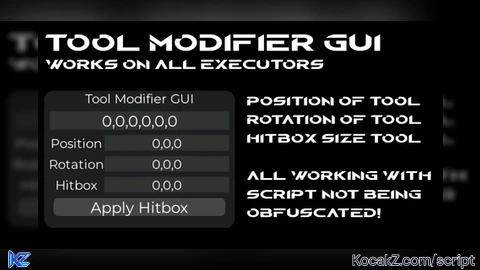
local player = game.Players.LocalPlayer
local playerGui = player:WaitForChild("PlayerGui")

-- ScreenGui
local gui = Instance.new("ScreenGui")
gui.Name = "ToolGripGUI"
gui.ResetOnSpawn = false
gui.Parent = playerGui

-- Frame
local frame = Instance.new("Frame")
frame.Size = UDim2.new(0, 320, 0, 230)
frame.Position = UDim2.new(0.8, 0, 0.7, 0)
frame.BackgroundColor3 = Color3.fromRGB(30, 30, 30)
frame.BorderSizePixel = 0
frame.Parent = gui

local corner = Instance.new("UICorner")
corner.CornerRadius = UDim.new(0, 16)
corner.Parent = frame

-- Title
local title = Instance.new("TextLabel")
title.Size = UDim2.new(1, 0, 0, 25)
title.BackgroundTransparency = 1
title.Text = "Tool Grip + Hitbox Editor"
title.TextColor3 = Color3.fromRGB(255,255,255)
title.TextScaled = true
title.Font = Enum.Font.Gotham
title.Parent = frame

-- Main textbox (Grip)
local fullBox = Instance.new("TextBox")
fullBox.Size = UDim2.new(1, -20, 0, 30)
fullBox.Position = UDim2.new(0, 10, 0, 35)
fullBox.BackgroundColor3 = Color3.fromRGB(50,50,50)
fullBox.TextColor3 = Color3.fromRGB(255,255,255)
fullBox.TextScaled = true
fullBox.Font = Enum.Font.Gotham
fullBox.ClearTextOnFocus = false
fullBox.Text = "0,0,0,0,0,0"
fullBox.Parent = frame

-- Small textboxes
local function createBox(labelText, posY)
	local label = Instance.new("TextLabel")
	label.Size = UDim2.new(0.3, 0, 0, 25)
	label.Position = UDim2.new(0.02, 0, 0, posY)
	label.BackgroundTransparency = 1
	label.Text = labelText
	label.TextColor3 = Color3.fromRGB(255,255,255)
	label.TextScaled = true
	label.Font = Enum.Font.Gotham
	label.Parent = frame

	local box = Instance.new("TextBox")
	box.Size = UDim2.new(0.65, 0, 0, 25)
	box.Position = UDim2.new(0.32, 0, 0, posY)
	box.BackgroundColor3 = Color3.fromRGB(50,50,50)
	box.TextColor3 = Color3.fromRGB(255,255,255)
	box.TextScaled = true
	box.Font = Enum.Font.Gotham
	box.ClearTextOnFocus = false
	box.Text = "0,0,0"
	box.Parent = frame

	return box
end

local posBox = createBox("Position (X,Y,Z)", 75)
local rotBox = createBox("Rotation (RX,RY,RZ)", 110)
local hitBox = createBox("Hitbox (HX,HY,HZ)", 145)

-- Make GUI draggable
local dragging, dragStart, startPos
local uis = game:GetService("UserInputService")
frame.InputBegan:Connect(function(input)
	if input.UserInputType == Enum.UserInputType.MouseButton1 then
		dragging = true
		dragStart = input.Position
		startPos = frame.Position
		input.Changed:Connect(function()
			if input.UserInputState == Enum.UserInputState.End then dragging = false end
		end)
	end
end)
uis.InputChanged:Connect(function(input)
	if dragging and input.UserInputType == Enum.UserInputType.MouseMovement then
		local delta = input.Position - dragStart
		frame.Position = UDim2.new(startPos.X.Scale, startPos.X.Offset + delta.X,
			startPos.Y.Scale, startPos.Y.Offset + delta.Y)
	end
end)

-- Function to update tool grip
local function updateTool()
	local char = player.Character
	if not char then return end
	local tool = char:FindFirstChildOfClass("Tool")
	if not tool or not tool:FindFirstChild("Handle") then return end
	local handle = tool.Handle

	local px,py,pz = posBox.Text:match("([^,]+),([^,]+),([^,]+)")
	local rx,ry,rz = rotBox.Text:match("([^,]+),([^,]+),([^,]+)")

	px,py,pz = tonumber(px) or 0, tonumber(py) or 0, tonumber(pz) or 0
	rx,ry,rz = math.rad(tonumber(rx) or 0), math.rad(tonumber(ry) or 0), math.rad(tonumber(rz) or 0)

	tool.Grip = CFrame.new(px,py,pz) * CFrame.Angles(rx,ry,rz)
	fullBox.Text = string.format("%s,%s,%s,%s,%s,%s", px,py,pz, math.deg(rx), math.deg(ry), math.deg(rz))
end

fullBox.FocusLost:Connect(updateTool)
posBox.FocusLost:Connect(updateTool)
rotBox.FocusLost:Connect(updateTool)

-- HITBOX BUTTON
local hitboxButton = Instance.new("TextButton")
hitboxButton.Size = UDim2.new(0.9, 0, 0, 30)
hitboxButton.Position = UDim2.new(0.05, 0, 0, 180)
hitboxButton.BackgroundColor3 = Color3.fromRGB(70,70,70)
hitboxButton.TextColor3 = Color3.fromRGB(255,255,255)
hitboxButton.TextScaled = true
hitboxButton.Font = Enum.Font.Gotham
hitboxButton.Text = "Apply Hitbox"
hitboxButton.Parent = frame

local corner = Instance.new("UICorner")
corner.CornerRadius = UDim.new(0,8)
corner.Parent = hitboxButton

hitboxButton.MouseEnter:Connect(function() hitboxButton.BackgroundColor3 = Color3.fromRGB(90,90,90) end)
hitboxButton.MouseLeave:Connect(function() hitboxButton.BackgroundColor3 = Color3.fromRGB(70,70,70) end)

local function applyHitbox()
	local char = player.Character
	if not char then return end
	local humanoid = char:FindFirstChildOfClass("Humanoid")
	if not humanoid then return end

	local tool = char:FindFirstChildOfClass("Tool")
	if not tool or not tool:FindFirstChild("Handle") then return end
	local handle = tool.Handle

	local hx, hy, hz = hitBox.Text:match("([^,]+),([^,]+),([^,]+)")
	hx, hy, hz = tonumber(hx) or 5, tonumber(hy) or 5, tonumber(hz) or 5

	local oldBox = handle:FindFirstChild("SelectionBoxCreated")
	if oldBox then oldBox:Destroy() end

	humanoid:UnequipTools()
	task.wait(0.005)
	humanoid:EquipTool(tool)

	handle.Size = Vector3.new(hx, hy, hz)
	handle.Massless = true
	handle.CanCollide = false
	handle.Transparency = 0 -- tool visible

	local box = Instance.new("SelectionBox")
	box.Name = "SelectionBoxCreated"
	box.Adornee = handle
	box.Color3 = Color3.fromRGB(0,255,0)
	box.LineThickness = 0.05
	box.SurfaceTransparency = 1 -- only outline
	box.Parent = handle
end

hitboxButton.MouseButton1Click:Connect(applyHitbox)![[KEYLESS] Moondiety Script | 17+ supported Games](https://scriptblox.com/images/sb/0-1753093706828.png)


Bro, when I run the script on mobile, it runs on a fixed screen and can't be used freely; it doesn't have the movement capabilities to move the script.