

Key RequiredUniversal
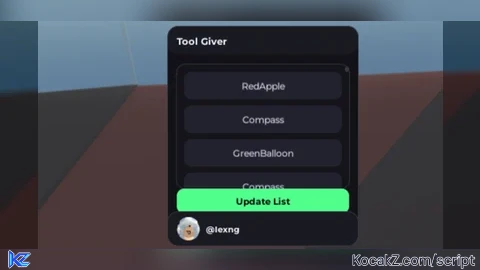
--// UI Upgrade (keeps your existing logic style)
local Players = game:GetService("Players")
local TweenService = game:GetService("TweenService")
local UIS = game:GetService("UserInputService")

local player = Players.LocalPlayer

local ScreenGui = Instance.new("ScreenGui")
ScreenGui.Name = "ToolGiverUI"
ScreenGui.Parent = game:GetService("CoreGui")
ScreenGui.ZIndexBehavior = Enum.ZIndexBehavior.Sibling
ScreenGui.ResetOnSpawn = false

-- Main Frame
local Frame = Instance.new("Frame")
Frame.Parent = ScreenGui
Frame.Active = true
Frame.BackgroundColor3 = Color3.fromRGB(18, 18, 22)
Frame.BorderSizePixel = 0
Frame.Position = UDim2.new(0.06, 0, 0.1, 0)
Frame.Size = UDim2.new(0, 260, 0, 300)

local mainCorner = Instance.new("UICorner")
mainCorner.CornerRadius = UDim.new(0, 14)
mainCorner.Parent = Frame

local mainStroke = Instance.new("UIStroke")
mainStroke.Color = Color3.fromRGB(55, 55, 70)
mainStroke.Thickness = 1
mainStroke.Parent = Frame

-- Top bar (for title + drag)
local TopBar = Instance.new("Frame")
TopBar.Parent = Frame
TopBar.BackgroundColor3 = Color3.fromRGB(26, 26, 34)
TopBar.BorderSizePixel = 0
TopBar.Size = UDim2.new(1, 0, 0, 38)

local topCorner = Instance.new("UICorner")
topCorner.CornerRadius = UDim.new(0, 14)
topCorner.Parent = TopBar

local Title = Instance.new("TextLabel")
Title.Parent = TopBar
Title.BackgroundTransparency = 1
Title.Position = UDim2.new(0, 12, 0, 0)
Title.Size = UDim2.new(1, -24, 1, 0)
Title.Font = Enum.Font.GothamBold
Title.Text = "Tool Giver"
Title.TextColor3 = Color3.fromRGB(240, 240, 255)
Title.TextSize = 15
Title.TextXAlignment = Enum.TextXAlignment.Left

-- ScrollingFrame
local ScrollingFrame = Instance.new("ScrollingFrame")
ScrollingFrame.Parent = Frame
ScrollingFrame.Active = true
ScrollingFrame.BackgroundColor3 = Color3.fromRGB(20, 20, 26)
ScrollingFrame.BorderSizePixel = 0
ScrollingFrame.Position = UDim2.new(0, 12, 0, 52)
ScrollingFrame.Size = UDim2.new(1, -24, 1, -130)
ScrollingFrame.ScrollBarThickness = 6
ScrollingFrame.ScrollBarImageColor3 = Color3.fromRGB(90, 90, 110)
ScrollingFrame.CanvasSize = UDim2.new(0, 0, 0, 0)

local scrollCorner = Instance.new("UICorner")
scrollCorner.CornerRadius = UDim.new(0, 12)
scrollCorner.Parent = ScrollingFrame

local scrollStroke = Instance.new("UIStroke")
scrollStroke.Color = Color3.fromRGB(50, 50, 64)
scrollStroke.Thickness = 1
scrollStroke.Parent = ScrollingFrame

local Padding = Instance.new("UIPadding")
Padding.Parent = ScrollingFrame
Padding.PaddingTop = UDim.new(0, 10)
Padding.PaddingBottom = UDim.new(0, 10)
Padding.PaddingLeft = UDim.new(0, 10)
Padding.PaddingRight = UDim.new(0, 10)

local UIListLayout = Instance.new("UIListLayout")
UIListLayout.Parent = ScrollingFrame
UIListLayout.SortOrder = Enum.SortOrder.LayoutOrder
UIListLayout.Padding = UDim.new(0, 8)

UIListLayout:GetPropertyChangedSignal("AbsoluteContentSize"):Connect(function()
	ScrollingFrame.CanvasSize = UDim2.new(0, 0, 0, UIListLayout.AbsoluteContentSize.Y + 20)
end)

-- Template button (hidden)
local TextButton = Instance.new("TextButton")
TextButton.Parent = ScrollingFrame
TextButton.Name = "TemplateButton"
TextButton.BackgroundColor3 = Color3.fromRGB(34, 34, 44)
TextButton.BorderSizePixel = 0
TextButton.Size = UDim2.new(1, 0, 0, 38)
TextButton.Visible = false
TextButton.Font = Enum.Font.Gotham
TextButton.TextColor3 = Color3.fromRGB(230, 230, 245)
TextButton.TextSize = 14
TextButton.TextWrapped = true
TextButton.AutoButtonColor = false

local btnCorner = Instance.new("UICorner")
btnCorner.CornerRadius = UDim.new(0, 10)
btnCorner.Parent = TextButton

local btnStroke = Instance.new("UIStroke")
btnStroke.Color = Color3.fromRGB(60, 60, 78)
btnStroke.Thickness = 1
btnStroke.Parent = TextButton

-- Hover effect for clones
local function attachHover(btn)
	btn.MouseEnter:Connect(function()
		TweenService:Create(btn, TweenInfo.new(0.12), {BackgroundColor3 = Color3.fromRGB(44, 44, 58)}):Play()
	end)
	btn.MouseLeave:Connect(function()
		TweenService:Create(btn, TweenInfo.new(0.12), {BackgroundColor3 = Color3.fromRGB(34, 34, 44)}):Play()
	end)
end

-- Update List button
local TextButton_2 = Instance.new("TextButton")
TextButton_2.Parent = Frame
TextButton_2.Name = "UpdateList"
TextButton_2.BackgroundColor3 = Color3.fromRGB(80, 255, 140)
TextButton_2.BorderSizePixel = 0
TextButton_2.Position = UDim2.new(0, 12, 1, -78)
TextButton_2.Size = UDim2.new(1, -24, 0, 34)
TextButton_2.Font = Enum.Font.GothamBold
TextButton_2.Text = "Update List"
TextButton_2.TextColor3 = Color3.fromRGB(10, 10, 12)
TextButton_2.TextSize = 14

local upCorner = Instance.new("UICorner")
upCorner.CornerRadius = UDim.new(0, 10)
upCorner.Parent = TextButton_2

-- Profile footer (username + avatar)
local Footer = Instance.new("Frame")
Footer.Parent = Frame
Footer.BackgroundColor3 = Color3.fromRGB(26, 26, 34)
Footer.BorderSizePixel = 0
Footer.Size = UDim2.new(1, 0, 0, 46)
Footer.Position = UDim2.new(0, 0, 1, -46)

local footCorner = Instance.new("UICorner")
footCorner.CornerRadius = UDim.new(0, 14)
footCorner.Parent = Footer

local footStroke = Instance.new("UIStroke")
footStroke.Color = Color3.fromRGB(55, 55, 70)
footStroke.Thickness = 1
footStroke.Parent = Footer

local Avatar = Instance.new("ImageLabel")
Avatar.Parent = Footer
Avatar.BackgroundTransparency = 1
Avatar.Size = UDim2.new(0, 32, 0, 32)
Avatar.Position = UDim2.new(0, 12, 0.5, -16)

local avCorner = Instance.new("UICorner")
avCorner.CornerRadius = UDim.new(1, 0)
avCorner.Parent = Avatar

local UserText = Instance.new("TextLabel")
UserText.Parent = Footer
UserText.BackgroundTransparency = 1
UserText.Position = UDim2.new(0, 52, 0, 0)
UserText.Size = UDim2.new(1, -64, 1, 0)
UserText.Font = Enum.Font.GothamBold
UserText.TextColor3 = Color3.fromRGB(240, 240, 255)
UserText.TextSize = 13
UserText.TextXAlignment = Enum.TextXAlignment.Left

UserText.Text = ("@%s"):format(player.Name)
task.spawn(function()
	local img = Players:GetUserThumbnailAsync(player.UserId, Enum.ThumbnailType.HeadShot, Enum.ThumbnailSize.Size150x150)
	Avatar.Image = img
end)

-- ====== YOUR ORIGINAL LOGIC (kept same style) ======
do
	local button = ScrollingFrame:WaitForChild("TemplateButton")
	button.Parent = nil
	button.Name = "slaves"

	local function updatelist()
		for _, v in ipairs(ScrollingFrame:GetDescendants()) do
			if v:IsA("TextButton") then
				v:Destroy()
			end
		end

		local function cloneToBackpack(toolObj)
			local clonedTool = toolObj:Clone()
			clonedTool.Parent = player:WaitForChild("Backpack")
		end

		for _, v in ipairs(game:GetDescendants()) do
			if v:IsA("Tool") and v.Parent and v.Parent.Parent ~= player then
				local clonebutton = button:Clone()
				clonebutton.Parent = ScrollingFrame
				clonebutton.Visible = true
				clonebutton.Text = v.Name
				attachHover(clonebutton)
				clonebutton.MouseButton1Click:Connect(function()
					cloneToBackpack(v)
				end)
			end
		end
	end

	TextButton_2.MouseButton1Click:Connect(updatelist)
end

-- ====== DRAG SCRIPT (better + smooth, drag from TopBar) ======
do
	local dragging = false
	local dragStart, startPos

	local function update(input)
		local delta = input.Position - dragStart
		Frame.Position = UDim2.new(startPos.X.Scale, startPos.X.Offset + delta.X, startPos.Y.Scale, startPos.Y.Offset + delta.Y)
	end

	TopBar.InputBegan:Connect(function(input)
		if input.UserInputType == Enum.UserInputType.MouseButton1 or input.UserInputType == Enum.UserInputType.Touch then
			dragging = true
			dragStart = input.Position
			startPos = Frame.Position
			input.Changed:Connect(function()
				if input.UserInputState == Enum.UserInputState.End then
					dragging = false
				end
			end)
		end
	end)

	UIS.InputChanged:Connect(function(input)
		if dragging and (input.UserInputType == Enum.UserInputType.MouseMovement or input.UserInputType == Enum.UserInputType.Touch) then
			update(input)
		end
	end)
end


Love the script!!!
it really give the tool. but you can't use it.
pfft