

--[[
	WARNING: Heads up! This script has not been verified by ScriptBlox. Use at your own risk!
]]
-- Создаем ScreenGui
local screenGui = Instance.new("ScreenGui")
screenGui.Parent = game.Players.LocalPlayer:WaitForChild("PlayerGui")
screenGui.Name = "PasswordGui"

-- Создаем основной фрейм для ввода пароля
local frame = Instance.new("Frame")
frame.Size = UDim2.new(0, 300, 0, 250)  -- Размер фрейма
frame.Position = UDim2.new(0.5, -150, 0.5, -125)  -- Центрируем фрейм
frame.BackgroundColor3 = Color3.fromRGB(30, 30, 30)  -- Темный фон
frame.BorderSizePixel = 2
frame.BorderColor3 = Color3.fromRGB(255, 0, 0)  -- Красная рамка
frame.Parent = screenGui

-- Создаем метку для ввода пароля
local passwordLabel = Instance.new("TextLabel")
passwordLabel.Size = UDim2.new(1, 0, 0, 40)
passwordLabel.Position = UDim2.new(0, 0, 0, 10)
passwordLabel.Text = "password here:"
passwordLabel.TextSize = 20
passwordLabel.Font = Enum.Font.GothamBold
passwordLabel.BackgroundColor3 = Color3.fromRGB(30, 30, 30)
passwordLabel.TextColor3 = Color3.fromRGB(255, 255, 255)
passwordLabel.Parent = frame

-- Создаем поле для ввода пароля
local passwordBox = Instance.new("TextBox")
passwordBox.Size = UDim2.new(1, 0, 0, 40)
passwordBox.Position = UDim2.new(0, 0, 0, 60)
passwordBox.PlaceholderText = "password"
passwordBox.TextSize = 20
passwordBox.Font = Enum.Font.GothamBold
passwordBox.BackgroundColor3 = Color3.fromRGB(255, 255, 255)  -- Белый фон
passwordBox.TextColor3 = Color3.fromRGB(0, 0, 0)  -- Черный текст
passwordBox.Parent = frame

-- Создаем кнопку для подтверждения
local confirmButton = Instance.new("TextButton")
confirmButton.Size = UDim2.new(1, 0, 0, 40)
confirmButton.Position = UDim2.new(0, 0, 0, 110)
confirmButton.Text = "confirm"
confirmButton.TextSize = 20
confirmButton.Font = Enum.Font.GothamBold
confirmButton.BackgroundColor3 = Color3.fromRGB(255, 0, 0)  -- Красный цвет кнопки
confirmButton.TextColor3 = Color3.fromRGB(255, 255, 255)  -- Белый текст
confirmButton.Parent = frame

-- Устанавливаем правильный пароль
local correctPassword = "KEY_34521"

-- Создаем метку для ссылки
local linkLabel = Instance.new("TextLabel")
linkLabel.Size = UDim2.new(1, 0, 0, 40)
linkLabel.Position = UDim2.new(0, 0, 0, 160)
linkLabel.Text = "link to get key:"
linkLabel.TextSize = 20
linkLabel.Font = Enum.Font.GothamBold
linkLabel.BackgroundColor3 = Color3.fromRGB(30, 30, 30)
linkLabel.TextColor3 = Color3.fromRGB(255, 255, 255)
linkLabel.Parent = frame

-- Создаем текстовое поле для ссылки
local linkBox = Instance.new("TextBox")
linkBox.Size = UDim2.new(1, 0, 0, 40)
linkBox.Position = UDim2.new(0, 0, 0, 200)
linkBox.Text = "https://link-hub.net/1235817/opadminscript "
linkBox.TextSize = 20
linkBox.Font = Enum.Font.GothamBold
linkBox.BackgroundColor3 = Color3.fromRGB(255, 255, 255)  -- Белый фон
linkBox.TextColor3 = Color3.fromRGB(0, 0, 0)  -- Черный текст
linkBox.Parent = frame
linkBox.ClearTextOnFocus = false  -- Не очищать текст при фокусе

-- Создаем кнопку для копирования ссылки
local copyButton = Instance.new("TextButton")
copyButton.Size = UDim2.new(1, 0, 0, 40)
copyButton.Position = UDim2.new(0, 0, 0, 250)
copyButton.Text = "copy link"
copyButton.TextSize = 20
copyButton.Font = Enum.Font.GothamBold
copyButton.BackgroundColor3 = Color3.fromRGB(0, 255, 0)  -- Зеленый цвет кнопки
copyButton.TextColor3 = Color3.fromRGB(255, 255, 255)  -- Белый текст
copyButton.Parent = frame
copyButton.Visible = false  -- Скрываем кнопку до ввода правильного пароля

-- Функция для проверки пароля
local function checkPassword()
	if passwordBox.Text == correctPassword then
		frame.Visible = false  -- Скрываем GUI
		linkBox.Visible = true  -- Показываем текстовое поле с ссылкой
		copyButton.Visible = true  -- Показываем кнопку для копирования ссылки
		-- Создаем ScreenGui
		local screenGui = Instance.new("ScreenGui")
		screenGui.Parent = game.Players.LocalPlayer:WaitForChild("PlayerGui")
		screenGui.Name = "AdminMenu"

		-- Создаем основной фрейм для меню (квадрат)
		local frame = Instance.new("Frame")
		frame.Size = UDim2.new(0, 70, 0, 70)  -- Размер квадрата
		frame.Position = UDim2.new(0, 10, 0, 10)
		frame.BackgroundColor3 = Color3.fromRGB(20, 20, 20)  -- Черный фон
		frame.BorderSizePixel = 2  -- Рамка
		frame.BorderColor3 = Color3.fromRGB(255, 0, 0)  -- Красная рамка
		frame.Parent = screenGui

		-- Перетаскивание GUI
		local dragging = false
		local dragInput, startPos, startPosFrame

		frame.InputBegan:Connect(function(input)
			if input.UserInputType == Enum.UserInputType.MouseButton1 then
				dragging = true
				dragInput = input
				startPos = input.Position
				startPosFrame = frame.Position
			end
		end)

		frame.InputChanged:Connect(function(input)
			if dragging and input.UserInputType == Enum.UserInputType.MouseMovement then
				local delta = input.Position - startPos
				frame.Position = UDim2.new(startPosFrame.X.Scale, startPosFrame.X.Offset + delta.X,
					startPosFrame.Y.Scale, startPosFrame.Y.Offset + delta.Y)
			end
		end)

		frame.InputEnded:Connect(function(input)
			if input == dragInput then
				dragging = false
			end
		end)

		-- Создаем кнопку для раскрытия меню
		local toggleButton = Instance.new("TextButton")
		toggleButton.Size = UDim2.new(1, 0, 1, 0)
		toggleButton.Text = "s"  -- Иконка меню
		toggleButton.TextSize = 26
		toggleButton.Font = Enum.Font.GothamBold
		toggleButton.BackgroundColor3 = Color3.fromRGB(255, 0, 0)  -- Красный цвет кнопки
		toggleButton.TextColor3 = Color3.fromRGB(255, 255, 255)  -- Белый текст
		toggleButton.Parent = frame

		-- Создаем фрейм для скрытого меню
		local hiddenFrame = Instance.new("Frame")
		hiddenFrame.Size = UDim2.new(0, 200, 0, 300)
		hiddenFrame.Position = UDim2.new(0, 0, 1, 5)
		hiddenFrame.BackgroundColor3 = Color3.fromRGB(30, 30, 30)  -- Темный фон
		hiddenFrame.BorderSizePixel = 2  -- Рамка для скрытого меню
		hiddenFrame.BorderColor3 = Color3.fromRGB(255, 0, 0)  -- Красная рамка
		hiddenFrame.Visible = false  -- Меню скрыто по умолчанию
		hiddenFrame.Parent = frame

		-- Функция для открытия/закрытия скрытого меню
		local function toggleMenu()
			hiddenFrame.Visible = not hiddenFrame.Visible
			toggleButton.Text = hiddenFrame.Visible and "§" or "s"  -- Меняем иконку на закрытие или открытие
		end

		toggleButton.MouseButton1Click:Connect(toggleMenu)

		-- Создаем кнопку для включения/выключения клипа
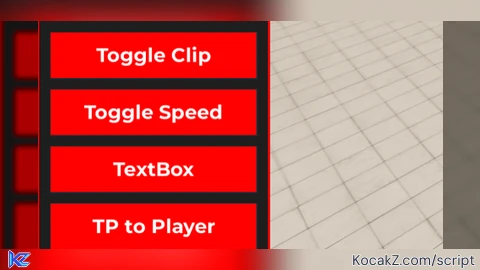
		local clipButton = Instance.new("TextButton")
		clipButton.Size = UDim2.new(0, 180, 0, 40)
		clipButton.Position = UDim2.new(0, 10, 0, 10)
		clipButton.Text = "Toggle Clip"
		clipButton.TextSize = 20
		clipButton.Font = Enum.Font.GothamBold
		clipButton.BackgroundColor3 = Color3.fromRGB(255, 0, 0)  -- Красный цвет кнопки
		clipButton.TextColor3 = Color3.fromRGB(255, 255, 255)  -- Белый текст
		clipButton.Parent = hiddenFrame

		-- Создаем кнопку для суперскорости
		local speedButton = Instance.new("TextButton")
		speedButton.Size = UDim2.new(0, 180, 0, 40)
		speedButton.Position = UDim2.new(0, 10, 0, 60)
		speedButton.Text = "Toggle Speed"
		speedButton.TextSize = 20
		speedButton.Font = Enum.Font.GothamBold
		speedButton.BackgroundColor3 = Color3.fromRGB(255, 0, 0)  -- Красный цвет кнопки
		speedButton.TextColor3 = Color3.fromRGB(255, 255, 255)  -- Белый текст
		speedButton.Parent = hiddenFrame

		-- Создаем текстовое поле для ввода ника
		local textBox = Instance.new("TextBox")
		textBox.Size = UDim2.new(0, 180, 0, 40)
		textBox.Position = UDim2.new(0, 10, 0, 110)
		textBox.PlaceholderText = "Enter Player Name"
		textBox.TextSize = 20
		textBox.Font = Enum.Font.GothamBold
		textBox.BackgroundColor3 = Color3.fromRGB(255, 0, 0)  -- Красный цвет поля
		textBox.TextColor3 = Color3.fromRGB(255, 255, 255)  -- Белый текст
		textBox.Parent = hiddenFrame

		-- Создаем кнопку для телепортации к игроку
		local tpButton = Instance.new("TextButton")
		tpButton.Size = UDim2.new(0, 180, 0, 40)
		tpButton.Position = UDim2.new(0, 10, 0, 160)
		tpButton.Text = "TP to Player"
		tpButton.TextSize = 20
		tpButton.Font = Enum.Font.GothamBold
		tpButton.BackgroundColor3 = Color3.fromRGB(255, 0, 0)  -- Красный цвет кнопки
		tpButton.TextColor3 = Color3.fromRGB(255, 255, 255)  -- Белый текст
		tpButton.Parent = hiddenFrame

		-- Создаем кнопку для телепортации игрока к себе
		local tpToMeButton = Instance.new("TextButton")
		tpToMeButton.Size = UDim2.new(0, 180, 0, 40)
		tpToMeButton.Position = UDim2.new(0, 10, 0, 210)
		tpToMeButton.Text = "TP Player to Me"
		tpToMeButton.TextSize = 20
		tpToMeButton.Font = Enum.Font.GothamBold
		tpToMeButton.BackgroundColor3 = Color3.fromRGB(255, 0, 0)  -- Красный цвет кнопки
		tpToMeButton.TextColor3 = Color3.fromRGB(255, 255, 255)  -- Белый текст
		tpToMeButton.Parent = hiddenFrame

		-- Создаем кнопку для трекинга игрока
		local trackPlayerButton = Instance.new("TextButton")
		trackPlayerButton.Size = UDim2.new(0, 180, 0, 40)
		trackPlayerButton.Position = UDim2.new(0, 10, 0, 260)
		trackPlayerButton.Text = "Track Player"
		trackPlayerButton.TextSize = 20
		trackPlayerButton.Font = Enum.Font.GothamBold
		trackPlayerButton.BackgroundColor3 = Color3.fromRGB(255, 0, 0)  -- Красный цвет кнопки
		trackPlayerButton.TextColor3 = Color3.fromRGB(255, 255, 255)  -- Белый текст
		trackPlayerButton.Parent = hiddenFrame

		-- Логика для телепортации к игроку по нику
		tpButton.MouseButton1Click:Connect(function()
			local playerName = textBox.Text
			local targetPlayer = game.Players:FindFirstChild(playerName)

			if targetPlayer and targetPlayer.Character and targetPlayer.Character:FindFirstChild("HumanoidRootPart") then
				local humanoidRootPart = targetPlayer.Character:FindFirstChild("HumanoidRootPart")
				local character = game.Players.LocalPlayer.Character or game.Players.LocalPlayer.CharacterAdded:Wait()
				character:SetPrimaryPartCFrame(humanoidRootPart.CFrame)
			else
				print("Player not found or has no HumanoidRootPart")
			end
		end)

		-- Логика для телепортации игрока к тебе
		tpToMeButton.MouseButton1Click:Connect(function()
			local playerName = textBox.Text
			local targetPlayer = game.Players:FindFirstChild(playerName)
			local localPlayer = game.Players.LocalPlayer
			local localCharacter = localPlayer.Character or localPlayer.CharacterAdded:Wait()

			if targetPlayer and targetPlayer.Character and targetPlayer.Character:FindFirstChild("HumanoidRootPart") and localCharacter and localCharacter:FindFirstChild("HumanoidRootPart") then
				local targetHRP = targetPlayer.Character.HumanoidRootPart
				local localHRP = localCharacter.HumanoidRootPart
				targetHRP.CFrame = localHRP.CFrame + Vector3.new(3, 0, 0)  -- Телепортируем игрока рядом с собой
			else
				print("Player not found or has no HumanoidRootPart")
			end
		end)

		-- Логика для трекинга игрока
		local tracking = false
		trackPlayerButton.MouseButton1Click:Connect(function()
			local playerName = textBox.Text
			local targetPlayer = game.Players:FindFirstChild(playerName)
			local localPlayer = game.Players.LocalPlayer
			local character = localPlayer.Character or localPlayer.CharacterAdded:Wait()

			if targetPlayer and targetPlayer.Character and targetPlayer.Character:FindFirstChild("HumanoidRootPart") then
				tracking = not tracking
				trackPlayerButton.Text = tracking and "Stop Tracking" or "Track Player"

				while tracking do
					local targetHRP = targetPlayer.Character.HumanoidRootPart
					character:SetPrimaryPartCFrame(targetHRP.CFrame)
					wait(0.1)  -- Интервал обновления
				end
			else
				print("Player not found or has no HumanoidRootPart")
			end
		end)

		-- Логика для клипа
		local player = game.Players.LocalPlayer
		local character = player.Character or player.CharacterAdded:Wait()
		local humanoid = character:WaitForChild("Humanoid")
		local isClipped = false

		clipButton.MouseButton1Click:Connect(function()
			isClipped = not isClipped
			for _, part in ipairs(character:GetChildren()) do
				if part:IsA("BasePart") then
					part.CanCollide = not isClipped  -- Включаем или выключаем клип
				end
			end
			clipButton.Text = isClipped and "Clip: On" or "Clip: Off"
		end)

		-- Логика для суперскорости
		local speedActive = false
		local normalWalkSpeed = 16
		local superSpeed = 100

		speedButton.MouseButton1Click:Connect(function()
			speedActive = not speedActive
			humanoid.WalkSpeed = speedActive and superSpeed or normalWalkSpeed
			speedButton.Text = speedActive and "Speed: On" or "Speed: Off"
		end)  -- Замените эту строку на свой код
	else
		passwordBox.Text = ""  -- Очищаем поле ввода
		local errorMessage = Instance.new("TextLabel")
		errorMessage.Size = UDim2.new(1, 0, 0, 40)
		errorMessage.Position = UDim2.new(0, 0, 0, 160)
		errorMessage.Text = "Неверный пароль!"
		errorMessage.TextSize = 20
		errorMessage.Font = Enum.Font.GothamBold
		errorMessage.BackgroundColor3 = Color3.fromRGB(30, 30, 30)
		errorMessage.TextColor3 = Color3.fromRGB(255, 0, 0)  -- Красный текст
		errorMessage.Parent = frame

		wait(2)  -- Ждем 2 секунды
		errorMessage:Destroy()  -- Удаляем сообщение об ошибке
	end
end

confirmButton.MouseButton1Click:Connect(checkPassword)

-- Функция для основного кода
local function runMainCode()
	-- Здесь разместите свой код, который вы хотите запустить после ввода правильного пароля
	print("Пароль правильный! Основной код запущен.")
	-- Например, можно добавить функционал из предыдущего кода
	-- (Скопируйте ваш скрипт, который нужно выполнить)
end

-- Функция для копирования ссылки
local function copyLink()
	setclipboard(linkBox.Text)  -- Копируем текст ссылки в буфер обмена
	print("Ссылка скопирована!")
end

copyButton.MouseButton1Click:Connect(copyLink)
How to Execute Universal Script – The Troll ruina stream
Step 1: Copy Code: Click the Copy Code button in the viewer above to grab the clean Lua loadstring.
Step 2: Launch Executor: Open a compatible, unpatched executor. If you need one, check our Roblox Executors Directory.
Step 3: Join Experience: Launch Roblox and join Universal Script.
Step 4: Attach & Run: Attach/inject your executor into the Roblox process, paste the code into the script tab, and press Execute.
Features & Information
Script Changelog (4)
Community Comments (0)
No comments yet for this script.
Frequently Asked Questions
How do I execute Universal Script – The Troll ruina stream in Roblox?
To run Universal Script – The Troll ruina stream, copy the Lua loadstring from the code viewer above, launch Roblox and join Universal Script, attach a working executor (such as Potassium, Solara, or Delta from our Executors directory), paste the code into your executor console, and click Execute.
Is Universal Script – The Troll ruina stream keyless or does it require an access key?
Universal Script – The Troll ruina stream requires an access key. You can retrieve the official key directly using the Get Script Key link provided above.
Is Universal Script – The Troll ruina stream currently safe and working?
This script is active and operational. Always test scripts using a secondary (alt) Roblox account to safeguard your main profile against anti-cheat bans.


![Ez Hub [Open Source] [150+ games] - Verified script for Universal Script](https://media.kocakz.me/b74a9ac15370ba766b2fa9531f17c9dad2c0befb2b951693ae723e4c7d2c3fb6.webp)



![[KEYLESS] Moondiety Script | 20+ supported Games - Verified script for Universal Script](https://media.kocakz.me/6834c33a36c9fbe66afae4c6754c2b80386ce636b2f972464a95866f4b6a42eb.webp)



