

Key RequiredUniversal
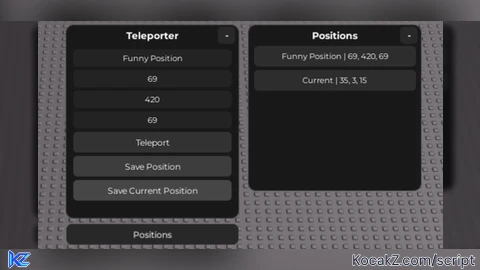
local Players = game:GetService("Players")
local TweenService = game:GetService("TweenService")

local player = Players.LocalPlayer
local char = player.Character or player.CharacterAdded:Wait()
local hrp = char:WaitForChild("HumanoidRootPart")

if player.PlayerGui:FindFirstChild("TeleportUI") then
	player.PlayerGui.TeleportUI:Destroy()
end

local function tween(obj, props, time, style)
    return TweenService:Create(obj, TweenInfo.new(time or 0.25, style or Enum.EasingStyle.Quad), props)
end

local function setChildrenVisible(frame, visible)
    for _, v in ipairs(frame:GetChildren()) do
        if v:IsA("GuiObject") and v.Name ~= "title" and v.Name ~= "collapseBtn" then
            v.Visible = visible
        end
    end
end

local gui = Instance.new("ScreenGui")
gui.Name = "TeleportUI"
gui.ResetOnSpawn = false
gui.Parent = player.PlayerGui

local frame = Instance.new("Frame", gui)
frame.AnchorPoint = Vector2.new(0.5, 0)
frame.Size = UDim2.new(0, 250, 0, 280)
frame.Position = UDim2.new(0.5, 0, 0.075, -120)
frame.BackgroundColor3 = Color3.fromRGB(25,25,25)
frame.BorderSizePixel = 0
Instance.new("UICorner", frame).CornerRadius = UDim.new(0, 10)
Instance.new("UIStroke", frame).Color = Color3.fromRGB(60,60,60)

local collapsed = false
local fullSize = frame.Size

local collapseBtn = Instance.new("TextButton", frame)
collapseBtn.Name = "collapseBtn"
collapseBtn.Size = UDim2.new(0, 25, 0, 25)
collapseBtn.Position = UDim2.new(1, -30, 0, 2)
collapseBtn.Text = "-"
collapseBtn.BackgroundColor3 = Color3.fromRGB(40,40,40)
collapseBtn.TextColor3 = Color3.new(1,1,1)
collapseBtn.Font = Enum.Font.GothamBold
collapseBtn.TextSize = 14
Instance.new("UICorner", collapseBtn).CornerRadius = UDim.new(0,6)

local title = Instance.new("TextLabel", frame)
title.Name = "title"
title.Size = UDim2.new(1,0,0,30)
title.BackgroundTransparency = 1
title.Text = "Teleporter"
title.TextColor3 = Color3.fromRGB(255,255,255)
title.Font = Enum.Font.GothamBold
title.TextSize = 16

local nameBox = Instance.new("TextBox", frame)
nameBox.Size = UDim2.new(1, -20, 0, 25)
nameBox.Position = UDim2.new(0,10,0,35)
nameBox.PlaceholderText = "Name"
nameBox.Text = ""
nameBox.BackgroundColor3 = Color3.fromRGB(35,35,35)
nameBox.TextColor3 = Color3.new(1,1,1)
nameBox.Font = Enum.Font.Gotham
nameBox.TextSize = 13
Instance.new("UICorner", nameBox).CornerRadius = UDim.new(0,6)

local function makeBox(y, text)
	local box = Instance.new("TextBox", frame)
	box.Size = UDim2.new(1, -20, 0, 25)
	box.Position = UDim2.new(0,10,0,y)
	box.PlaceholderText = text
	box.Text = ""
	box.BackgroundColor3 = Color3.fromRGB(35,35,35)
	box.TextColor3 = Color3.new(1,1,1)
	box.Font = Enum.Font.Gotham
	box.TextSize = 13
	Instance.new("UICorner", box).CornerRadius = UDim.new(0,6)
	return box
end

local xBox = makeBox(65, "X")
local yBox = makeBox(95, "Y")
local zBox = makeBox(125, "Z")

local tpBtn = Instance.new("TextButton", frame)
tpBtn.Size = UDim2.new(1, -20, 0, 30)
tpBtn.Position = UDim2.new(0,10,0,155)
tpBtn.Text = "Teleport"
tpBtn.BackgroundColor3 = Color3.fromRGB(50,50,50)
tpBtn.TextColor3 = Color3.new(1,1,1)
tpBtn.Font = Enum.Font.Gotham
tpBtn.TextSize = 14
Instance.new("UICorner", tpBtn).CornerRadius = UDim.new(0,6)

local saveBtn = Instance.new("TextButton", frame)
saveBtn.Size = UDim2.new(1, -20, 0, 30)
saveBtn.Position = UDim2.new(0,10,0,190)
saveBtn.Text = "Save Position"
saveBtn.BackgroundColor3 = Color3.fromRGB(60,60,60)
saveBtn.TextColor3 = Color3.new(1,1,1)
saveBtn.Font = Enum.Font.Gotham
saveBtn.TextSize = 14
Instance.new("UICorner", saveBtn).CornerRadius = UDim.new(0,6)

local saveCurrentBtn = Instance.new("TextButton", frame)
saveCurrentBtn.Size = UDim2.new(1, -20, 0, 30)
saveCurrentBtn.Position = UDim2.new(0,10,0,225)
saveCurrentBtn.Text = "Save Current Position"
saveCurrentBtn.BackgroundColor3 = Color3.fromRGB(70,70,70)
saveCurrentBtn.TextColor3 = Color3.new(1,1,1)
saveCurrentBtn.Font = Enum.Font.Gotham
saveCurrentBtn.TextSize = 14
Instance.new("UICorner", saveCurrentBtn).CornerRadius = UDim.new(0,6)

local togglePos = Instance.new("TextButton", gui)
togglePos.AnchorPoint = Vector2.new(0.5, 0)
togglePos.Size = UDim2.new(0, 250, 0, 30)
togglePos.Position = UDim2.new(0.5, 0, 0.25, -10)
togglePos.Text = "Positions"
togglePos.BackgroundColor3 = Color3.fromRGB(40,40,40)
togglePos.TextColor3 = Color3.new(1,1,1)
togglePos.Font = Enum.Font.Gotham
togglePos.TextSize = 14
Instance.new("UICorner", togglePos).CornerRadius = UDim.new(0,8)
Instance.new("UIStroke", togglePos).Color = Color3.fromRGB(60,60,60)

local posFrame = Instance.new("Frame", gui)
posFrame.AnchorPoint = Vector2.new(0, 0)
posFrame.Size = UDim2.new(0, 250, 0, 240)
posFrame.Position = UDim2.new(0.5, 140, 0.075, -120)
posFrame.BackgroundColor3 = Color3.fromRGB(25,25,25)
posFrame.BorderSizePixel = 0
posFrame.Visible = false
Instance.new("UICorner", posFrame).CornerRadius = UDim.new(0,10)
Instance.new("UIStroke", posFrame).Color = Color3.fromRGB(60,60,60)

local collapsedPos = false
local fullSizePos = posFrame.Size

local collapseBtnPos = Instance.new("TextButton", posFrame)
collapseBtnPos.Name = "collapseBtn"
collapseBtnPos.Size = UDim2.new(0, 25, 0, 25)
collapseBtnPos.Position = UDim2.new(1, -30, 0, 2)
collapseBtnPos.Text = "-"
collapseBtnPos.BackgroundColor3 = Color3.fromRGB(40,40,40)
collapseBtnPos.TextColor3 = Color3.new(1,1,1)
collapseBtnPos.Font = Enum.Font.GothamBold
collapseBtnPos.TextSize = 14
Instance.new("UICorner", collapseBtnPos).CornerRadius = UDim.new(0,6)

local posTitle = Instance.new("TextLabel", posFrame)
posTitle.Name = "title"
posTitle.Size = UDim2.new(1,0,0,30)
posTitle.BackgroundTransparency = 1
posTitle.Text = "Positions"
posTitle.TextColor3 = Color3.fromRGB(255,255,255)
posTitle.Font = Enum.Font.GothamBold
posTitle.TextSize = 16

local list = Instance.new("ScrollingFrame", posFrame)
list.Size = UDim2.new(1, -10, 1, -35)
list.Position = UDim2.new(0,5,0,30)
list.CanvasSize = UDim2.new(0,0,0,0)
list.BackgroundTransparency = 1
list.ScrollBarThickness = 0

local layout = Instance.new("UIListLayout", list)
layout.Padding = UDim.new(0,5)
layout.HorizontalAlignment = Enum.HorizontalAlignment.Center

local function addPosition(name, x, y, z)
	local btn = Instance.new("TextButton")
	btn.Size = UDim2.new(1, -5, 0, 30)
	btn.Text = name.." | "..x..", "..y..", "..z
	btn.BackgroundColor3 = Color3.fromRGB(45,45,45)
	btn.TextColor3 = Color3.new(1,1,1)
	btn.Font = Enum.Font.Gotham
	btn.TextSize = 13
	btn.Parent = list
	Instance.new("UICorner", btn).CornerRadius = UDim.new(0,6)

	btn.MouseButton1Click:Connect(function()
		hrp.CFrame = CFrame.new(x,y,z)
	end)

	task.wait()
	list.CanvasSize = UDim2.new(0,0,0,layout.AbsoluteContentSize.Y)
end

tpBtn.MouseButton1Click:Connect(function()
	local x = tonumber(xBox.Text)
	local y = tonumber(yBox.Text)
	local z = tonumber(zBox.Text)
	if x and y and z then
		hrp.CFrame = CFrame.new(x,y,z)
	end
end)

saveBtn.MouseButton1Click:Connect(function()
	local name = nameBox.Text ~= "" and nameBox.Text or "Unnamed"
	local x = tonumber(xBox.Text)
	local y = tonumber(yBox.Text)
	local z = tonumber(zBox.Text)

	if x and y and z then
		addPosition(name, x, y, z)
	end
end)

saveCurrentBtn.MouseButton1Click:Connect(function()
	local pos = hrp.Position

	local x = math.floor(pos.X + 0.5)
	local y = math.floor(pos.Y + 0.5)
	local z = math.floor(pos.Z + 0.5)

	local name = nameBox.Text ~= "" and nameBox.Text or "Current"

	addPosition(name, x, y, z)
end)

togglePos.MouseButton1Click:Connect(function()
	posFrame.Visible = not posFrame.Visible
end)

collapseBtn.MouseButton1Click:Connect(function()
    collapsed = not collapsed

    if collapsed then
        collapseBtn.Text = "+"
        tween(frame, {Size = UDim2.new(0, 250, 0, 30)}, 0.25):Play()
        tween(togglePos, {Position = UDim2.new(0.5, 0, 0.25, -260)}, 0.25):Play()

        for _, v in ipairs(frame:GetChildren()) do
            if v:IsA("GuiObject") and v ~= title and v ~= collapseBtn then
                tween(v, {BackgroundTransparency = 1, TextTransparency = 1}, 0.2):Play()
            end
        end

        task.delay(0.22, function()
            setChildrenVisible(frame, false)
        end)

    else
        collapseBtn.Text = "-"
        setChildrenVisible(frame, true)

        for _, v in ipairs(frame:GetChildren()) do
            if v:IsA("GuiObject") and v ~= title and v ~= collapseBtn then
                v.BackgroundTransparency = 1
                v.TextTransparency = 1
            end
        end

        tween(frame, {Size = fullSize}, 0.25):Play()
        tween(togglePos, {Position = UDim2.new(0.5, 0, 0.25, -10)}, 0.25):Play()

        for _, v in ipairs(frame:GetChildren()) do
            if v:IsA("GuiObject") and v ~= title and v ~= collapseBtn then
                tween(v, {BackgroundTransparency = 0, TextTransparency = 0}, 0.25):Play()
            end
        end
    end
end)

collapseBtnPos.MouseButton1Click:Connect(function()
    collapsedPos = not collapsedPos

    if collapsedPos then
        collapseBtnPos.Text = "+"
		posFrame.Visible = true
        tween(posFrame, {Size = UDim2.new(0, 250, 0, 30)}, 0.25):Play()

        for _, v in ipairs(posFrame:GetChildren()) do
            if v:IsA("GuiObject") and v ~= posTitle and v ~= collapseBtnPos then
                tween(v, {BackgroundTransparency = 1, TextTransparency = 1}, 0.2):Play()
            end
        end

        task.delay(0.22, function()
            setChildrenVisible(posFrame, false)
        end)

    else
        collapseBtnPos.Text = "-"
		posFrame.Visible = true
        setChildrenVisible(posFrame, true)

		tween(posFrame, {Size = fullSizePos}, 0.25):Play()

        for _, v in ipairs(posFrame:GetChildren()) do
            if v:IsA("GuiObject") and v ~= posTitle and v ~= collapseBtnPos then
                v.BackgroundTransparency = 1
                v.TextTransparency = 1
            end
        end

        for _, v in ipairs(posFrame:GetChildren()) do
            if v:IsA("GuiObject") and v ~= posTitle and v ~= collapseBtnPos then
                tween(v, {BackgroundTransparency = 0, TextTransparency = 0}, 0.25):Play()
            end
        end
    end
end)No comments yet for this script.


