loadstring(game:HttpGet("https://pastebin.com/raw/VVWcfs9t"))()
Features & Information
Crosshair
Highlight(on/off)
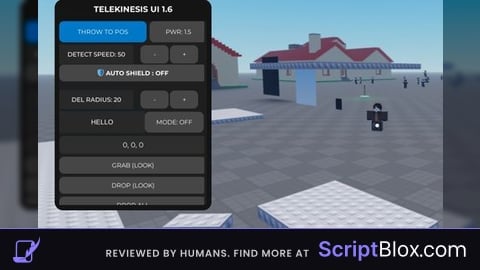
Grab(Look)
Drop(Look)
Drop(All)
Freeze(Look) --You need grab First and click Freeze
Unfreeze(Look)
Unfreeze(All)
Auto Grab NPC
Auto Grab part
Auto freeze --You can turn on this and after turn on auto other features it will auto freeze to
Auto throw --Dont turn on any auto to
Throw(Look)
Distance setting --it you network radius/network owner
Move Mode
--this will show list part you freeze and you can click to select that or select all it will highlight that part you select
And show ui move
Delete Part(Look) --this like you throw part for high speed
Auto delete part
Follow Owner --You need grab or freeze part after that
That part will follow you
Puppet Master Mode --Click the npc that you want control
And click start control
Throw To Position (Get the Position and put in the UI after you throw part it will throw that position)
Auto Shield(Detect Speed that setting and auto freeze that)
Car Mode --Click turn on and click the part that you want to that be car
And More features in ui



fe?