


KeylessUniversal
--[[
	SpiderWebSwing (LocalScript)

	PLACEMENT: StarterPlayer > StarterPlayerScripts
	(It needs to live here because it has its own persistent UI/settings that
	 should survive dying and respawning. The character is re-acquired
	 automatically every time you respawn.)

	FEATURES:
	  - Only ONE web at a time: shooting a new one instantly removes the old one.
	  - The string visually shoots out from your hand to the target over a
	    fraction of a second (speed scales with distance, WEB_TRAVEL_SPEED)
	    instead of just appearing at full length. The real physics rope only
	    attaches once it "lands".
	  - Speed boost: your current speed is amplified when you shoot a web while
	    already moving, and holding WASD while swinging accelerates you further
	    (up to a cap, MAX_SWING_SPEED).
	  - Real swing feel: while a web is attached, the Humanoid is put into
	    "Physics" state so Roblox's normal walking control never takes over and
	    zeroes your speed when you're near the ground at the bottom of the arc.
	  - Release with high speed (see SLIDE_MIN_SPEED) and you fly off, then
	    gradually slow down (SLIDE_FRICTION) instead of stopping dead.
	  - Loose/"ragdoll" feel WITHOUT looking ragdolled: the web attaches
	    slightly above your center of mass (SWING_HAND_HEIGHT), which gives a
	    natural lean during swings instead of perfectly rigid motion, and
	    AutoRotate is turned off so you're not forced to face your direction
	    of travel. A weak AlignOrientation (ORIENTATION_MAX_TORQUE /
	    ORIENTATION_RESPONSIVENESS) only stops you from ending up permanently
	    upside-down - your body always looks completely normal (no loose
	    limbs, no broken joints). This loose feel starts the moment you shoot
	    a web and lasts through the whole time you're airborne - including
	    after you release it - and only ends the instant you actually touch
	    the ground. While a web is still attached it NEVER ends early (even
	    if you brush the ground mid-swing), so the pendulum can't get "stuck"
	    at the bottom of a low arc.
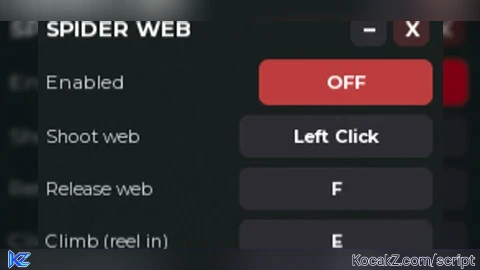
	  - A small settings UI that's open by default. Drag the header
	    ("SPIDER WEB") to move the panel, click "–" to collapse it to just the
	    header, or click "X" to fully close it (this also automatically turns
	    the whole mechanic OFF). Click the spider tab on the left edge to
	    reopen it. In the panel you can:
	      * Turn the whole mechanic ON/OFF.
	      * Click "Change" next to an action, then press any key or mouse
	        button to rebind it - or press Esc while it's listening to make
	        that action fully unbound.

	DEFAULT CONTROLS (changeable in the UI; click "Change" then press any
	key/mouse button, or press Esc while it's listening to unbind it):
	  Left Click   -> Shoot web
	  F            -> Release web
	  Hold E       -> Climb (reel in)
	  Hold Q       -> Let out more rope
]]

local Players = game:GetService("Players")
local UserInputService = game:GetService("UserInputService")
local RunService = game:GetService("RunService")

-- ===================== SETTINGS =====================
local MAX_WEB_DISTANCE = 350   -- how far you can shoot a web (studs)
local MIN_TARGET_SIZE  = 3     -- ignore tiny junk smaller than this (studs, largest side)
local ROPE_THICKNESS   = 0.06
local ROPE_SLACK       = 1.05  -- MUST be >= 1. Below 1 makes the rope "shorter" than the
                                -- actual distance right from the start, which makes the
                                -- physics engine yank you hard toward the anchor instantly
                                -- (feels like a teleport). 1.0 = taut immediately, higher
                                -- gives a bit of slack/drop before the swing kicks in.
local MIN_ROPE_LENGTH  = 4
local REEL_IN_SPEED    = 18    -- studs/second while climbing (E)
local LET_OUT_SPEED    = 14    -- studs/second while letting out rope (Q)

local LAUNCH_BOOST_MULTIPLIER = 1.4  -- amplifies your current speed when the web is shot
local SWING_THRUST     = 110         -- extra force (studs/s^2) in the direction you press while swinging
local MAX_SWING_SPEED  = 160         -- cap on horizontal swing speed

local SLIDE_MIN_SPEED    = 15   -- release with at least this much speed (studs/s) to slide instead of stopping dead
local SLIDE_FRICTION     = 2.5  -- how fast the slide slows down (higher = stops sooner)
local SLIDE_MAX_DURATION = 1.5  -- safety cap in seconds for how long the slide can last

local SWING_HAND_HEIGHT          = 1.6  -- height (studs) above your center where the web
                                         -- attaches to YOU. Keeps the rope's pull from going
                                         -- straight through your center of mass, giving a
                                         -- natural lean during swings instead of perfectly
                                         -- rigid motion (the "ragdoll feel" without looking
                                         -- ragdolled).
local ORIENTATION_MAX_TORQUE     = 6000 -- how hard you're corrected if you lean/tip too far.
                                         -- Lower = looser/more "ragdoll", higher = stiffer.
local ORIENTATION_RESPONSIVENESS = 3    -- how fast that correction happens (lower = softer/slower).

local WEB_TRAVEL_SPEED    = 300  -- studs/second the visual string travels while "shooting out"
local WEB_TRAVEL_MIN_TIME = 0.05 -- seconds, floor so very close shots don't look instant/jumpy
local WEB_TRAVEL_MAX_TIME = 0.3  -- seconds, cap so very far shots don't feel sluggish

local GROUND_CHECK_DISTANCE = 3.5 -- studs below your feet checked to detect landing
-- ======================================================

local player = Players.LocalPlayer
local mouse = player:GetMouse()

-- ===================== ACTIONS / KEYBINDS =====================
local actions = {
	Shoot   = {name = "Shoot web",        input = Enum.UserInputType.MouseButton1},
	Release = {name = "Release web",      input = Enum.KeyCode.F},
	ReelIn  = {name = "Climb (reel in)",  input = Enum.KeyCode.E},
	LetOut  = {name = "Let out",          input = Enum.KeyCode.Q},
}

local scriptEnabled = true

-- ===================== CHARACTER =====================
local character, humanoid, rootPart
local activeWebs = {} -- list of {rope, attachment0, attachment1} - just the visual/physical rope
local reeling, lettingOut = false, false
local sliding = false
local slideVelocity = Vector3.new()
local slideEndTime = 0

-- The "ragdoll" rig (loose orientation assist) is tracked separately from
-- the rope itself, because it now needs to keep existing after you release
-- the web - it only goes away once you actually touch the ground.
local ragdollOrientationAttachment = nil
local ragdollAlignOrientation = nil

-- Tracks the visual "string shooting out" animation so a newer shot, a
-- release, or a respawn can cleanly cancel an in-flight one.
local travelToken = 0
local currentTravelPart = nil

local function cancelWebTravel()
	travelToken = travelToken + 1
	if currentTravelPart then
		currentTravelPart:Destroy()
		currentTravelPart = nil
	end
end

local function destroyWebEntry(entry)
	if entry.rope then entry.rope:Destroy() end
	if entry.attachment0 then entry.attachment0:Destroy() end
	if entry.attachment1 then entry.attachment1:Destroy() end
end

local function ensureRagdollRig()
	if ragdollAlignOrientation and ragdollAlignOrientation.Parent then
		return -- already active (e.g. chaining a new web before landing)
	end
	if not rootPart then return end

	local orientationAttachment = Instance.new("Attachment")
	orientationAttachment.Name = "SwingOrientationAttachment"
	orientationAttachment.Parent = rootPart

	local alignOrientation = Instance.new("AlignOrientation")
	alignOrientation.Name = "SwingUprightAssist"
	alignOrientation.Mode = Enum.OrientationAlignmentMode.OneAttachment
	alignOrientation.Attachment0 = orientationAttachment
	alignOrientation.RigidityEnabled = false
	alignOrientation.MaxTorque = ORIENTATION_MAX_TORQUE
	alignOrientation.Responsiveness = ORIENTATION_RESPONSIVENESS
	alignOrientation.CFrame = rootPart.CFrame
	alignOrientation.Parent = rootPart

	ragdollOrientationAttachment = orientationAttachment
	ragdollAlignOrientation = alignOrientation

	if humanoid then
		humanoid.AutoRotate = false
	end
end

local function endRagdoll()
	if ragdollAlignOrientation then ragdollAlignOrientation:Destroy() end
	if ragdollOrientationAttachment then ragdollOrientationAttachment:Destroy() end
	ragdollAlignOrientation = nil
	ragdollOrientationAttachment = nil
	if humanoid then
		humanoid.AutoRotate = true
	end
end

local function destroyAllWebs()
	for _, entry in ipairs(activeWebs) do
		destroyWebEntry(entry)
	end
	activeWebs = {}
end

local function onCharacterAdded(newCharacter)
	activeWebs = {} -- the old instances belonged to the previous body and are already gone
	sliding = false
	ragdollOrientationAttachment = nil
	ragdollAlignOrientation = nil
	cancelWebTravel()
	character = newCharacter
	humanoid = character:WaitForChild("Humanoid")
	rootPart = character:WaitForChild("HumanoidRootPart")
	humanoid.Died:Connect(destroyAllWebs)
end

onCharacterAdded(player.Character or player.CharacterAdded:Wait())
player.CharacterAdded:Connect(onCharacterAdded)

-- ===================== WEB LOGIC =====================

local function isValidTarget(hitPart, hitPosition)
	if not hitPart or not hitPart:IsA("BasePart") then
		return false
	end
	if hitPart:IsDescendantOf(character) then
		return false
	end
	if not hitPart.Anchored then
		return false -- only grab fixed/static things (buildings, ground, etc.)
	end

	local ancestorModel = hitPart:FindFirstAncestorOfClass("Model")
	if ancestorModel and Players:GetPlayerFromCharacter(ancestorModel) then
		return false -- don't let players attach a web to each other
	end

	local size = hitPart.Size
	if math.max(size.X, size.Y, size.Z) < MIN_TARGET_SIZE then
		return false
	end

	if (hitPosition - rootPart.Position).Magnitude > MAX_WEB_DISTANCE then
		return false
	end

	return true
end

local function applyLaunchBoost()
	local vel = rootPart.AssemblyLinearVelocity
	local horizontal = Vector3.new(vel.X, 0, vel.Z)
	if horizontal.Magnitude > 2 then
		local boosted = horizontal * LAUNCH_BOOST_MULTIPLIER
		if boosted.Magnitude > MAX_SWING_SPEED then
			boosted = boosted.Unit * MAX_SWING_SPEED
		end
		rootPart.AssemblyLinearVelocity = Vector3.new(boosted.X, vel.Y, boosted.Z)
	end
end

-- Actually attaches the real physics rope once the visual string has
-- finished travelling to its target.
local function attachWeb(hitPart, hitPosition)
	if not scriptEnabled then return end
	if not rootPart or not rootPart.Parent then return end

	local anchorAttachment = Instance.new("Attachment")
	anchorAttachment.Name = "WebAnchor"
	anchorAttachment.Parent = hitPart      -- Parent MUST be set before WorldPosition,
	anchorAttachment.WorldPosition = hitPosition -- otherwise the position is computed wrong
	                                              -- and the anchor can end up far away
	                                              -- (this caused the old teleport bug).

	local playerAttachment = Instance.new("Attachment")
	playerAttachment.Name = "WebHand"
	playerAttachment.Position = Vector3.new(0, SWING_HAND_HEIGHT, 0) -- not at the center of mass -> natural lean
	playerAttachment.Parent = rootPart

	local distance = (hitPosition - rootPart.Position).Magnitude

	local rope = Instance.new("RopeConstraint")
	rope.Name = "SpiderWebRope"
	rope.Attachment0 = playerAttachment
	rope.Attachment1 = anchorAttachment
	rope.Length = math.max(distance * ROPE_SLACK, MIN_ROPE_LENGTH)
	rope.Restitution = 0
	rope.Visible = true
	rope.Color = BrickColor.new("White")
	rope.Thickness = ROPE_THICKNESS
	rope.Parent = rootPart

	table.insert(activeWebs, {
		rope = rope,
		attachment0 = playerAttachment,
		attachment1 = anchorAttachment,
	})

	applyLaunchBoost()
end

local function shootWeb()
	if not scriptEnabled then return end
	if not rootPart or not rootPart.Parent then return end

	local hitPart = mouse.Target
	local hit = mouse.Hit
	if not hitPart or not hit then return end

	local hitPosition = hit.Position
	if not isValidTarget(hitPart, hitPosition) then return end

	-- only one web at a time: the old one (attached, or still shooting out) disappears immediately
	destroyAllWebs()
	cancelWebTravel()
	sliding = false

	-- weak "keep me upright" force: only stops you from ending up permanently
	-- upside-down, but is soft enough to let you lean/sway naturally with the
	-- swing's motion (your body still looks completely normal - just looser
	-- and more physics-driven). Starts right away (before the string even
	-- lands) so shooting feels immediately responsive, and stays active
	-- until you actually touch the ground.
	ensureRagdollRig()

	if humanoid then
		-- Physics state = the Humanoid completely stops managing horizontal
		-- speed, so the rope's pendulum physics can take over without
		-- "sticking" when you're close to the ground at the bottom of the arc.
		humanoid:ChangeState(Enum.HumanoidStateType.Physics)
	end

	-- Shoot the string out visually instead of having it just appear at full
	-- length: a thin glowing line travels from your hand to the target at a
	-- fixed speed, then the real physics rope attaches once it "lands".
	travelToken = travelToken + 1
	local myToken = travelToken

	local startPosition = rootPart.Position + Vector3.new(0, SWING_HAND_HEIGHT, 0)
	local travelDistance = (hitPosition - startPosition).Magnitude
	local travelTime = math.clamp(travelDistance / WEB_TRAVEL_SPEED, WEB_TRAVEL_MIN_TIME, WEB_TRAVEL_MAX_TIME)

	local travelPart = Instance.new("Part")
	travelPart.Name = "WebTravelVisual"
	travelPart.Anchored = true
	travelPart.CanCollide = false
	travelPart.CanQuery = false
	travelPart.CanTouch = false
	travelPart.CastShadow = false
	travelPart.Material = Enum.Material.Neon
	travelPart.Color = Color3.new(1, 1, 1)
	travelPart.Size = Vector3.new(ROPE_THICKNESS, ROPE_THICKNESS, 0.05)
	travelPart.CFrame = CFrame.new(startPosition, hitPosition)
	travelPart.Parent = workspace
	currentTravelPart = travelPart

	task.spawn(function()
		local elapsed = 0
		while elapsed < travelTime do
			if travelToken ~= myToken then
				return -- cancelled: replaced by a new shot, released, disabled, or respawned
			end
			elapsed = elapsed + RunService.Heartbeat:Wait()
			local alpha = math.clamp(elapsed / travelTime, 0, 1)
			local tip = startPosition:Lerp(hitPosition, alpha)
			local length = math.max((tip - startPosition).Magnitude, 0.05)
			travelPart.Size = Vector3.new(ROPE_THICKNESS, ROPE_THICKNESS, length)
			travelPart.CFrame = CFrame.new(startPosition, tip) * CFrame.new(0, 0, -length / 2)
		end

		if travelToken ~= myToken then return end
		travelPart:Destroy()
		currentTravelPart = nil
		attachWeb(hitPart, hitPosition)
	end)
end

-- Releases the web on purpose (kept separate from destroyAllWebs, which is
-- also used internally when a new web replaces an old one, or on death/disable).
local function releaseWebs()
	local hadWeb = #activeWebs > 0
	local vel = (rootPart and rootPart.AssemblyLinearVelocity) or Vector3.new()
	local horizontal = Vector3.new(vel.X, 0, vel.Z)

	destroyAllWebs()
	cancelWebTravel()

	if not hadWeb then return end

	if horizontal.Magnitude >= SLIDE_MIN_SPEED then
		-- fly off with the speed you had, then gradually slow down instead
		-- of stopping dead when you land
		sliding = true
		slideVelocity = horizontal
		slideEndTime = tick() + SLIDE_MAX_DURATION
	else
		sliding = false
	end

	-- Deliberately NOT restoring AutoRotate/Humanoid state here anymore:
	-- you stay loose/"ragdolled" for as long as you're still in the air,
	-- and only snap back to normal control once you actually touch the
	-- ground (handled in the Heartbeat loop below).
end

local actionHandlers = {
	Shoot = shootWeb,
	Release = releaseWebs,
	ReelIn = function() reeling = true end,
	LetOut = function() lettingOut = true end,
}

local actionHandlersEnded = {
	ReelIn = function() reeling = false end,
	LetOut = function() lettingOut = false end,
}

-- ===================== PHYSICS LOOP (climbing + speed) =====================

RunService.Heartbeat:Connect(function(dt)
	if not scriptEnabled then return end
	if not humanoid or not rootPart then return end

	-- reel in / let out
	if reeling or lettingOut then
		for _, entry in ipairs(activeWebs) do
			local rope = entry.rope
			if rope and rope.Parent then
				if reeling then
					rope.Length = math.max(MIN_ROPE_LENGTH, rope.Length - REEL_IN_SPEED * dt)
				elseif lettingOut then
					rope.Length = math.min(MAX_WEB_DISTANCE, rope.Length + LET_OUT_SPEED * dt)
				end
			end
		end
	end

	-- extra speed while swinging (hold WASD)
	if #activeWebs > 0 then
		local moveDir = humanoid.MoveDirection
		if moveDir.Magnitude > 0.05 then
			local vel = rootPart.AssemblyLinearVelocity
			local newVel = vel + moveDir * SWING_THRUST * dt
			local horizontal = Vector3.new(newVel.X, 0, newVel.Z)
			if horizontal.Magnitude > MAX_SWING_SPEED then
				horizontal = horizontal.Unit * MAX_SWING_SPEED
				newVel = Vector3.new(horizontal.X, newVel.Y, horizontal.Z)
			end
			rootPart.AssemblyLinearVelocity = newVel
		end
	end

	-- ragdoll upkeep: stays active the whole time you're airborne - from the
	-- moment you shoot a web, through releasing it, until you actually touch
	-- the ground. While a web is still attached we NEVER end it here (even if
	-- you brush the ground mid-swing), so the pendulum can't get "stuck" at
	-- the bottom of a low arc.
	if ragdollAlignOrientation then
		if #activeWebs == 0 and humanoid.FloorMaterial ~= Enum.Material.Air then
			-- touched the ground after releasing: stop being ragdolled
			endRagdoll()
			if humanoid:GetState() == Enum.HumanoidStateType.Physics then
				humanoid:ChangeState(Enum.HumanoidStateType.Landed)
			end
		else
			if humanoid:GetState() ~= Enum.HumanoidStateType.Physics then
				humanoid:ChangeState(Enum.HumanoidStateType.Physics)
			end

			-- update the "keep upright" target: same yaw as right now, but
			-- with no tilt/roll. Lets you lean/sway freely with the motion in
			-- the short term, but you'll never end up permanently upside-down.
			local look = rootPart.CFrame.LookVector
			local flatLook = Vector3.new(look.X, 0, look.Z)
			if flatLook.Magnitude > 0.001 then
				ragdollAlignOrientation.CFrame = CFrame.lookAt(rootPart.Position, rootPart.Position + flatLook)
			end
		end
	end

	-- slide after releasing the web: gradually brake (like friction) instead
	-- of letting the Humanoid zero your speed the instant you land.
	-- Deliberately does NOT touch the Humanoid's state - you stay a fully
	-- normal, animated character the whole time, since no web exists anymore.
	if sliding then
		if tick() > slideEndTime or slideVelocity.Magnitude < 2 then
			sliding = false
		else
			slideVelocity = slideVelocity * math.max(0, 1 - SLIDE_FRICTION * dt)
			local vel = rootPart.AssemblyLinearVelocity
			rootPart.AssemblyLinearVelocity = Vector3.new(slideVelocity.X, vel.Y, slideVelocity.Z)
		end
	end
end)

-- ===================== UI =====================

local playerGui = player:WaitForChild("PlayerGui")

local screenGui = Instance.new("ScreenGui")
screenGui.Name = "SpiderWebGUI"
screenGui.ResetOnSpawn = false
screenGui.IgnoreGuiInset = true
screenGui.Parent = playerGui

local panel = Instance.new("Frame")
panel.Name = "Panel"
panel.AutomaticSize = Enum.AutomaticSize.Y
panel.Size = UDim2.new(0, 260, 0, 0)
panel.Position = UDim2.new(0, 10, 0.5, 0)
panel.AnchorPoint = Vector2.new(0, 0.5)
panel.BackgroundColor3 = Color3.fromRGB(20, 20, 24)
panel.BackgroundTransparency = 0.08
panel.BorderSizePixel = 0
panel.Visible = true
panel.Parent = screenGui
Instance.new("UICorner", panel).CornerRadius = UDim.new(0, 10)

local stroke = Instance.new("UIStroke")
stroke.Color = Color3.fromRGB(255, 255, 255)
stroke.Transparency = 0.85
stroke.Parent = panel

local outerLayout = Instance.new("UIListLayout")
outerLayout.SortOrder = Enum.SortOrder.LayoutOrder
outerLayout.Padding = UDim.new(0, 8)
outerLayout.Parent = panel

local padding = Instance.new("UIPadding")
padding.PaddingTop = UDim.new(0, 10)
padding.PaddingBottom = UDim.new(0, 10)
padding.PaddingLeft = UDim.new(0, 12)
padding.PaddingRight = UDim.new(0, 12)
padding.Parent = panel

-- Header row (drag this to move the panel)
local header = Instance.new("Frame")
header.Name = "Header"
header.Size = UDim2.new(1, 0, 0, 22)
header.BackgroundTransparency = 1
header.LayoutOrder = 0
header.Parent = panel

local title = Instance.new("TextLabel")
title.Size = UDim2.new(1, -52, 1, 0)
title.BackgroundTransparency = 1
title.Text = "SPIDER WEB"
title.TextColor3 = Color3.fromRGB(255, 255, 255)
title.Font = Enum.Font.GothamBold
title.TextSize = 15
title.TextXAlignment = Enum.TextXAlignment.Left
title.Parent = header

local minimizeButton = Instance.new("TextButton")
minimizeButton.Name = "MinimizeButton"
minimizeButton.Size = UDim2.new(0, 22, 0, 22)
minimizeButton.Position = UDim2.new(1, -50, 0, 0)
minimizeButton.BackgroundColor3 = Color3.fromRGB(45, 45, 52)
minimizeButton.BorderSizePixel = 0
minimizeButton.Text = "–"
minimizeButton.TextColor3 = Color3.fromRGB(255, 255, 255)
minimizeButton.Font = Enum.Font.GothamBold
minimizeButton.TextSize = 16
minimizeButton.Parent = header
Instance.new("UICorner", minimizeButton).CornerRadius = UDim.new(0, 6)

local closeButton = Instance.new("TextButton")
closeButton.Name = "CloseButton"
closeButton.Size = UDim2.new(0, 22, 0, 22)
closeButton.Position = UDim2.new(1, -24, 0, 0)
closeButton.BackgroundColor3 = Color3.fromRGB(70, 40, 40)
closeButton.BorderSizePixel = 0
closeButton.Text = "X"
closeButton.TextColor3 = Color3.fromRGB(255, 255, 255)
closeButton.Font = Enum.Font.GothamBold
closeButton.TextSize = 14
closeButton.Parent = header
Instance.new("UICorner", closeButton).CornerRadius = UDim.new(0, 6)

-- Content (hidden entirely when minimized, panel shrinks automatically)
local content = Instance.new("Frame")
content.Name = "Content"
content.AutomaticSize = Enum.AutomaticSize.Y
content.Size = UDim2.new(1, 0, 0, 0)
content.BackgroundTransparency = 1
content.LayoutOrder = 1
content.Parent = panel

local contentLayout = Instance.new("UIListLayout")
contentLayout.SortOrder = Enum.SortOrder.LayoutOrder
contentLayout.Padding = UDim.new(0, 6)
contentLayout.Parent = content

-- Enable/disable row
local toggleRow = Instance.new("Frame")
toggleRow.Size = UDim2.new(1, 0, 0, 28)
toggleRow.BackgroundTransparency = 1
toggleRow.LayoutOrder = 0
toggleRow.Parent = content

local toggleLabel = Instance.new("TextLabel")
toggleLabel.Size = UDim2.new(0.55, 0, 1, 0)
toggleLabel.BackgroundTransparency = 1
toggleLabel.Text = "Enabled"
toggleLabel.TextColor3 = Color3.fromRGB(220, 220, 220)
toggleLabel.Font = Enum.Font.Gotham
toggleLabel.TextSize = 13
toggleLabel.TextXAlignment = Enum.TextXAlignment.Left
toggleLabel.Parent = toggleRow

local toggleButton = Instance.new("TextButton")
toggleButton.Size = UDim2.new(0.45, 0, 1, 0)
toggleButton.Position = UDim2.new(0.55, 0, 0, 0)
toggleButton.BackgroundColor3 = Color3.fromRGB(60, 180, 90)
toggleButton.BorderSizePixel = 0
toggleButton.Text = "ON"
toggleButton.TextColor3 = Color3.fromRGB(255, 255, 255)
toggleButton.Font = Enum.Font.GothamBold
toggleButton.TextSize = 13
toggleButton.Parent = toggleRow
Instance.new("UICorner", toggleButton).CornerRadius = UDim.new(0, 6)

local function setScriptEnabled(state)
	scriptEnabled = state
	if scriptEnabled then
		toggleButton.Text = "ON"
		toggleButton.BackgroundColor3 = Color3.fromRGB(60, 180, 90)
	else
		toggleButton.Text = "OFF"
		toggleButton.BackgroundColor3 = Color3.fromRGB(190, 60, 60)
		reeling, lettingOut = false, false
		sliding = false
		destroyAllWebs()
		cancelWebTravel()
		endRagdoll()
		if humanoid then
			humanoid:ChangeState(Enum.HumanoidStateType.Freefall)
		end
	end
end

toggleButton.MouseButton1Click:Connect(function()
	setScriptEnabled(not scriptEnabled)
end)

-- keybind rows
local function inputToText(bound)
	if not bound then return "None" end
	if bound == Enum.UserInputType.MouseButton1 then return "Left Click" end
	if bound == Enum.UserInputType.MouseButton2 then return "Right Click" end
	if bound == Enum.UserInputType.MouseButton3 then return "Middle Click" end
	if bound.EnumType == Enum.KeyCode then return bound.Name end
	return tostring(bound)
end

local rowsOrder = {"Shoot", "Release", "ReelIn", "LetOut"}
local bindButtons = {}

for i, key in ipairs(rowsOrder) do
	local action = actions[key]

	local row = Instance.new("Frame")
	row.Size = UDim2.new(1, 0, 0, 26)
	row.BackgroundTransparency = 1
	row.LayoutOrder = i
	row.Parent = content

	local label = Instance.new("TextLabel")
	label.Size = UDim2.new(0.5, 0, 1, 0)
	label.BackgroundTransparency = 1
	label.Text = action.name
	label.TextColor3 = Color3.fromRGB(220, 220, 220)
	label.Font = Enum.Font.Gotham
	label.TextSize = 12
	label.TextXAlignment = Enum.TextXAlignment.Left
	label.TextTruncate = Enum.TextTruncate.AtEnd
	label.Parent = row

	local bindBtn = Instance.new("TextButton")
	bindBtn.Size = UDim2.new(0.5, 0, 1, 0)
	bindBtn.Position = UDim2.new(0.5, 0, 0, 0)
	bindBtn.BackgroundColor3 = Color3.fromRGB(45, 45, 52)
	bindBtn.BorderSizePixel = 0
	bindBtn.TextColor3 = Color3.fromRGB(255, 255, 255)
	bindBtn.Font = Enum.Font.GothamBold
	bindBtn.TextSize = 12
	bindBtn.Text = inputToText(action.input)
	bindBtn.Parent = row
	Instance.new("UICorner", bindBtn).CornerRadius = UDim.new(0, 6)

	bindButtons[key] = bindBtn
end

-- minimize: collapses the panel down to just the header
local minimized = false
local function setMinimized(state)
	minimized = state
	content.Visible = not minimized
	minimizeButton.Text = minimized and "+" or "–"
end

minimizeButton.MouseButton1Click:Connect(function()
	setMinimized(not minimized)
end)

-- close: fully hides the panel AND turns the whole mechanic off
local function closePanel()
	panel.Visible = false
	setScriptEnabled(false)
end

closeButton.MouseButton1Click:Connect(closePanel)

-- drag the header to move the panel
local dragging = false
local dragInput, dragStart, startPos

local function updateDrag(input)
	local delta = input.Position - dragStart
	panel.Position = UDim2.new(
		startPos.X.Scale, startPos.X.Offset + delta.X,
		startPos.Y.Scale, startPos.Y.Offset + delta.Y
	)
end

header.InputBegan:Connect(function(input)
	if input.UserInputType == Enum.UserInputType.MouseButton1
		or input.UserInputType == Enum.UserInputType.Touch then
		dragging = true
		dragStart = input.Position
		startPos = panel.Position

		input.Changed:Connect(function()
			if input.UserInputState == Enum.UserInputState.End then
				dragging = false
			end
		end)
	end
end)

header.InputChanged:Connect(function(input)
	if input.UserInputType == Enum.UserInputType.MouseMovement
		or input.UserInputType == Enum.UserInputType.Touch then
		dragInput = input
	end
end)

UserInputService.InputChanged:Connect(function(input)
	if input == dragInput and dragging then
		updateDrag(input)
	end
end)

-- ===================== INPUT (dispatch + rebinding) =====================

local listeningFor = nil -- which action is waiting for a new key press

local function beginListening(actionKey)
	if listeningFor then
		bindButtons[listeningFor].Text = inputToText(actions[listeningFor].input)
	end
	listeningFor = actionKey
	bindButtons[actionKey].Text = "Press a key..."
end

for key, btn in pairs(bindButtons) do
	btn.MouseButton1Click:Connect(function()
		beginListening(key)
	end)
end

local function getInputBindFromEvent(input)
	if input.UserInputType == Enum.UserInputType.Keyboard then
		if input.KeyCode == Enum.KeyCode.Unknown then return nil end
		return input.KeyCode
	elseif input.UserInputType == Enum.UserInputType.MouseButton1
		or input.UserInputType == Enum.UserInputType.MouseButton2
		or input.UserInputType == Enum.UserInputType.MouseButton3 then
		return input.UserInputType
	end
	return nil
end

local function inputMatches(io, bound)
	if not bound then return false end
	if typeof(bound) ~= "EnumItem" then return false end
	if bound.EnumType == Enum.KeyCode then
		return io.KeyCode == bound
	elseif bound.EnumType == Enum.UserInputType then
		return io.UserInputType == bound
	end
	return false
end

UserInputService.InputBegan:Connect(function(input, gameProcessed)
	if listeningFor then
		if input.UserInputType == Enum.UserInputType.Keyboard and input.KeyCode == Enum.KeyCode.Escape then
			-- Esc = make the action unbound (no key) instead of binding it to Esc
			actions[listeningFor].input = nil
			bindButtons[listeningFor].Text = "None"
			listeningFor = nil
			return
		end

		local newBind = getInputBindFromEvent(input)
		if newBind then
			-- clear any duplicate on another action
			for otherKey, otherAction in pairs(actions) do
				if otherKey ~= listeningFor and otherAction.input == newBind then
					otherAction.input = nil
					if bindButtons[otherKey] then
						bindButtons[otherKey].Text = "None"
					end
				end
			end
			actions[listeningFor].input = newBind
			bindButtons[listeningFor].Text = inputToText(newBind)
		else
			bindButtons[listeningFor].Text = inputToText(actions[listeningFor].input)
		end
		listeningFor = nil
		return
	end

	if gameProcessed then return end

	for key, action in pairs(actions) do
		if action.input and inputMatches(input, action.input) and actionHandlers[key] then
			actionHandlers[key]()
		end
	end
end)

UserInputService.InputEnded:Connect(function(input, _gameProcessed)
	for key, action in pairs(actions) do
		if action.input and inputMatches(input, action.input) and actionHandlersEnded[key] then
			actionHandlersEnded[key]()
		end
	end
end)No comments yet for this script.


